
xMatix Finance is the double-entry ledger that every invoice, bill, payment, journal, stock movement and depreciation run posts into, together with the Finance app where you enter those documents, browse the chart of accounts and read the financial statements. It sits at the end of the business process: sales, procurement, inventory, payroll and expenses produce documents, and Finance turns them into balanced journals, open receivables and payables, and statements. This page explains the ideas behind it, walks you around the Finance app, gives administrators the setup order, and maps the rest of the finance documentation.
Overview
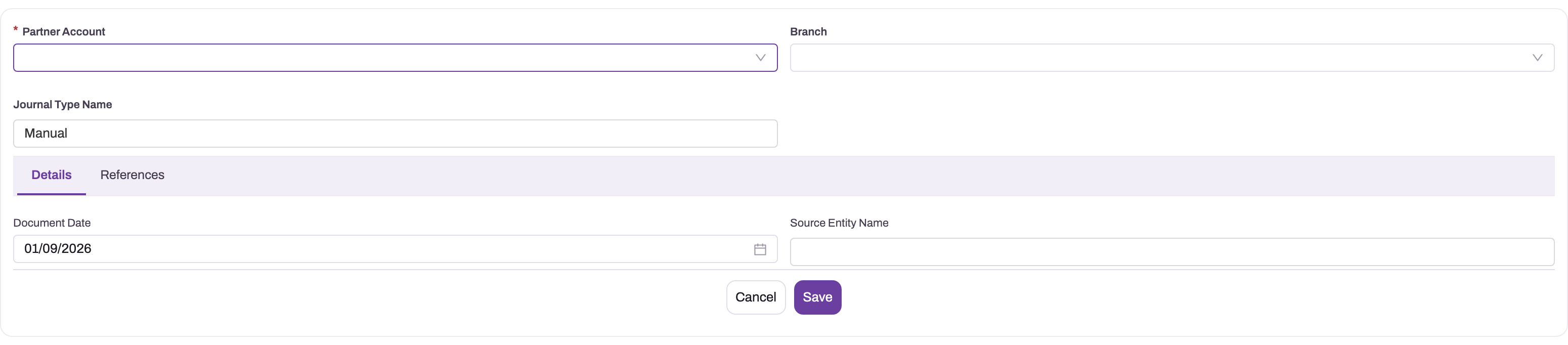
- 1
Partner Account supplies the company scope used when fiscal periods and GL context are resolved.
- 2
Branch supplies the organizational dimension for reporting and controls.
- 3
Journal Type defaults to Manual on this blank form; use source fields, not this label alone, to identify provenance.
- 4
Document Date determines the fiscal period and whether posting is allowed.
- 5
Source Entity preserves provenance when a journal represents another business event.
The manual-journal header shows the coordinates every finance record carries: the company (Partner Account), the Branch, the Journal Type Name, the Document Date and the source of the entry. The company scopes the chart of accounts and the fiscal calendar, the date picks the fiscal period, and the source fields explain why the accounting event exists. Manual is only the default of Journal Type Name; a journal created by a document or a recurring template can carry it too, so use Source Entity Name, Source Record and the narration to tell where a journal came from.
How xMatix handles it
Four ideas explain most of what you see in the Finance app.
- The journal is the ledger. A value movement reaches the ledger as a balanced journal. A journal is created as a draft and becomes Posted only through its Post action, which checks the lines, finds the open fiscal period and updates the account balances. A posted journal cannot be edited or deleted: the correction is the Reverse action, which posts a linked reversing journal. See Working with journals.
- Posting is document-specific. Invoices, bills, payments, credit and debit notes, bank transfers, stock movements, depreciation and the other documents each have their own posting action and checks, and posting definitions decide which GL account each leg uses. Approving a document does not by itself post it — confirm the journal on the document instead of assuming a status change produced one. Documents the automatic posting sweep could not post are listed in the Posting Error Log.
- Statements read the posted ledger. Trial Balance, Profit and Loss, Balance Sheet and the other statement screens are computed from posted journals when you open them. There is no separate report store to refresh. To freeze a filed copy, use Published statements.
- Dimensions are filled in at posting. When a journal posts, each line that has no branch, business unit or GST registration of its own is filled in this order: the journal header's branch and business unit, then the GL account's default branch, then the business unit and GST registration of the line's branch, then the company's default GST registration, and finally the GL account's default business unit. Check the saved lines when a statement slice by branch, business unit or GSTIN looks incomplete — a missing link in that chain leaves the dimension empty.
The Finance app
Open the Finance app from the app launcher. Its navigation bar holds the following entries, in this order. Which of them you see depends on your security profile (see Permissions).
| Entry | What it holds |
|---|---|
| Home | The finance landing page, a dashboard |
| Invoices, Bills, Expenses, Payments, Journals | The document lists. See Invoicing and payments, Bills, Expense vouchers, Recording and applying payments and Working with journals |
| Adjustments | Credit Notes and Debit Notes |
| Banking | Bank Reconciliation, Bank Transfers, Bank Statements, Cheque Transactions and Cheque Registers — see Banking |
| Chart of Accounts | The chart-of-accounts explorer, web only — see Browse the chart of accounts |
| Statements | A tile for each statement and statutory screen: the Profit and Loss and Balance Sheet in their standard, Schedule III and horizontal forms, Trial Balance, Changes in Equity, Cash Flow, Fund Flow, Financial Ratios, Risk Ratios, Budget vs Actual, Financial Projection, Resource Profitability, GL Account Balances, GL Account Ledger, Inventory Valuation, and the AOC-4, MGT-7A, Related Party Disclosure, Audit Schedules, MSME Delayed Payments, DPT-3, ADT-1 and Form 3CD screens. See Financial statements |
| Reports | The reports you have access to |
| Dashboards | The dashboards you have access to |
| Settings | The Finance Setup tiles: Fiscal Years, Business Units, GST Registrations, Cost Centers, Accounting Books, Posting Definitions, Posting Error Logs, Bank Accounts, Inventory Valuation Policies, Revenue Recognition Schedules, Budgets, Financial Projections, TDS Sections, Lower Deduction Certificates, TDS Challans, TDS Returns, TDS certificates, TDS Transactions, Interest Policies, Interest Runs, Interest Charges and Accounts |
Documents that start in another product are raised there and reach the ledger from there: a customer invoice is generated from a sales order, a supplier bill is raised in Procurement, a payroll run posts its accrual from the Payroll app, and stock movements post from Inventory and Warehouse. Each leaves a journal you can find in Journals by its Source Entity Name and Source Record.
Prerequisites
Before anyone posts in Finance, an administrator sets up the company's books. In order:
- The company exists and has finance enabled. In Setup → Feature Hub → Administration → Org Settings, open the Companies list and click Enable finance on the company's row. Pick a chart-of-accounts template under Select a COA template and click Seed Chart of Accounts. You see "Finance enabled — Chart of Accounts seeded". See Tenants and companies and GL accounts.
- A fiscal year with open periods. Posting needs an open fiscal period for the document date. See Fiscal years and periods.
- An accounting book. See Accounting books.
- Control accounts and posting definitions. The receivable, payable, bank, tax and inventory accounts that documents post to, and the definitions that pick them. See Posting definitions.
- Optional dimensions and registers as your business needs them: business units, cost centers, bank accounts, GST registrations and inventory valuation policies.
Procedure
Step 1 — Browse the chart of accounts
- In the Finance app, click Chart of Accounts. The explorer opens with a company already chosen in the Company box; pick another company there if you keep books for more than one.
- Read the tree. Top-level accounts are grouped under bands — the statement heading (Assets, Liabilities, Equity, Income, Expenses), then the Schedule III section, then the Schedule III classification — in the same way the Trial Balance groups them. Child accounts sit under their parent account. Each row shows the closing balance, and each band shows the total of everything beneath it.
- To see balances on an earlier day, change the Balance as on date. Future dates cannot be picked.
- Use Search code, name or type to find an account, Expand all and Collapse all to open or close the tree, and Show inactive accounts to include accounts that have been switched off.
- Click an account. Its Ledger opens on the right, with the account name and code at the top. Click Open account to go to the full GL account record.
Step 2 — Add or regroup accounts
- In Chart of Accounts, click New. The new GL account form opens with the selected company already filled in. Save it and the account appears in the tree. Field-by-field guidance is in GL accounts.
- To move an account under a different parent, drag it onto the new parent account. You see a message such as "Rent → Operating Expenses", or "… is now a top-level account" when you drop it at the top level. An account cannot be dropped onto itself or onto one of its own children. If the save fails, the account returns to where it was and the error is shown.
- To take the chart away, click Export and choose a format.
Step 3 — Find the journal behind a document
- In the Finance app, open Journals.
- Search or filter on Source Entity Name for the kind of document, then open the row whose Source Record is your document.
- Check its Status. Posted means it is in the ledger; a draft has not reached the ledger yet.
Step 4 — Read a statement
- In the Finance app, click Statements and pick a tile, for example Trial Balance.
- Choose the company, the date or date range and any comparison, and read the result. It reflects every journal posted up to that moment. See Financial statements for what each screen answers and how to email one on a schedule.
Example
A trading company starts using xMatix Finance at the beginning of its financial year.
- The administrator enables finance for the company with the India — Trading (Goods / Inventory) template, creates the fiscal year from 1 April 2026 to 31 March 2027 and generates its periods.
- The administrator opens Chart of Accounts, adds a Packing Materials expense account with New, and drags it under the existing Direct Expenses parent.
- During April, sales invoices, supplier bills and receipts are posted from their own screens. Each produces a posted journal.
- At month end, the accountant opens Statements → Trial Balance for 30 April 2026, confirms debits equal credits, then opens Profit and Loss for April to review the month's result.
- A wrong manual journal is found. The accountant opens it in Journals and uses Reverse; the reversing journal brings the effect back to zero and the correct journal is posted in its place.
Training
Practice exercise
In a sandbox company with finance enabled:
- Open Chart of Accounts, set Balance as on to today, and note the balance on your main bank account.
- Create a manual journal in Journals that moves 1,000 from the bank account to a petty cash account, and Post it.
- Go back to Chart of Accounts, click Refresh, and check both balances.
Expected result: the bank account is 1,000 lower and the petty cash account 1,000 higher, any band that holds both accounts keeps the same total, and selecting either account shows the journal in its Ledger.
Quick reference
- Every value movement reaches the ledger as a balanced, posted journal.
- Approving a document does not post it; its posting action does.
- A posted journal is never edited or deleted — reverse it.
- Posting needs an open fiscal period for the document date.
- Statements are computed live from posted journals; publish a copy to freeze it.
- Use Source Entity Name and Source Record, not Journal Type Name, to see where a journal came from.
- Chart of Accounts is the place to browse, add and regroup accounts; drag an account to change its parent.
- Finance setup lives under the Finance app's Settings entry.
Permissions
The Finance app's navigation is filtered by the user's security profiles: an entry that opens a page appears only when a profile grants that page, and the Adjustments and Banking entries appear only when a profile grants their app. The document lists (Invoices, Bills, Expenses, Payments, Journals) follow the user's access to each entity, and what a user can create, edit, delete, post or reverse follows their entity and action permissions. As shipped:
| Entry | Granted to |
|---|---|
| Finance app | System Admin, Standard User, Sales Manager, Sales Executive |
| Home, Settings | System Admin |
| Chart of Accounts, Statements | System Admin, Standard User, Sales Manager, Sales Executive |
| Adjustments, Banking | System Admin, Sales Executive |
A user without a grant simply does not see the entry. Administrators change these grants on the profile in Setup → Access Control — see Security profiles. An entry can also be hidden because the product that owns it is not licensed for the tenant, or because the tenant has switched off the module behind it.
Configuration
Everything an administrator tailors in Finance, and where it lives:
| What | Where | What it affects |
|---|---|---|
| Enable finance for a company, seed its chart | Setup → Feature Hub → Administration → Org Settings → Companies | Turns on GL posting for the company and creates its accounts |
| GL accounts and their hierarchy | Finance → Chart of Accounts | Where postings land and how statements group them — see GL accounts |
| Fiscal years and periods | Finance → Settings → Fiscal Years | Which dates can post; period close — see Fiscal years and Period close |
| Accounting books | Finance → Settings → Accounting Books | Which book inventory costing posts to; tax or management books — see Accounting books |
| Posting definitions | Finance → Settings → Posting Definitions | Which GL account each document leg posts to — see Posting definitions |
| Business units, cost centers | Finance → Settings | The reporting slices on journal lines and statements — see Business units and Cost centers |
| Bank accounts | Finance → Settings → Bank Accounts | Payments, statements and reconciliation — see Bank accounts and Matching rules |
| Inventory valuation policies | Finance → Settings → Inventory Valuation Policies | The costing method for stock — see Inventory valuation policies |
| Budgets, financial projections | Finance → Settings | Budget vs Actual and the cash-flow forecast — see Budgets and Financial projections |
| Revenue recognition schedules | Finance → Settings → Revenue Recognition Schedules | Deferred revenue release — see Revenue recognition |
| Interest policies and runs | Finance → Settings → Interest Policies, Interest Runs | Interest on overdue customer balances — see Interest on overdue payments |
| GST registrations, TDS sections and certificates | Finance → Settings | Tax on documents and the compliance cycle — see The Tax Center and TDS & TCS |
| Navigation and page access | Setup → Access Control (security profiles) | Who sees each Finance entry — see Permissions |
Common problems
"I can't see Settings (or Home) in the Finance app"
As shipped, only the System Admin profile is granted those two pages. Ask your administrator to grant the page on one of your security profiles.
"New and Refresh are greyed out on Chart of Accounts"
No company is selected. Pick one in the Company box at the top of the explorer.
"Posted journals are immutable. Use the ReverseJournal action to correct them."
You tried to change the status of a posted journal. Posted journals cannot be edited or deleted; open the journal and use Reverse, then post a corrected journal.
"A journal cannot be changed to 'Posted' directly"
A journal reaches Posted only through its Post action, which runs the line checks and finds the fiscal period. Use Post instead of setting the status.
"A statement shows nothing for a branch or business unit I expected"
The journal lines carry no value for that dimension. Check the branch's business unit and GST registration, and the GL account's default branch and business unit (see How xMatix handles it), then look at the saved lines of a sample journal.
Common questions
Does approving an invoice or bill post it to the ledger?
Not by itself. Each document type has its own posting action or posting service, and approval is a separate step in its workflow. After you approve a document, check that its journal exists in Journals — filter on Source Entity Name and look for your document in Source Record — and that its status is Posted. Documents that the automatic posting sweep tried and failed to post are listed with the reason in the Posting Error Log, which you can open from Finance → Settings → Posting Error Logs.
Can I correct a posted journal?
Not by editing it. Posted journals are part of the ledger and cannot be changed or deleted; xMatix rejects the save with a message telling you to reverse instead. Open the journal and use Reverse: xMatix posts a linked journal with the opposite effect, so the net is zero and both entries stay visible for audit. Then create and post a corrected journal. A journal that is itself a reversal cannot be reversed again. See Working with journals for the full procedure.
Why does a statement change after I looked at it?
Statements are computed from the posted ledger each time you open them, so any journal posted since — a late bill, a reversal, a depreciation run — moves the figures, as does reclassifying a GL account. That is deliberate: there is no copy to fall out of date. When you need a figure that never changes, such as the Balance Sheet you filed, publish it as a published statement; the published copy is computed once and locked.
Where do payroll and expense postings show up?
In the same ledger. Payroll runs and expense vouchers post their journals into Finance like any other document, so their effect appears in the Trial Balance and the statements, and you can find each journal in Journals by its source. They are set up in their own products — see xMatix Payroll and xMatix Expenses.
What is in this section
Ledger and setup
- Chart of accounts, books and periods — GL accounts, accounting books, posting definitions and the fiscal calendar.
- GL accounts — seed a company's chart, create and retire accounts, tag control accounts and read an account's ledger.
- Accounting books — the primary book inventory costing posts to, tax or management books, and statements by book.
- Posting definitions — the rules that pick the GL account for each leg of a document's journal.
- Business units — the divisions a company reports by.
- Cost centers — set up cost centers and read the Profit and Loss by cost centre.
- Fiscal years and periods — create a fiscal year, generate its periods, control posting and close the year.
- Fiscal periods and period close — period statuses, month-end close, reopen and lock.
- Posting Error Log — documents automatic posting could not post, and why.
Day-to-day accounting
- Working with journals — manual journals, posting, reversal and recurring journals.
- AR and AP subledgers — how documents create open items, settle, and reconcile to control accounts.
- Recording and applying payments — customer receipts and supplier payments.
- Payment allocations — what links a payment, credit note or advance to the documents it settles.
- Credit notes and Debit notes — adjustments to invoices and bills.
- Interest on overdue payments — policies, accrual runs and posting.
- Revenue recognition — deferred revenue schedules and recognition runs.
Banking
- Banking — the banking layer at a glance.
- Bank accounts, Bank transfers, Bank statements and Cheques and cheque registers.
- Reconciling a bank account, Matching rules, Reconciliation matches and Reconciliation worksheets.
Statements, budgets and planning
- Financial statements — every statement screen and what it answers.
- Published statements — freeze a year's statements and filing copies.
- Budgets and budget vs actual and Budget commitments.
- Financial projections — expected amounts that feed the Cash Flow Forecast.
Fixed assets
- Fixed assets — the asset register and how depreciation posts.
- Assets, Running depreciation, Depreciation policies, Asset disposals and Asset blocks.
Tax
- The Tax Center — GST returns, e-invoicing, e-way bills and TDS/TCS compliance.
Related topics
- xMatix Finance & Accounting product overview
- Apps, entities and records — how xMatix screens are organized.
- Tenants and companies — what makes a partner a company with its own books.
- Security profiles — who sees which app, page and record.
- Administration guide — access, security and data management.