
This section is for the people who run xMatix for their organization: inviting users, deciding who may see and do what, keeping licenses and templates in order, moving data in and out, and testing changes in a sandbox before they reach production. Every page names the Setup screen it describes, lists the settings that matter, and states honestly what a control does — and does not — do.
Where administration lives in the product
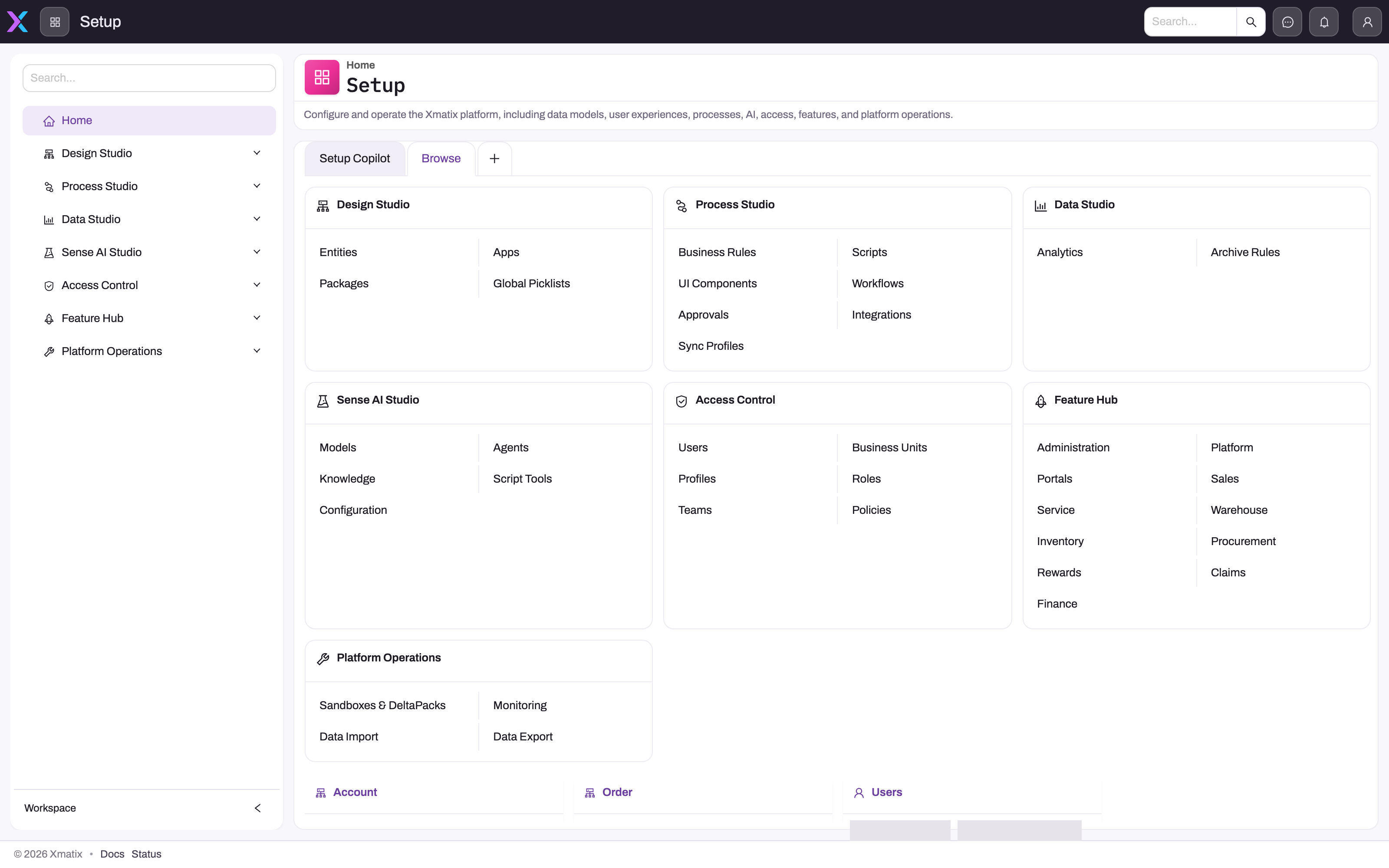
All administrative work happens in Setup, reached from the app launcher. Its home page opens on a Browse tab (or directly on the section cards when your organization has no Setup Copilot license) that maps the same groups as the left sidebar:
- 1
Browse shows the section cards; the Setup Copilot tab beside it appears only when your organization is licensed for it.
- 2
Access Control: Users, Business Units, Profiles, Roles, Teams and Policies — the identity and record-security screens.
- 3
Feature Hub: Administration holds Licenses and Org Settings; Platform holds Document Settings and Email Templates; module groups hold their own Settings.
- 4
Platform: Sandboxes & DeltaPacks, Monitoring, Data Import and Data Export.
- 5
The sidebar carries the same groups; leaf screens such as Licenses or Jobs open from here.
- 6
Recently used entities give quick access to the metadata you edited last.
| Setup group | What administrators do there | Documented in |
|---|---|---|
| Access Control | Users, Business Units, Profiles, Roles, Teams, Policies — identities and the two gates that decide what they can do and which records they see | User accounts, Invite a user, Offboard a user, Security profiles, Roles, teams and business units, Record security, Restriction rules |
| Feature Hub → Administration | Org Settings, Licenses, License Usage, Themes | Licensing |
| Feature Hub → Platform | Document Settings, Deduplication rules, Localization Resources, Email Templates, Resources, Guided Journeys | Email templates and document numbering, Document numbering, Deduplication rules |
| Platform | Sandboxes & DeltaPacks, Monitoring (Jobs, Audit, Message Log, Tracing), Data Import, Data Export | Sandboxes and promoting changes, Import data, Export data |
The other groups — Design Studio, Process Studio, Data Studio and Sense AI Studio — are where the model, automation, analytics and AI agents are built; they are covered in Customizing xMatix, Data Studio and Sense AI. The cards for Access Control, Feature Hub and Platform list their sub-groups as text; open the actual screens from the left sidebar. Below the cards, the home page keeps shortcuts to the entities you worked on most recently.
The access model in one paragraph
Every action a user attempts passes two independent gates. A security profile must grant the operation — the app, the entity, the field, the action or the setup capability — and record security (the entity's policy, ownership, the role hierarchy, shares and rules) must expose the specific record. Roles, teams and business units never grant operations; licenses and seats are a third, commercial layer that must also be satisfied for licensed products and features. When a user "can't see something", work through the layers in order rather than widening one profile: Troubleshooting: a user can't see something is the ordered checklist, and Worked security scenarios shows the building blocks combined into configurations you can copy.
Capabilities you will need
Setup screens are gated by capabilities on your security profiles. The built-in SystemAdmin profile holds all of them; a delegated administrator needs only the relevant ones:
| Task | Capability |
|---|---|
| Users (create, edit, deactivate) | setup.security.users.manage |
| Profiles, roles, teams, business units, policies and rules | setup.security.manage |
| Licenses, license usage, per-user seats, license coverage | setup.licensing.admin |
| Messaging templates | setup.metadata.email.manage |
| Data import / data export | setup.data.import.manage / setup.data.export.manage |
| Jobs monitoring | setup.diagnostics.jobs.view (actions: setup.diagnostics.jobs.manage) |
| Sandboxes, copy profiles, DeltaPacks, inbound DeltaPacks | setup.sandboxes.manage, setup.sandboxcopyprofiles.manage, setup.deltapacks.manage, setup.deltapacks.inbound.manage |
A screen you cannot see in the sidebar is almost always a missing capability, not a missing feature; some groups are additionally hidden when the feature is not enabled for your organization (sandboxes) or when the current environment is itself a sandbox.
Reading order
- Invite a user — the account, provisioning and the first profile; User accounts covers every field and edit after that.
- Security profiles and the grant matrix — the operation gate.
- Roles, teams and business units, Record-level security and sharing and Restriction rules — the record gate.
- Licensing — the commercial layer and per-user seats.
- Branches — the operating locations your companies transact from, in the Platform app rather than Setup.
- Branch time slots — the bookable windows and weekday capacities a branch offers for demos, service appointments and deliveries, kept on the branch.
- Postal codes — the postal code list that fills city, state and country on leads, opportunities and quotes, and the branch postal codes that route new leads to a branch.
- Resources — the person record behind each user: default company and branch, reporting line, pay and identity details, also in the Platform app.
- Partner resources — dated assignments of a person to a company and branch, used to fill and check documents and as assignment-rule candidates.
- Business hours — working calendars (time zone, working days, daily window) for SLAs, attendance, appointments and fiscal days, linked to policies, branches and resources.
- Holidays — the non-working dates that mobile check-in, appointment slots, fiscal days, SLAs and training sessions skip, each scoped its own way.
- KYC documents — identity, address, income and business documents kept on resources, opportunities and partner onboarding applications, with a verified flag.
- Resource groups — named lists of people used as queue agent pools, assignment-rule candidates, incentive-plan populations and console filters.
- Email templates and document numbering — outbound messages and generated document numbers.
- Document numbering — the number pattern of each entity, the running counters behind each series, and how to continue numbering from another system.
- Import data and Export data — bulk data in and out.
- Deduplication rules — which records the Duplicates panel offers as likely duplicates of each other.
- Sandboxes and promoting changes — test in isolation, promote with DeltaPacks.
Related topics
- Security model concepts
- Tenants and companies
- Data lifecycle concepts
- Getting started with xMatix — the user-facing orientation.
- Platform security & governance