
A tenant is your organization's own, isolated xMatix environment — its users, data, configuration and customizations live inside it and nowhere else. Within a tenant, the companies your organization transacts through can be modeled as first-class things, and user access can be scoped to them. The two boundaries behave very differently: tenant isolation is enforced by the platform on every read and write and needs no configuration, while the company boundary is an operating model your administrator switches on deliberately.
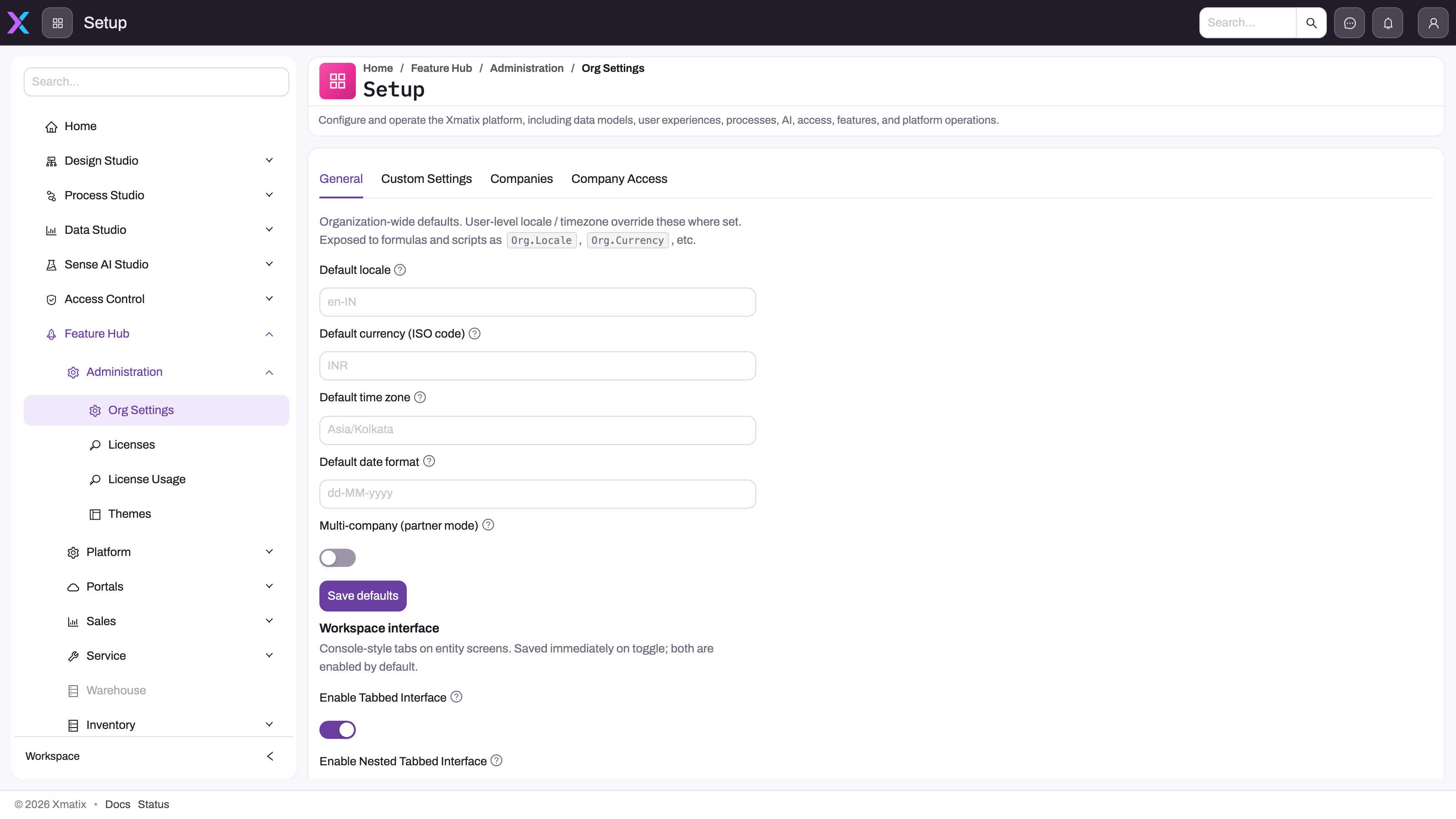
- 1
General: organization-wide defaults every user inherits unless their own profile overrides them — tenant-level, not per company.
- 2
Companies and Company Access are the multi-company tabs: onboard a partner account as a company, then grant each user View or Transact access per company.
- 3
Locale, currency, time zone and date format are exposed to formulas and scripts as Org.Locale, Org.Currency and similar.
- 4
Multi-company (partner mode) is the organization's switch; on this tenant it is off, so company scoping does nothing and no user is restricted.
- 5
Workspace interface toggles are tenant-wide too — console-style tabs on entity screens for everyone, saved as soon as they are flipped.
Both live under Setup → Feature Hub → Administration → Org Settings. The General tab holds the organization-wide defaults every user inherits unless their own profile overrides them — default locale, currency, time zone and date format, exposed to formulas and scripts as Org.Locale, Org.Currency and so on — plus the Multi-company (partner mode) switch. Custom Settings is where you author your own named settings for formulas and scripts. Companies and Company Access appear when multi-company mode is on. Editing Org Settings needs the setup.org.settings.manage capability; the company tabs need setup.companies.manage.
A tenant is your organization's environment
Everything your organization does in xMatix happens inside its tenant: every user account, every record, every entity customization and every setting belongs to it. Tenants are strictly isolated from one another — your data is never visible to another organization, and theirs is never visible to you. This isolation is enforced on every query and every save, is not something an administrator configures, and cannot be widened by any setting described on this page. Sandboxes are separate copies of your tenant for testing; see sandboxes.
Companies within a tenant
Many organizations transact through more than one legal entity — group companies, partner firms, distributors keeping their own books. xMatix models these as companies inside your tenant, and the model separates three ideas:
- A partner account is just an account. Any account can be flagged as a partner account, and partners may exist that never transact.
- Onboarding makes a partner a company. A partner becomes a company when it is onboarded on the Companies tab, which creates its company profile; from then on transactional records — orders, invoices, journals, bank transactions and so on — may be keyed to it. A company can also have finance enabled from a chart-of-accounts template so its books stand on their own.
- Company access is a permission layer on top. Once companies exist, users can be restricted to particular companies (next section).
Master data is more flexible than transactions. Some masters are shared tenant-wide — items and customer accounts are common to all companies — while others, such as price lists, tax groups and branches, carry a company and can therefore be company-specific or left shared. Transactions and financial balances are always kept per company, which is what makes independent, per-company statements possible.
Scoping users to companies
Company access is recorded per user, per company, on the Company Access tab, with one of two kinds:
- View — the user may see the company's records, for consolidated reporting, but not post into it.
- Transact — the user may see and post into the company; it implies View.
A common pattern is Transact in the user's home company and View across the rest. Two switches bypass company scoping entirely: Access to all companies on the user, and the equivalent flag on a security profile (the built-in System Admin profile carries it), so administrators and group finance see everything without being granted company by company. Access changes take effect within about a minute for signed-in users.
Two things are worth knowing about how this is enforced. First, restricting a user is a filter added to their queries and a guard on their saves; it applies only to records that carry a company, and it never widens what ordinary record-level security already allows — a user still needs the entity permission and record access. Second, the company filter and save guard are activated by the organization's multi-company switch together with platform-level enforcement that the xMatix operations team turns on per environment after validating it. Until both are on, Company Access rows record intent but do not restrict anyone — so treat the switch as the start of a rollout, not proof of enforcement, and test a representative restricted user before relying on it.
Single-company organizations
If your organization is one company, leave multi-company mode off. Company scoping then does nothing, no Companies or Company Access tabs appear, and ordinary tenant security applies unchanged. Organizations that grow into several entities later can switch the mode on, onboard companies and grant access without any change to existing users, who keep seeing everything until Company Access rows restrict them.
Common questions
Is our data separate from other organizations' data?
Yes. Every tenant is isolated: all of your records, users and configuration are scoped to your tenant, and the platform enforces that scoping on every access. No user of another tenant can see your data, and no report, search or integration crosses tenant boundaries. Company scoping operates within your tenant and is deliberately softer — cross-company visibility inside one organization is often legitimate for consolidation and administration.
Do we need multi-company mode?
Only if your organization transacts through more than one legal entity and needs per-company books or per-user company access. Enable it for a documented requirement: decide which masters are shared and which are company-specific, onboard each company, grant Company Access, and then have a restricted user confirm both what they can see and what they cannot post before treating it as a control.
What is shared across companies and what is separate?
Users, security profiles, entity customizations, automation and Org Settings belong to the tenant, not to any one company. Items and customer accounts are shared. Price lists, tax groups, branches and similar masters carry a company and can be shared or company-specific. Transactions and balances are always per company.
Can one user work in more than one company?
Yes. A user can hold access to several companies with a different kind in each — Transact in one, View in others — and users who need everything can be given access to all companies outright.
Does multi-company mode give each company its own chart of accounts?
It can. Each onboarded company can have finance enabled from a chart-of-accounts template, which seeds that company's ledger accounts and turns on posting for it; companies that share a chart use the same template. Document numbering is configured separately under Setup → Feature Hub → Platform → Document Settings and is not keyed per company.