
The concepts section explains the ideas that every xMatix screen, module and setup option is built on, so you know why the product behaves as it does before you change it. Each page answers one question in plain language: how your organization's space is structured, how work is organized into apps and records, who can see and do what, which customization tool fits which job, what runs when a record is saved, what happens to deleted data, how the mobile app works without a network, and how the Sense AI assistant stays inside the same rules as everything else. None of these pages is a step-by-step guide. They are the background that makes the step-by-step guides make sense.
Overview
xMatix is metadata-driven. Every list, record page, dialog and mobile form is generated from definitions your administrators maintain: entities and their fields, views, layouts, apps, rules and permissions. Two consequences follow, and the concept pages come back to them again and again:
- One change reaches every surface. A field added to an entity, or a rule added to its save, applies on the web, on mobile, through imports and through the API alike, because they all read the same definitions.
- Every question has one home. A missing field, an unexpected save result, a record a colleague cannot see and an AI answer you did not expect are four different problems, configured in four different places. Knowing which place owns which question is most of the skill of administering xMatix.
What this section covers
The pages build on one another, so reading them in order works well the first time through:
| Page | The question it answers | Written for |
|---|---|---|
| Tenants and companies | How your organization's private tenant relates to the companies, branches and business units you run inside it | Administrators |
| Apps, entities and records | How entities describe the shape of your data, records hold it, and apps group it into workspaces | Users and administrators |
| Security model | Which layers decide what a user may do and which records they can reach: profiles, capabilities, licensing and record-level security | Administrators |
| Customization ladder | Which tool to reach for when you change how xMatix behaves, from plain configuration up to custom code | Administrators |
| Execution order | What runs, and in what sequence, when a record is saved: defaults, validation, business rules, module logic, workflows, approvals and scripts | Administrators |
| Data lifecycle | What delete really does: the recycle bin, restore, retention windows and archiving | Administrators |
| Offline mobile | How the mobile app keeps data on the device, queues edits made offline and syncs them when connectivity returns | Users and administrators |
| Sense AI governance | How the AI assistant is scoped to each user's permissions, what it may write, and how administrators control it | Administrators |
Where each concept is configured
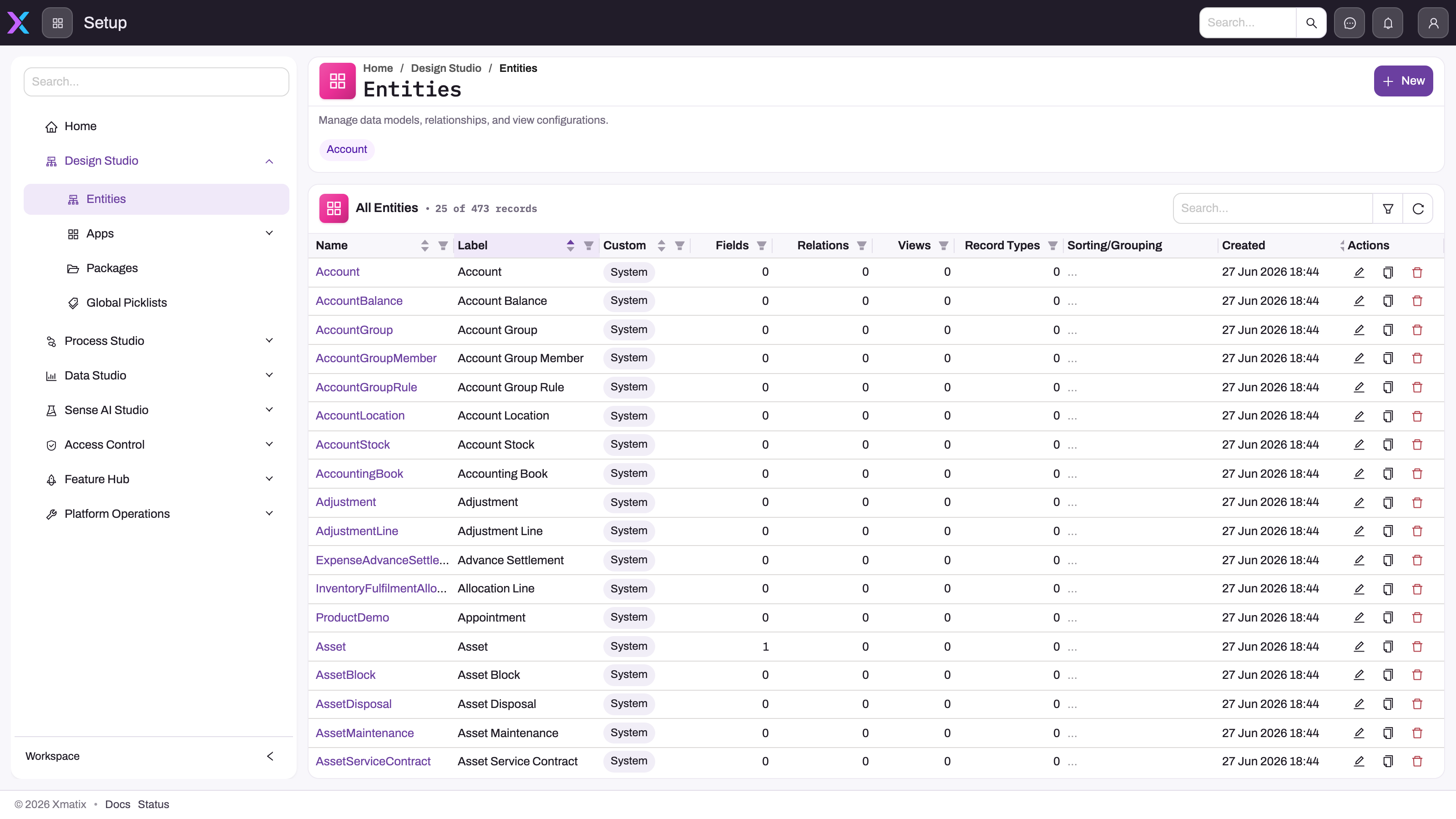
Most concepts become concrete in Setup, the administration workspace. Setup groups its screens by the kind of question they answer. The groups below are the ones Setup shows today, in the order it shows them. The picture above shows the Entities registry under Design Studio; its navigation was captured before Data Studio moved out of Setup.
| Setup group | What lives there | Concept page |
|---|---|---|
| Design Studio | Entities, Apps (with App Pages and Mobile Apps), Packages and Global Picklists: the shape of your data and the workspaces that present it | Apps, entities and records |
| Process Studio | Business Rules, Assignment Rules, Scripts, UI Components, Workflows and Approvals: behaviour that runs over your records | Customization ladder, Execution order |
| Platform | Sandboxes & DeltaPacks, Monitoring, Integrations, Sync Profiles, Testing, Data (Import, Export, Archive Rules) and KPI: the machinery that moves data in and out and keeps the tenant running | Data lifecycle |
| Sense AI Studio | Models, Agents, Knowledge, Script Tools, AI Mechanic, Traces and Configuration: how the AI assistant is set up and governed | Sense AI governance |
| Access Control | Users, Business Units, Profiles, Roles, Teams, Policies and Security Assignment: who may do what, and which records they reach | Security model |
| Feature Hub | Administration (Org Settings, Licenses, License Usage, Themes), Platform (document numbering, templates, messaging and similar shared settings) and one group per licensed module with its settings | Tenants and companies, Security model |
Data Studio (data models, datasets and their refresh) is not part of Setup. It is an app of its own that you open from the app launcher. See Data Studio.
Where to start with a question
Use this map to decide where a question belongs before you change any configuration:
| You notice… | It is usually a question of… | Start at |
|---|---|---|
| A field, list or record type you need is missing | The data model | Design Studio → Entities and Apps, entities and records |
| A save is refused, or a value changes by itself on save | Save-time behaviour | The entity's execution plan, see Execution order |
| A colleague cannot see an app, a record or a button | Access | Access Control and Security model |
| A whole module or Setup group is missing | Licensing | Feature Hub → Administration → Licenses, see Licensing |
| A record you deleted has disappeared from lists | Data lifecycle | Data lifecycle |
| Edits made on a phone have not reached the web | Offline sync | Offline mobile |
| The AI assistant answered or acted unexpectedly | AI governance | Sense AI Studio and Sense AI governance |
How to open Setup
On the web, select the gear button in the top bar, then Setup. Setup opens in a new browser tab, and its navigation runs down the left side. On a phone-sized screen, Setup is a link in your profile menu instead.
On an entity list or record page, the same gear menu also offers shortcuts to the definitions behind the screen, if you hold the matching Setup rights:
- Edit Page opens the page's layout in the layout designer.
- Edit Entity opens the entity's definition in Setup.
- Edit View Columns (on lists) opens the columns editor for the entity's views.
Clear cache is always in the menu. It reloads the definitions your browser has stored, which helps after an administrator changes a layout or field and your screen has not caught up.
Permissions
What you see in Setup is controlled by capabilities, the Setup rights granted through your security profile. See Security model.
- Without any Setup capability, the gear menu has no Setup entry and the profile menu shows no Setup link.
- Inside Setup, each screen appears only if you hold its capability. A group whose screens are all hidden disappears.
- Screens that belong to a product module, such as the module settings under Feature Hub, appear only when your organization's licence for that product is enabled.
Two administrators can therefore see different Setup menus, and neither is broken. The administration guide explains how to grant the rights.
Who these pages are for
- Administrators get the most from this section. Almost every configuration decision, such as a new field, a security profile, a business rule or an approval process, sits on top of one of these models.
- Everyday users should read Apps, entities and records and Offline mobile. They explain why lists, views and records behave alike in every module, and what the sync indicators on the phone mean.
- Trainers can use the pages as the theory part of an onboarding course: one concept per session, followed by the matching procedure from the administration or module guides.
- Implementation partners and evaluators will find the section a compact description of the platform's architecture in the words users see on screen.
How concepts relate to the rest of the documentation
The getting started guide teaches the screens: signing in, navigating apps, lists and records. The administration guide and the customization guide hold the procedures: the exact steps to create a security profile, add a field or write a business rule. This section holds the reasoning that connects them. A good pattern is to skim the concept page once, work from the procedures day to day, and come back here when something behaves in a way you did not expect.
Training
Practice exercise
In a sandbox, sign in as an administrator and find where each of these questions is answered. Write down the Setup group and screen for each:
- Which fields does the Account entity have?
- Which business rules run when an Account is saved?
- Which security profile does your own user have?
- Which product licences does your organization hold?
Expected result: (1) Design Studio → Entities, then open Account. (2) Process Studio → Business Rules, or the entity's execution plan described in Execution order. (3) Access Control → Users, then open your user. (4) Feature Hub → Administration → Licenses. If a group is missing from your menu, your profile lacks the matching capability. That is the lesson of the Security model page, not a fault.
Quick reference
- Everything you see is generated from metadata. Change the definition, not the screen.
- Data shape → Design Studio. Save-time behaviour → Process Studio. Access → Access Control. AI → Sense AI Studio.
- Tenant machinery (sandboxes, monitoring, integrations, import and export) → Platform. Licences and module settings → Feature Hub.
- Data models and datasets live in the Data Studio app, not in Setup.
- Open Setup from the gear button in the top bar. It opens in a new tab.
- A missing Setup screen usually means a missing capability or licence.
- Clear cache in the gear menu refreshes stale definitions in your browser.
Common questions
Why can't I find Setup?
Setup appears only for users who hold at least one Setup capability through their security profile. Most everyday users don't, so the gear menu shows only Clear cache for them. If you need to administer part of the system, ask an administrator to add the matching capability to your profile. Being able to open Setup does not mean you see every screen in it. Each screen is gated separately, so a colleague with broader rights may see groups you don't. See Security model.
Where did Data Studio go in Setup?
Data Studio is no longer a Setup group. Data models and datasets are worked on in the Data Studio app, which you open from the app launcher like any other app. Archive Rules stayed in Setup under Platform → Data. Reports and dashboards are created and designed from the analytics screens in the apps themselves. Like every app, whether you see it in the launcher depends on your security profile and your organization's licences. See Data Studio.
Do I need to read these pages before using xMatix?
No. Everyday users can start with the getting started guide and come back here when something surprises them. Apps, entities and records is the one page worth reading early, because it explains why every module's lists and records work the same way. Administrators should read the whole section once before making configuration changes. Most configuration mistakes come from changing the right thing in the wrong place, for example writing a workflow where a business rule or a security setting was the better tool.
Does a change in Setup apply to mobile and imports too?
Yes. The web, the mobile app, imports and the API all read the same definitions, so a new field, rule or permission applies to all of them. Two things vary by surface. Layouts are designed separately for web and mobile, so a field added to the entity still has to be placed on each layout where you want users to see it. The mobile app also keeps cached copies of layouts and settings, so a change reaches a phone once the app has refreshed them. See Offline mobile.