
Customization is how you make xMatix work the way your business does. You can add business objects, change forms, enforce rules at save time, set up sign-off chains and run server-side logic, all without waiting for a product release. Every tool lives in Setup. Together they form a ladder from plain configuration up to code, and one rule keeps a tenant maintainable: pick the lowest rung that genuinely solves the problem. Use configuration before rules, rules before scripts, and code only when nothing declarative can express the requirement. If you read one page before the how-tos, make it the customization ladder. Every page in this section assumes its logic.
Overview
The section is ordered the way customizations are usually built. You shape the data first, then the behavior around it, then the experience, then the automation on top.
| Page | What it covers |
|---|---|
| The data model | Entities, fields, picklists, relations and record types: the no-code data model everything else builds on |
| Create a custom entity | The end-to-end procedure: entity, fields, views, layout and app placement |
| Entity behavior | Views, validations, actions, field mappings, lookup filters and field dependencies: what each does and where it lives |
| Design a form layout | The visual layout designer: sections, widgets, per-record-type variants, mobile layouts and defaults |
| Business rules | Save-time automation: conditions and actions that default, require, block, lock and notify |
| Your first automation script | Server-side code in a sandbox: where scripts attach, what they can reach, and how to test them |
| Build a workflow | The visual workflow designer: entity-lifecycle triggers, multi-step orchestration and publishing |
| Approval processes | Sign-off chains: steps and approvers, submitting records, the approvals inbox, and how approval state gates documents |
| Expressions | The two expression surfaces, formulas and query filters: where each is used and how their syntax differs |
Where the tools live in Setup
In Setup, the navigation on the left groups the customization tools like this:
| Setup menu | Entries | What you change there |
|---|---|---|
| Design Studio | Entities, Apps (with Apps, App pages and Mobile apps), Packages, Global picklists | The data model and the experience: entities and their fields, validations, actions, views and layouts; the apps and pages users navigate; shared picklists |
| Process Studio | Business rules, Assignment rules, Scripts, UI components, Workflows, Approvals | Behavior: save-time rules, automatic owner assignment, server-side code, custom interface widgets, multi-step orchestration and sign-off chains |
| Platform | Sandboxes & DeltaPacks, Monitoring, Integrations, Sync profiles, Testing, Data, KPI | The machinery around your customizations: sandboxes for trying changes, tracing, jobs and the audit trail for watching them run, connections to other systems, and import, export and archive rules |
| Sense AI Studio | Models, Agents, Knowledge, Script tools and Configuration | The AI assistants and the tools they may use |
| Access control | Users, Business units, Profiles, Roles, Teams, Policies, Security assignment | Who can see and do what |
| Feature Hub | Administration, Platform, and one group per licensed module with its Settings | Organization settings, licenses, themes and branding; document settings, deduplication rules, messaging templates and resources; module settings |
Integrations and sync profiles are system boundaries, not record behavior, so they sit under Platform, not Process Studio.
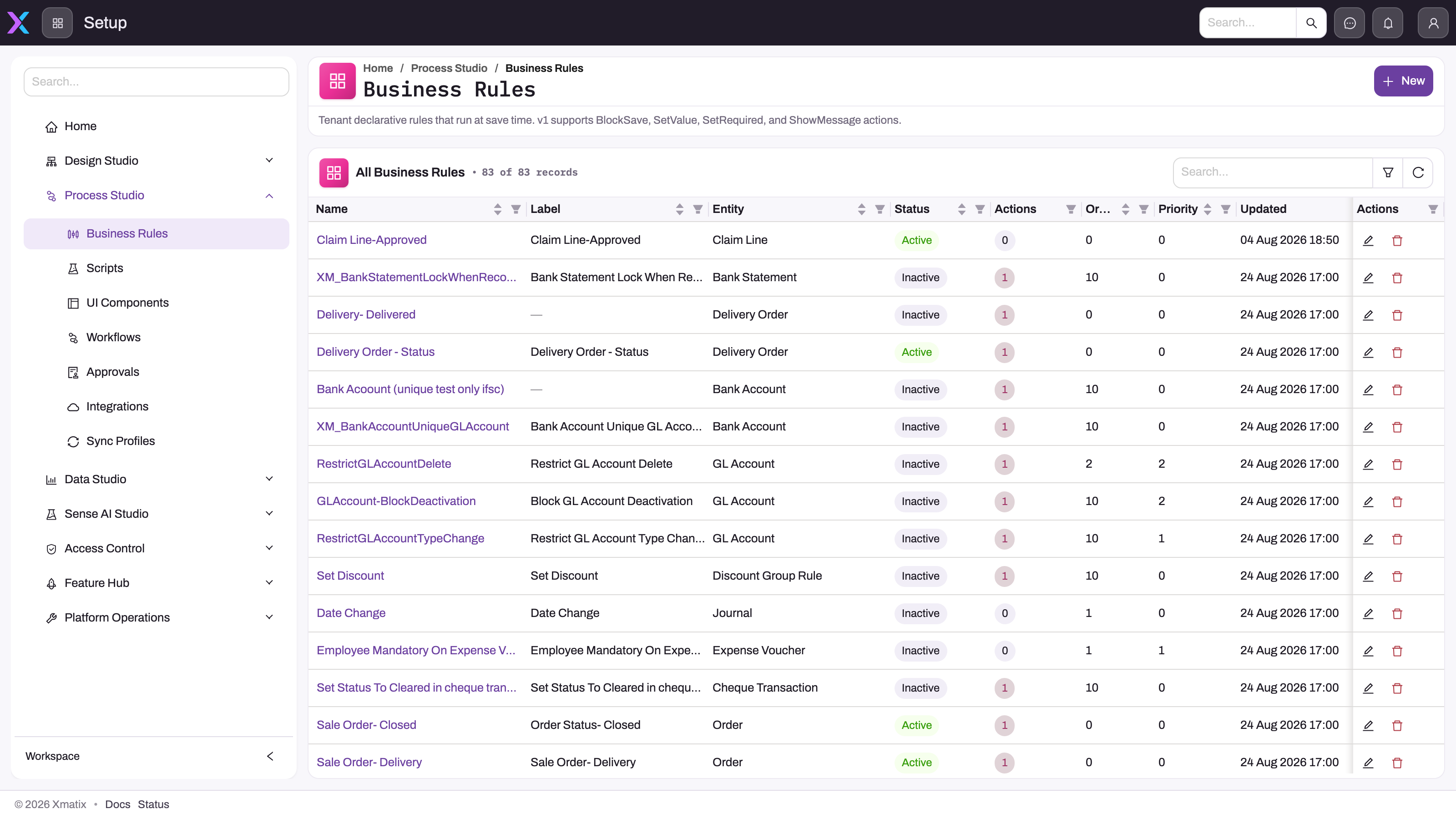
Each register has New in its page header and a searchable list. Before you create anything, search the register for the entity you are changing. Overlapping rules, scripts and workflows on the same entity are the most common cause of surprising saves.
Where each change belongs
A few signal phrases route most requests:
| The request sounds like… | Use | Where |
|---|---|---|
| "This field must…", "add a field", "show a different form" | Data-model configuration, validations and layouts | Design Studio → Entities |
| "When the record is saved…", "block it if…", "default it to…" | A business rule | Process Studio → Business rules |
| "New records should go to…" (owner, resource, branch) | An assignment rule | Process Studio → Assignment rules |
| "Someone must approve…" | An approval process | Process Studio → Approvals |
| "Then wait, then notify, then later…" | A workflow | Process Studio → Workflows |
| "Look across records…", "call another system…", "a custom button that…" | An automation script | Process Studio → Scripts |
| "Show it differently…" when no standard widget fits | A UI component | Process Studio → UI components |
| "Keep these records in step with another system…" | An integration or sync profile | Platform → Integrations or Platform → Sync profiles |
When two tools both work, the lower rung wins. It stays visible in Setup, it can be tested before it goes live, and any administrator can change it, not only whoever wrote the code.
How the pieces run together
Every customization on an entity runs inside one save lifecycle. The phases are load defaults (new records only), pre-validate, validate, before save, after save and, once the record is committed, post-commit. The configured steps from several tools can share a phase. Validations, save-time business rule actions, validate-phase scripts and before-save workflow triggers can stop a save. Anything that runs after the commit cannot undo it. When two customizations seem to fight, open the entity's execution plan to see the real order instead of guessing. See what runs when you save a record.
Approval is not a step that every save passes through. A record enters an approval process only through an entry point you configure, such as a Submit for approval action, a business rule's Request Approval action or a workflow step.
Prerequisites
- An account with access to Setup.
- The setup capability for each area you work in. Setup hides every menu entry you do not hold the capability for. A group whose entries are all hidden disappears.
- For module groups under Feature Hub (Sales, Service, Inventory, Procurement, Claims, Finance and others), an enabled license for that product. Setup hides groups for products your tenant is not licensed for.
- For larger changes, a sandbox to build and prove them in. See Sandboxes.
Permissions
Each Setup entry is gated by its own capability, granted per security profile on the profile's Entitlements tab (see Security profiles):
| Area | Capability |
|---|---|
| Design Studio → Entities, and Feature Hub → Platform → Localization resources | setup.metadata.model.manage |
| Design Studio → Apps (Apps, App pages, Mobile apps) | setup.metadata.apps.manage |
| Design Studio → Packages | setup.metadata.packages.manage |
| Design Studio → Global picklists | setup.metadata.picklists.manage |
| Process Studio → Business rules and Assignment rules | setup.automation.businessrules.manage |
| Process Studio → Scripts | setup.automation.scripts.manage |
| Process Studio → UI components | setup.automation.customcomponents.manage |
| Process Studio → Workflows | setup.automation.workflows.manage |
| Process Studio → Approvals | setup.metadata.approval.manage |
| Platform → Integrations and Sync profiles | setup.integration.manage |
| Platform → Testing | setup.quality.tests.manage |
| Feature Hub → Platform → Messaging templates | setup.metadata.email.manage |
| Module Settings pages under Feature Hub | setup.featurehub.settings.manage (the Feature Hub group itself also needs setup.licensing.admin) |
A user without a capability does not see the entry in Setup. Give customization capabilities only to the people who own those changes. A business rule or script is live enforcement for every user the moment it is active.
Training
Practice exercise
In a sandbox, take this request: "Orders above a set amount need a sales manager's sign-off before they proceed." Route it before you build anything. A blocking business rule on its own cannot express "unless a manager approves", and an editable "approved" checkbox records no approver, time or reason. Model the sign-off as an approval process, and use a business rule only for any unconditional check. Expected result: you can name the Setup entry for each part (Process Studio → Approvals for the sign-off, Process Studio → Business rules for the check). You have also searched both registers for existing definitions on the Order entity before selecting New.
Quick reference
- Lowest rung first: configuration → business rule → approval → workflow → script → UI component.
- Data shape and forms: Setup → Design Studio → Entities.
- Behavior: Setup → Process Studio.
- Integrations and sync profiles: Setup → Platform, not Process Studio.
- Search the register before New. Duplicate logic on one entity causes surprising saves.
- Only validate-phase and before-save work can block a save. Post-commit work cannot undo it.
- A missing Setup entry usually means a missing capability or an unlicensed product.
- Build larger changes in a sandbox first.
Common questions
Do I need a developer to customize xMatix?
Not for most of this section. The data model, entity behavior, layouts, business rules, assignment rules, workflows and approval processes are all configured in Setup. They need no code, can be tested before they go live, and any administrator with the right capabilities can adjust them. Automation scripts and UI components are the exceptions. They are real code and should be owned like code. The ladder exists so that the coded rungs are the last resort, not the first.
Do customizations survive product updates?
Yes, and that is the point of building on the declarative tools. Custom entities, fields, rules, layouts and processes are tenant metadata, separate from the platform's own objects. System entities and system fields are read-only in your tenant. You extend them with custom fields, validations, views and layouts instead of editing them, so a product update never has to merge with your changes. Custom entity and field names also get a _c suffix, so they cannot collide with names the platform adds later.
Where do I try changes before users see them?
Each tool has its own way to stage a change. A business rule has no effect until it is active, and its Test Runner tab checks it against real records. A workflow registers triggers only from its published version. A script does nothing until it is bound to a lifecycle phase or a server action. The safe pattern everywhere is draft, verify, then activate. Bigger changes belong in a sandbox, promoted when proven. See Sandboxes.
Why can't I see a Setup entry a colleague can?
Setup filters its navigation by capability and by product license. If an entry such as Scripts or Workflows is missing, your security profile lacks that area's capability (see Permissions above). If a whole module group under Feature Hub is missing, your tenant is not licensed for that product. An administrator who manages security profiles can grant the capability on the profile's Entitlements tab under Setup → Access control → Profiles.