
A security profile decides what a user may do in xMatix: which entities they can read and write, which fields, which apps appear in their navigation, which actions they can run, and which Setup areas they can administer. A user can hold several profiles; their effective rights are the union of everything those profiles grant. Profiles are one half of the model — which records a user sees within a granted entity is decided by record-level security, and both halves must allow an operation for it to succeed.
The grant matrix
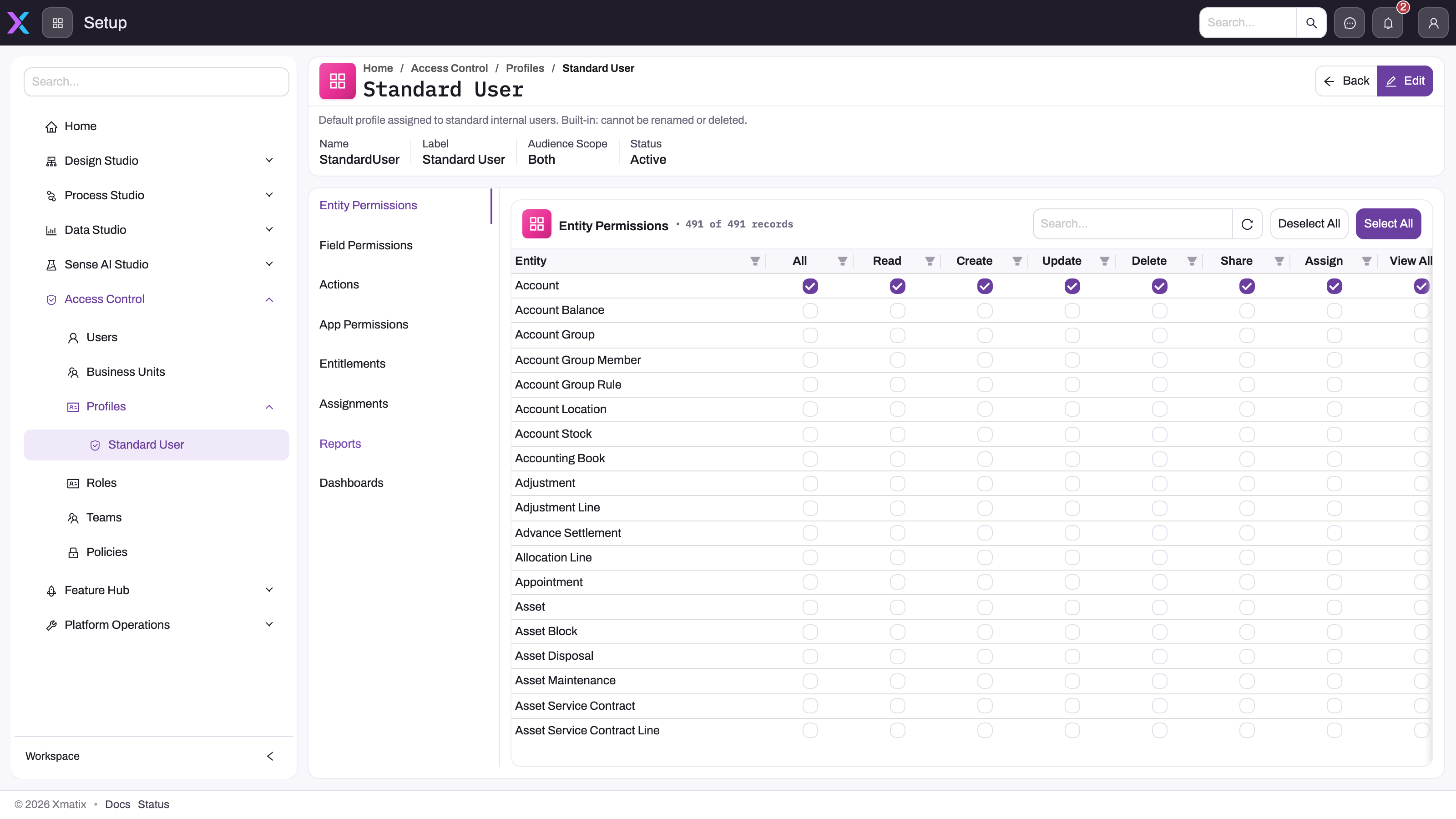
Per entity, a profile carries allowed operations, managed under Setup → Access Control → Profiles on the Entity Permissions tab.
- 1
Name, Label, Audience Scope and Status: Both means the profile can be assigned to internal and external users; the built-in profiles cannot be renamed or deleted.
- 2
Entity Permissions is the grant matrix; Field Permissions, Actions, App Permissions, Entitlements, Assignments, Reports and Dashboards are the other layers a profile controls.
- 3
One row per entity — an entity with no ticks on any of the user's profiles is denied outright.
- 4
Read, Create, Update, Delete, Share and Assign are granted independently; View All and Modify All step around record-level scoping.
- 5
Deselect All and Select All change every row at once — review the matrix before using either in Edit mode.
| Operation | Lets the holder |
|---|---|
| Read | open the entity's lists and records |
| Create | create new records |
| Update | edit records they have access to |
| Delete | delete records they have access to |
| Share | share individual records with other people |
| Assign | reserved for changing a record's owner — the runtime does not currently check it separately; owner changes are governed by Update |
| View All | read every record of the entity, bypassing record-level scoping |
| Modify All | update and delete every record, bypassing record-level scoping |
Entity access is a strict allowlist: an entity with no grant on any of the user's profiles is denied, and a user with no active profile is denied everywhere. Include Read in every grant — write-only grants let users change what they cannot see — and hand out View All and Modify All sparingly; they step around record-level policies.
Fields, apps, actions, reports
Field permissions override the entity grant for a single field — make a sensitive field read-only or hide it. A field with no override follows the entity grant.
App visibility is its own allowlist: an app (and each of its pages) appears in navigation only when a profile explicitly grants view access. Forgetting this is the most common reason a new profile "does nothing": right entity grants, empty navigation.
Actions: standard New, Edit and Delete buttons follow the entity operations automatically; custom server actions each need an explicit grant on the Actions tab.
Reports and dashboards are visible to everyone or to selected roles, teams and profiles. A report with no visibility grants is invisible to non-administrators.
Capabilities: access to Setup areas
Setup areas are gated by named capabilities (keys such as setup.security.manage), browsable under Setup → Access Control → Capabilities and granted per profile on the Entitlements tab. Each capability belongs to a feature: the profile must hold the owning feature first, and a capability of a feature your organization has not licensed and enabled stays dark even when granted. One guardrail is built in: the core security capabilities cannot be removed from the SystemAdmin profile, so there is always a recovery hatch. Elsewhere take care — revoking setup.security.manage from the profile your own account relies on locks you out of security administration.
How profiles combine with licensing
Licensed functionality has three layers that must line up: the organization's entitlement (enabled, in seats, not expired), the profile's license grants, and the user's own seat. The runtime intersects them, so a feature can be missing for one user — no profile grants it, or no seat — while the organization-level entitlement is fine. Where seat enforcement is on, assigning a profile that carries license grants fails until the user has matching seats; the assignment dialog then offers Assign missing seats, which enables the organization license if needed and allocates the seat, and the user's Access Diagnostics tab shows which requirements are unmet. See Licensing.
Assigning and managing profiles
Profiles are assigned per user on the Profile Assignments tab (Setup → Access Control → Users). Each profile has an audience scope — internal, external, or both — and the assignment dialog only offers profiles whose scope matches the user's audience; a mismatched assignment is also ignored at runtime. Because access is a union, removing one profile only removes what no other profile still grants, and there is no deny. The built-in SystemAdmin and StandardUser profiles cannot be deleted or renamed — create a separate profile rather than bending the built-ins, and always leave at least one active SystemAdmin holder. To start a new profile from an existing one, open it and select Clone in the page header: enter a Label and Name, and under Clone related choose which grants to copy (entity, field, app, app page and action permissions, mobile app access, product and feature entitlements, capabilities). User assignments are never copied, so the clone starts with nobody on it. Adjusting a clone is safer than editing a live profile, whose changes hit every assigned user immediately.
Common questions
What happens when a user has no profile?
They see nothing: no apps, no entities, no records, and operations fail with an explicit "no security profiles" denial. This is the first thing to rule out when someone reports a blank workspace after signing in — check the Profile Assignments tab for at least one active assignment, then work through Why can't a user see something? if the problem persists.
Can one profile deny what another grants?
No. All grants are additive and there is no explicit deny, so a user's rights are the union of their active profiles. To narrow access you remove or shrink grants — typically by moving the user to a smaller profile — rather than adding a restrictive one. For narrowing which records they see, rather than which operations, use restriction rules instead.
Why does a new profile seem to do nothing?
Usually app visibility: the profile grants entity operations but no app, so the user's navigation stays empty. Next come a capability granted without its owning feature, a licensed feature your organization has not enabled, and missing seats where seat enforcement is on. The Access Diagnostics tab pinpoints which layer is short; a session refresh is worth trying after any grant change.