
Sense AI does not operate outside the platform. Every answer it gives, every record it touches and every nudge it raises passes through the same security, business rules and audit as a person doing the same thing — under an identity you can name, with tools you granted, inside budgets you set. Governance therefore rests on five things you control from Setup → Sense AI Studio: the identity an agent executes as, the tools it is allowed to call, whether an action needs approval, where nudges come from and how loudly they speak, and the switches that decide whether Sense exists for your users at all.
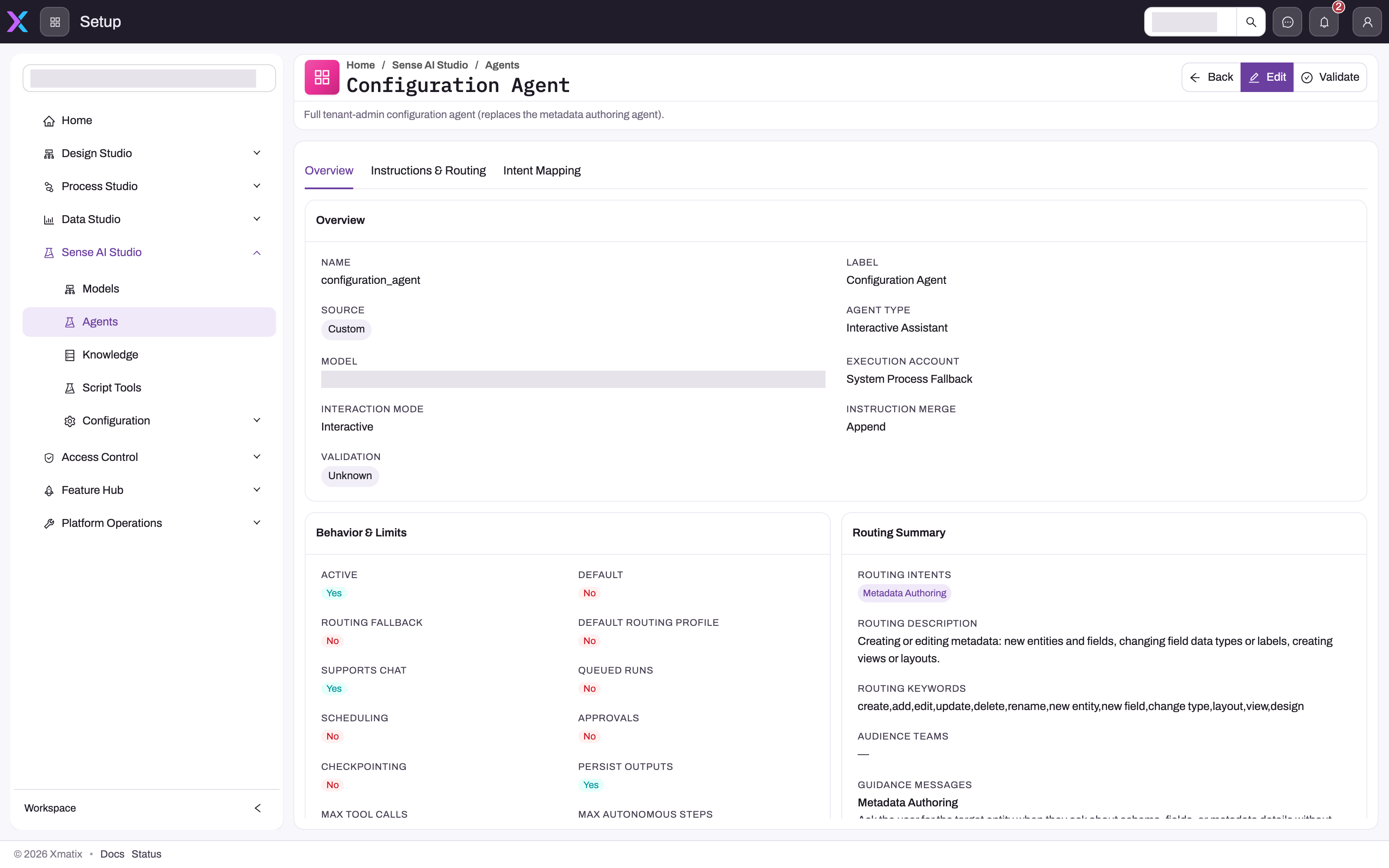
- 1
Execution Account is the identity whose security profiles decide what this agent can read and write; System Process Fallback means no account is pinned, so interactive turns run as the signed-in user and unattended runs as the platform fallback identity.
- 2
The model pinned to the agent; unpinned agents follow the tenant's default chat model, and the model's credit rate meters every turn.
- 3
Interaction Mode: an interactive assistant answers people in chat; autonomous modes run from schedules or events with nobody watching, so identity and grants carry the safety.
- 4
Approvals says whether this agent takes part in approval flows; whether a given tool pauses for Approve this action? is set on the execution policy, and the platform default is not to require it.
- 5
Max Tool Calls and Max Autonomous Steps bound how much one run can do, alongside its timeout and concurrency limit.
- 6
Instructions & Routing holds the tenant's additional instructions, the Capability Grants that restrict the agent's tools, and the knowledge collections it may search.
- 7
Audience Teams limit who the router may send to this agent; empty means every licensed user.
An agent's detail page (Sense AI Studio → Agents, open an agent) is where most of this is visible in one place: which model it uses, the Execution Account it runs as, its Interaction Mode, whether it supports chat, queued runs, scheduling and Approvals, and its limits — maximum tool calls per run, maximum autonomous steps, timeout and concurrency. The Instructions & Routing tab holds the instructions a tenant may add, the Capability Grants that bound its tools, and the knowledge collections it may search. Managing agents requires the setup.aistudio.agents.manage capability; models require setup.aistudio.models.manage.
Know which identity is executing
Interactive chat runs as the signed-in user: entity, field and record access apply exactly as they do in the workspace, so two users asking the same question can legitimately get different answers. When the router hands a turn to a different agent, the identity is re-resolved for that agent — never inherited from the default one.
An agent can also be pinned to an Execution Account, chosen from the tenant's user accounts. It applies to background runs only — a chat turn stays with the signed-in user whatever account is set. For a background run, that account's security profiles decide what the run can read and write, which is how a scheduled or event-triggered workflow can act without a person present, and how a pipeline can be bounded to a deliberately scoped operator. Background runs whose agent has no execution account fall back to a platform system identity (shown as System Process Fallback on the agent page); an operations-side option can point that fallback at a dedicated least-privilege System Agent user per tenant instead. Before publishing an agent that runs unattended, read its execution account as you would read a user's Access Diagnostics, and prefer a scoped account over a broad one.
Tools are granted, never assumed
An agent can only call tools it has been granted. Built-in tools are grouped into platform capabilities; your own script tools and MCP servers can be bundled into tenant-defined capabilities under Configuration → Capabilities. An agent with no grants inherits the full capability set the platform profile allows; an agent with Capability Grants gets only the intersection of those grants with that platform ceiling — granting a name never widens beyond what the platform and your feature licenses permit. Write-capable tools (updating records, publishing nudges, acting in the user interface) are gated separately from read tools, and the agent's Max Tool Calls and Max Autonomous Steps bound how much any single run can do.
Approval is a deliberate setting, not a default
When a tool that requires approval is about to run during a chat, the conversation pauses and the user sees Approve this action? with the proposed change; nothing happens until they allow it. Which tools require approval is set by the execution policy behind the agent, and the platform default is not to require it — so autonomous workflows and nudge publication run without a person in the loop unless you decide otherwise. The agent's Approvals flag says whether the agent participates in approval flows at all. Review both for every agent that can write: require approval where the business risk demands it, and remember that a scheduled run has nobody to approve, so its safety comes from its execution account and grants.
Nudge sources have different trust models
Nudges — the suggestions on record panels, list views and the Sense home feed — come from four kinds of source, all listed under Configuration → Nudges: built-in signal providers that run deterministic checks (dormant customers, overdue receivables, stale drafts, scheme gaps…), rule sources authored as the Raise Nudge action of a business rule, agent sources published by a tenant-authored agent through its nudge tools, and external ingests from other systems through the ingest endpoint. Each row shows its kind, category and the entities it watches, and can be disabled, given a longer dismissal cooldown, capped in how many nudges it surfaces per view, or have its thresholds overridden; no override means the code default.
Treat kind as part of the evidence. A built-in provider's threshold is fixed and inspectable; an agent source depends on that agent's instructions, model and grants; an external source depends on who is allowed to post to the ingest endpoint (it requires the agents-manage capability). Whatever the source, a nudge never executes anything itself: its actions run through the ordinary APIs with the user's own token, so permissions, business rules, approvals and audit apply as if the user had done it by hand, and Why? shows the evidence behind it.
Activity is recorded
Sense's footprint is observable. Every agent run is stored with its conversation, the tools it called and the identity it ran under; the execution account is stamped on the run, so an autonomous change is attributable. Record changes that originate from a confirmed suggestion are ordinary audited edits. Nudge interactions — dismiss, snooze, applied, feedback — are recorded per nudge and feed ranking, so a source that users keep dismissing is demoted and can be tuned or switched off. Configuration → AI Credits shows allowances and consumption for the period: credits are metered per model, and when a tenant or per-user allowance is exhausted the assistant stops taking turns until the next period or a larger allocation.
Administrators control availability
Whether Sense exists for your users is layered, and each layer is yours:
- Licensing holds the Sense AI product on security profiles — every profile holds it by default, so every user sees the Sense surfaces; remove it from a profile and those users see none, whatever else is switched on.
- Module settings (Configuration → Sense AI Settings) provide the master switch for the module, an independent Enable Sense AI nudges switch that stops nudge computation and display while leaving the chat assistant available, Show AI model in assistant chat (off by default, so model and provider names stay hidden from users), and Remember users across conversations, which controls long-term per-user memory — users can review and forget their own memories regardless.
- Per-source and per-agent controls — the nudge registry's enabled, cooldown, cap and threshold settings, and each agent's active flag, audience teams, execution account and grants.
- External Assistants (Configuration → External Assistants) decides whether people may connect other AI assistants to xMatix at all and whether those connections may write; each person signs in with their own account and sees only what they already can, and connections can be revoked there.
Off means off: a disabled nudge source stops computing, not merely displaying, and a deactivated agent cannot be routed to.
Common questions
Can Sense change data without a person involved?
Yes, when an agent with write-capable grants runs a scheduled or event-triggered workflow and its tools do not require approval — which is the platform default. Use an execution account with only the access the job needs, grant only the capabilities it needs, keep Max Autonomous Steps small, and require approval on interactive agents whose writes matter. Then audit the runs.
Can Sense reveal something a user isn't allowed to see?
Not in chat. Every chat turn runs as the asking user, whichever agent answers and whatever execution account that agent has, so the assistant reads only what the user's own profiles allow. The execution account matters for background runs: a scheduled workflow under a broad account can read and write more than any one user, and what it writes into shared records is then visible to whoever can open them. Scope that account on the agent, not in the prompt: instructions are not an access-control layer.
How do I roll Sense out to some users and not others?
Through licensing: Sense AI is granted to every security profile by default, so remove the product from the profiles that should not have it and those users have no Sense surfaces. Agents can additionally be limited to audience teams, so a specialist agent is only routable for members of the teams you name. Usage is governed per user by the free daily tier and any credits an administrator assigns. There is no per-user nudge permission beyond the profile grant and the module switch.
Where do I see what a run actually did?
Open the conversation's run details in the chat, or the agent's runs in Sense AI Studio; each shows the routed agent, the tools called and the identity used. Nudges carry a Why? action that shows the evidence a source used, and agent-published nudges link back to the producing agent's conversation.