
Data Studio is the modelling layer beneath xMatix analytics. Where the Analytics section covers consuming numbers — reports, dashboards, pivots — Data Studio covers governing them: reusable data models built once and shared, datasets shaped for analysis and rebuilt on a schedule, row-security declarations that live with the dataset, and archival rules that move cold history out of the working system. Define revenue once here, and everything downstream means the same thing by it.
The pipeline in one paragraph
Operational records live in entities. A data model joins entities (and archived or externally landed warehouse tables) into a governed, reusable structure and materializes it into the analytics warehouse — a managed warehouse provisioned for your organization. A dataset is built from a data model: named dimensions and measures over that structure, compiled into SQL and materialized as its own warehouse table on a refresh schedule. Datasets are what analysis consumes — dashboard widgets can read them directly. Archive rules feed the warehouse from the other direction, moving cold operational rows into archive tables that data models can also read. Every materialization step is logged, schedulable and inspectable.
Read the Dataset Builder
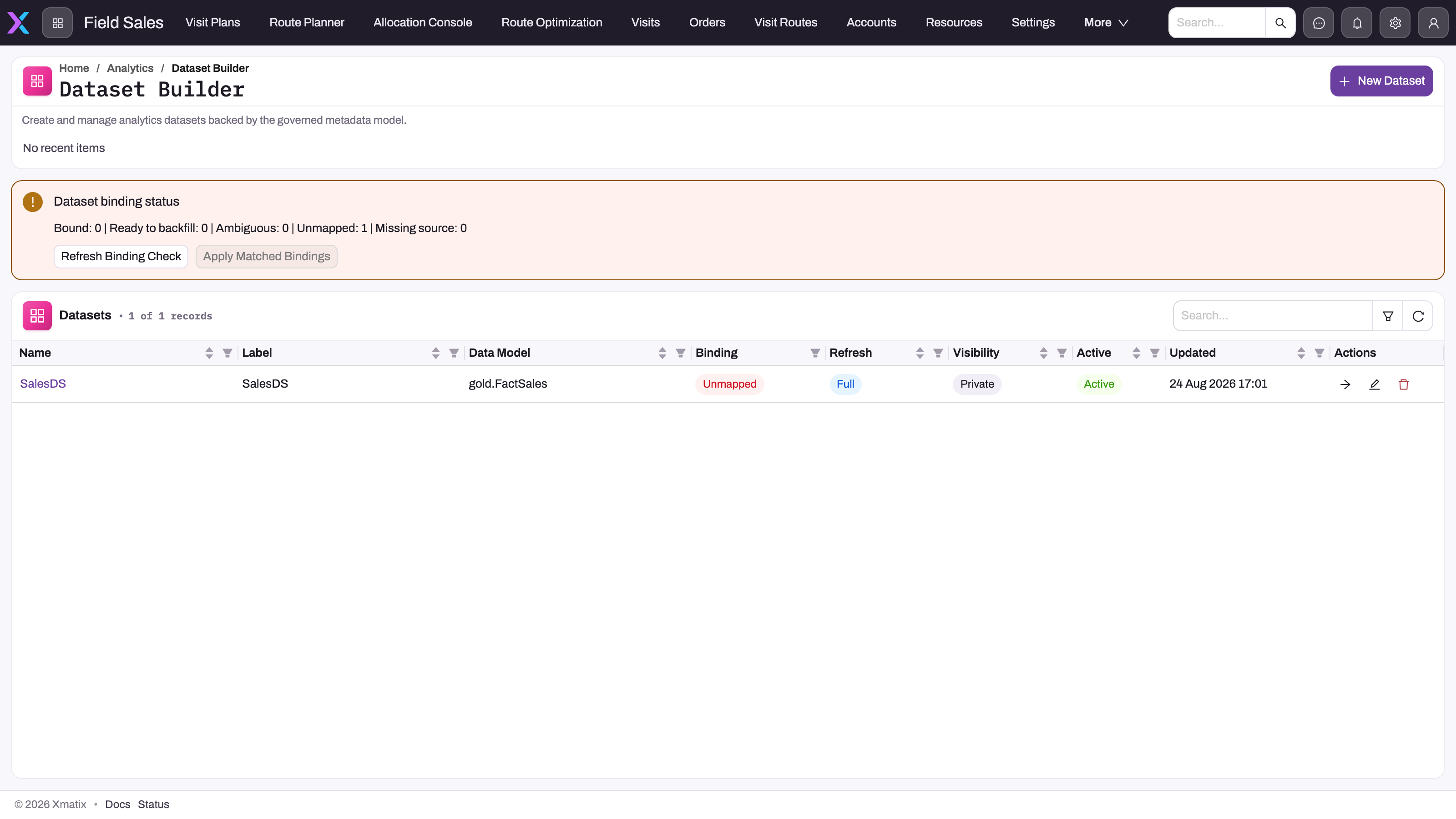
- 1
New Dataset creates the dataset shell — name, label, data model or fallback table, grain, refresh schedule and warehouse table.
- 2
Bound / Ready to backfill / Ambiguous / Unmapped / Missing source counts show which datasets lack a published-model binding.
- 3
Refresh Binding Check re-evaluates every dataset against published models; Apply Matched Bindings writes only unambiguous matches.
- 4
Binding, Refresh, Visibility and Active describe the dataset contract; Refresh type and Visibility are stored but do not change behaviour yet.
- 5
Open Workspace authors sources, dimensions, measures and filters; Edit reopens the shell dialog; Delete removes the definition.
The Dataset Builder is the working surface of Data Studio's consumption layer. The Dataset binding status panel reports how many datasets are bound to a published model and how many are unmapped, ambiguous or missing their source; the table below lists every dataset with its Data Model, Binding, Refresh type, Visibility, Active flag and last update, with Open Workspace, Edit and Delete on each row. New Dataset creates the dataset shell — the definition is then authored in the workspace. The build procedure is in Build a dataset.
What's in this section
| Page | What it covers |
|---|---|
| Build a dataset | The Dataset Builder end to end — sources, dimensions, measures, filters, compile, validate, preview and refresh |
| Data models and materialization | What a data model is, what building one produces, and how models relate to datasets |
| Row-level security on datasets | Row security rules — what a rule declares, how rules are validated, and how they relate to build-time filters |
| Archive rules | Rule-based archival — what qualifies, scheduling, and where archived data goes |
| Archived records | The Live / Archived switch on every list of an archived entity, and the read-only archived record page |
| Refresh scheduling and monitoring | Cron schedules, what triggers a run, run statuses and history — for datasets, models and archive rules |
| Troubleshooting Data Studio | Stale datasets, missing rows, failed builds — the working method for each |
Where it lives in the product
Data Studio has two entry points, deliberately split by audience:
- Setup no longer carries a Data Studio section, and the org-wide analytics admin page that used to list every report and dashboard is gone with it: reports and dashboards are created, designed and deleted on the front end. Archive Rules lives under Setup → Platform → Data, beside Import and Export (a rule runs on a schedule rather than defining anything analytics reads) and Consent under Setup → Access Control (it governs who may use whose data).
- Dataset Builder (
/analytics/datasets) and Data Model Builder (/analytics/data-models) are application pages, not Setup screens. Dataset Builder ships as a navigation item of the standard Analytics app, after Reports and Dashboards; Data Model Builder is available as a Feature navigation item that an administrator adds to an app (Setup → Apps → navigation items → type Feature → the route), so the people who model data work inside the app they already use.
Access follows those two shapes. Archive Rules requires the archive administration capability (setup.metadata.archive.manage), and datasets and data models the analytics administration capability (setup.metadata.analytics.manage), so modelling and archival can be held by different people. Within Analytics, each dataset's Visibility decides which authors see it, and only its author or a dataset steward (Manage all datasets) can change it — see Datasets. The two builder pages are reached through app navigation: who can model data is controlled by which apps carry those routes and who can open those apps. Data Studio is also a licensed product: an organization without the Data Studio licence gets no scheduled or queued builds, refreshes or archive runs.
What to know before relying on it
- Refreshes can be partial. Data models default to Incremental builds that recompute a trailing window of days, and datasets can refresh only their most recent periods (Incremental) or append a dated copy per run (Snapshot). Both fall back to a full rebuild on their own when a partial one is unsafe, and both have a separate full reload schedule for catching up on older changes. See Refresh scheduling and monitoring.
- Row security is applied when a dashboard reads a dataset. Dataset security rules are not baked into the compiled table, but native dashboard tiles filter by them for the viewer's roles and show nothing to a viewer no rule covers. Anything that reads the warehouse table directly does not apply them, so use dataset filters or separate datasets when rows must never leave the build. Details in Row-level security on datasets.
- Visibility decides who can pick a dataset, not who sees its numbers. A Private dataset is offered only to its author and dataset stewards; a Shared one to every dashboard author. A viewer of a dashboard built on it still sees the tile, filtered by the dataset's row security. Details in Build a dataset.
Common questions
What is the difference between Data Studio and Analytics?
Analytics is where numbers are consumed: dashboards, reports, pivots. Data Studio is the layer beneath — the data models, datasets, refresh schedules, security declarations and archival rules those consumers draw from. The practical consequence: when a number is wrong everywhere, the fix is usually one place in Data Studio, not a hunt through every report. See the Analytics documentation for the consumption side.
Do we need our own data warehouse or BI team?
No. Datasets and data models materialize into a managed warehouse that is provisioned and maintained as part of the platform — there are no pipelines to build or servers to run. What your organization supplies is the modelling judgment: which entities join into which models, which dimensions and measures matter, and what "cold" means for archival.
Who is told when a scheduled refresh breaks?
The creator of whatever broke — dataset, data model or archive rule. The first failed scheduled run sends an in-app notification and an email with the error; repeated failures stay quiet, and the next success after a failure sends one more message saying it is healthy again. Manual runs notify nobody — see Refresh scheduling and monitoring.