
A data model is where a business definition is made once. It joins sources — operational entities, archived history, externally landed warehouse tables — into a named structure with declared output columns, and materializes that structure into a physical table in the analytics warehouse. Datasets then build on the model rather than on raw tables, which is the whole point: ten dashboards needing "revenue" means one model defining it, not ten private versions that drift apart.
What a model is made of
A model is authored in the Data Model Builder — an application page (route /analytics/data-models) that an administrator adds to an app's navigation as a Feature item; it is not in Setup. The builder lists models with Name, Label, Root Source, Root Entity, Grain, Warehouse Object, Published (Published or Draft), Active and Updated, with Open Workspace, Edit and Delete per row. New Data Model opens the dialog below.
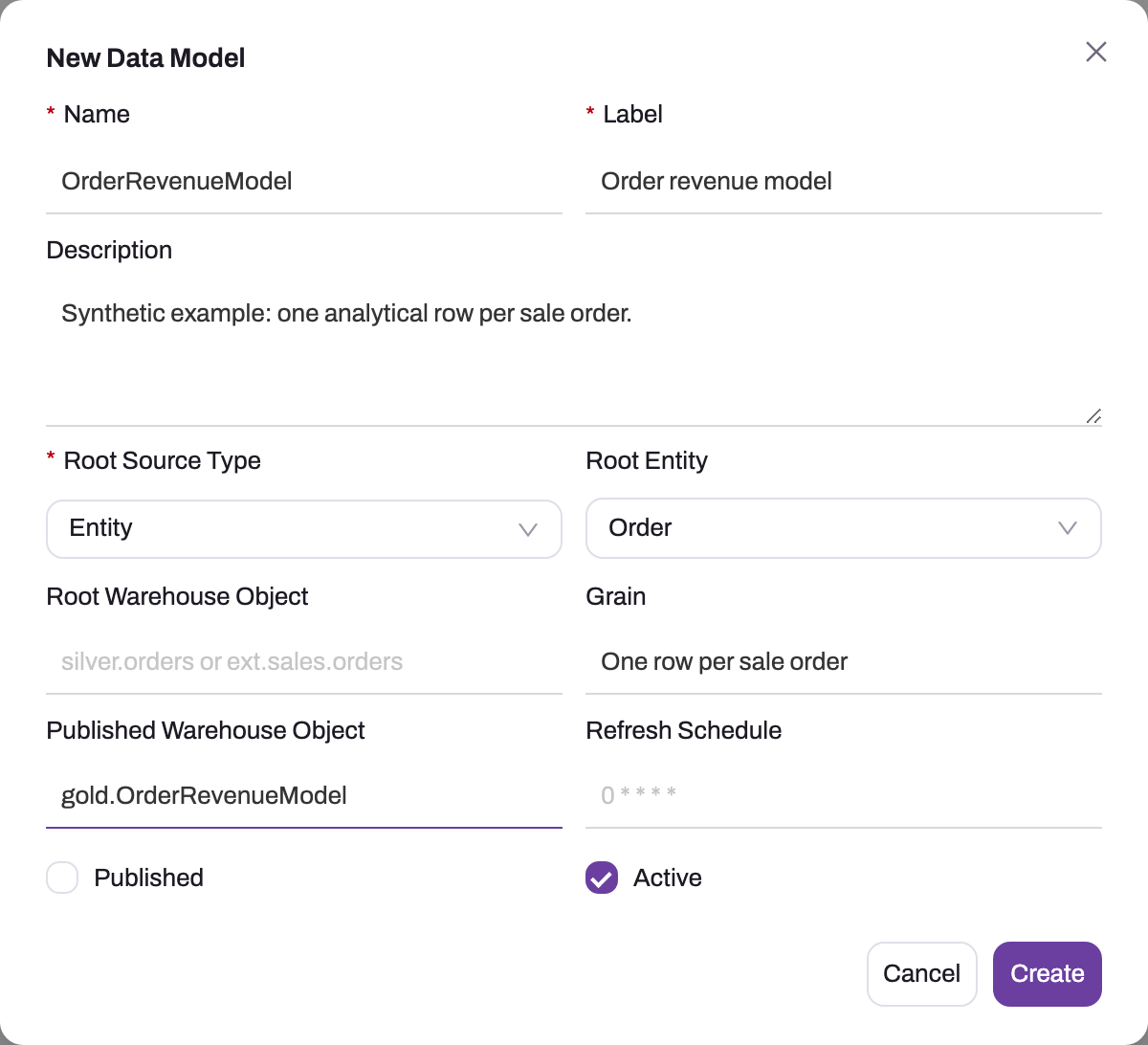
- 1
Name is the stable technical key; Label on the right is the title dataset authors see.
- 2
Description should state the reusable business definition in plain language.
- 3
Root Source Type — Entity, Warehouse Table or External Warehouse Table — decides whether Root Entity or Root Warehouse Object applies.
- 4
Grain states exactly what one materialized row represents.
- 5
Published Warehouse Object is the physical table every build drops and recreates; a bare name lands in the model schema.
- 6
Published is the offer to dataset authors — there is no separate Publish button. Active (right) decides whether the model participates at all.
The dialog captures the model's contract before any source is joined: Name (the stable key), Label, Description (state the business definition), Root Source Type — Entity, Warehouse Table or External Warehouse Table — with its companion Root Entity or Root Warehouse Object, Grain, Published Warehouse Object, Refresh Schedule (five-field cron, UTC), and the Published and Active checkboxes (a new model is active but unpublished; there is no separate Publish button — publishing is this checkbox). Everything else is authored in the model's workspace, whose tabs are Overview, Sources, Columns, Filters and Build History, with Edit, Build, Validate, Preview and Delete in the header. A model consists of four parts:
- A root source — an operational entity, or a warehouse table (an archive table produced by archive rules, or external data already landed in the warehouse).
- Joined sources — additional entities or warehouse tables, each with an alias, a join type (inner, left, right or full) and a join condition tying it to a parent alias; for an entity source the Relation Helper prefills the entity and join from the parent entity's relations. The join graph must have exactly one root, and every non-root source needs its parent and condition.
- Output columns — the model's published schema: each column maps a source alias and field (or an expression) to an output column name, with a display name, an optional aggregation (Sum, Count, Average, Min, Max, Count Distinct or Expression), a Key Column flag and a Visible flag. These output columns are what datasets see and validate against.
- Filters — predicates ANDed into the build, for scoping the model itself.
The model also carries a grain statement ("one row per sale order"), the warehouse object name its build writes to, a refresh schedule, and two switches that mean different things: Active (the model participates at all) and Published (the model is offered to dataset authors).
What building actually does
Build validates the definition first (a blocking error stops the build and writes no history row), then generates SQL from the sources, columns and filters and loads the result into the model's warehouse object as a physical table — not a view, so downstream reads pay no join cost at query time. A bare object name without a schema lands in the model schema. Whether a build rewrites the whole table or only part of it is set by the model's Refresh type:
- Incremental (the default for a new model) deletes and recomputes only the rows whose Incremental column — an output date or datetime such as
OrderDate— falls inside the trailing Days to recompute (default 7), and keeps everything older. Rows with no date are always recomputed. The build switches to a full rebuild on its own, and records why in Build History, when there is no table yet, no incremental column is set, a full rebuild was asked for, or the structure changed: an output column added, removed, renamed, reordered or given a different expression, or a column type that differs in the warehouse. - Full drops and recreates the table on every build.
A change or deletion dated before the window is not picked up by an incremental build. Set a Full rebuild schedule (for example 0 3 * * 0, Sundays at 03:00 UTC) or run a full rebuild by hand to catch up.
Two more settings shape what the build writes. Shape lays the table out as Flat (one wide table), Star (a fact table plus one table per dimension), Snowflake, or Auto, which derives it from the sources. Deleted rows excludes soft-deleted records by default, so dashboards stop counting them; include them only for a model that is about the deletions.
How the data gets there depends on where the sources live: How the data gets there depends on where the sources live:
- Warehouse sources only — the table is built entirely inside the warehouse from the generated SQL.
- Entity sources only — the qualifying operational data is copied into the warehouse table.
- Mixed — entity data is first staged into the warehouse, the join then runs there against the warehouse-resident sources, and the staging copies are cleaned up afterwards. This is what lets one model combine live records with archived history in a single structure.
Every build appends a Build History entry — started, completed, status (Pending, Running, Succeeded, Failed, Canceled), row count, duration and error message. Builds run on demand from the workspace's Build action (the toast reads Data model build triggered), or on the model's cron schedule; scheduled builds require the model to be active and published, with a valid schedule. The schedule is checked about once a minute, the first occurrence after saving is not back-filled, and a cron expression the scheduler could not run is refused when the model is saved; the dialog, the list and the Overview show the next run in your organization's time zone with UTC alongside. When a scheduled build fails after a good one, the model's creator gets one in-app notification and email, and one more when it recovers; manual builds notify nobody, so Build History is where a model that "never builds" is diagnosed. Building requires a reachable warehouse; when it is not, the build is refused before anything runs. Validate checks the definition — the join graph, aliases, required columns, expressions — without touching the warehouse, and Preview shows the generated SQL and projected columns before anything runs.
How models relate to datasets
The relationship is a deliberate one-way dependency: datasets consume models, never the reverse.
- Binding. A dataset binds to one published, active model. Binding auto-fills the dataset's source and grain, and is what the dataset's guidance and validation hang off.
- Schema guidance. A bound dataset's editors offer the model's root object and published output columns as pick lists, and its validation rejects references to columns the model does not publish — schema mismatches surface at authoring time instead of as build failures.
- Lifecycle. A successful build refreshes what is built on the model, set by After a build: Refresh dependents (the default) compiles every dataset over the model, then builds its graphs, in name order, and one dependent's failure does not stop the others; Nothing leaves each dataset to its own schedule, so dashboards show the previous build's numbers until then. Unpublish a model and it stops being offered to new datasets. The model is the contract; datasets are its consumers.
A dataset can bypass models and name a warehouse table directly — supported as a fallback, at the cost of all guidance and schema validation. The governed default is: model first, datasets on top.
Common questions
What is the difference between a data model and a dataset?
A data model is a reusable source: the joined, governed structure where the business definition lives. A dataset is a consumption output: dimensions and measures over exactly one model, aggregated to an analysis grain and materialized for dashboards. The test: if several analyses will share it, it belongs in the model; if it is one analysis's shape — which columns to group by, which numbers to aggregate — it belongs in the dataset.
Can a model include archived or external data?
Yes — that is a core reason models exist. A source can be a warehouse table as easily as an entity: archive tables written by archive rules, or external data already landed in the warehouse. A mixed model joins live operational records with that warehouse-resident history in one structure, so "sales including the archived years" is one model rather than a stitching exercise in every report.
What happens if I rename the model's warehouse object after builds?
The next build writes to the new name and the previously built table is simply left behind — orphaned, not migrated or dropped. Anything reading the old name (a dataset's fallback source, BI content built over it) keeps reading the stale table without errors, which is worse than breaking. Treat the warehouse object name as part of the model's contract: set it before the first build and change it only with the downstream consumers in hand.
Why is my model not offered when creating a dataset?
The dataset modal lists models that are both published and active — a draft or deactivated model does not appear, however many successful builds it has. Publishing is the explicit act of offering the model to dataset authors; check both switches on the model's overview before looking anywhere else.