
The receivables and payables subledgers record who owes what, and since when. Each open item is an Open Transaction: when a document posts to a receivable or payable control account, xMatix raises an open transaction for it, and payments, credit notes, write-offs and withholding tax reduce it until nothing is left. Each of those reductions is recorded as a Settlement Allocation. The ageing statements, the interest run, the cash-flow forecast and the credit-limit check all read these records. The general ledger only holds the control-account totals behind them.
Overview
An open transaction is one outstanding amount: an invoice a customer has not fully paid, a bill you still owe, a receipt not yet applied, an expense claim waiting for reimbursement. It records:
- who — the customer or supplier (Party Account), or the employee for staff items;
- which side — Direction is Receivable (money owed to you) or Payable (money you owe);
- where it came from — Source Entity Name and Source Record point back to the document, and Journal points to the posting;
- how much — Original Amount when it was raised, and Open Amount still outstanding;
- when — Document Date and Due Date, which drive the ageing;
- state — Status: Open, PartiallySettled, Settled or Reversed.
You never create open transactions yourself. Posting creates them and settlement reduces them. The Open Transactions list is where you review them.
When to use it
- To answer "what does this customer still owe?" — or what you owe a supplier. Use the ageing statements, or filter the Open Transactions list by party.
- To trace a balance — open the open transaction, then its Source Record and Journal, to see which document raised it and how it posted.
- To find unapplied money — receipts, payments and credit notes not yet applied appear as negative open transactions.
- To see exactly what settled an item — which payment, credit note, write-off or tax deduction, for how much and on which date. Use the Settlement Allocations list (see Review the settlement allocations behind an item).
- At month end — to tie the receivable and payable control accounts to the open items (see Reconcile to the control accounts).
How xMatix handles it
Which documents raise an open transaction
| Document | Direction | Sign of the amount | Notes |
|---|---|---|---|
| Sales invoice | Receivable | Positive | One item for the whole invoice, for the amount on the receivable control line. |
| Customer debit note (sale debit note, including interest charged on overdue invoices) | Receivable | Positive | Uses the control account of the invoice it charges. |
| Customer credit note and sales return | Receivable | Negative | Reduces what the customer owes once applied. |
| Supplier bill | Payable | Positive | Tax withheld on the bill reduces its open amount. |
| Supplier debit note | Payable | Negative | Reduces what you owe the supplier once applied. |
| Purchase return (bill return credit note) | Payable | Negative | |
| Receipt or supplier payment that is not fully applied | Receivable for a receipt, Payable for a payment | Negative | The unapplied part stays on the party as money on account. Labelled On account: …. |
| Refund to a customer, refund from a supplier | Receivable for a customer refund, Payable for a supplier refund | Positive | Cleared by the credit note or receipt it refunds. |
| Expense claim | Payable | Positive | Against the employee, not an account. See Expense claims. |
| Expense advance | Receivable | Positive | Against the employee. See Expense advances. |
| Expense voucher paid later (credit voucher) | Payable | Positive | See Expense vouchers. |
| Payroll run | Payable | Positive | One item for each employee with net pay above zero. See Payroll runs. |
| Full & final settlement | Payable | Positive | Only when the net settlement is above zero. See Full & final settlement. |
| Loan / advance to an employee | Receivable | Positive | Against the employee. |
| Interest charged by a supplier (payable interest) | Payable | Positive | Raised by the interest run. See Interest on overdue payments. |
A manual journal never raises an open transaction, even when it posts to a receivable or payable account.
How an open transaction is reduced
Each reduction is either a settlement allocation (a record of how much of which payment, credit note or write-off was applied to the item) or a direct change made by the employee-side processes:
- Applying a payment — when a receipt or payment is applied to a document, an allocation is recorded and the document's open amount drops. See Recording and applying payments.
- Applying a credit or debit note — the note's negative item and the document's item are knocked off against each other. See Credit notes and Debit notes.
- Write Off — clears a small remaining balance on an invoice or bill (see Writing off a small balance).
- Tax withheld — tax deducted at source on a bill, or deducted by a customer on a receipt, is recorded as part of the settlement. Tax collected at source on an invoice increases the open amount.
- Employee items — reimbursing an expense claim, recovering or settling an expense advance, paying payroll net pay, and recovering a loan through payroll update the open amount directly, without an allocation.
Settlement allocations
A settlement allocation records one reduction of one open transaction by one settling document. xMatix writes it; you don't. It says which item was reduced (Open Transaction), what reduced it (Source Entity Name and Source Record, plus Payment when it was a payment), on which date (Settlement Date), by how much, and which journal stands behind it (Journal).
The amount is split by kind, and all of them count towards what is settled:
- Allocated Amount — money or credit applied: a payment, a receipt, a credit note or a debit note.
- TDS Amount — tax withheld at source, which closes part of the item without money moving.
- Write Off Amount — a small balance written off.
- Discount Taken and Rounding Amount — counted when present, but no standard process fills them.
For every item that is not reversed, Open Amount = Original Amount minus the sum of these amounts on its Posted allocations. Verify Ledger checks exactly this.
| What happens | The allocation xMatix records |
|---|---|
| A payment is saved with a credit note, debit note or opposite payment ticked in Open Documents | Source Payment, Payment filled, Allocated Amount = the amount ticked (the item's whole open amount when none is typed), dated the payment date, Journal = the payment's journal. Recorded when the payment posts. |
| A payment, credit note or debit note is applied to an invoice, bill or expense voucher (a payment allocation), and both documents are posted | Two allocations: one against the document's item for the amount applied, and one against the settling document's own item with a negative Allocated Amount, so both items move together. Dated the later of the two document dates. No new journal: Journal is the settling document's own posting. Source Payment, CreditNote or DebitNote. |
| Write Off on an invoice or bill | Source WriteOff, Allocated Amount 0, Write Off Amount = the amount, dated the write-off date, Journal = the write-off's own journal. |
| Tax withheld: TDS on a bill, or TDS a customer deducted on a receipt | Source TdsTransaction, Allocated Amount 0, TDS Amount = the tax, dated the deduction date. |
| A posted document is posted again | The allocations on its old item are marked Reversed and identical Posted copies are raised against the new item. |
An allocation has two statuses: Posted (it counts) and Reversed (it no longer counts). Undoing a settlement never deletes the allocation. It is marked Reversed and the amount goes back onto the open item, so the history stays visible. The ageing statements, Verify Ledger and the interest run read Posted allocations only.
Open transaction status
| Status | Meaning |
|---|---|
| Open | Nothing has been settled, or a settlement was undone. |
| PartiallySettled | Part of the amount is settled. |
| Settled | The open amount has reached zero. |
| Reversed | The document's posting was reversed, so the item no longer counts. Its open amount is set to zero. |
Settled is not final: undoing an application or a write-off adds the amount back and the status returns to Open or PartiallySettled.
Reposting and reversing a document
When a posted invoice, bill, credit note, debit note or payment is posted again (for example after a line is changed), xMatix reverses the old item and raises a new one. Payments and credits already applied to the old item move across to the new one. If the new amount is smaller than what is already settled, the repost is refused (see Common problems).
When a document is un-approved or deleted after posting, its item is set to Reversed and nothing replaces it.
Reversing the posting journal by hand from the journal record does not touch the open transaction. The item stays open with its full amount, so the ageing and the control account no longer agree. Reverse or correct the document itself instead.
Expense claims, advances, payroll runs, full & final settlements, loans and payable interest are posted once. Their open transactions are not replaced.
Prerequisites
- The receivable and payable control accounts exist for the company. Posting finds them by their control type. See GL accounts.
- Documents are posted. A draft invoice or bill has no open transaction.
- To open the Open Transactions list you need read access to Open Transaction (all four shipped profiles have it).
Procedure
Step 1 — Open the Open Transactions list
Open the App Launcher, search for Open Transactions under all entities, and open it. The list is not on any app's menu in the standard setup; an administrator can add it (see Configuration).
You can also reach a document's own items from the document: a posted credit note, for example, lists them under Related → Open Transactions.
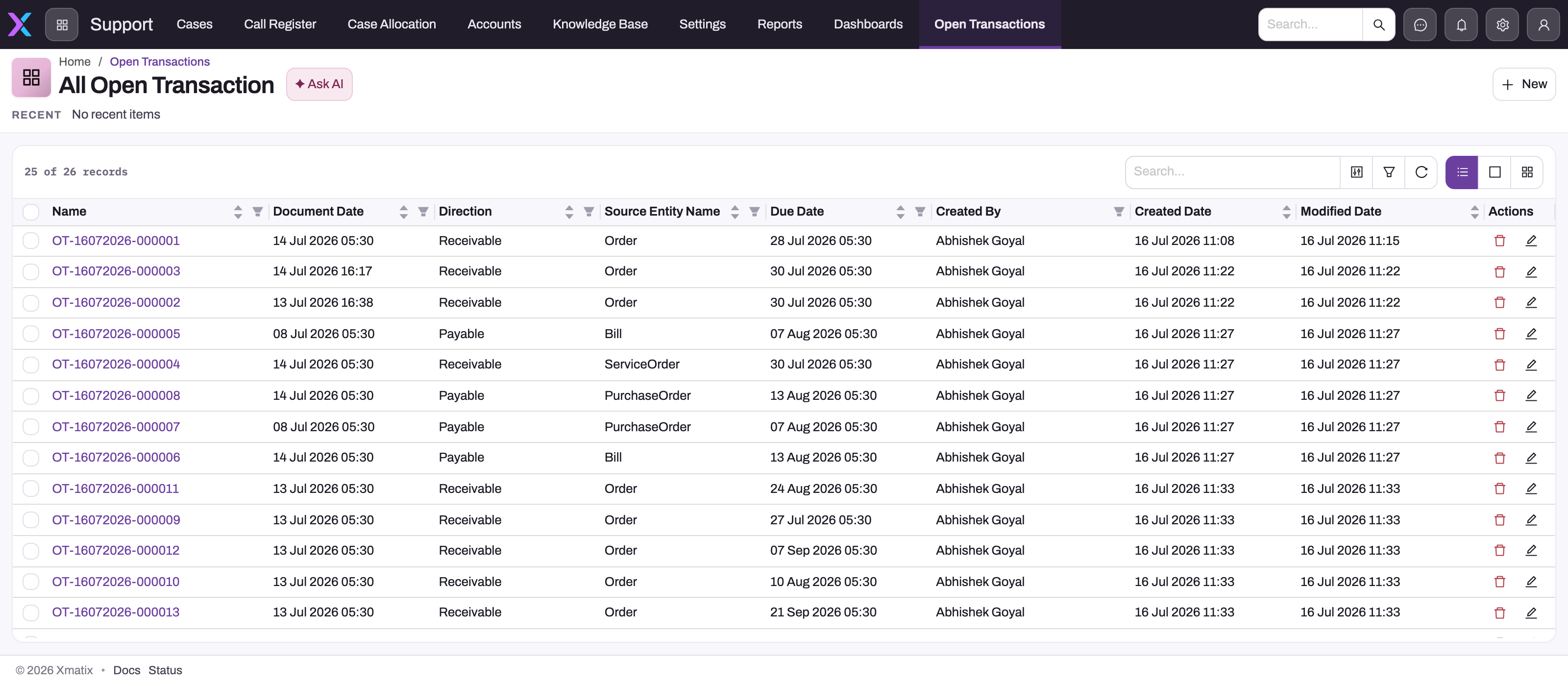
The standard All Open Transaction view shows Name, Document Date, Direction, Source Entity Name, Due Date, Created By, Created and Updated On. Open and party columns are not in the view; add Open Amount, Party Account and Status through the column picker when you work with balances.
Step 2 — Find the items for one party or document
Use the list's search, filters and column filters:
- Direction Receivable or Payable to separate customers from suppliers.
- Party Account for one customer or supplier.
- Status — leave out Reversed and Settled to see what is still outstanding.
- Source Entity Name (for example Invoice, Bill, CreditNote, Payment) to see one kind of document.
A negative Open Amount is money on account: a receipt, payment, advance or credit note that has not been applied yet.
Step 3 — Trace an item to its document and posting
Open the record. The page shows Due Date, Control GL Account, Source Entity Name, Open Amount, Original Amount, Party Account, Direction, Journal and Source Record, with Partner Account and Branch in the header.
- Select Source Record to open the document that raised the item.
- Select Journal to see the posting.
- Original Amount minus Open Amount is what has been settled so far.
Step 4 — Review the settlement allocations behind an item
- Open the App Launcher, search for Settlement Allocations under all entities, and open it. Like Open Transactions, it is not on any app's menu in the standard setup.
- The All Settlement Allocation view shows Name, Source Entity Name, Settlement Date, Allocated Amount, Discount Taken, TDSAmount and Created. Add Open Transaction, Status and Write Off Amount through the column picker.
- Filter on Open Transaction to see everything that settled one item, or on Source Entity Name (Payment, CreditNote, DebitNote, WriteOff, TdsTransaction) to see one kind of settlement. Leave out Status Reversed to see only what still counts.
- Open a row. The record page shows Payment, TDS Amount, Label, Source Entity Name, Settlement Date, Allocated Amount, Discount Taken, Status, Source Record, Write Off Amount, Journal, Rounding Amount and Open Transaction. Select Journal to see the posting behind it, or Open Transaction to go back to the item.
The Posted allocations on an item, added up, equal its Original Amount minus its Open Amount. A credit note's or payment's own item shows negative allocations: that is the credit it gave away.
On an invoice or bill you don't need the list for write-offs. They appear on the document's amount card as Write Off rows under the payments, and each row opens its journal.
Step 5 — Run the ageing statements
Go to Financials → Statements → Receivables & Payables. Four statements are there, added by a platform update and visible to the System Administrator profile out of the box:
- Receivables Ageing Summary and Payables Ageing Summary — one row per party: Not due, the overdue bands (1-30, 31-60, 61-90 and 91+ days by default), Unapplied, Total, credit limit, credit days, document count and oldest days overdue.
- Receivables Ageing Details and Payables Ageing Details — every open document under its party, with the amount settled by the date and the amount still open.
Choose the as-of date in the toolbar. The statement rebuilds the subledger as it stood on that date: documents dated later are left out, and settlements and reversals dated later have not happened yet. The bands, the ageing basis and the Unapplied column default from the Finance settings, and each run can override them. The statement ends with a reconciliation line that compares the net open items with the receivable or payable control-account balance on the same date.
Step 6 — Reconcile to the control accounts
- Run the ageing summary for the last day of the period.
- Read the reconciliation line at the foot of the statement. A difference of zero means the subledger and the general ledger agree on that date.
- If there is a difference, open the details statement and the control account's ledger, and look for the usual causes: a manual journal posted to the control account, a posting journal reversed by hand, or an open transaction edited or deleted by hand (see Common problems).
- Run Verify Ledger on the fiscal period (see Closing a period). It lists every open transaction whose open amount differs from its original amount minus its settlement allocations.
Fields
Open Transaction
| Field | What it means | Notes |
|---|---|---|
| Name | The record's number. | From the OT numbering series, for example OT-19102026-000001. |
| Document Number | The number of the source document. | Copied at posting. |
| Label | A short description. | The document number; On account: … for unapplied money; Employee payable … or Net pay … for staff items. |
| Direction | Receivable or Payable. | Credit documents keep the direction and carry a negative amount instead. |
| Party Account | The customer or supplier. | Empty on employee items (expense claims, advances, payroll, full & final, loans). |
| Control GL Account | The receivable, payable or employee control account the item sits on. | Empty on the on-account item of a payment. |
| Source Entity Name | The kind of document that raised it. | For example Invoice, Bill, CreditNote, DebitNote, Payment, ExpenseClaim, PayrollRun. |
| Source Record | The document itself. | Opens the document. |
| Journal | The posting that raised the item. | |
| Document Date | The posting date of the document. | Decides which as-of dates the item appears on in the ageing. |
| Due Date | When the amount falls due. | The document's due date, or its posting date when it has none. Employee items have no due date. |
| Original Amount | The amount when the item was raised. | Negative for credit notes, debit notes on payables, returns and unapplied money. |
| Open Amount | What is still outstanding. | Reduced by settlements; zero once Settled or Reversed. |
| Status | Open, PartiallySettled, Settled or Reversed. | Set by posting and settlement. |
| Partner Account | Your own company the item belongs to. | From the posting journal. |
| Branch | The branch of the posting. | From the posting journal. |
| Business Unit | The finance division of the posting. | From the posting journal; empty on full & final and loan items. |
| GST Registration | The GST registration. | Filled only on payable interest items. |
Settlement Allocation
The fields in the order of the record page. All are filled by xMatix when it records the settlement.
| Field | What it means | Notes |
|---|---|---|
| Name | The allocation's number. | From the STA numbering series, for example STA-28102026-000001. Some screens label it GL Account Name. With the series switched off, xMatix uses a generated SA- code instead. |
| Payment | The payment or receipt that did the settling. | Empty when the settling document is a credit note, debit note, write-off or tax deduction. |
| TDS Amount | Tax withheld at source that this allocation settles. | Filled on TdsTransaction allocations. Counts towards the settled amount. |
| Label | A short description. | With the standard numbering on, it carries the same number as Name. |
| Source Entity Name | The kind of settling document. | Payment, CreditNote, DebitNote, WriteOff or TdsTransaction. |
| Settlement Date | The date the settlement takes effect. | Decides from which as-of date the ageing shows the item reduced. For money applied, it is also the day the interest run stops charging on that part. |
| Allocated Amount | Money or credit applied. | Negative on the settling document's own item. 0 on write-offs and tax deductions. |
| Discount Taken | A settlement discount. | No standard process fills it; counted when present. |
| Status | Posted or Reversed. | Only Posted allocations count. |
| Source Record | The settling document itself. | For a write-off, the allocation's own record; for a tax deduction, the TDS register row. |
| Write Off Amount | The balance written off. | Filled on WriteOff allocations. |
| Journal | The posting behind the settlement. | The payment's or note's own journal, the write-off journal, or the withholding journal. |
| Rounding Amount | A rounding difference. | No standard process fills it; counted when present. |
| Open Transaction | The open item this allocation reduces. | Exactly one item per allocation. |
| Partner Account | Your own company. | Copied from the posting. Not on the form; add it as a list column if you need it. |
Business rules
- One item per document. Invoices, bills, notes, refunds and vouchers raise one open transaction for the amount on their receivable or payable control line. A payroll run raises one per employee.
- Only control-account postings count. A document whose journal has no line with a party raises no open transaction.
- Unapplied money is negative. The part of a receipt or payment not applied to a document is a negative item on the same party until a document uses it.
- Settlement never deletes an item. It lowers the open amount and moves the status; a fully settled item stays on the list as Settled.
- Every settlement leaves an allocation. Payments, credit and debit notes, write-offs and withholding tax each record a Posted settlement allocation against the item. Employee items are the exception (see above).
- Undo is a status change. A settlement that is undone, because a payment allocation was reduced, a document was reversed or reposted, or a payment was posted again, is marked Reversed and its amount goes back onto the item. A changed amount is a Reversed allocation plus a new Posted one, never an edit.
- A knock-off is clipped. An application never takes an invoice or bill below zero, and never gives away more credit than the payment or note still has open. The excess stays on account.
- Order of posting doesn't matter. When a payment allocation names a document that is not posted yet, the subledger settlement waits and is made when the later of the two documents posts.
- Ageing by settlement date. The ageing for an as-of date counts only allocations dated on or before it. An allocation with no date uses its journal's date, and then the item's document date.
- Repost carries settlements. A reposted document gets a new item, and earlier applications move to it. A repost that would leave the item settled beyond its new amount is refused.
- Manual journals are outside the subledger. A journal posted or reversed by hand does not create, settle or reverse open transactions.
- Employee items are separate. They are left out of the receivables and payables ageing statements, which list items with a party account only.
- Ageing by date. The ageing statements age each item from its due date (or document date when it has none) by default, or from the document date when the Finance setting says so.
- No write protection. The list allows New, Edit and Delete for anyone with full access to the entity. Changing an open transaction by hand posts nothing and puts the subledger out of step with the general ledger. Treat the list as read-only.
- The same goes for settlement allocations. Their list offers New, Edit, Clone and Delete, but nothing reacts to them: a hand-made allocation does not reduce the item and posts no journal, and editing or deleting one does not give the item anything back. Verify Ledger reports any item whose Posted allocations no longer add up to its open amount.
- Integrations can't write them. The integration sync engine refuses Settlement Allocation and Open Transaction in either direction, so a connector cannot apply a payment twice. Synced payments, notes and payment allocations are settled by xMatix itself once they post.
Example
A customer is invoiced 11,800 (10,000 plus 18% tax) on 1 March with 30-day terms.
- The invoice posts. An open transaction is raised: Direction Receivable, Original Amount 11,800, Open Amount 11,800, Due Date 31 March, Status Open.
- On 20 March the customer pays 5,000 and you apply it to the invoice. The item's Open Amount becomes 6,800 and its Status PartiallySettled. The Settlement Allocations list now holds two Posted rows from the receipt: 5,000 against the invoice's item and −5,000 against the receipt's own on-account item, both dated 20 March.
- On 10 April the Receivables Ageing Summary shows 6,800 for the customer in the 1-30 band (10 days past due).
- A credit note for 1,180 posts and is applied to the invoice. The note's item is −1,180; after the application the invoice's item is 5,620 and the note's item is 0.
- On 25 April the customer pays 5,618. 2.00 remains, and you select Write Off on the invoice for 2 with the reason "rounding". A WriteOff allocation with Write Off Amount 2 is recorded, the invoice's item reaches 0 and becomes Settled, and the amount card shows a Write Off row.
- Running the ageing as of 15 April still shows 5,620 open, because the last payment and the write-off are dated later.
- On the invoice's item, the Posted allocations add up to 5,000 + 1,180 + 5,618 + 2 = 11,800, the Original Amount. Verify Ledger finds nothing to report.
Training
Practice exercise
In a sandbox:
- Post a sales invoice for a test customer with a due date 15 days ago.
- Open the Open Transactions list, add the Open Amount, Party Account and Status columns, and find the invoice's item.
- Take a receipt for half the invoice amount and apply it to the invoice.
- Refresh the list and open the item.
- Open the Settlement Allocations list, add the Open Transaction and Status columns, and find the rows dated today with Source Entity Name Payment.
- Run the Receivables Ageing Details for today.
Expected result: the item's Status is PartiallySettled and its Open Amount is half the invoice. Two Posted allocations exist for the receipt: half the invoice against the invoice's item, and the same amount negative against the receipt's own item. The ageing details show the invoice under the customer in the 1-30 band with the remaining half open, and the reconciliation line shows no new difference.
Quick reference
- Open transactions are created by posting, never by hand.
- Receivable = owed to you; Payable = you owe.
- Negative open amount = unapplied money on account.
- Original minus Open = settled so far = the item's Posted settlement allocations.
- Settlement allocations are written by xMatix; Reversed ones no longer count.
- Leave out Reversed and Settled to see what is outstanding.
- Ageing: Financials → Statements → Receivables & Payables, any as-of date.
- Correct a balance through the document, a payment, a credit or debit note, or Write Off — not by editing the item.
- Reverse a posted document, not its journal.
Permissions
| What | Who can do it in the standard setup |
|---|---|
| View the Open Transactions list | System Administrator, Standard User, Sales Manager and Sales Executive (all have full access to Open Transaction). |
| View the Settlement Allocations list | The same four profiles, which have full access to Settlement Allocation. |
| Run the ageing statements | The four ageing statements' actions are granted to System Administrator and Standard User; the statement pages are visible to System Administrator. |
| Settle items | Whoever can post payments, credit notes, debit notes and write-offs. See Recording and applying payments. |
Because the shipped profiles have full access, an administrator who wants the lists read-only should remove create, edit and delete on Open Transaction and Settlement Allocation from the profiles in Setup → Access Control → Security Profiles (see Security profiles).
Configuration
| What | Where | Effect |
|---|---|---|
| Ageing bands | Setup → Feature Hub → Finance → Settings, Ageing bands (days) | Overdue band boundaries, comma-separated. Default 30,60,90. Up to eight, ascending. |
| Ageing basis | Same place, Age open items from | DueDate (default): the due date, or the document date when there is none. DocumentDate: every item ages from the day it was raised. |
| Unapplied column | Same place, Show unapplied amounts in their own column | On (default): negative items appear in Unapplied. Off: they are netted into the band of their own date. |
| Unapplied money and new documents | Same place, Apply unapplied payments to new invoices and bills | Whether earlier receipts and payments are applied automatically when an invoice or bill posts. See Recording and applying payments. |
| Write-off tolerance | Same place, Write-off tolerance | The largest balance Write Off clears without the Force Write Off permission. |
| Control accounts | The GL accounts with the receivable, payable and employee control types | Which account each open transaction sits on. See GL accounts. |
| Numbering | Setup → Design Studio → Entities → Open Transaction → Logic → Document Settings | The OT series used for Name. |
| Allocation numbering | Setup → Design Studio → Entities → Settlement Allocation → Logic → Document Settings | The STA series used for Name and Label. Switched off, new allocations get a generated SA- code. |
| Write-off account | A posting definition with role WriteOff | The account a write-off posts to. Without one, Write Off is refused. See Recording and applying payments. |
| Lists on a menu | Setup → Design Studio → Apps → Manage Items | Add the Open Transaction and Settlement Allocation entities to an app, such as Finance, so users can reach the lists without the App Launcher. |
| List columns | The All Open Transaction and All Settlement Allocation views | Add Open Amount, Party Account and Status to the first, and Open Transaction, Status and Write Off Amount to the second, for everyday use. |
Common problems
An invoice or bill is missing from the ageing
It has not posted, so it has no open transaction, or its posting was reversed. Check the document's GL posting status. Also check the as-of date: a document dated after it is left out.
The ageing does not agree with the control account
The reconciliation line shows a difference. The usual causes are a manual journal posted to the receivable or payable account, a posting journal reversed by hand from the journal record, or an open transaction edited or deleted by hand. Find the entry in the control account's ledger, then correct it through the source document (reverse and post it again, or apply a credit note or payment).
"… cannot be re-posted at …: … is already settled against it …"
You changed a posted document so that its new amount is smaller than the payments and credits already applied to it. Undo or reduce those applications first, then post again.
"Expense voucher's earlier posting was reversed, but its payable was already paid against."
Un-apply the payments made against the voucher, then post it again.
Verify Ledger reports "Open item …: open … ≠ original − allocations …"
The open amount was changed without a settlement allocation. This happens when someone edits an open transaction by hand. It is also reported for employee items — expense claims, advances, payroll net pay and loans — because those are settled directly without allocations. Check the document named in the message before you change anything.
I deleted an open transaction and now the balance is wrong
A deleted open transaction disappears from the ageing and from the payment screens, but the control account still holds the amount, and a later repost or reversal of the document can no longer find the item. Don't create a replacement by hand: a new record has no settlement history, and the document still can't find it. Ask your administrator for help restoring the deleted record.
I applied a payment to an invoice, but the invoice's open transaction is still fully open
The subledger settlement is made only when both documents are posted. Until then the invoice's own Open Amount moves, but its open transaction and the payment's on-account item don't, and there is no settlement allocation yet. Post the one that is still a draft; the allocation is recorded as it posts.
Less was settled in the subledger than I applied
An application is clipped so that it never takes the document below zero and never uses more credit than the payment or note still has open. Look at the document's other allocations: a payment or credit note applied earlier may already have settled part of it. The part that did not fit stays on account.
A settlement allocation shows Status Reversed
Nothing is wrong. The settlement was undone or replaced: the payment allocation was reduced or removed, a document was reversed, cancelled or posted again, or a write-off was undone. When the document was reposted, a Posted copy of the allocation sits on the document's new open transaction.
Verify Ledger reports an item after someone changed a settlement allocation
An allocation was created, edited or deleted by hand. Nothing reacts to such a change, so the item's open amount and its allocations no longer agree. Undo the hand change if you can see what it was. Otherwise ask your administrator before you change anything else, and correct the balance through the documents.
An employee's expense claim or advance is not in the payables ageing
The receivables and payables ageing statements list customer and supplier items only. Employee items have no party account; review them from the Open Transactions list or the expense and payroll screens.
Common questions
Is the open amount on the invoice the same as the open transaction?
Not always. The open transaction is the subledger's own figure, and the ageing statements and Verify Ledger work from it and its allocations. Some documents also keep their own open or balance fields for display. When the two disagree, trust the open transaction and its allocations, and look for a hand edit or a reversed journal.
Can I post a manual journal to a receivable or payable account?
Treat it as a last resort. When the account is flagged as a control account, the journal line must name the party, but the journal still does not create or settle an open transaction. The control account then differs from the ageing by that amount until you clear it with another journal. Prefer the document that fits the event: a credit note, a debit note, a payment or a write-off.
Why does a customer show a negative balance?
They have money on account: a receipt, advance or credit note that has not been applied to an invoice. With the default settings it appears in the Unapplied column of the ageing. Apply it to an invoice from the payment or the invoice to clear both.
What is the difference between a payment allocation and a settlement allocation?
A payment allocation (Payment Adjustment) is the document-level link you make when you apply a payment or note to an invoice, bill or voucher. It moves the documents' own paid and open amounts straight away. A settlement allocation is the subledger's record of the same event, against the open transactions, and is made only once both documents are posted. Write-offs and tax withheld have settlement allocations but no payment allocation. The ageing statements, the interest run and Verify Ledger read settlement allocations.
Can I undo a write-off?
The standard screens have no button for it. Cancelling an invoice undoes the write-offs on it, along with the payments that settled it: each write-off's journal is reversed and its settlement allocation is marked Reversed. To correct a write-off on a document that stays posted, ask your administrator.
Can I run the ageing for a past date?
Yes. The ageing statements rebuild the subledger as of any date, so a past date shows the documents, settlements and reversals that existed then. An application that was later undone is treated as never made.