
A payment is the record of money you receive from a customer or pay to a supplier, and it is the one document that settles what is open on their account. It comes after the invoice, bill or order it pays, or before them as an advance. When you save it, xMatix posts it to the ledger and applies it to the documents you chose. Anything you don't apply stays on the account as an advance until a later document uses it up.
Overview
One Payment record covers both directions. The Payment Type decides which one it is:
| Payment Type | What it is | Ledger effect when posted |
|---|---|---|
| Payment Taken | A receipt: a customer pays you | The cash, bank or cheques-in-hand account is debited; accounts receivable is credited |
| Payment Given | A payment you make, for example to a supplier | Accounts payable is debited; the cash, bank or credit-card account is credited |
Payments appears in the Finance app and in the Sales app, on the web and in the mobile app. Both apps open the same list.
You record a payment on one screen, the payment form. It is used everywhere a payment is taken: from New on the Payments list, from the Payment button on an invoice or order, and when you edit a saved payment. On the left you describe the money: who paid, how much, when and how. On the right, Open Documents lists what is open on that account, and you choose what the payment settles.
When to use it
- A customer pays one or more invoices, in full or in part.
- You pay a supplier's bills, or an expense voucher.
- A customer pays an advance against a sales order, or you pay an advance against a purchase order.
- Money arrives or leaves before there is a document to match it to, and you want it held as an advance.
Use a credit note or debit note, not a payment, when the amount owed itself changes because of a price, quantity, return or tax correction. Use Write Off on the invoice or bill for a small residual that won't be paid (see Writing off a small balance).
How xMatix handles it
- Saving posts the payment. If the payment's company has GL posting turned on, saving a new payment posts it to the ledger in the same step. There is no separate approval stage. The payment's Status moves from Draft to Posted and its GL Posting Status becomes Posted. If GL posting is off for the company, the payment is saved as Draft and nothing is posted.
- The mode chooses the money account. Unless a specific bank account is chosen on the form, the money side posts to the company's account of the type that matches How was it paid?: Cash to Cash, Bank and Electronic Transfer to Bank, Cheque to Cheques In Hand (or to Bank when the company has no Cheques In Hand account). A Card payment you make posts to Credit Card, and a card receipt to Bank. Any other mode value posts to Cash.
- Allocations settle documents. Each document you apply the payment to gets an allocation. This reduces the document's open amount and its open item in the ledger, so the ageing, the party ledger and the document's payment progress all follow. An invoice's Amount Paid and Outstanding Amount update from these allocations. See Payment allocations for what each allocation records and how to correct one.
- What you don't apply stays as an advance. It sits on the account as an unapplied receipt or payment. A later invoice or bill can use it, by hand or automatically (see Unapplied receipts and advances).
- Order advances stay open. A payment taken against a sales order is linked to the order and raises the order's advance. It settles nothing yet. When the invoice for that order posts, xMatix applies it to the invoice. Purchase-order advances work the same way for the bill.
- Cheques go to the cheque register. A cheque payment recorded on the web creates a cheque transaction (Direction Issued for a cheque you pay, Received for one you receive). Clearing the cheque moves the amount between Cheques In Hand and Bank. Marking it Bounced reverses the payment's journal, so the documents it settled re-open in the ledger. See Cheques and cheque registers.
- Withholding tax. When the setup requires it, posting a supplier payment books TDS at payment time, and a customer receipt can book TCS or TDS receivable. See the Tax Center.
- Numbering. A new payment is numbered from the PAY series.
Prerequisites
- The payment's company (Partner Account) has GL posting turned on, or the payment will stay unposted.
- The company has a GL account of each money type you use: Cash, Bank and, for cheques, Cheques In Hand. Its chart also needs Accounts Receivable and Accounts Payable. The chart of accounts templates provide them.
- The fiscal period for the payment date is open.
- The invoices or bills to settle are posted, so that they have an open amount.
- You have access to Payments in your security profile (see Permissions).
Procedure
Step 1 — Start a payment
Do one of the following:
- In the Finance or Sales app, open Payments and select New.
- On an invoice, select Payment in the Amount Summary panel or in the header. The form opens with that invoice's customer and company filled in and the invoice already listed.
- On a sales order, select Payment in the amount panel to take an advance against the order.
The payment form opens. A new payment starts as a receipt (Payment Taken) with Cash selected and today's date. The company and branch are filled in from your own user record.
Step 2 — Choose the direction, if you are paying out
For a supplier payment, select More details and change Payment Type to Payment Given. The Amount received label changes to Amount paid and the bank box to Paid from. Changing the type reloads Open Documents with the documents of the other direction.
More details also holds Partner Account (the company whose books take the payment) and Branch. Change them only when the payment belongs to another company or branch than your own. On a tenant that runs one company or one location, these pickers are hidden.
Step 3 — Select the account and check what is open
In Account, search for the customer or supplier and select it. Open Documents loads what is open on that account. For a receipt this is invoices, orders, service orders, customer credit and debit notes, and payments in the other direction. For a payment it is bills, purchase orders, expense vouchers, supplier credit and debit notes, and receipts in the other direction. Each row shows the document, its date, its amount and what is still open. You can search by document number or narrow the list by document type.
Compare the list with the remittance advice or the customer's instructions. If nothing is open, the panel says "No open documents on this account. The payment is kept as an advance."
Step 4 — Enter the amount, date and mode
- Enter the total in Amount received (or Amount paid). It must be greater than zero.
- Check Payment date. This is the accounting date of the payment, and its fiscal period must be open.
- Under How was it paid?, select the mode. The choices come from the Mode Of Payment list; the standard list is Bank, Cash, Cheque and Electronic Transfer. The detail fields that appear depend on the mode:
- Cheque: Cheque number, Cheque date and Bank name.
- Bank: Deposited to (or Paid from), the company bank account the money went through, plus the card fields Card type, Card number (last 4 digits) and Card expiry.
- Electronic Transfer: Deposited to (or Paid from), Electronic mode (such as NEFT, RTGS, IMPS or UPI), UTR number and Transaction date.
- Cash: no extra fields.
- Add Remarks if needed. They appear on the receipt.
Choosing an account in Deposited to or Paid from decides exactly which bank GL account the payment posts to. If you leave it empty, xMatix uses the company's account of the matching type. See Bank accounts.
Step 5 — Apply the payment
Choose how to apply it:
- Oldest first: xMatix fills the ticked documents from the oldest, up to the payment amount.
- Pick manually: tick the documents and type the amount to apply to each one in the amount column. A partial amount leaves the rest of that document open.
- On account: apply nothing. The whole payment stays on the account as an advance.
The summary under the list shows Payment, how much is Applied to how many documents, and what is Left as advance. If you apply more than the payment, it reads Over-applied. Reduce an amount before you save.
When you tick several sales orders, xMatix saves one payment per order, each for that order's amount. This is not possible with a cheque: "A cheque cannot be split across orders. Take one payment per order, or select one order."
Step 6 — Save and check the result
Select Save (or Record payment when the form was opened from an invoice or order). xMatix saves the payment, posts it and then saves the allocations. The payment gets its Document Number and appears in All Payments. If the company posts to the ledger, it also appears in Paid Payments with Status Posted.
Open the payment to check it. The record page shows the same form, read-only, with what the payment was applied to. Open a settled invoice or bill to check that its open amount went down.
If you see "Payment saved, but the selected documents could not be settled.", the payment itself was posted but it is sitting on the account as an advance. Apply it from the invoice or bill (Step 8).
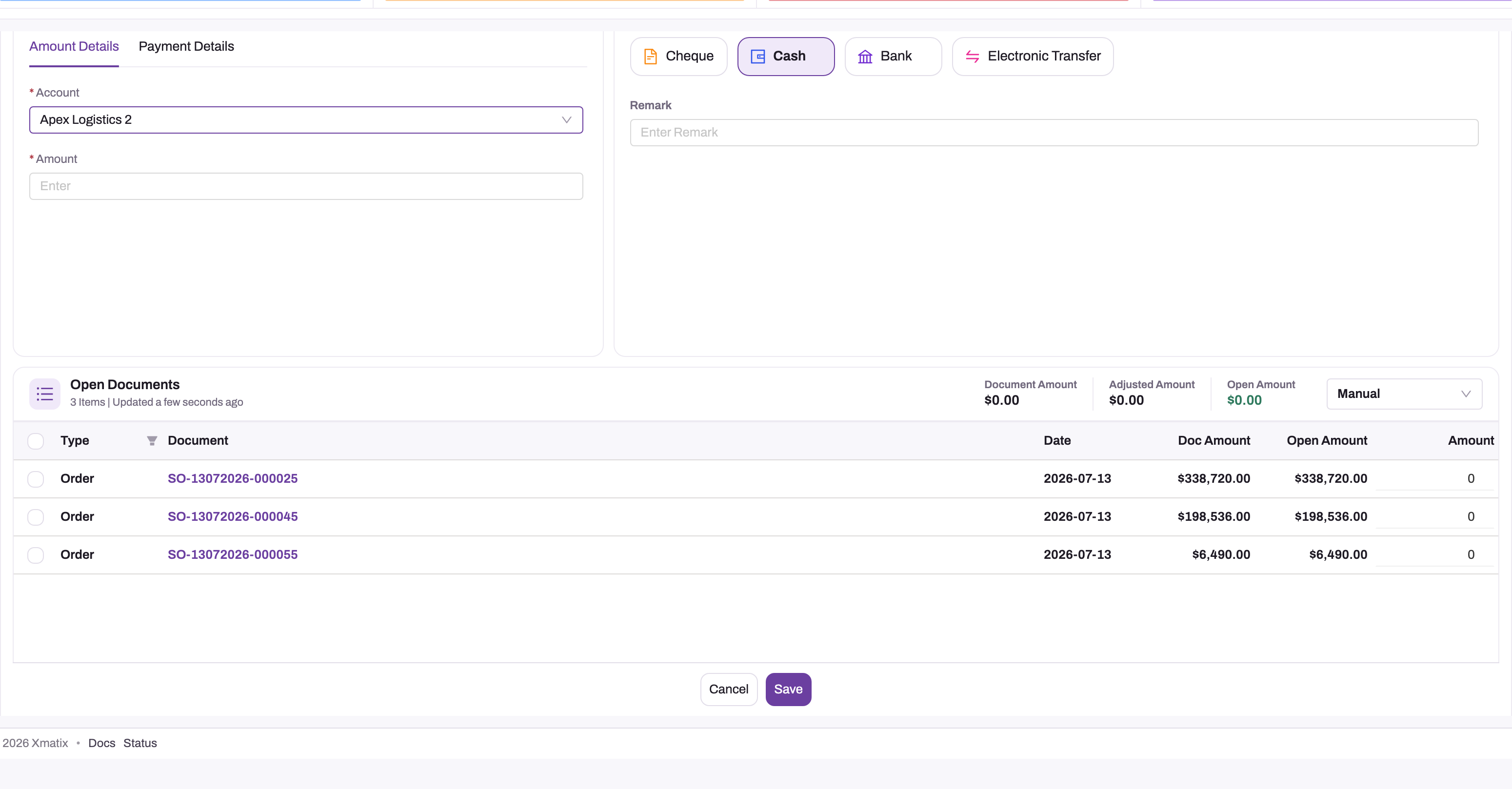
The current form arranges the same parts in two columns: the payment details on the left and Open Documents on the right.
Step 7 — Change a payment that is not yet posted
On a payment that is still unposted, select Edit. You can change the amount, date, mode, remarks and the allocations, then select Save. Account, company, branch and payment type are locked once the payment is saved.
Edit is hidden as soon as the payment's GL Posting Status is Posted. That is the normal state of a payment in a company that posts to the ledger, so in practice a saved payment's money details are final. Check them before you save.
Step 8 — Apply an existing payment or advance to a document
To use money that is already on the account, open the invoice or bill. Then select Apply payment on its amount card. The button shows while something is open. The Apply documents dialog lists the party's unapplied payments, plus credit notes (and debit notes, on a bill). Apply them Auto (oldest first) or Manual, then confirm. See Invoices and Bills.
Step 9 — Take a payment on the mobile app
In the mobile app, select + on the Payments list, or Payment on an order's amount summary. You can also use a visit's Payment Collection task. The Record a receipt sheet has the same parts as the web form: account, amount, date, How was it paid?, remarks, More details (company, branch and up to two photos as proof of payment) and Apply to (Oldest first, Pick manually or On account). Select Save receipt.
The mobile payment screen needs a connection. It does not queue the payment for later when you are offline.
Fields
Payment form
| Field | What it means | Notes |
|---|---|---|
| Account | The customer who paid you, or the supplier you paid | Required. Selecting it loads Open Documents. Locked once the payment is saved. |
| Amount received / Amount paid | The total amount of money | Required, greater than zero. Always positive: the direction comes from Payment Type. |
| Payment date | The accounting date of the payment | Defaults to today. Stored as Document Date. |
| How was it paid? | The mode of payment | Bank, Cash, Cheque or Electronic Transfer in the standard list. Decides the money-side GL account (see How xMatix handles it). |
| Deposited to / Paid from | The company bank account the money went through | Shown for Bank and Electronic Transfer, and for card receipts. Sets the payment's GL Account and fills Bank Name. Lists the company's active bank accounts that have a GL account. |
| Cheque number, Cheque date, Bank name | The cheque's details | Cheque mode. For a cheque you pay, leaving the number empty takes the next number from the company's active cheque register. |
| Card type, Card number, Card expiry | Card details | Bank mode. Enter only the last four digits. |
| Electronic mode | The transfer method, such as NEFT, RTGS, IMPS or UPI | Electronic Transfer mode. |
| UTR number | The bank's reference for the transfer, as shown in the bank statement | Electronic Transfer mode. Stored as Transaction Reference. |
| Transaction date | The date the bank executed the transfer | Electronic Transfer mode. |
| Remarks | Free text shown on the receipt | Optional. |
| Partner Account (More details) | The company whose books take the payment | Defaults to your own company. Hidden on single-company tenants. Locked once saved. |
| Branch (More details) | The company's branch | Defaults to your own branch. Hidden on single-location tenants. Locked once saved. |
| Payment Type (More details) | Payment Taken (a receipt) or Payment Given (a payment you make) | Defaults to Payment Taken. Locked once saved. |
| Apply mode | Oldest first, Pick manually or On account | Decides how the amount is spread over the ticked documents. |
| Applied amount (per document) | How much of this payment settles that document | Editable on ticked rows in Oldest first and Pick manually. Can't exceed the document's open amount. |
Payment record (list columns and mobile details)
| Field | What it means | Notes |
|---|---|---|
| Document Number | The payment's number | Set automatically from the PAY series. The list column is headed Name. |
| Status | Draft or Posted | Draft on creation. Moves to Posted when the payment posts, and back to Draft if the posting is withdrawn. Read-only in practice. |
| GL Posting Status | Draft, Partially Posted or Posted | Set by posting. When it is Posted, Edit is hidden. |
| Mode Of Payment | The mode chosen under How was it paid? | The value posting reads. |
| Adjusted Amount | How much of the payment has been applied to documents | Maintained from the allocations. |
| Open Amount | What is still unapplied | Amount minus Adjusted Amount (and minus any related GL amount). This is the advance left on the account. |
| GL Account | The money-side GL account the payment posted to | Set by Deposited to / Paid from. Empty means the account was found by type. |
| Order / Purchase Order | The order the payment was taken against as an advance | Set when the payment was taken from an order or against one order row. |
| Transaction Reference | The UTR or other bank reference | Filled from UTR number. |
| Advance GL Account | A specific account for this payment's unapplied amount | Not on the standard form. See Configuration. |
| Refund Of Payment | The original payment that this payment refunds | Not on the standard form. See Common questions. |
| Related GL Account / Related GL Amount | A third journal line for exchange gain or loss, or bank charges | Not on the standard web form. Both must be filled together, and the amount must be smaller than the payment. |
Business rules
- Amount must be greater than zero, on the form and on the server ("A positive decimal number is expected for the field: Amount.").
- If the company uses branches, a payment needs a Branch ("Branch is required for this Partner Account.").
- A new payment posts on save when its company has GL posting turned on. A payment whose Payment Type is neither Payment Taken nor Payment Given never posts.
- The money side posts to the GL account chosen on the form. If none is chosen, it uses a Payment posting definition with role Header. Failing that, it uses the company's account of the type that matches the mode. If none of these exists, posting fails with "No GL account resolved for document header (…)".
- The other side posts to accounts receivable (Payment Taken) or accounts payable (Payment Given).
- An allocation can't be negative and can't exceed the document's open amount ("Allocation increase … exceeds … open amount …").
- A cancelled invoice can't receive an allocation ("A cancelled invoice cannot receive a payment allocation.").
- An invoice or bill that was paid when it was posted (a Cash, Bank or Card document) has nothing open to apply to.
- An advance can't be reduced below what has already been used.
- A document that has no open ledger entry can't be settled from the payment form: "… cannot be settled from this screen — no open ledger entry exists for it. Deselect that row to continue."
- Changing the amount, mode, GL account, date, account, company or branch of a posted payment re-posts it. Its old journal is reversed on its own date and a new one is posted.
- Deleting a payment is not blocked, even when it is posted. Deleting it does not reverse its journal.
Example
A distributor receives a bank transfer of 45,000.00 from Greenleaf Stores. Greenleaf has two posted invoices, 30,000.00 and 25,000.00.
- The cashier opens Finance → Payments → New and selects Greenleaf Stores in Account. Open Documents shows both invoices.
- They enter 45,000.00 in Amount received, keep today's date and select Electronic Transfer. They choose the company's current account in Deposited to, select NEFT in Electronic mode, and copy the UTR from the bank alert into UTR number.
- They leave the apply mode on Oldest first and tick both invoices. xMatix applies 30,000.00 to the older invoice and 15,000.00 to the newer one, and shows nothing left as advance.
- They select Save. The payment posts: Bank is debited 45,000.00 and accounts receivable credited 45,000.00. The first invoice now shows nothing outstanding, and the second shows 10,000.00 still open.
Training
Practice exercise
In a sandbox, post an invoice for a test customer for 1,000.00. Then record a cash receipt of 1,200.00 from that customer with Pick manually, applying 1,000.00 to the invoice.
Expected result: the payment is saved with Status Posted. The invoice shows nothing outstanding. The payment's Open Amount is 200.00, which is the advance left on the customer's account. Then post a second invoice for 500.00 to the same customer and select Apply payment on it. The 200.00 advance is offered in Apply documents.
Quick reference
- One record, two directions: Payment Taken is a receipt, Payment Given a payment you make.
- Select Account first. Open Documents follows it.
- Change Payment Type under More details.
- The mode decides the money account; Deposited to / Paid from pins the exact bank account.
- Oldest first, Pick manually or On account decides what gets settled.
- Whatever you don't apply stays on the account as an advance.
- Saving posts the payment. Edit disappears once it is posted.
- Apply old payments from the invoice or bill with Apply payment.
- A cheque payment creates a cheque register entry. Clear or bounce it there.
Permissions
Access is set per security profile under Setup → Access Control → Profiles (see Security profiles):
- Entity Permissions: viewing, creating, editing and deleting payments follow the profile's access to the Payment entity. The standard System Admin, Standard User, Sales Manager, Sales Executive, Sales and Service profiles have full access.
- Actions: Post General Ledger and Repost GL Posting are granted to System Admin, Standard User and Sales Manager, not to Sales Executive. Clone is granted to System Admin, Standard User and Sales Executive.
- Write Off on an invoice or bill is granted to System Admin and Standard User. Writing off more than the tolerance needs Force Write Off, which only System Admin has out of the box.
A user whose profile has no access to the Payment entity can't open or record payments.
The standard web record page shows only Edit and Delete in its header. Post General Ledger (posts a payment that was saved while posting was withheld) and Repost GL Posting (reverses the journal and posts it again from the current values) are available as actions but are not on the standard page. An administrator can add them to the Payment View layout's page header in the layout designer.
Configuration
| What | Where | What it affects |
|---|---|---|
| GL posting for the company | GL Posting Enabled on the company's account record (see Accounts) | When it is off, payments save as Draft and nothing posts. |
| Money-side accounts | Finance Setup app → Books & Posting → Posting Definitions (Entity Name Payment, Posting Role Header), or a GL account per type (Cash, Bank, Cheques In Hand, Credit Card) in the chart of accounts | Which account each mode posts to when no bank account is picked on the form. |
| Bank accounts | Finance Setup → Books & Posting → Bank Accounts | What Deposited to / Paid from offers. See Bank accounts. |
| Bank account box on the form | The payment widget's Show Bank Account Picker setting in the layout designer | When off, bank payments post to the company's Bank account found by type. |
| Modes of payment | The picklist values of the Payment Mode Of Payment field (Setup → Design Studio → Entities → Payment) | The buttons under How was it paid?. A value that isn't Cash, Cheque, Bank, Electronic Transfer or Card posts to Cash. |
| Advance accounts | Posting Definitions with Entity Name Payment and Posting Role CustomerAdvance or VendorAdvance, or a GL account tagged with that control type (the chart templates ship both) | Where unapplied amounts are carried. See below. |
| Finance settings | Setup → Feature Hub → Finance → Settings | See the table below. |
| Numbering | Setup → Design Studio → Entities → Payment → Logic → Document Settings | The PAY series. |
| Write-off account | Posting Definition with Entity Name Invoice, Bill or OpenTransaction and Posting Role WriteOff | Without it, Write Off fails with "No write-off account is configured". |
| Cheque registers | Cheques and cheque registers | The numbers issued to cheques you pay. |
Finance settings that affect payments:
| Setting | Values | Default | Effect |
|---|---|---|---|
| Unapplied customer receipts are carried in | Advance account, Off | Advance account | Moves a receipt's unapplied amount to the customer advance account |
| Unapplied vendor payments are carried in | Advance account, Off | Advance account | Moves a payment's unapplied amount to the vendor advance account |
| Apply unapplied payments to new invoices and bills | Manual, Same order, Oldest first | Same order | Same order: advances follow the invoice or bill raised from their order. Oldest first: every new invoice or bill also takes the party's other unapplied money when it posts. Manual: nothing is applied automatically. |
| Record a payment for Cash / Bank / Card invoices and bills | On, Off | Off | Posting a document paid on the spot also creates its payment |
| Write-off tolerance | An amount, 0 or more | 10 | Above this, a write-off needs Force Write Off |
| Write off small residuals automatically | On, Off | On | Writes off residuals within the tolerance when a write-off account exists |
| Apply a credit note to its invoice when it posts | On, Off | On | See Credit notes |
| Withholding tax on receivables is recognised at | Bill, Payment | Bill | When TDS deducted by a customer is booked |
Unapplied receipts and advances
A receipt saved with nothing applied is an advance: it posts against accounts receivable and stays on the customer as a negative open item until a document uses it. A supplier payment with nothing applied is the same on the payables side.
With the default settings, a second journal then moves the unapplied amount to an advance account. A customer advance goes to a liability account (advances from customers), and a supplier advance to an asset account (advances to suppliers). Each later application moves the applied part back. The open item, the ageing and the party ledger are unchanged; only the GL account that holds the amount changes.
The advance account is chosen in this order:
- the payment's Advance GL Account;
- a Payment posting definition with role CustomerAdvance or VendorAdvance;
- the company's GL account tagged with that control type.
If none exists, the payment stays in the receivable or payable account and nothing fails. The control types are set by the chart templates. The Control Type list on the GL account form does not offer them, so for your own accounts use a posting definition.
An advance taken against a sales order follows the invoice raised from that order, and one paid against a purchase order follows its bill. They are applied oldest first and split when the document is smaller. A cheque is never split; it moves in full once the order is fully invoiced or billed.
Writing off a small balance
When a small difference remains on an invoice or bill, for example a rounding gap or a short payment not worth chasing, select Write Off on its amount card. The button shows while something is open. Enter the amount (what is open, by default), a reason and a date in an open period. The write-off posts to the company's write-off account and reduces the open balance like a payment would. It is not a substitute for a credit or debit note when a price, quantity, return or tax changed.
The amount card then lists it as a Write Off row under the payments, and selecting the row opens its journal. In the subledger it is a settlement allocation with source WriteOff. The standard screens have no button to undo a write-off; cancelling an invoice undoes the write-offs on it.
Common problems
"Amount must be greater than 0" or "Account is required"
The form checks both before saving. Select the customer or supplier and enter a positive amount.
Open Documents stays empty
Nothing is open on that account for the chosen direction. Check Payment Type under More details. A supplier's bills appear only under Payment Given. Also check that the documents are posted: draft invoices and bills have nothing open.
"Payment saved, but the selected documents could not be settled."
The payment was saved and posted, but the allocations failed, so the money is on the account as an advance. Open the invoice or bill and use Apply payment. Do not record the payment a second time.
"… cannot be settled from this screen — no open ledger entry exists for it."
The ticked credit note, debit note or payment has not been posted to the ledger, so there is nothing to settle against. Deselect that row, post the document, and apply it afterwards.
"Allocation increase … exceeds … open amount …"
You applied more to a document than is still open on it, often because someone else applied a payment to it meanwhile. Refresh the list and reduce the amount.
"No GL account resolved for document header (…)"
The company has no account for the payment's mode: for example, no Bank account for a bank transfer. Add the account to the chart or create a Payment posting definition, then record the payment again.
"Branch is required for this Partner Account."
The company works with branches. Select More details and choose the Branch.
The payment posted to Cash, not to the bank
The mode was Cash, or a mode your administrator added that xMatix doesn't recognise. Only Bank, Electronic Transfer, Cheque and Card post elsewhere. Payments received through the online storefront's gateway are also recorded this way. Ask your administrator to review the posting.
A cheque taken on the mobile app is not in the cheque register
The mobile app records the mode but does not create the cheque transaction, so the amount waits in Cheques In Hand with no cheque to clear. Record cheques that need clearing through the register on the web.
I can't edit the payment
Edit is hidden once the payment is posted. A posted payment can't be changed from the standard screens. If the amount or account is wrong, ask your administrator. They can add Repost GL Posting to the page, or correct it with an offsetting payment.
"A cheque cannot be split across orders."
You ticked several orders with mode Cheque. Take one payment per order, or tick one order.
Write Off is refused
The message says why:
- "… has no live open item to write off (post it first, or it is already settled)." — the invoice or bill is not posted, or nothing is open on it.
- "The write-off (…) exceeds what is open on … (…)." — enter at most the open balance.
- "… is above the write-off tolerance of … (Finance setting writeOffTolerance). A balance this size needs a credit / debit note, or the Force Write Off permission." — raise a credit or debit note, or ask a user whose profile has Force Write Off. The tolerance is the Write-off tolerance Finance setting.
- "No open fiscal period covers … for the item's company; pick a date in an open period." — choose a date in an open period.
- "No write-off account is configured …" — your administrator needs to add the write-off posting definition (see Configuration).
- "The write-off account cannot be the control account itself." — the write-off posting definition points at the receivable or payable account; point it at an expense or income account instead.
Common questions
Can a customer pay part of an invoice?
Yes. Apply less than the open amount, with Pick manually or because the payment runs out under Oldest first. The invoice stays open for the rest and moves to partially paid. Each part-payment is its own payment record, and the invoice's Amount Paid adds them up. Apply later payments the same way, or from the invoice with Apply payment. If the small remainder will never be paid, use Write Off on the invoice instead of leaving it open.
Is there a review step between saving and posting?
No. In a company with GL posting turned on, a new payment posts as soon as you save it. There is no draft-and-approve stage for payments, and Edit disappears once the payment is posted. Check the account, the amount, the mode, the bank account and every allocation before you select Save. If GL posting is turned off for the company, payments stay Draft. Once posting is turned on, Post General Ledger posts such a payment. Your administrator may need to add that action to the payment page first.
How do I refund an advance?
A refund is a payment of the opposite type that names the original payment in Refund Of Payment. For example, a Payment Given that refunds a customer's receipt posts against accounts receivable and reduces the customer's advance. The standard payment form has no Refund Of Payment field, so a refund can't be recorded correctly from it as delivered. Ask your administrator how refunds are entered in your setup before you pay one out.
Can I pay several bills with one payment?
Yes. Select the supplier, set Payment Type to Payment Given, and tick every bill the payment covers in Open Documents. Oldest first fills them from the oldest. Pick manually lets you set each amount. One payment record and one journal are created, with an allocation per bill. There is no batch payment run for paying many suppliers at once. Record one payment per supplier. Payment batch records exist in the data model, but the standard product does not use them (see Banking).
What happens when a cheque bounces?
Mark the cheque transaction Bounced (see Cheques and cheque registers). xMatix reverses the payment's journal, so the invoice or bill it settled re-opens in the ledger and the ageing. The payment record itself keeps its Posted status. Check the document's balance afterwards, and take a new payment when the customer pays again. Clearing a cheque instead moves the amount from Cheques In Hand to the company's bank account.