
A bill is the supplier's invoice recorded in xMatix: what you owe a vendor for goods or services, and the document that turns a purchase into a payable in your ledgers. It closes the procure-to-pay chain. A purchase order says what you ordered and a goods receipt records what arrived. The bill records what the supplier charged. Once posted, the bill is an open payable until supplier payments settle it.
Overview
Bills appear under Bills in both the Procurement app and the Finance app, on the web and in the mobile app. The list is titled All Bills. A saved bill has these parts:
- a record header showing Document Date, Partner Account, Branch, Supplier Account and Total Amount;
- the Post General Ledger, Post Inventory, Clone, Edit and Delete buttons (Edit is hidden once the bill is posted);
- a Status stepper under the header;
- three tabs: Lines, Details and Related;
- an Amounts panel beside the tabs, with a Payment button.
When to use it
Record a bill whenever a supplier invoices you and the amount should become a payable in your books:
- for goods you ordered on a purchase order, whether or not they have arrived yet;
- for goods already received on a goods receipt;
- for a service, a charge or an expense with no order behind it, keyed in directly;
- for bills that an accounting integration brings in, which you can let xMatix post automatically (see Configuration).
How xMatix handles it
Where bills come from
| Source | Action | What the bill gets |
|---|---|---|
| Purchase order | Release Invoice, Selective Release Invoice on the order | The order's branch, partner account, supplier and document date, linked to the order. An order line with receipt lines still to bill gets one bill line per receipt line, linked to both the order line and the receipt line, with the receipt's lot. An order line with nothing received gets one bill line linked to the order line only. The selective version takes the lines you tick, at a quantity no larger than each line's pending invoice quantity. |
| Goods receipt | Release Bill on the receipt | The receipt's branch, partner account, supplier and document date, linked to the receipt. Each bill line carries the receipt-line link only, the line's tax group and lot. |
| Direct entry | New on the list | A header you fill in and lines you add. No source links, so nothing rolls back into an order or receipt. |
Bill lines for items are priced from the bill's own Price List when they are created. The order's or receipt's unit cost is not copied, except on description-only charge lines, which keep the cost typed on the order. Always compare the lines with the supplier's invoice before posting.
Every bill line counts against its source. Adding, changing or deleting a bill line updates the billed and pending-to-bill quantities on the purchase-order line and the goods-receipt line it points at. An order can therefore be billed in several invoices, before or after the goods arrive.
Status, document state and posting state
A bill carries three posting markers, none of which shows payment, and a separate Payment Status.
| Marker | Values | What moves it |
|---|---|---|
| Status (the stepper) | Draft, Posted | Posting the bill to the general ledger moves it from Draft (or empty) to Posted. If the journal is later reversed, it goes back to Draft. |
| Document State (read-only) | Draft, Journal Posted, Inventory Posted | The last posting action that succeeded: Journal Posted after Post General Ledger, Inventory Posted after Post Inventory. A later general-ledger posting does not overwrite Inventory Posted. The field is not on the shipped screens; add it to a list view to see it. |
| GL Posting Status | Draft, Partially Posted, Posted | Written by each general-ledger posting and reversal. Use it, not Document State, to tell whether the journal is currently posted. |
| Payment Status (read-only, a column on All Bills) | Unpaid, Partially Paid, Paid, Overdue | Worked out each time the bill is read, from Open Amount, Total Amount, TDS and Due Date. Paid once the open amount is nil; Overdue when money is still open after the due date. Empty for a cancelled bill or one with no total. |
Payment progress is also shown by Open Amount and Adjusted Amount and by the Payment summary in the Amounts panel.
What posting does
Post General Ledger sets GL Posting Approved on the bill and writes one balanced journal, numbered by your Journal numbering setting (see Working with journals), with the bill as its Source Record:
- Debit for each line, in this order of precedence:
- the line's own GL Account, if set;
- otherwise a matching posting definition;
- otherwise the chart's default account. That is the goods-received-not-invoiced account for a line linked to a goods-receipt line, inventory for a line whose GL Posting Type is exactly Inventory, and expense for any other line.
- Debit for the input tax on each line to the tax-credit account. For a line whose ITC Eligibility is Blocked or Ineligible, the tax is a cost instead: it goes to the account an IneligibleTax posting definition names, or else to the line's own debit account.
- Credit for the total to Accounts Payable, with the supplier as the party.
- Round-off. When the bill has a Round Off amount, a rounding line balances it.
The same run also does four more things:
- It raises a payable open item due on the Due Date, or on the document date when Due Date is empty. Ageing and supplier payments work from that open item — see AR and AP subledgers.
- It deducts TDS for lines carrying a TDS Section whose deduction point is the bill: debit Accounts Payable, credit TDS Payable. The deducted amount shows on the bill as TDS Deducted. Net Payable is the total less TDS, and the open amount is reduced to match. See TDS and TCS.
- For businesses in India, it records the input-tax entries that GST returns and GSTR-2B reconciliation read. These use the Supplier Invoice Number and Supplier Invoice Date, falling back to the bill's own number and date.
- For a purchase made for a service order, it writes the billed cost back onto Cost Plus service-order lines that are not manually rated and not yet invoiced.
Posting only happens when the bill's Partner Account (your company) has general-ledger posting enabled. Otherwise the action completes without writing a journal.
Is RCM marks a reverse-charge bill. The tax portion is credited to the reverse-charge GST payable account instead of Accounts Payable, and the payable is reduced by the same amount.
Post Inventory posts every bill line that has no inventory-ledger entry yet to the inventory ledger. Use it where the bill, rather than a goods receipt, is the stock document. Each line with a quantity above zero adds its quantity to the stock's Purchased figure, at the line's item, SKU, lot and Storage Location. A line that came from a goods-receipt line also takes the same quantity off Inward, so received stock moves across rather than being counted twice. Saving a new line never posts stock by itself.
After a line has been posted to stock, saving a new Quantity or Unit Cost on it reverses its stock entry and posts it again, and deleting the line reverses it. A line added later stays unposted until Post Inventory runs again.
Changing a posted bill
Once a bill is posted, the record page no longer offers Edit, and its header fields cannot be changed in place. Its lines can still be changed from the Lines tab. A saved line change that affects the accounting reverses the journal and posts a new one automatically, and any settlements carried by the old open item move to the new one. Line changes that count are amount, quantity, cost, discount, tax, GL account, item, GL Posting Type or ITC Eligibility, and adding or deleting a line. A TDS-tagged line added to a posted bill also has its TDS deducted.
The server applies the same re-posting to header changes made another way, such as an import or an integration: supplier, partner account, branch, document date, due date, GL Posting Type, GL Account, Is RCM or Round Off. Notes, references and status changes post nothing. A posted bill cannot be deleted.
Prerequisites
- The supplier is an active account marked as a supplier — only those can be picked in Supplier Account.
- Your company (the Partner Account) and Branch are active and belong together.
- To post to the general ledger, your company has finance enabled, with an Accounts Payable control account and, for TDS, a TDS Payable control account. See GL accounts.
- A purchase-type price list exists if you want lines priced automatically; otherwise you type each Unit Cost.
- Your security profile grants access to Bill and Bill Line and to the actions you will run (see Permissions).
Procedure
Step 1 — Find a bill
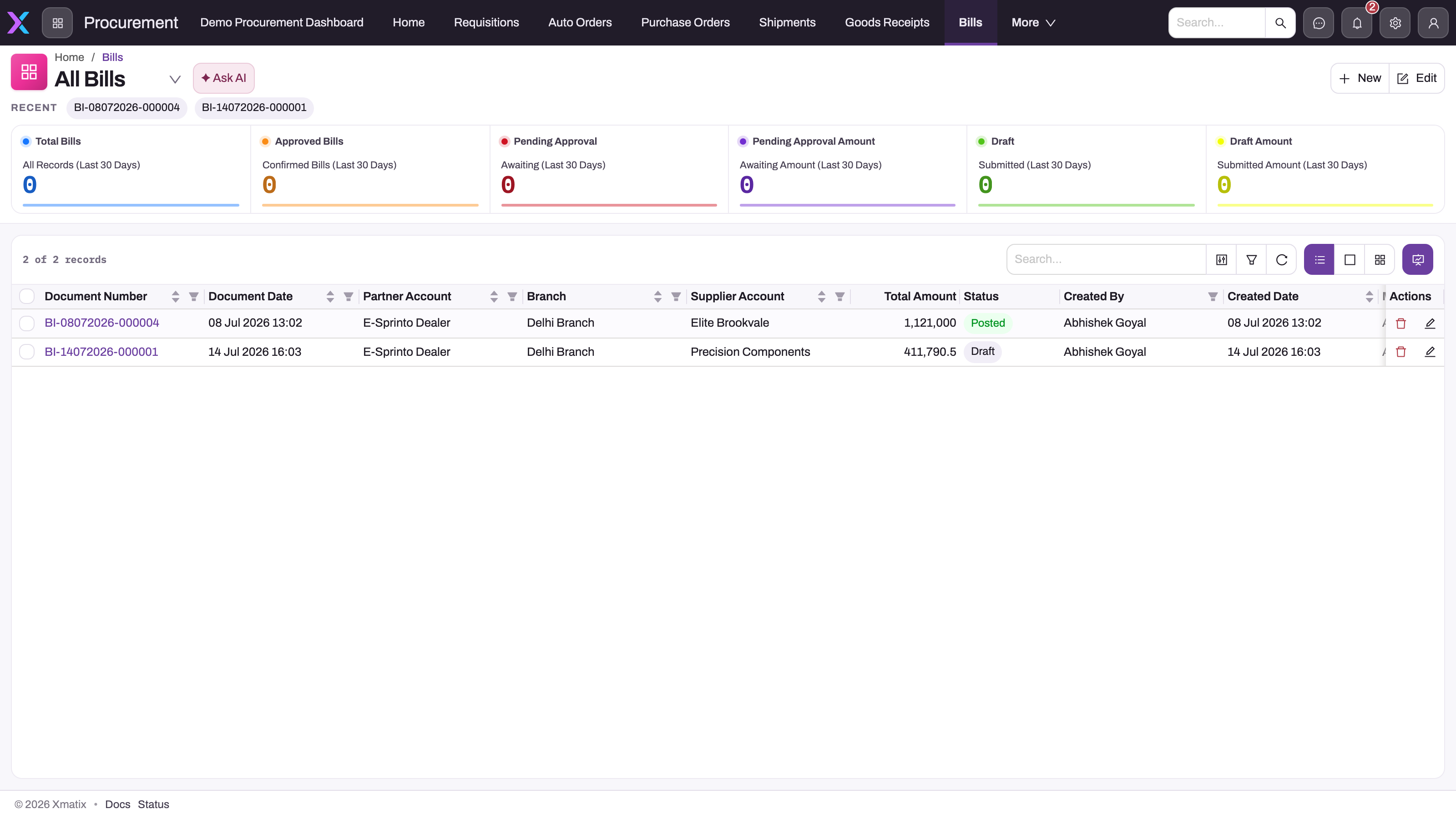
Open Procurement → Bills (or Finance → Bills). The All Bills list shows Document Number, Document Date, Partner Account, Branch, Supplier Account, Total Amount, Status and Payment Status, then who created and last changed each bill. The cards above it count and total recent bills. Use search, filters and column sorting to narrow the list, and open a bill by its Document Number. A purchase order's or goods receipt's bills are also on that document's Related tab.
Step 2 — Release the bill from its source
When the bill follows an order or a receipt, start there rather than with New, so the lines keep their links:
- On the purchase order, choose Release Invoice to bill every line with pending invoice quantity, or Selective Release Invoice to bill chosen lines at quantities you enter.
- On the goods receipt, choose Release Bill.
The new bill is created at Status Draft with its lines already built, and appears on the source document's Related tab; open it from there. If your process receives before billing and you want both links on every line, release the invoice from the purchase order after the receipt exists. Only lines with the order-line link move the order's billed quantity; see match orders, receipts and bills.
Step 3 — Or create a bill directly
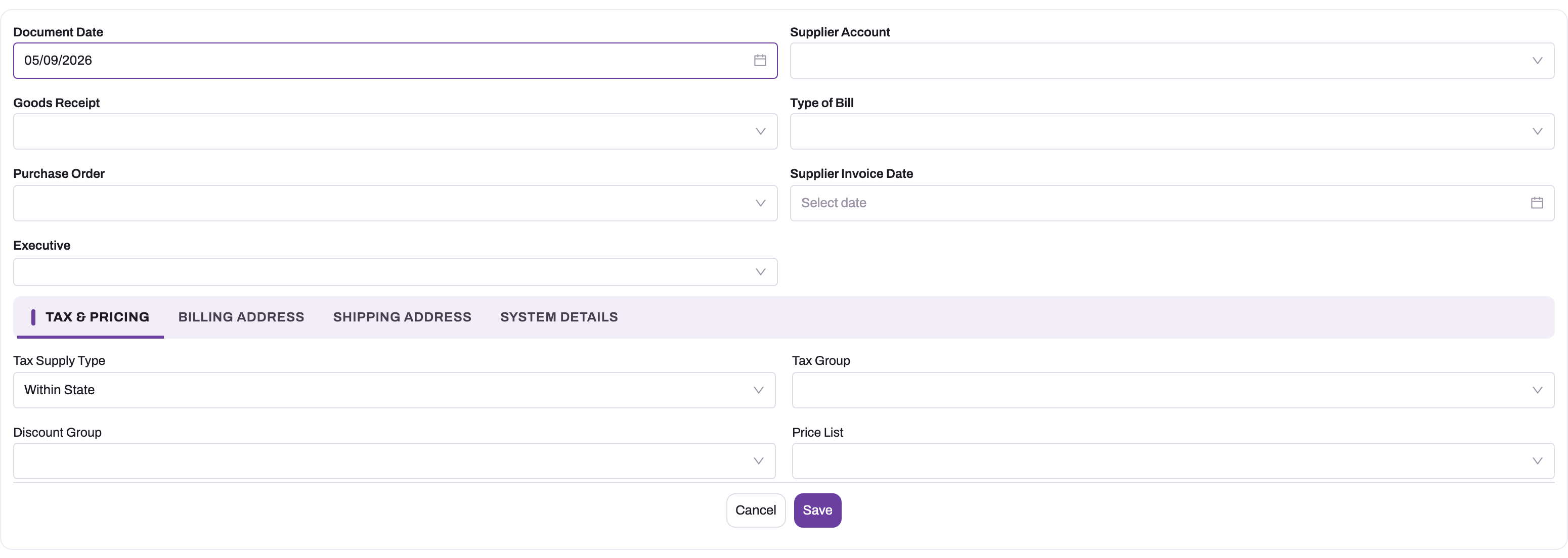
Choose New on the list. Fill the top of the form:
- Document Date
- Supplier Account — filled from the branch's default supplier if you leave it empty
- Type of Bill
- Supplier Invoice Date
- Goods Receipt and Purchase Order — leave these empty for a direct bill
Then the tabs:
- Tax & Pricing: check Tax Supply Type, Tax Group, and the defaulted Discount Group and Price List.
- Billing Address and Shipping Address: filled from your partner account's default address when you leave them empty.
- System Details: Partner Account, Branch and Executive.
Save. The bill gets a number such as BI-10102026-000021 and opens at Status Draft.
Step 4 — Add or check the lines
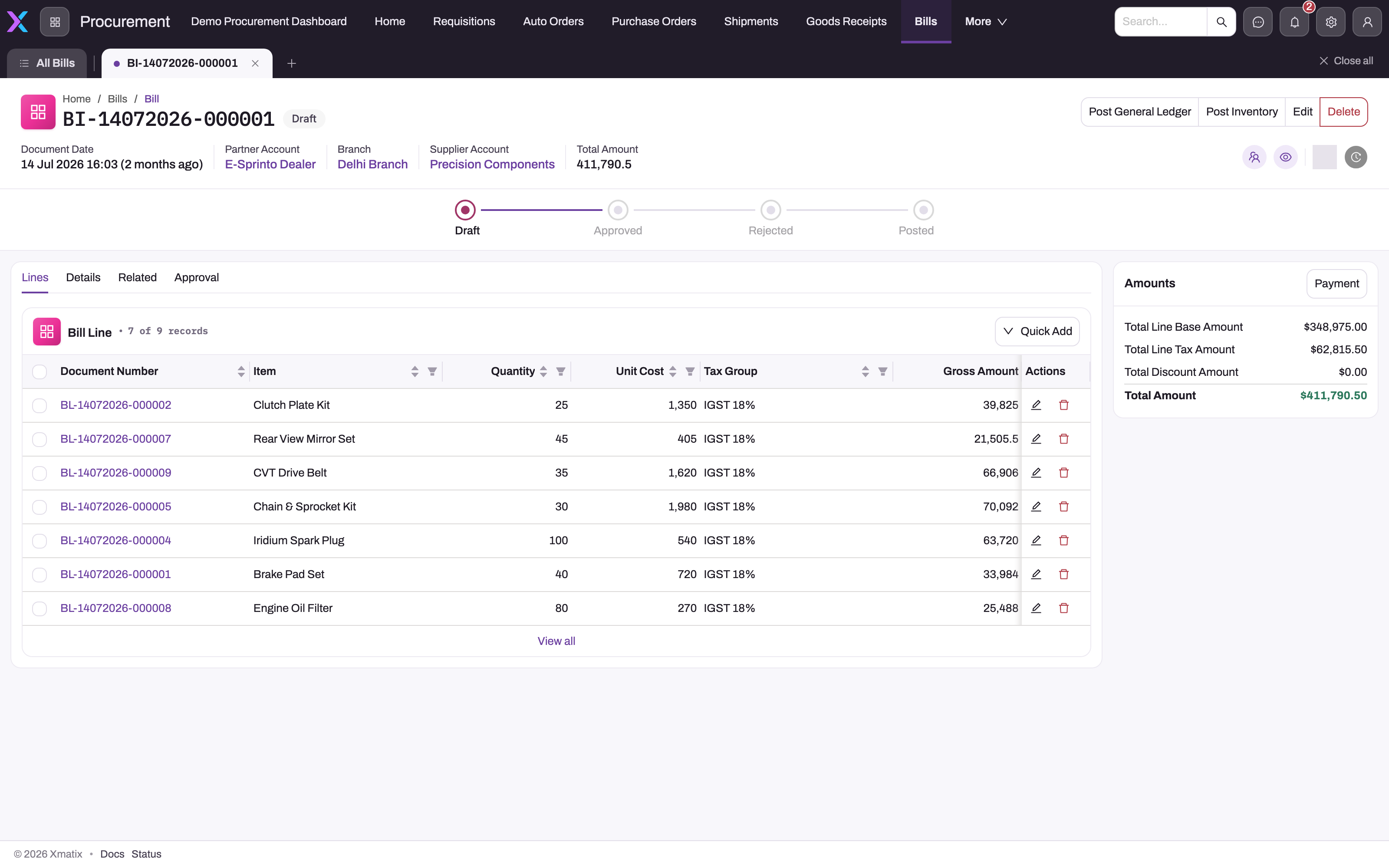
The Lines tab lists the bill's lines with Bill Line Number, Item, Quantity, Unit Cost, Tax Group, Gross Amount and GL Account. Each row has Edit and Delete.
Add a line. Choose Quick Add above the list. The form asks for Item, SKU, Item Lot Type, Quantity (required, a whole number of at least 1), Unit Cost, Tax Group, Description and GL Account. On save:
- a Unit Cost you typed is kept; an empty one is filled from the bill's price list when a rule matches the item;
- tax-group rules and discount groups are applied, and the taxes of the line's tax group are worked out;
- the item's HSN/SAC code is copied onto the line;
- the vendor's default TDS/TCS Section is applied if the line has none.
The line gets a number such as BL-17102026-000005.
Open a line. Choose the line's number to open its record page. Fields there edit in place, and Edit and Delete are in its header. The page has these panels, with an Amounts panel beside them:
- Item Details: Item, SKU, Item Lot, Description, Item Lot Type, TDS/TCS Section and GL Posting Type;
- Quantity Details: Quantity, Returned Quantity, Eligible Return Quantity and Invoice Quantity;
- Tax & Price Details: Tax Amount, Tax Group, Unit Cost, Price List and Price As On Date;
- Discount Details: Discount, Discount Amount, Scheme Discount, Scheme Discount Amount and Scheme Benefit;
- Related Documents: Purchase Order Line, Goods Receipt Line, GL Account and Storage Location;
- System Information: who created and last changed the line, and when.
Use the line page to set GL Account (which decides the debit account), the TDS/TCS Section, a discount, or the Storage Location the stock posting should use. Changing Price List or Price As On Date on a line reprices it from the list, replacing a cost you typed.
Check released lines. For a released bill, compare every line with the supplier's invoice. Change Unit Cost to what the supplier charged, and reduce Quantity if they billed less. On a line released from a goods receipt, Item, SKU, Item Lot and Tax Group cannot be changed.
The bill's Amounts panel shows the lines' base amount, discount, tax and TDS, and the Total Amount.
Step 5 — Record the supplier's references and payment terms
Choose Edit and open the Details tab. Under Supplier Information, enter the supplier's own Supplier Invoice Number, Supplier Invoice Date and Supplier Invoice Amount. Under Key Information, set Due Date; it becomes the payable's due date and drives ageing. Under Controls, tick Is RCM if reverse charge applies. Save.
Step 6 — Post the bill
- If the bill is your stock document, choose Post Inventory first and confirm. The lines are posted to the inventory ledger and Document State becomes Inventory Posted. The button shows only while some line is still unposted and Status is not Posted.
- Choose Post General Ledger. The journal, open item, TDS and input tax described above are written. Status becomes Posted and Document State Journal Posted, unless it already shows Inventory Posted. The button shows only while the bill has quantity, is not Posted and is not yet approved for posting.
The journal appears on the Related tab under the journals list, together with any payment adjustments.
Step 7 — Check payment progress
Choose Payment in the Amounts panel to see the bill's total, adjusted and open amounts and the payments and adjustments behind them. Open Amount and Adjusted Amount are also on Details. Pay the supplier from the payment side — see Recording and applying payments.
Step 8 — Correct, clone or delete
- Correct a posted bill by changing its lines on the Lines tab. A saved change to their accounting re-posts the journal automatically (see Changing a posted bill).
- Clone creates a new Draft bill with the same header and a copy of every line. The copy carries nothing of the original's posting, payment or return progress, and gets new numbers. Each copied line keeps its purchase-order-line and goods-receipt-line links, so its quantity counts as billed on those source lines a second time. Use Clone for direct bills, not for released ones.
- Delete removes a bill that has never been posted, after a confirmation.
- Delete a line with its row's Delete, or Delete on the line page. Its billed quantity is released back to the order and receipt lines, and any stock it posted is reversed. A line that has been returned against cannot be deleted, and its quantity cannot go below the returned quantity.
Step 9 — Work on mobile
Bills are available in the Procurement and Finance apps of the mobile app. You can:
- create a bill with the same fields as on the web;
- add lines with quick add, which on mobile asks for Item, Quantity, Unit Cost, Tax Group and TDS Section only (no SKU, so items that need a SKU are refused there);
- open a line to see its item, quantity, tax, price, discount and source details, which include Price List Rule;
- run Post General Ledger and Post Inventory from the record header.
Fields
Header
| Field | What it means | Notes |
|---|---|---|
| Document Number | The bill's number. | Generated on save, for example BI-10102026-000021. |
| Document Date | The date the bill is booked in your ledgers. | Can be changed while the bill is a draft. Also the journal date. |
| Supplier Account | The vendor you owe. | Only active supplier accounts. Defaulted from the branch's default supplier. Locked once saved. |
| Goods Receipt | The receipt the bill was released from. | Filled by Release Bill. |
| Purchase Order | The order the bill was released from. | Filled by Release Invoice. Locked once saved. |
| Type of Bill | A classification. | Purchase Bill, Expense Bill, OTC Purchase Bill. Posting does not read it; Supplier GSTIN is shown only for Purchase Bill. |
| Supplier Invoice Date, Supplier Invoice Number, Supplier Invoice Amount | The supplier's own document references. | Kept apart from your number and date. GST capture and supplier reconciliation match on the supplier's number. |
| Tax Supply Type | The tax lane. | Within State, Outside State, Exempt, Exports, SEZ. For businesses in India it is recalculated on every save from the supplier's GST registration type and whether place and source of supply differ. |
| Place of Supply, Source of Supply | The states that decide the tax lane. | For businesses in India, filled from the supplier and the branch when empty. |
| Tax Group | Header-level taxes. | |
| Discount Group, Price List | Where line discounts and prices come from. | Purchase-type ones are defaulted on create. |
| Price As On Date | The date prices are taken from. | Changing it reprices the lines. |
| Billing Address, Shipping Address | Addresses on the bill. | Defaulted from the partner account's default address when empty. |
| Partner Account | Your company, which owes the money. | Only active partner accounts. Locked once saved. Posting needs general-ledger posting enabled for it. |
| Branch | Your branch. | Must belong to the partner account and be active. Locked once saved. |
| Executive | The person responsible for the bill. | |
| Due Date | When the supplier expects payment. | Copied onto the payable open item; ageing counts from it, or from the document date when empty. |
| Payment Terms | The supplier's terms, as text. | Informational. |
| GL Account | A header account. | Not used to choose the payable account; the credit goes to Accounts Payable. |
| GL Posting Approved | Whether the bill is approved for posting. | Set by Post General Ledger. |
| Is RCM | Reverse charge applies. | For businesses in India, defaulted from the supplier when empty. See What posting does. |
| Supplier GSTIN | The supplier's GST number. | Read from the supplier account when Type of Bill is Purchase Bill; empty otherwise. |
| TCS Eligible Amount | The amount on which tax collected at source applies. | |
| Status | Draft or Posted. | Set by posting; see Status, document state and posting state. |
| Total Quantity, Total Line Amount, Total Discount Amount, Total Scheme Discount Amount, Total Amount | Totals from the lines. | Calculated. |
| TDS Deducted, Net Payable | Withholding deducted at bill time, and the total less it. | Read-only. |
| Open Amount, Adjusted Amount | What is still owed, and what payments, adjustments and TDS have settled. | Open Amount is Total Amount less Adjusted Amount. Adjusted Amount is maintained by posting and settlement. |
Lines
| Field | What it means | Notes |
|---|
In the order of the line's record page:
| Field | What it means | Notes |
|---|---|---|
| Bill Line Number | The line's number. | Generated on save, for example BL-17102026-000005. |
| Item, SKU | What was bought. | Optional, so a line can be a description-only charge. Active items only; SKU is required when the item requires one, and must be one of the item's SKUs (the picker offers only those). Discount items are refused. Cannot change once the line is saved with a quantity, and never on a line from a goods receipt. |
| Item Lot | The stock lot. | Copied from the goods-receipt line on released lines. Locked like Item. |
| Description | Text for the line. | Copied from the purchase-order line on order releases; otherwise what you type. Used as the journal narration when the line has no item. |
| Item Lot Type | The lot type. | Copied from the receipt on released lines. |
| TDS/TCS Section | The withholding section. | Defaulted from the vendor's default section on new lines. Deducts at posting when the section's deduction point is the bill. |
| GL Posting Type | Decides the debit for a line that has no GL Account and no receipt link. | Inventory debits inventory; anything else, or blank, debits expense. The shipped list has no values, so it stays blank until an administrator adds them (see Configuration). |
| Quantity | The quantity billed. | Required on quick add. Cannot be negative or below the returned quantity. Counts as billed on the source order and receipt lines. |
| Returned Quantity | Quantity returned to the supplier against this line. | Rolled up from the lines of vendor credits that name this bill line. |
| Eligible Return Quantity, Invoice Quantity | Quantity less Returned Quantity. | Calculated; both show what is still billed after returns. |
| Tax Amount | The line's total tax. | Calculated from the tax group's components; rounded per document when the Finance tax-rounding setting says so. |
| Tax Group | The line's taxes. | Taxes are recalculated when Tax Group, Item, SKU, Quantity or Amount change. Locked on a line from a goods receipt. |
| Unit Cost | The price per unit. | A typed cost is kept; an empty one is filled from the bill's price list. Description-only lines released from an order keep the order's cost. |
| Price List, Price As On Date | Where and as of when the line was priced. | Changing either reprices the line, replacing a typed cost. |
| Discount, Scheme Discount | Percent discounts. | 0 to 100. |
| Discount Amount, Scheme Discount Amount | Fixed discount amounts. | When above zero, used instead of the matching percent. |
| Scheme Benefit | The scheme benefit that set the scheme discount. | Filled by the scheme engine, which bill lines run through like sales lines. See trade schemes. |
| Purchase Order Line, Goods Receipt Line | The source lines. | Set by releases. Cannot change once the line is saved with a quantity. |
| GL Account | An explicit debit account. | Wins over every other rule. The picker is not filtered by company, so make sure you pick one of the bill's company. |
| Storage Location | Where the stock sits. | Used by Post Inventory for the stock row. |
The Amounts panel on the line shows its base amount (Quantity × Unit Cost, or × Unit Cost 2 when that override is above zero), discounts, tax and gross amount. Some line fields are on no shipped form and need adding in Design Studio before anyone can set them:
- ITC Eligibility: Eligible, Blocked (Sec 17(5)) or Ineligible. Blank counts as Eligible. Blocked and Ineligible GST is booked as cost and reported as not claimable.
- Unit Cost 2: an override cost.
- HSN/SAC Code: copied from the item. For businesses in India, a code that is filled in must have 4, 6 or 8 digits.
The full list of stored fields is in the Bill entity reference and the Bill Line entity reference.
Business rules
- Numbering. Bills are numbered
BI-+ the document date as DDMMYYYY + a six-digit counter; lines useBL-. - Locked fields. Supplier Account, Purchase Order, Partner Account and Branch cannot change once saved with a value. Document Date can. On a bill released from a goods receipt, Partner Account, Branch and Supplier Account keep the receipt's values.
- Posted bills. Once Status or GL Posting Status is Posted, the record page hides Edit. Lines stay editable.
- Partner, branch and supplier. The branch must belong to the partner account; both, and the supplier, must be active. When the partner account has branches, a branch is required.
- Line numbering. Lines are numbered
BL-+ the date as DDMMYYYY + a six-digit counter. - Line links. A line's order-line and receipt-line links, item, SKU and lot cannot change once the line has been saved with a quantity. On a line from a goods receipt, item, SKU, lot and tax group can never change.
- Line checks. A new line's item must be active, and its SKU must be given when the item requires one and must belong to the item. Discount percents must be 0 to 100.
- Line pricing and tax. A typed unit cost is kept on a new line; an empty one comes from the price list. Changing a line's price list or price date reprices it. Taxes are recalculated when tax group, item, SKU, quantity or amount change.
- Quantities. Quantity and the returned quantities cannot be negative. A line's quantity cannot drop below what has been returned. A line with returns cannot be deleted.
- Line stock. Saving a line posts no stock. Post Inventory posts the unposted lines; after that a quantity or cost change re-posts the line, and deleting it reverses it.
- Roll-up. Bill-line quantities count as billed on the source order and receipt lines, and are released again when the bill line is reduced or deleted.
- Posting. Needs general-ledger posting enabled for the partner account. Re-posting reverses the live journal and posts again; saved financial edits do this automatically.
- TDS. Deducted once, at the point its section prescribes: bill, payment, or the earlier of the two.
- Deletion. A bill with a posted journal cannot be deleted.
- Returns. Quantities returned to the supplier against a bill line add to its Returned Quantity.
Example
A tractor dealer orders 40 oil filters and 12 hydraulic hoses from a parts supplier. Thirty filters and all the hoses arrive on one goods receipt. The supplier's invoice, number SP/2431, bills exactly those quantities, at ₹180 per filter rather than the ₹175 on the dealer's price list.
The accounts clerk opens the purchase order and chooses Release Invoice. A bill BI-10102026-000021 appears on the order's Related tab with two lines, each linked to both its order line and its receipt line. The clerk changes the filter line's Unit Cost to 180. On Details they enter Supplier Invoice Number SP/2431, its date and amount, and a Due Date 30 days out.
The clerk chooses Post General Ledger. The journal debits the goods-received-not-invoiced account and input tax and credits Accounts Payable. Status moves to Posted and a payable open item appears for the supplier, due in 30 days.
When the last ten filters arrive, the next Release Invoice bills only those.
Training
Practice exercise
In a sandbox, as a user with the System Admin or Standard User profile, for a company with finance enabled:
- Create a purchase order for a test supplier with one stock item, quantity 10, and run Release Receipt. Receive the goods.
- On the order, run Release Invoice. Expected: a
BI-bill at Status Draft with one line of 10, linked to the order line and the receipt line. - Change the line's quantity to 6 and save. Expected: the order line shows 4 still to bill.
- Set a Due Date and choose Post General Ledger. Expected: Status Posted; a journal on the Related tab; Open Amount equal to Total Amount; the Post General Ledger button gone.
- Change the line's Unit Cost and save. Expected: the journal on Related is reversed and a new one posted; Open Amount follows the new total.
- Try to delete the bill. Expected: "Bill '…' has a posted GL journal and cannot be deleted. Reverse or un-approve it first."
Quick reference
- Release from the purchase order after receipt to keep both line links.
- Item lines are priced from the bill's price list — check them against the supplier's invoice.
- Supplier, partner account and branch lock on save; item, SKU and lot lock on a line once it has a quantity.
- Enter the supplier's invoice number and a due date before posting.
- Post Inventory only when the bill is the stock document, and before Post General Ledger.
- Status Posted means the journal is posted; payment is in Open Amount and the Payment summary.
- Correct a posted bill through its lines — the journal re-posts itself. Posted bills cannot be deleted.
- A typed unit cost is kept; changing the line's price list or price date replaces it.
- TDS on a line comes from the vendor's default section unless you pick one.
Permissions
Access is set on security profiles:
- Entity access. The shipped System Admin, Standard User, Sales Manager and Sales Executive profiles have full access to Bill and Bill Line, including View All and Modify All. The shipped Procurement profile has no bill access: give it entity access before assigning it to buyers or accounts staff.
- Record sharing. Bills are owned by a user. The organization-wide default is Read Only; see record security.
- Actions. Each button is a separately granted action:
- System Admin and Standard User have every bill and bill-line action.
- Sales Manager has every bill action except Clone.
- Sales Executive can edit, clone and delete bills and lines, but has no New, no posting actions and no Payment summary.
A user without an action does not see its button. Grant missing ones on the profile's Actions tab.
- Setup. Enabling finance for a company needs access to Org Settings → Companies; the Finance settings need access to Feature Hub settings.
Configuration
- Document numbering. Setup → Feature Hub → Platform → Document Settings: the bill setting (series
BI, separator-, date DDMMYYYY, six digits) and the bill-line setting (seriesBL). See Email templates and document numbering. - Enable general-ledger posting. Setup → Feature Hub → Administration → Org Settings → Companies → Enable finance seeds the chart of accounts and turns posting on for the company. Without it, Post General Ledger writes nothing. See GL accounts.
- Control accounts and posting definitions. The payable goes to the company's Accounts Payable control account. TDS needs a GL account with control type TDS Payable. Line, tax and round-off accounts come from posting definitions or the chart's defaults. A bill with a Round Off amount needs a Rounding posting definition for bills. See posting definitions.
- TDS. Set the vendor's default TDS section and TDS applicable switch on the supplier account, and each section's deduction point, as described in TDS and TCS.
- Auto-post synced bills. Setup → Feature Hub → Modules → Finance → Settings, group Auto-post synced documents. Post synced Bills automatically (off by default) posts bills that an accounting integration creates, together with the required Only documents created on or after (yyyy-MM-dd, UTC). A background job runs every 15 minutes. It posts only bills of a company with posting enabled that have lines and have finished syncing. Failures are listed in the Posting Error Log and retried when the bill changes.
- Branch default supplier — see the procurement configuration reference.
- Pricing, discounts and taxes come from purchase price lists, discount groups and tax groups.
- Layouts and views. The create form, record page, header buttons and list views are metadata you change in Design Studio:
- Post TDS is not on the shipped record page. Add it for bills that were posted before their lines were tagged with a TDS section.
- Edit is hidden on posted bills by a record-state rule on the bill's Edit actions. Lines have no such rule.
- Line forms. Quick Add on the Lines tab and the row Edit open the bill line's quick-add form. A second line form with TDS/TCS Section instead of SKU and lot type is also shipped. ITC Eligibility, Unit Cost 2 and HSN/SAC Code are on no shipped line form; add them where your users need them.
- The Approved Bills, Pending Bills and Rejected Bills views filter on Status values the system never sets, so they stay empty unless a process of your own sets them; adjust or hide them.
- Approval. No approval process is shipped for bills. To require sign-off before posting, create one in Setup → Process Studio → Approvals — see Approval processes.
- Lookup filters. The shipped filters limit Supplier Account to active suppliers, Partner Account to active partner accounts, Branch to the partner account's branches and a line's SKU to the item's SKUs. A line's GL Account has no filter.
- Line GL Posting Type values. The bill line's GL Posting Type picklist ships empty. To let users send direct lines to inventory without picking a GL account, add a value named exactly
Inventoryto it in Design Studio. Any other value debits expense. - Blocked or ineligible GST. To book non-claimable GST to its own account, add a posting definition with role IneligibleTax for Bill Line, either for each tax type or with the tax type blank to catch all. The same definition is used when a vendor credit reverses the bill line. Without one, the tax joins the line's own expense or inventory account.
- Stock posting rules. The two shipped inventory-ledger rules for bill lines post to Purchased, and for receipt-linked lines move the quantity off Inward. They run on Post Inventory, on later line changes and on deletes, never on a new line's save. See inventory configuration.
Common problems
"Key fields are not editable once the related objects are added. Field Name : …"
You tried to change Supplier Account, Purchase Order, Partner Account or Branch on a saved bill. They cannot change. Delete the unposted bill and create it again, or release it again from its source. "Source populated field … is not editable once the record is created with source record." is the same protection for a bill released from a goods receipt.
"Bill '…' has a posted GL journal and cannot be deleted. Reverse or un-approve it first."
The bill has been posted. Correct it by editing its lines or header instead — the journal re-posts on save.
"No GL account resolved for line '…' (Expense). Configure a PostingDefinition or a chart-of-accounts default."
Posting could not find a debit account for that line. Set GL Account on the line, or ask an administrator to add a posting definition or the chart's default expense, inventory or goods-received-not-invoiced account. The same message for tax, document header (Accounts Payable) or RCM GST payable names the missing account.
"No TDS Payable control account (GLControlType.TdsPayable) is configured."
A line carries a TDS section but the company has no TDS Payable control account. An administrator tags one in GL accounts, or re-runs Enable finance to tag the seeded account.
"Configure a Bill Rounding posting definition before posting round-off."
The bill has a Round Off amount and no rounding account is set up. Add a Rounding posting definition for bills, or remove the round-off.
Post General Ledger completes but no journal appears
General-ledger posting is not enabled for the bill's Partner Account. An administrator enables finance for the company in Org Settings → Companies.
The Post General Ledger button is missing
It shows only while the bill has a total quantity above zero, Status is not Posted, and the bill is not yet approved for posting. A posted bill does not need it: edit the bill to correct it.
"No Bill Lines found for Inventory Posting."
Every line is already posted to the inventory ledger. Nothing more is needed.
"Quantity cannot be less than the already transacted quantity."
Goods have been returned against the line. Enter at least the returned quantity. "There are downstream transactions. The record cannot be deleted." is the same protection when deleting the line.
"'…' is a Discounted Item, which can't be used on a bill."
Discount items are for sales documents. Record a supplier discount in the line's own discount, or raise a debit note.
"The field … is locked and not editable as transactions have been made against this record."
You changed the item, SKU, lot, or order or receipt link of a saved line with a quantity. Delete the line and add a new one, unless it has been returned against.
"Source populated field … is not editable once the record is created with source record." on a line
The line came from a goods receipt, so its item, SKU, lot and tax group follow the receipt. Correct the receipt line, or delete the bill line and add a direct one.
"Item is Inactive.", "SKU is required for this item." or "Invalid SKU selected for this item."
A new line's item has been deactivated, needs a SKU, or the SKU is not one of the item's. Pick an active item and one of its SKUs. The mobile quick add has no SKU box, so add lines for SKU-tracked items on the web.
"A valid percent value (0 to 100) is expected for the field: …"
Discount, Discount 2, Contract Discount and Scheme Discount are percentages. For a fixed amount, use Discount Amount instead.
"… must be a 4, 6 or 8 digit HSN/SAC code."
The line copies the item's HSN/SAC code, and that code is malformed. Correct it on the item, then add the line again.
GL Posting Type offers no values
The shipped picklist is empty. Set GL Account on the line, or ask an administrator to add an Inventory value (see Configuration).
Edit is missing on a posted bill
This is intended: a posted bill changes through its lines, which re-post the journal when saved.
A bill released from a goods receipt has lines with zero quantity
Release Bill creates a bill line for every line of the receipt, including lines that are already fully billed; those get quantity 0. Delete the zero-quantity lines before posting.
The line's unit cost differs from the purchase order
Released item lines are priced from the bill's price list, not copied from the order. Change Unit Cost to what the supplier invoiced. Do not change the line's Price List or Price As On Date afterwards, because that reprices it again.
Common questions
Do I have to receive the goods before recording the bill?
No. Release the invoice from the purchase order while the line still has pending invoice quantity. The bill line then carries the order-line link only. If you invoice after receipt lines exist, the order-side release builds the bill lines from the receipt lines and links both. Either way, the order line's billed and pending-to-bill quantities update, so you cannot bill the same quantity twice through releases.
Why does Status say Posted when the supplier has not been paid?
Status records the accounting posting, not payment. Posted means the bill's journal and payable open item exist. How much is still owed is in Open Amount, and the Payment button in the Amounts panel lists the payments and adjustments that settled the rest. Ageing and supplier statements read the open item, which shows the same position.
How is TDS handled on a bill?
Each line can carry a TDS Section; new lines inherit the vendor's default section. When the bill posts, sections whose deduction point is the bill deduct tax: the payable is reduced, TDS Payable is credited, and the bill shows TDS Deducted and a lower Net Payable and Open Amount. Sections that deduct at payment do so when you pay. A deduction is never made twice. For bills posted before their lines were tagged, an administrator can add the Post TDS action.
Can a manually entered bill be matched against the order and receipt?
Not through the line counters. A keyed-in bill's lines have no order-line or receipt-line link, so they move neither the order's nor the receipt's billed quantity, and posting debits inventory or expense instead of clearing the Unbilled Receipt account. A bill released from a goods receipt has only the receipt-line link, so the order still shows the quantity as unbilled. For bills you can match, release the invoice from the purchase order after the receipt exists; see match orders, receipts and bills.
How do I record GST that cannot be claimed as input credit?
Set the line's ITC Eligibility to Blocked (Sec 17(5)) or Ineligible. The field is on no shipped form, so an administrator adds it to the bill line's forms first. When the bill posts, that line's GST is booked as cost rather than as input tax credit. It goes to the account named by an IneligibleTax posting definition, or else to the line's own expense or inventory account. The GST records that returns read mark the line as not claimable. Changing the field on a posted bill re-posts the journal. A blank value counts as Eligible.
Does Post Adjustments do anything?
No. It exists as an action but is not implemented and is not on the shipped record page; running it returns an error. Settle bills from the payment side; the bill shows the result in Open Amount and Adjusted Amount.
Related topics
- Creating, releasing and tracking purchase orders
- Receive goods against a purchase order
- Match orders, receipts and bills
- Procurement configuration reference
- Troubleshooting procurement
- Recording and applying payments
- AR and AP subledgers
- TDS & TCS: the withholding compliance cycle
- GL accounts
- Bill entity reference