
GSTR-9 is the annual GST return for one GSTIN and one financial year, and in xMatix you do not re-key it: Compute GSTR9 adds up the year's already-filed GSTR-1 and GSTR-3B returns, the GSTR-2B statements and your own tax ledger into the statutory tables. You then fill the rows that no monthly return carries, review the differences, run the pre-file checklist, and either file through your GSTN integration or file on the government portal and record it with File To GSTN. GSTR-9 comes last in the GST year: it depends on all twelve months of GSTR-1 and GSTR-3B being filed first.
Overview
Each GSTR 9 Return record covers one GSTIN and one financial year (April to March). The standard record page has:
- A page header showing the record's Name and five statistics — AATO, GSTIN, Status, Financial Year and Computed At — with the buttons Compute GSTR9 and File To GSTN.
- Summary — the annual grid, with a switch between three views:
- Annual Summary — every row of the form, grouped into its statutory tables (Part II Tables 4 and 5, Part III Tables 6, 7 and 8, Part V Tables 10–14, Part VI Tables 15 and 16), with the taxable value, IGST, CGST, SGST and cess the return will carry, a Δ (variance) column and an Actions column.
- Table 9 — Tax paid — tax payable, paid in cash and paid through each credit ledger, and any shortfall, for each of the eight Table 9 descriptions.
- Validation — the pre-file checklist and its findings.
- Table 17/18 - HSN Summaries — two lists side by side, Outward HSN Summary (Table 17) and Inward HSN Summary (Table 18). Each shows Name, HSN Code, UQC, Rate, Quantity, Taxable Value, IGST Amount, CGST Amount, SGST Amount, Cess Amount and GSTR 9 Return, sorted by HSN code, and has no buttons (see How the HSN tables are built).
- Details — GST Registration, Legal Name, Owner and Modified By.
When to use it
Work on GSTR-9 once the financial year is over and every month's GSTR-1 and GSTR-3B for the GSTIN is Filed in xMatix — either filed through your integration or recorded as filed after you filed on the portal. You can compute earlier to see where the year stands, but the checklist will not pass until all twelve months are filed.
An Input Service Distributor (ISD) registration does not file GSTR-9, so no GSTR-9 is created for it (see GSTR-6).
How xMatix handles it
The record is created for you. When GST returns are provisioned for any month of a financial year — by the Provision GST returns scheduled job, or the Provision GST Returns action on a GST Registration or a monthly GST fiscal period — xMatix also creates that year's GSTR-9 for every active registration that is not an ISD. The first month creates it; the other eleven find it and add nothing. A provisioned return is Draft, named for example "GSTR9-29AAAAA0000A1Z5-2025-26", with Period From 1 April and Period To 31 March. See The GST console.
Status moves forward through the actions:
| Status | Set by | What it means |
|---|---|---|
| Draft | Provisioning, or creating the record | Nothing computed yet |
| Computed | Compute GSTR9 | The rows are built. Running Compute again on a Validated return takes it back to Computed |
| Validated | The pre-file checklist, when it finds no blocking errors | Ready to file |
| Filed | File To GSTN, or a successful File GSTR-9 on GSTN | A frozen statutory snapshot |
Four lanes on every row. Each row keeps its figures in four lanes, so you can always see where a number came from:
| Lane | Meaning |
|---|---|
| Computed (shown as Filed in the lane comparison) | The rollup of what you filed during the year — the primary figure |
| Books | The same figure from your own tax ledger, for comparison. Only five rows have one: 4N, 6A, 6B, 7E and 8F |
| Override | Your entry or adjustment, always with a reason |
| Final | What goes on the return and into the export — the Computed figure unless you override it |
The grid shows the Final lane. On a row with a Books lane, expand the row to see the Filed, Books and Variance lanes side by side. The Δ column shows a tick when the filed rollup agrees with the books, the difference (Computed minus Books) when it does not, and a dash on rows with no Books lane. On 7E and 8F it shows n/c (not compared), because those books figures stay zero unless your purchase tax lines classify credit as blocked or ineligible.
What feeds what. Only returns whose status is Filed are read. A GSTR-1 or GSTR-3B still in Draft contributes nothing.
| Part of the form | Source |
|---|---|
| Table 4 and Table 5 — outward supplies | The books side of the year's filed GSTR-1 returns, added up from each document's rate lines. The Ignore and Carry Forward decisions recorded on GSTR-1 documents are not applied here (see Common problems). Supplies to unregistered persons go to 4A; B2B invoices to 4B, or to 5C when the recipient pays tax under reverse charge; SEZ supplies to 4D (with tax) or 5B (without); deemed exports to 4E; exports to 4C (with tax) or 5A (without); credit notes to 4I and debit notes to 4J; exempt, nil-rated and non-GST supplies to 5D, 5E and 5F |
| 4G — inward supplies on reverse charge | Table 3.1(d) of the filed GSTR-3B returns |
| Table 6 — ITC availed | The ITC tables of the filed GSTR-3B returns |
| Table 7 — ITC reversed | The reversal rows of the filed GSTR-3B returns, sorted into 7A–7H by the reversal reason: section 17(5) or blocked credit → 7E, TRAN-II → 7G, other TRAN → 7F, Rule 37A → 7A1, Rule 37 → 7A, Rule 39 → 7B, Rule 42 → 7C, Rule 43 → 7D, anything else → 7H. GSTR-3B writes RULE37 on its Rule 37 reversal and CREDIT_NOTES (→ 7H) on its credit note reversal. Its computed 4B(1) blocked-credit row normally has no reason, so it reaches 7H rather than 7E (see GSTR-3B) |
| 8A — ITC as per GSTR-2B | The ITC Available amounts of the portal-side ITC Summary on each of the year's GSTR-2B statements for the GSTIN. A month whose statement was never pulled from GSTN adds nothing (see How the ITC Summary is built) |
| Table 9 — tax paid | The table 6.1 payment rows recorded on each filed GSTR-3B. A tax head xMatix does not recognise lands under Other |
| Table 17 — outward HSN | The books-side HSN summaries of the filed GSTR-1 returns, combined by HSN code and rate across the B2B and B2C halves and the months. Quantity is the sum of the GSTR-1 rows' quantities, which are 1 for goods and 0 for services rather than the quantity sold (see How the HSN summary is built) |
| Books lane | Your tax ledger lines for the GSTIN whose document date falls between Period From and Period To |
| Sub-totals and differences | Calculated from other rows, for example 4H = 4A + … + 4G1 and 4N = 4H + 4M |
| Every other row | Your entry — created as zero for you to complete |
Table 18 (inward HSN) is not built from any source; its list stays empty (see How the HSN tables are built).
Rows you complete yourself. These rows start at zero and show a Needs input tag until you enter a value: 4F, 4G1, 4K, 4L, 5C1, 5H, 5I, 5J, 5K, 6A1, 6K, 6L, 6M, 8C, 8E, 8F, 8G, 8H1, 8J, 10, 11, 12, 13, 14, 15A–15G and 16A–16C.
Your entries flow into the totals. When you enter or override a row, xMatix recalculates every sub-total that depends on it in the same step — a figure entered on 4F moves 4H, 4N and 5N straight away. A sub-total you overrode yourself keeps your figure. The Computed and Books lanes are never changed by your entries, so the variance always compares what you filed with your books.
Recomputing keeps your work. Compute GSTR9 can be run as often as you like before filing. It rebuilds every row you have not overridden and refreshes the Computed and Books lanes on the rows you have, but keeps your Override and Final figures and your reasons. It also rebuilds Table 17.
Some rows are read-only. 6A (total ITC availed per GSTR-3B), 8A (ITC as per GSTR-2B) and every Table 9 row come from the portal's own records and show a lock. A difference there is settled by paying through the government's DRC-03 process, never by editing the return. Calculated rows (marked ƒ) cannot be overridden either; change the rows they add up instead.
The form is defined per year. Which rows exist, and how each figure is produced, is held as data for each financial year rather than built into the product. The first time a year is computed, xMatix creates that year's form definition. A future change to the form can be applied to a new year while earlier years keep computing as they did.
How the HSN tables (17 and 18) are built
- Table 17 comes from the filed GSTR-1s. Each time you run Compute GSTR9, xMatix removes the return's HSN rows and builds them again from the books-side HSN summary (Table 12) rows of the GSTIN's GSTR-1 returns that are Filed, in the twelve months of the year. Portal-side rows pulled from GSTN are not read. A month whose GSTR-1 is not yet filed adds nothing.
- One row per code and rate. The monthly rows are added together for each HSN/SAC code and rate, across the months and across the B2B and B2C halves of Table 12. Quantity, Taxable Value and the four tax heads are sums, so a code whose credit notes exceeded its sales in the year shows negative amounts.
- The rate is the rate of the tax lines. GSTR-1 groups each tax line by its own rate, and Table 17 keeps that grouping. An item sold at 18% within the state therefore appears at 9 (its central and state tax rate), and the same item sold across states appears as a second row at 18. Cess at its own rate forms another row. See How the HSN summary is built.
- Unit and quantity are not what you sold. GSTR-1 reports quantity 1 with unit NOS for goods and quantity 0 with unit NA for services, so Table 17's Quantity is a count of month-and-half rows, not units. UQC is taken from the first monthly row that has one; it is not recalculated if the months disagree.
- Rows with no code. Sales lines with no HSN/SAC code make a Table 17 row with a blank HSN Code. That row is kept in the list but is not sent to GSTN.
- Table 18 is never built. xMatix has no source for inward quantities and units, so the Inward HSN Summary list stays empty and no Table 18 is sent to GSTN.
- Read-only. The HSN lists have no New, Edit, Delete or row buttons, and an HSN row has no designed form, so opening one shows a plain read-only list of its fields. Its figures cannot be changed or overridden: Table 17 changes only when the filed GSTR-1 HSN summaries behind it change and you compute again. Recomputing creates fresh rows, and each new row gets a new number in the GST9HSN series from the GSTR9 HSN Summary Name Setting, so row names change each time; read the code from HSN Code, not from the name.
- Filing. Save GSTR-9 to GSTN sends every Table 17 row with a code: code, unit (NA when blank), quantity, taxable value, rate and the tax heads. Export GSTR9 JSON does not include the HSN tables.
An HSN row holds:
| Field | What it means | Notes |
|---|---|---|
| Name | The row's record number | From the GST9HSN series; changes on every compute |
| GSTR 9 Return | The annual return the row belongs to | Set by Compute GSTR9 |
| Direction | Outward (Table 17) or Inward (Table 18) | Compute writes Outward only |
| HSN Code | The goods or service code | Blank for sales lines with no code; a blank row is not sent to GSTN |
| UQC | Unit quantity code | NOS for goods or NA for services, as reported in GSTR-1 |
| Quantity | The year's quantity for the code and rate | The sum of the GSTR-1 rows' 1s and 0s, not units sold |
| Rate | The tax rate of the tax lines in the row | The central and state rate (half the GST rate) on intra-state supplies |
| Taxable Value | Sales less credit notes for the code and rate | Added up over the year |
| IGST Amount, CGST Amount, SGST Amount, Cess Amount | The tax heads, added up | Credit notes subtracted |
What each row of the annual grid holds
Each row of the Annual Summary and of Table 9 is a GSTR 9 Summary record, so the grid is a view over these records:
- Created by Compute GSTR9. The first compute creates one record for every row of the year's form definition. Before that, the grid shows the form's rows at zero, but no records exist yet.
- Rebuilt on every compute. Each compute removes the rows you have not overridden and creates them again. Every new record gets a new number in the GSTR9S series from the GSTR 9 Summary Document Name Setting, so identify a row by its Table Row Code (4B, 6A1, 9-IGST-PAYABLE and so on), not by its name. Overridden rows are kept. Only their Computed and Books lanes, Computed On and Version No are refreshed.
- A form of its own, for reading. The rows are not in any app menu. Find GSTR 9 Summary from the App Launcher to open the All GSTR 9 Summary list, which shows Name, Serial Number, Description, Section and the computed figures. A row opens on the standard View GSTR 9 Summary page. Its header shows Section and GSTR 9 Return. Below the header, the Information panel holds Serial Number, Description, Section and GSTR 9 Return. Then come one panel each for Taxable Value, CGST, SGST, IGST and Cess, each with its Computed, Override and Final figure.
- Enter and override in the grid, not on the row's form. Saving a row on its own form is a plain record save. It does not ask for a reason, does not recalculate the sub-totals that depend on the row, and is not stopped on a Filed return. On a row that is not overridden, the next compute discards the change. A row created with New has no table row code, so it is not part of the form, and the next compute removes it. The same applies to changes made in the rows grid of the field app's GSTR 9 Return page.
| Field | What it means | Notes |
|---|---|---|
| Serial Number | Not used | Shown first on the row's form, but always blank |
| Description | The row's description, for example "Supplies to registered persons (B2B)" | A copy of Line Item, written by Compute GSTR9 |
| Section | The statutory table heading the row is grouped under, for example "Part II · Table 4 — Outward supplies on which tax is payable" | Written by Compute GSTR9. The form's drop-down offers short codes (4a to 19a) that the compute never uses. Leave it as it is |
| GSTR 9 Return | The annual return the row belongs to | Set by Compute GSTR9 |
| Computed Taxable Value, Computed IGST, Computed CGST, Computed SGST, Computed Cess | The rollup of what you filed during the year | Never changed by your entries or overrides. Zero on the rows you complete yourself |
| Override Taxable Value, Override IGST, Override CGST, Override SGST, Override Cess | Your figures from Enter value or Override | All five are saved together |
| Final Taxable Value, Final IGST, Final CGST, Final SGST, Final Cess | What the return carries | Your figures on an overridden row, otherwise the computed ones. Sub-totals are recalculated from the Final figures of the rows they add up. The export and the GSTN save read these |
| Final Tax Amount | The total of the four Final tax heads | On the row's form it sits in the Taxable Value panel, but it is a tax total. Computed Tax Amount and Override Tax Amount are the same totals for the other two lanes |
| Table Row Code | The GSTR-9 row code | Not on the form. It is the key the grid, overrides, export and GSTN save use |
| Line Item | The row's text in the grid | From the form definition |
| Logic Type | How the figure is produced: RollupFiledReturns, Rollup2B, Formula or Manual | A Manual row still at zero is tagged Needs input. A Formula row cannot be overridden |
| GSTR 9 Config | The form-definition record that produced the row | Refreshed on every compute, see The GSTR-9 form definition |
| Books Taxable Value, Books IGST, Books CGST, Books SGST, Books Cess | The same figure from your own tax ledger | Only on 4N, 6A, 6B, 7E and 8F. Blank elsewhere |
| Variance Value | Computed tax minus Books tax | Tax only, not taxable value. Blank on rows without a Books lane. Shown in the Δ column |
| Is Overrden | Yes once you have entered or overridden the row | Keeps the row through recomputes. The standard configuration has no working reset, so it stays Yes |
| Override Reason | Your reason for the entry or override | Required, at least five characters in the grid's dialog |
| Is System Locked | Yes on 6A, 8A and every Table 9 row | These rows cannot be entered or overridden |
| Version No | Starts at 1 | Goes up when the row is overridden, when a recompute refreshes an overridden row, and when an entry elsewhere changes this row's Final figures through a sub-total |
| Computed On | When Compute GSTR9 last created or refreshed the row |
Sub Section, Tax Type, Source Module, Source Document Type, Source Reference, Is Locked, Computed Quantity and Override Quantity are not written by xMatix and stay blank. Where a figure comes from is shown by Logic Type and the linked GSTR 9 Config instead.
Prerequisites
- The GSTR-9 for the GSTIN and year exists (provisioned, or created by hand — see Step 1).
- All twelve months' GSTR-1 and GSTR-3B for the GSTIN are Filed in xMatix.
- Each month's GSTR-3B carries its table 6.1 paid amounts. Process GSTR3B fills only the tax payable per head; the amounts paid in cash and through each credit ledger are never calculated. Without them, Table 9 reports the whole payable as a shortfall.
- You know the year's figures that no monthly return carries: advances, amendments, ITC of the previous year availed this year, transitional credit, next-year spill-over, refunds and demands, and the other Part V and Part VI items.
- To file through GSTN: your administrator has set up the GSTR-9 integration flow and placed the GSTN buttons on the form (see Configuration), you have the GSTN action permissions, and the GSTIN's GST Registration has a live GSTN session.
Procedure
Step 1 — Open the return
Open the year's GSTR-9 from the annual row of the GST console, or from the GSTR 9 Return list. Check the GSTIN, Financial Year and Status in the page header.
If no return exists for the year, provision any month of the year, which creates it. You can also click New and enter the GSTIN and Financial Year (for example 2025-26). xMatix links the return to that year's annual GST fiscal period, creating the period if it does not exist, writes the year as "2025-26" and fills Period From and Period To with 1 April and 31 March if you left them blank. Only one GSTR-9 is allowed per GSTIN and year.
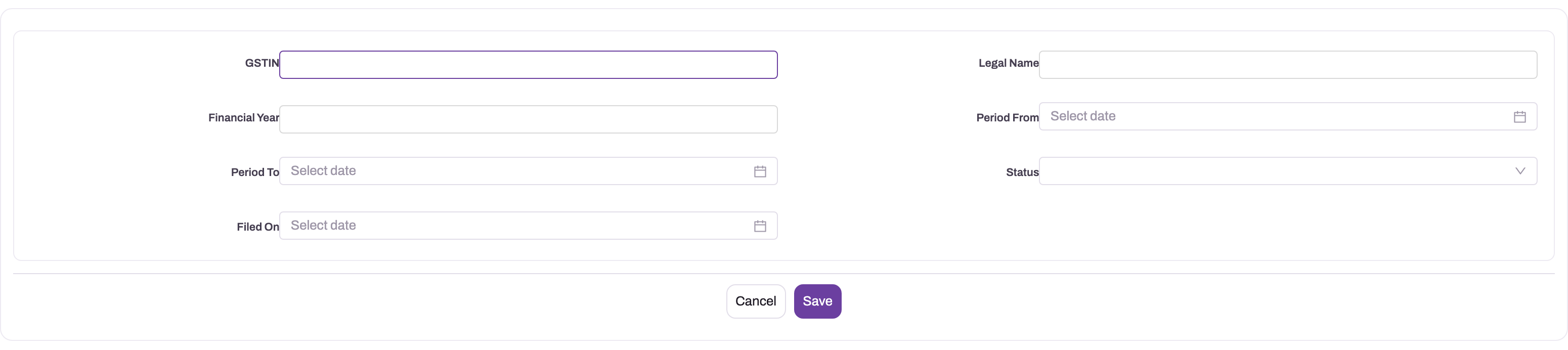
- 1
GSTIN identifies the registration whose monthly returns and ledgers feed this annual rollup.
- 2
Legal Name provides the filing identity that should agree with the selected registration.
- 3
Financial Year is the governing annual boundary for source periods and comparisons.
- 4
Period From and Period To make the exact coverage window explicit before computation or filing.
- 5
Status and Filed On preserve the transition from preparation through completed filing.
Step 2 — Compute the return
Click Compute GSTR9. The Annual Summary fills with every row of the form, Status becomes Computed, and Computed At is stamped. The return's Prerequisite Status records how many months are filed, for example "Complete: 12/12 GSTR-1 and 12/12 GSTR-3B filed." or "Incomplete: 11/12 GSTR-1 and 12/12 GSTR-3B filed." It is not on the standard form; you see it on the first card of the Validation view.
If the figures look empty, use the reload button at the top of the Annual Summary.
Step 3 — Review the computed figures
Work through the tables in the Annual Summary:
- Switch on Hide zero rows to see only the rows that carry figures. The count next to the switch tells you how many rows have values.
- Compare Table 4 and Table 5 with your sales registers, Table 6 and Table 7 with your ITC records, and 8A with the year's GSTR-2B.
- Expand 4N, 6A or 6B to see the filed rollup next to your books. A red Δ means the filed returns and your ledger disagree; find the cause in the source documents before you file.
Step 4 — Enter the rows only you know
On each row tagged Needs input, click Enter value. In the dialog, the current figures are filled in; enter the Taxable value (not shown for Tables 6, 7 and 8, which carry tax only), IGST, CGST, SGST and Cess, and a Reason of at least five characters. Click Save. The row is tagged Overridden, and every sub-total above it is recalculated.
The dialog saves all five figures together, so check each one before you save.
Step 5 — Adjust a computed figure, if you must
If a computed figure is wrong and you cannot correct its source, click Override on the row, enter the figures and a reason, and click Save. The row is tagged Overridden; hover over the tag to see the reason and the version number. To change an override later, click Edit on the row.
Prefer correcting the source: fix the transaction, re-file or amend the monthly return as the law allows, and compute again. An override records that the annual figure no longer matches what you filed.
Step 6 — Check Table 9
Switch to Table 9 — Tax paid. For each description — integrated tax, central tax, state/UT tax, cess, interest, late fee, penalty and other — you see the tax payable, the amount paid in cash, the amount paid through each credit ledger (IGST cr., CGST cr., SGST cr., Cess cr.) and the Shortfall — DRC-03. The credit-ledger columns say which ledger paid the liability: on the integrated tax row, CGST cr. is central-tax credit used to pay integrated tax. Interest, late fee, penalty and other cannot be paid through credit. A shortfall is paid on the portal through DRC-03; the table cannot be edited.
Step 7 — Enter the annual aggregate turnover
Make sure AATO (annual aggregate turnover) is filled in on the return. xMatix never fills it for you, because it is your declaration and the statutory thresholds depend on it. It appears in the page header and is included in the export.
Step 8 — Run the pre-file checklist
Switch to Validation. Before you run anything, three cards show whether the prerequisite is met, whether the return is computed, and whether the portal-owned rows are locked. Click Run pre-file checklist.
- Blocking findings stop the return from advancing: the return has not been computed, it has no rows, or the prerequisite is not met because not all twelve GSTR-1 and GSTR-3B are filed.
- Finding — does not block filing reports a Table 9 shortfall to settle through DRC-03, or tax paid beyond the amount payable to verify.
- When there are no blocking findings, the message reads "No errors — the return advanced to Validated." and Status becomes Validated.
If you compute again after validating, Status goes back to Computed and you must run the checklist again. Entering or overriding a row does not change the status, so run the checklist again yourself after any late change.
Step 9 — File through GSTN
Use this route when your administrator has set up the GSTR-9 integration and placed its buttons on the form.
- Make sure the GSTIN has a live session: on its GST Registration, request the GSTN OTP, submit it, and wait until it is authenticated. A session is treated as expired 6 hours after authentication.
- Optionally, click Get GSTR-9 Auto-Calculated to fetch the figures the portal has calculated for the year, so you can compare them with yours before saving.
- Click Save GSTR-9 to GSTN and confirm. The return must be Computed or Validated. The Final figures and the HSN tables are sent. A few seconds later, reopen the return: GSTN Status reads Completed and Save Reference Id is filled. A save is queued at GSTN, not final — click Get GSTR-9 Details to see what GSTN now holds.
- Click File GSTR-9 on GSTN and confirm. The return must be Validated. When GSTN answers with an acknowledgement, the ARN is filled, Filed On is stamped, Is Filed is set and Status becomes Filed.
Each of these buttons only prepares the request on the return; your tenant's integration sends it and writes the answer back, and xMatix reads the answer automatically. The outcome is always in GSTN Message. Only one request can be in progress per return; if one is still running, you are asked to wait (requests are abandoned after 5 minutes).
If GSTN Message says some rows were not sent because they have no GSTN mapping, enter those rows on the portal before filing (see Common problems).
Step 10 — Or record a filing you made on the portal
If you filed GSTR-9 directly on the government portal, click File To GSTN on a Validated return. This sends nothing to GSTN; it only records the outcome. Is Filed is set, Status becomes Filed and Filed On is stamped. The standard dialog has no ARN or date field, so Filed On is the moment you confirm and the ARN stays empty — keep the portal's acknowledgement with your filing records.
Step 11 — After filing
A Filed GSTR-9 is a frozen statutory snapshot. Compute GSTR9 is refused ("A filed GSTR-9 cannot be recomputed; it is a statutory snapshot."), rows can no longer be entered or overridden, and the return cannot be saved, filed or recorded as filed again. Running the checklist on a Filed return changes nothing.
Step 12 — GSTR-9A and GSTR-9C (through GSTN only)
xMatix does not compute GSTR-9A or GSTR-9C. If your integration is set up, you can send one you prepared elsewhere from the same GSTR-9 record:
- Paste the return's JSON data (for example, from the government's offline tool) into GSTN Manual Payload on the GSTR-9 and save. The GSTIN and return period in it are always replaced with the return's own.
- Click Save GSTR-9C to GSTN (or Save GSTR-9A to GSTN), check Save Reference Id, then click File GSTR-9C on GSTN (or File GSTR-9A on GSTN).
GSTR-9C can be filed only after the GSTR-9 is Filed, and only once; its acknowledgement goes into GSTR-9C ARN and the date into GSTR-9C Filed On. Get GSTR-9 Records for 9C and Get GSTR-9C Summary fetch the portal's figures into Portal 9C Records and Portal 9C Summary.
Fields
| Field | What it means | Notes |
|---|---|---|
| Name | The record's name, for example "GSTR9-29AAAAA0000A1Z5-2025-26" | Set by provisioning; required |
| GSTIN | The GSTIN the annual return is for | Must be a well-formed 15-character GSTIN. Decides which monthly returns and ledger lines are read |
| Legal Name | The registered legal name | Not filled by provisioning; enter it if your process needs it |
| Financial Year | The year covered, written like 2025-26 | Required when creating a return by hand. Decides which months, and which year's form definition, are used. Cannot be moved to another year once the return is past Draft |
| Period From, Period To | The coverage dates | Filled with 1 April and 31 March. They set the date range for the Books lane |
| Status | Where the return is in its lifecycle | Draft → Computed → Validated → Filed, written by the actions. Do not set it by hand |
| AATO | Annual aggregate turnover | Your declaration; never filled by xMatix. Included in the export |
| Prerequisite Status | Whether all twelve months are filed | Written by Compute GSTR9, for example "Complete: 12/12 GSTR-1 and 12/12 GSTR-3B filed." |
| Computed At | When Compute GSTR9 last ran | |
| Filed On | When the return was filed | Stamped by File To GSTN or by a successful filing through GSTN |
| Is Filed | Yes once the return is filed by either route | Set together with Status Filed |
| ARN | The acknowledgement number for the GSTR-9 filing | At most 120 characters. Filled automatically when you file through GSTN |
| GST Registration | The GST Registration the return is filed under | Its GSTN session is used by the GSTN actions; its GSTIN must match the return's |
| GSTN Operation | The last GSTN request made from this return | |
| GSTN Status | Where that request is: Requested, Responded, CallFailed, Completed or Failed | Requested starts the integration. Never edit it by hand |
| GSTN Requested (UTC) | When the request was made | A request is treated as abandoned after 5 minutes |
| GSTN Message | The outcome of the last request, or GSTN's refusal in its own words | |
| GSTN Manual Payload | JSON data for GSTR-9A or GSTR-9C, which xMatix does not compute | Pasted by you before saving or filing those forms |
| Portal Auto-Calculated, Portal Details | The portal's auto-calculated GSTR-9, and the GSTR-9 as saved on the portal | Filled by the Get actions |
| Portal 8A Token, Portal 8A Details | The portal's Table 8A request token and the Table 8A details | Filled by Create GSTR-9 Table 8A and Get GSTR-9 Table 8A |
| Portal 9C Records, Portal 9C Summary | The portal's GSTR-9 records for 9C, and its GSTR-9C summary | Filled by the GSTR-9C Get actions |
| Save Reference Id | The reference GSTN issued for the last save | A save is queued, not final |
| GSTR-9C ARN, GSTR-9C Filed On | The acknowledgement and date of the GSTR-9C filing | Separate from the GSTR-9 ARN |
Each row of the annual grid is a GSTR 9 Summary record (see What each row of the annual grid holds), and each HSN line a GSTR 9 HSN Summary record. The full field lists are in the GSTR 9 Return entity reference, the GSTR 9 Summary reference and the GSTR 9 HSN Summary reference.
Business rules
- Saving a return. A GSTR-9 is refused when its GSTIN is not a valid 15-character GSTIN, when it has neither a financial year nor an annual period, when its year does not match its period, when another GSTR-9 already exists for the same GSTIN and year, or when it is moved to another year after leaving Draft.
- Only filed months count. Compute reads GSTR-1 and GSTR-3B whose status is Filed, for the return's GSTIN, in the twelve months of the financial year.
- Prerequisite. It is complete only when every one of the twelve months has a filed GSTR-1 and a filed GSTR-3B. If fewer than twelve monthly periods exist for the year, the status says so ("only 5/12 GST periods exist").
- Compute is repeatable. It rebuilds every row you have not overridden, keeps your overrides and reasons, refreshes Table 17, and sets Status to Computed. It is refused on a Filed return.
- Overrides need a reason and are refused on locked rows and on a Filed return. Your entries flow into the sub-totals that depend on them.
- The checklist blocks on an uncomputed return, a return with no rows or an incomplete prerequisite. A Table 9 shortfall is reported but does not block. A clean run sets Status to Validated.
- Filing needs Validated. File To GSTN and File GSTR-9 on GSTN are both refused unless Status is Validated, and both are refused on a return that is already Filed.
- Saving to GSTN needs Computed or Validated, a GST Registration for the GSTIN with a session less than 6 hours old, and computed rows to send.
- The export and the GSTN save use the Final lane, so they carry your entries and overrides.
- Filed is one-way. Nothing in the product turns a Filed return back to an earlier status.
Example
A distributor files GSTR-9 for GSTIN 29AAAAA0000A1Z5 for 2025-26. All twelve GSTR-1 and GSTR-3B returns were filed on the portal and recorded as filed in xMatix.
- In April 2026, the provisioning job created "GSTR9-29AAAAA0000A1Z5-2025-26" in Draft.
- After the year closes, the accountant opens it and clicks Compute GSTR9. Prerequisite Status reads "Complete: 12/12 GSTR-1 and 12/12 GSTR-3B filed." and Status is Computed.
- 4B shows taxable B2B supplies of ₹4,80,00,000. Expanding 4N shows a Δ of ₹12,500: the books ledger carries more tax than the filed returns. The accountant traces it to a sales invoice posted in the books but left out of a filed GSTR-1, and agrees with the tax advisor how to report it before going on.
- They click Enter value on 4F, enter advances of ₹2,00,000 with IGST ₹36,000 and the reason "Advance received in March, invoice issued in April". 4H, 4N and 5N update immediately.
- They enter 6A1 (previous-year ITC availed this year) and the Table 15 refund figures, and type AATO ₹5,20,00,000 on the return.
- Table 9 shows a nil shortfall on every description.
- On Validation they click Run pre-file checklist. There are no blocking findings, and Status is Validated.
- The finance manager authenticates the GSTIN, clicks Save GSTR-9 to GSTN, checks the saved figures with Get GSTR-9 Details, and clicks File GSTR-9 on GSTN. The ARN appears and Status is Filed.
Training
Practice exercise
In a sandbox tenant with a GSTIN whose year is only partly filed:
- Open the year's GSTR-9 and click Compute GSTR9.
- Switch to Validation and click Run pre-file checklist.
- Back on Annual Summary, click Enter value on 4F, enter a taxable value of 1,00,000 and IGST of 18,000 with a reason, and save.
- Hover over Override on row 6A.
Expected result:
- After step 1, Status is Computed and Prerequisite Status starts with "Incomplete:".
- In step 2, a Blocking finding says the prerequisite is not met, and Status stays Computed.
- After step 3, 4F is tagged Overridden, and 4H and 4N each rise by the amounts you entered.
- In step 4, the button is disabled and its tooltip explains that the row is auto-filled from the portal.
Quick reference
- One GSTR-9 per GSTIN and year; provisioning creates it, never for an ISD.
- Only Filed GSTR-1 and GSTR-3B are read — file the twelve months first.
- Compute GSTR9 as often as you like before filing; overrides survive.
- Fill every row tagged Needs input; your entries flow into the totals.
- Change figures only in the annual grid. A change saved on a row's own form skips the reason and is lost on the next compute.
- 6A, 8A and Table 9 are locked; settle a Table 9 shortfall through DRC-03.
- Enter AATO yourself — xMatix never guesses it.
- Run the pre-file checklist to reach Validated; compute again and you must re-validate.
- Filing needs Validated: File GSTR-9 on GSTN, or file on the portal and click File To GSTN.
- A Filed return is frozen for good.
Permissions
Each button is a server action that a security profile must grant. In the standard profiles:
| Action | System Admin | Standard User | Sales Manager | Sales Executive |
|---|---|---|---|---|
| Compute GSTR9 | Yes | Yes | No | Yes |
| Get Records (an older name for the same compute) | Yes | Yes | Yes | No |
| Get GSTR9 (loads the annual grid) | Yes | Yes | No | No |
| Override GSTR9 Line (Enter value, Override, Edit) | Yes | Yes | No | No |
| Validate GSTR9 (Run pre-file checklist) | Yes | Yes | No | No |
| Export GSTR9 JSON | Yes | Yes | No | No |
| File To GSTN | Yes | Yes | Yes | No |
| The GSTN actions (Save, File and Get for GSTR-9, 9A and 9C, Read GSTN Reply) | Yes | No | No | No |
When the GSTN actions were added to an existing tenant, profiles that could already compute GSTR-9 received the Get and Read GSTN Reply actions, and profiles that could already use File To GSTN received the Save and File actions. Because saving or filing at GSTN is a statutory act, grant those only to the people who sign the return.
A user without an action does not get that button. A user without Get GSTR9 sees an error instead of the grid. Reading the record also depends on the profile's access to the GSTR 9 Return entity, which all four standard profiles have; see Why can't a user see a record?.
All four standard profiles also have full access to the GSTR 9 Summary rows, so anyone with one of them can open, create and change rows on their own form. That bypasses the reason, the sub-total recalculation and the filed-return lock. If only the people preparing the return should touch the figures, give other profiles read-only access to GSTR 9 Summary. The grid's Enter value, Override and Edit buttons are granted separately, through the Override GSTR9 Line action.
Configuration
- Provisioning. The Provision GST returns scheduled job (Setup → Administration → Jobs) creates the year's GSTR-9 with the first month it provisions, for every active registration that is not an ISD. Provision GST Returns on a GST Registration or a monthly GST fiscal period does the same on demand. It refuses an annual period: provision any month of the year instead. See The GST console.
- GST registrations. Each GSTIN needs an active GST Registration. Registrations with Enable ISD get no GSTR-9. To file through GSTN, the registration must be authenticated with GSTN through its OTP actions; a session lasts about 6 hours.
- The monthly returns. GSTR-9 is only as good as its sources: make sure each month's GSTR-1 and GSTR-3B is filed, and that each GSTR-3B carries its table 6.1 payment rows and reversal reasons, because the reason text decides which Table 7 row a reversal lands in.
- GSTN integration (Setup → Platform → Integrations). Filing through GSTN needs one integration flow, in the integration app that holds your GSP connection, with an entity-event trigger on GSTR 9 Return updates where GSTN Status becomes Requested. That one flow carries every GSTR-9, 9A and 9C request: it sends the request prepared on the return and writes the reply back to GSTN Response Payload and GSTN Status (Responded or CallFailed). Use the same GSP connection and partner credentials as your other GST return flows. Without the flow the buttons still respond, but nothing reaches GSTN and GSTN Status stays at Requested. See Outbound integrations.
- The form. The standard page header shows only Compute GSTR9 and File To GSTN; the checklist runs from the grid's Validation view. If your filers use GSTN, add the GSTN buttons you need (for example Save GSTR-9 to GSTN, File GSTR-9 on GSTN, Get GSTR-9 Auto-Calculated, Get GSTR-9 Details, Read GSTN Reply) to the page header, and GSTN Status, GSTN Message, Save Reference Id and GSTN Manual Payload to the Details tab, in the form designer. Add Export GSTR9 JSON if you want the JSON export, and AATO and ARN to Details if your users should edit them there. The annual grid can be set to start with zero rows hidden.
- The form definition. Each financial year's rows are held as GSTR 9 Config records, created the first time the year is computed. A shipped correction to a row updates your records automatically unless the record is marked Is Customized, which protects a deliberate change. Change these records only when you know the statutory form well; a mistake surfaces as a compute error naming the row. No form is shipped for them, so they open read-only until an administrator adds a layout. See The GSTR-9 form definition for how to read, change and reset a row.
- Row numbering. Each annual-grid row is numbered by the GSTR 9 Summary Document Name Setting (series GSTR9S). The HSN rows use the GSTR9 HSN Summary Name Setting (series GST9HSN). Every row a compute rebuilds gets a new number, so nothing should depend on a row's name.
- Security profiles. Grant the actions as described in Permissions, and decide who may change GSTR 9 Summary rows directly.
- Mobile. The GSTR 9 Return has a mobile layout showing the summary rows and the header details. Whether it is reachable in the field app depends on your mobile app configuration.
Common problems
Every figure is zero
The monthly returns are not Filed in xMatix. Only Filed GSTR-1 and GSTR-3B are read. File them, or record the filings you made on the portal, and compute again.
Table 9 shows a shortfall on every head although tax was paid all year
Table 9 reads the table 6.1 rows of each Filed GSTR-3B. Process GSTR3B fills the tax payable per head on those rows, but never the amounts paid in cash or through each credit ledger, because xMatix does not hold your electronic ledgers. If nobody recorded the paid amounts, every rupee payable shows as a shortfall. Record the paid amounts on each month's 6.1 head rows (see GSTR-3B), then compute again. If Table 9 is zero altogether, the monthly returns were never processed before they were filed (for example, recorded with Record Manual Filing only), so they have no 6.1 rows.
"Prerequisite not met: Incomplete: … (all 12 GSTR-1 + GSTR-3B must be filed)."
At least one month's GSTR-1 or GSTR-3B is not Filed for this GSTIN, or a month's period does not exist ("only n/12 GST periods exist"). Provision and file the missing months, then compute again.
"A GSTR-9 return for … already exists for this financial year; use it instead of creating a second one."
Each GSTIN has one GSTR-9 per year. Open the existing one.
"'…' is not a valid 15-character GSTIN."
The GSTIN on the return is malformed. Correct it before saving.
"This GSTR-9 is … and cannot be moved to another financial year; its summary was computed for the original one."
Once a return has been computed, it stays with its year. Use the return for the other year.
Table 4 or 5 is higher than the GSTR-1 returns you filed
The outward-supply rows add up the rate lines of every books-side document in the year's filed GSTR-1 returns. The decisions you recorded on GSTR-1 documents are kept on the document, not on its rate lines, and GSTR-9 does not check them. A document you ignored in GSTR-1 is still counted, and a document you carried forward is counted twice: once in the month it came from and once in the month it was carried to. Find those documents on the GSTR-1 Reconciliations tabs, then correct the affected rows with Override and give the reason.
The Override button is disabled
The row is locked (6A, 8A and Table 9 come from the portal's records) or calculated from other rows (marked ƒ). Change the rows it adds up, or settle a Table 9 difference through DRC-03.
"A reason is mandatory when overriding a GSTR-9 line (audit trail)."
Every entry and override needs a reason. Type one and save again.
A figure I changed on a row's own form disappeared after Compute GSTR9
Saving a GSTR 9 Summary record on its own form does not mark the row as overridden, so the next compute removes the row and rebuilds it from the filed returns. Such a save also skips the reason and does not update the sub-totals. Enter the figure with Enter value or Override in the annual grid instead. See What each row of the annual grid holds.
The row names in the GSTR 9 Summary list changed
Every compute rebuilds the rows you have not overridden, and each new row gets a new number in the GSTR9S series. Use the Table Row Code, for example 4B, to find a row.
Source Module, Tax Type and Serial Number are blank on every row
xMatix does not fill these fields. The row's Logic Type and its GSTR 9 Config record tell you how its figure is produced.
Reset on an overridden row fails
The annual grid shows Reset on overridden rows, but the reset action is not included in the standard configuration, so the request is refused. To undo an override, click Edit and enter the figures shown in the Filed lane, with a reason that says you are reverting. The row stays marked Overridden.
"GSTR-9 '…' is 'Computed'; run ValidateGSTR9 and reach Validated before filing."
File To GSTN needs a Validated return. Run the pre-file checklist and clear its blocking findings. The GSTN route says "Run Validate and reach Validated before filing." for the same reason.
"A filed GSTR-9 cannot be recomputed; it is a statutory snapshot."
The return is Filed. Nothing on it can change; corrections go through the means the law provides, outside this return.
"… is not authenticated with GSTN. Request an OTP and complete authentication on the GST registration first."
The GSTIN has no GSTN session, or it has expired ("The GSTN session for … has expired"). Authenticate the GST Registration again. "No GST registration found for …" means the GSTIN has no GST Registration record; "This return is for … but its GST registration is …" means the return's GST Registration belongs to another GSTIN.
"… is already with GSTN for this return. Wait for it to finish …"
A request from this return is still running. Wait a few seconds and reopen the return. If GSTN Status is still Requested after 5 minutes, the integration flow did not run or did not write back; your administrator should check the flow's trigger and run history. You can then try again.
GSTN Status is Failed
GSTN or the gateway refused the request. GSTN Message gives the reason in GSTN's own words, for example "GSTN refused the request (…): …". Fix the cause and run the action again. If a reply arrived but was not read, click Read GSTN Reply.
GSTN Message says some rows were "Not sent (no GSTN key mapped yet; enter these on the portal)"
Rows 4G1, 5C1, 6A1, 6A2, 7A1, 8H1 and 14 cannot be sent to GSTN from xMatix. Enter the rows listed in the message on the portal before filing. Also note that the portal splits 6B, 6C, 6D and 6E into inputs, capital goods and input services, which the filed GSTR-3B does not record. xMatix sends 6B and 6E each as one inputs line, and 6C and 6D together as one line. The totals are right but the split is not, so correct it on the portal if it matters to you.
Saving GSTR-9C or GSTR-9A asks you to paste its JSON
The message says xMatix does not compute that form. Saving or filing GSTR-9A or GSTR-9C needs its JSON in GSTN Manual Payload. Paste it, save the return and run the action again.
"GSTR-9C is filed after GSTR-9. File the GSTR-9 first."
File the GSTR-9, then the GSTR-9C.
Table 17 shows the same HSN code twice, at 9 and at 18
The code was sold both within the state and across states. Table 17 keeps the rate of each tax line, so intra-state sales appear at the central and state rate (9 for an 18% item) and inter-state sales at the integrated rate (18). Both rows are correct sums of what you filed in GSTR-1; they cannot be merged in xMatix. See How the HSN tables are built.
Table 17 has a row with no HSN code, or Table 18 is empty
A row with no code adds up sales lines that had no HSN/SAC code; it is not sent to GSTN. Give the items their HSN/SAC Code so future sales carry it (see GSTR-1). Table 18 is never built or sent by xMatix. If your registration must report either, complete those entries on the government portal before you file there, then record the filing with File To GSTN.
Common questions
Does xMatix prepare GSTR-9C?
No. xMatix computes GSTR-9 only. The Books lane gives you a books-versus-filed comparison on a few rows, but the reconciliation with audited financial statements that GSTR-9C needs is prepared outside the product. If your GSTN integration is set up, you can save and file a GSTR-9C you prepared elsewhere from the GSTR-9 record, by pasting its JSON into GSTN Manual Payload.
Why did my entry on 4F change 4H, 4N and 5N?
Because those sub-totals include 4F. Whenever you enter or override a row, xMatix recalculates every sub-total that depends on it, so the return stays consistent and the export carries the right totals. The Computed lane of those sub-totals does not change, so the variance still compares what you filed with your books. A sub-total that you overrode yourself keeps your figure.
Will computing again lose my entries?
No. Compute GSTR9 rebuilds only the rows you have not overridden. On the rows you have, it refreshes the Computed and Books lanes but keeps your figures and your reason, and the sub-totals are recalculated from them. If the return was Validated, it goes back to Computed, so run the pre-file checklist again before filing.
Can I file GSTR-9 before all twelve months are filed?
Not from xMatix. The pre-file checklist blocks until every month's GSTR-1 and GSTR-3B for the GSTIN is Filed, and both filing routes need a Validated return. You can compute at any time to see the year so far, but treat those figures as provisional.
What does the Export GSTR9 JSON action produce?
JSON built from the Final lane: the GSTIN, the financial year, the annual aggregate turnover and, for every row code, its taxable value, IGST, CGST, SGST and cess. It is a first-cut payload for review and hand-off, not the complete layout of the government's offline tool, so do not upload it to the portal as it is. To send the return to GSTN, use Save GSTR-9 to GSTN, which builds GSTN's own format from the same Final lane, including the HSN tables.