
The chart of accounts is the list of GL accounts every journal line posts to. Around it sit three structures that decide how postings happen: accounting books (parallel valuation perspectives per company), posting definitions (which account each document line hits), and the fiscal calendar (which dates are open for posting). All four are maintained in the Finance app's Settings area.
Read the screen
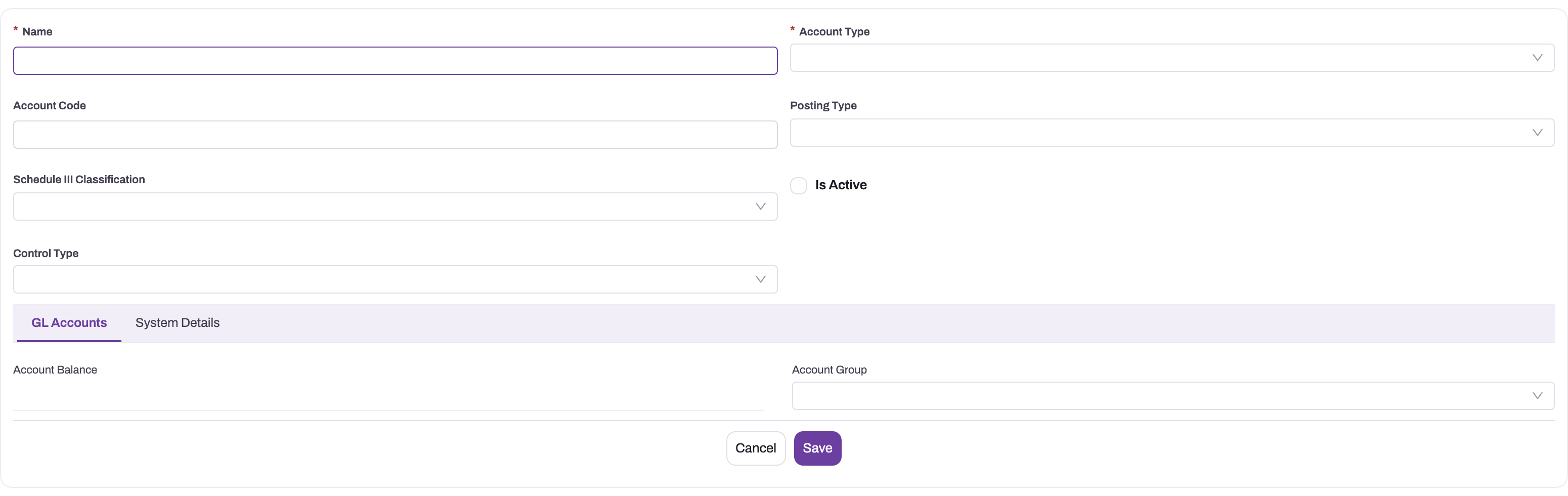
- 1
Name is required; Account Code is the optional durable code used in reporting and integrations.
- 2
Account Type records the economic category; Posting Type is a separate classification immediately below it.
- 3
Schedule III Classification is the primary statutory placement used by the statements, with Account Type as fallback.
- 4
Control Type labels the intended subledger role. Party enforcement also depends on IsControlAccount, which this create layout does not expose.
- 5
The GL Accounts tab includes Account Balance and Account Group; a new unsaved account has no balance yet.
The account form turns a reporting idea into a ledger master. Begin with a durable Name and optional Account Code, then select the Account Type that matches the economic substance. For statement placement, the statements use Schedule III Classification and fall back to Account Type; they never use Posting Type.
Control Type and Is Control Account are separate settings. Control Type lets features such as withholding tax and payroll find the account. Is Control Account makes a customer or supplier mandatory on every line. The create form shows only Control Type; Is Control Account appears on the record page, in the Applicability section of the Details tab. Tick it only for receivables and payables controls — see Mark a control account for the ways to set it.
GL accounts
Each GL account belongs to one company and carries an Account Type, and can carry a Schedule III classification. Statements use Schedule III when present and otherwise fall back to Account Type. The full procedure — seeding a chart from a template, creating and retiring accounts, tagging control accounts and reading an account's ledger — is in GL accounts.
Control accounts
A control account summarizes a subledger inside the general ledger. Party enforcement applies only when Is Control Account is ticked. The withholding, payroll and employee controls carry a Control Type but are kept with Is Control Account cleared. The usual control accounts are:
| Control type | Summarizes |
|---|---|
| Accounts Receivable | Customer open items |
| Accounts Payable | Supplier open items |
| Bank | Bank account activity |
| Inventory | Inventory value layers |
| Tax payable / tax credit | Output and input tax captured from documents |
| Withholding payable | Tax withheld or collected on documents |
| Inter-business-unit | Cross-division balances |
Reconciliation reports compare each control account's posted balance against the detail it summarizes and flag any difference — see AR and AP subledgers.
Accounting books
An accounting book is a valuation perspective for a company. Each company that keeps stock needs one active primary book: it is the book inventory costing posts to. Without it, stock moves but is never valued. Secondary books, such as a tax or management book, restate only inventory value and cost of goods sold. They do this through overlay rows on the statements, not through journals of their own. xMatix does not check that a company has only one primary book, so keep exactly one. Setup, statements by book and troubleshooting are covered in Accounting books.
Posting definitions
A posting definition decides which GL account one leg of a document's journal posts to. Each definition names the document or line (Entity Name), the leg (Posting Role, such as Header, Line, Tax or Rounding) and, for tax, the tax component. It can be narrowed to a company, branch, item, customer or supplier. When a document posts, an account named on the document itself wins first. After that, the most specific matching definition is used. If none matches, xMatix falls back to the company's chart by account type. The standard product ships no definitions, so you add them only where the chart default is not the account you want. Round-off, document charges and write-offs have no chart fallback and always need one.
If no account resolves for a leg, the document does not post, and the message says which leg and account type it could not resolve. Add the account to the chart or add a posting definition rather than posting manually. The full setup, with every entity name and posting role xMatix reads, is in Posting definitions.
Fiscal years and periods
The fiscal calendar gates posting: a journal posts only into a period whose status is Open, inside a fiscal year whose status is also Open. The full procedure is in Fiscal years and periods.
- Create a fiscal year (name, company, start and end date) and generate its periods — one Open period per calendar month of the year.
- The exposed Fiscal Period actions implement Open → Closed, Closed → Open, and Lock. There is no first-party Soft Close action, and posting does not include a “soft-closed with permission” branch.
- A journal's posting period is derived from its document or journal date, validated against the open period — a March invoice entered in April still lands in March.
Common questions
What happens when a document line cannot resolve a GL account?
The posting fails with a message that starts "No GL account resolved for …" and names the leg and account type. It never guesses an account. Add an account of that type to the company's chart, or add or correct the posting definition for that leg, then post the document again. A party is also mandatory on any control-account line, so a receivable or payable line without a customer or supplier fails the same way.
Can I post into last month?
Only while last month's period is Open. A Closed period must be reopened before posting; a Locked period is not accepted. The period comes from the journal date, so backdating targets the earlier period only if that period is Open.
Do I need more than one accounting book?
Most companies need only the one active primary book. Add a secondary book only when you must report inventory and cost of goods sold on a second costing basis. A secondary book needs its own valuation policies, and its figures must be refreshed with Recompute before you report. See Accounting books.