
An inventory valuation policy decides which costing method xMatix uses for a set of stock movements within one accounting book. You set it up once per company and book, and change it rarely. It sits between the accounting book, which must exist first, and the costing engine, which reads the winning policy every time a stock movement is posted or a valuation statement is opened. What the engine then does with the method (cost layers, consumptions, cost journals) is explained in Inventory valuation and costing.
Overview
A policy is a rule with three parts:
- Which book. Every policy belongs to one accounting book. The company's primary book is the one that posts cost of goods sold. A secondary book (tax or management) uses its own policies to restate inventory on the statements.
- Which stock. Optional scope keys: Partner Account (the company), Business Unit, Branch, Item Group and Item, plus an Effective From / Effective To window. An empty key matches everything.
- Which method. Valuation Method: FIFO, LIFO, Weighted Average or Moving Average.
When no active policy matches a movement, the book values it at moving average. A company that is happy with moving average everywhere needs no policy at all.
When to use it
- You want a method other than moving average, for example FIFO for the whole company.
- One branch, business unit, item group or item needs a different method from the rest.
- A secondary book (for example a management book) should value stock differently from the statutory book.
- A method change should take effect from a date. Note that the new method then re-costs the whole history of each item and branch (see Business rules).
How xMatix handles it
For each item and branch, xMatix takes all the book's policies and keeps those that are active, whose window includes the date being costed, and whose filled-in scope keys all match. Business Unit matches the business unit set on the movement's branch. Item Group matches when the item is a member of that group (a member row whose Is Active is switched off doesn't count).
Among the policies that match, the most specific one wins. Specificity is scored: Item 16, Item Group 8, Branch 2, Business Unit 1. Partner Account adds nothing. On a tie, the lower Priority number wins, then the later Effective From. The winner's Valuation Method is used. If the winner has no method, or nothing matches, the method is moving average.
The date being costed is the latest document date in the posting being costed. On the Valuation Statement and secondary-book statements it is each column's date.
Prerequisites
- An active accounting book for the company. For costing to run at all, one of the company's books must be ticked Is Primary. See Accounting books.
- Access to the Finance Setup app and create access on Inventory Valuation Policy (see Permissions).
- If you plan LIFO: the book must have Allows Lifo ticked, and its Gaap Framework must not be Ind AS or IFRS.
Procedure
Step 1 — Open the policy list
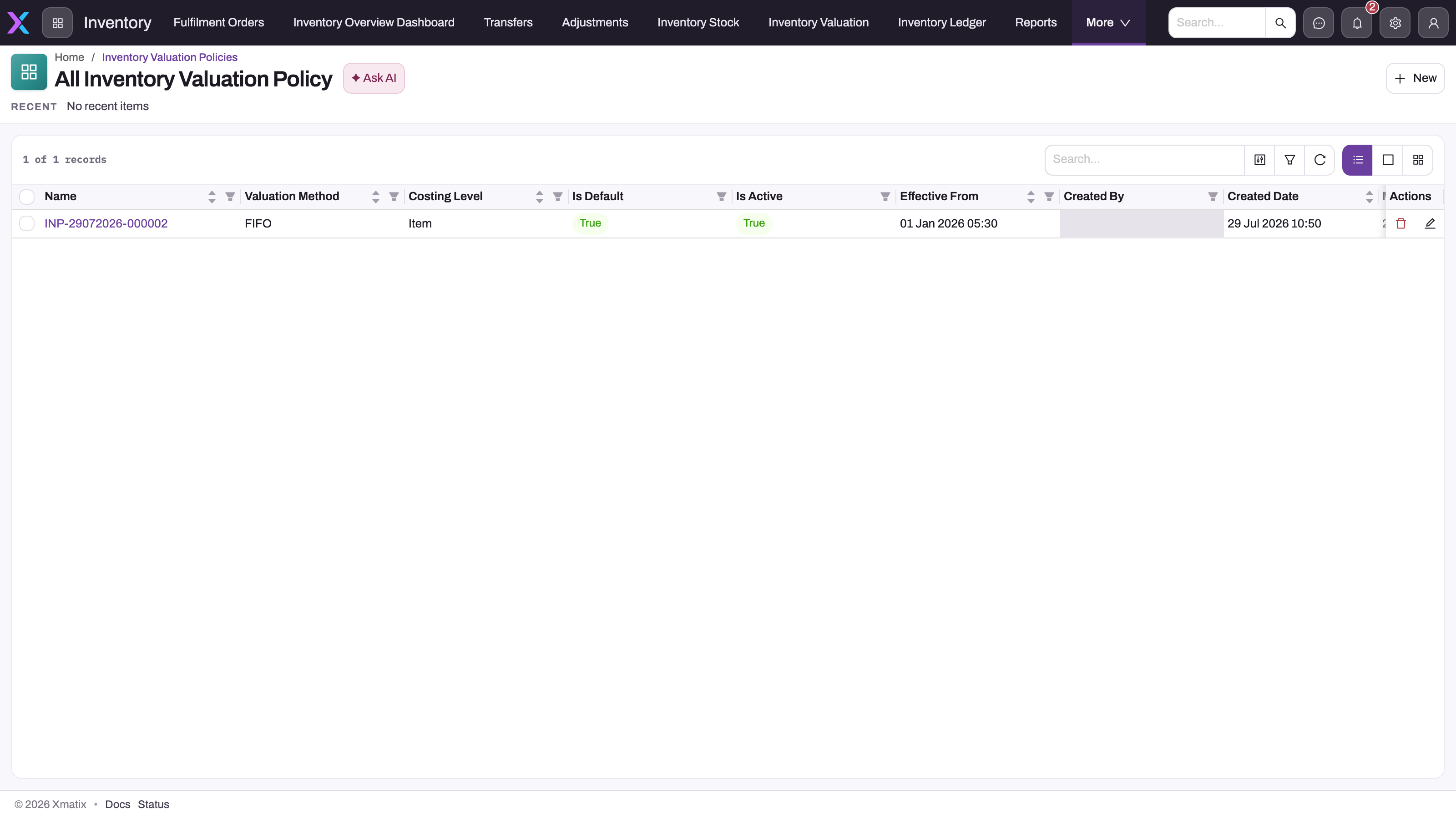
Open Finance Setup → Books & Posting → Inventory Valuation Policies. The All Inventory Valuation Policy list shows Name, Valuation Method, Costing Level, Is Default, Is Active, Effective From and the audit columns. Review the policies that already exist for the book before you add one, because a second active policy with exactly the same scope and overlapping dates is refused.
Step 2 — Start a new policy and set the scope
Select New. The form has three scope fields above three tabs.
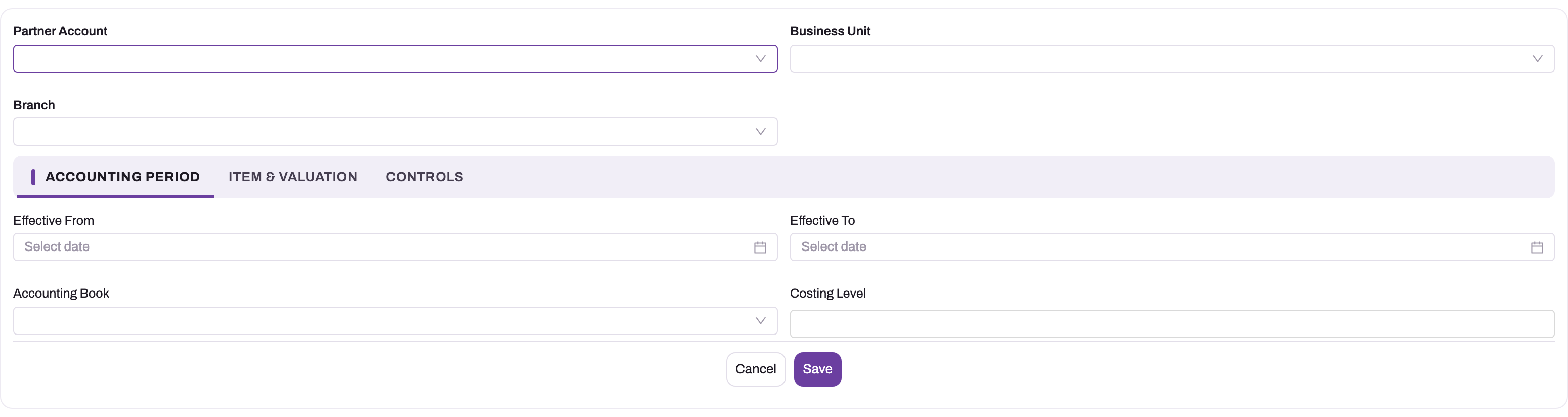
- Partner Account: choose the company. You can leave it empty, but keep the same choice across a book's policies (see Common problems).
- Business Unit and Branch: fill one only if the policy is for that part of the company. Leave both empty for a company-wide policy.
Step 3 — Fill in the Accounting Period tab
- Effective From: the first date the policy applies. Leave it empty to apply from the beginning.
- Effective To: the last date, or empty for no end.
- Accounting Book: the book the policy is for. This is required: a policy without a book is refused.
- Costing Level: optional. Type one of
Company,Business Unit,Branch,Storage Location,Item,BatchorSerial Number. It is checked on save but doesn't change how stock is pooled.
Step 4 — Choose the method on the Item & Valuation tab
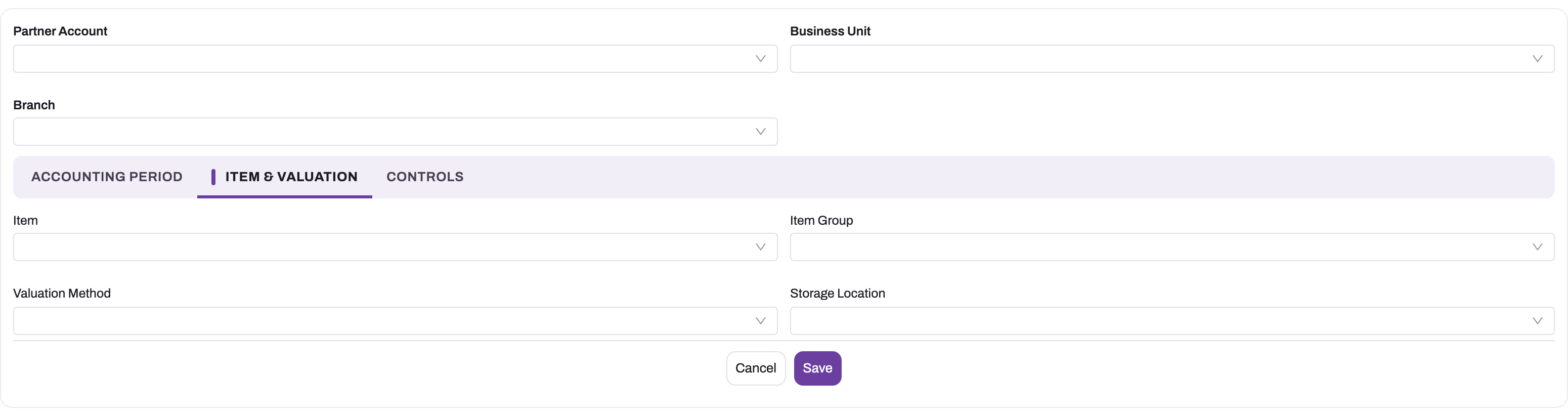
- Item or Item Group: fill one to narrow the policy to an item or a group of items. Leave both empty for every item.
- Valuation Method: choose FIFO, LIFO, Weighted Average or Moving Average. Weighted Average is refused on the primary book. LIFO is refused on an Ind AS or IFRS book and on a book without Allows Lifo.
- Storage Location: leave it empty. A policy scoped to a storage location is refused, because stock is costed per branch.
Step 5 — Check the Controls tab and save
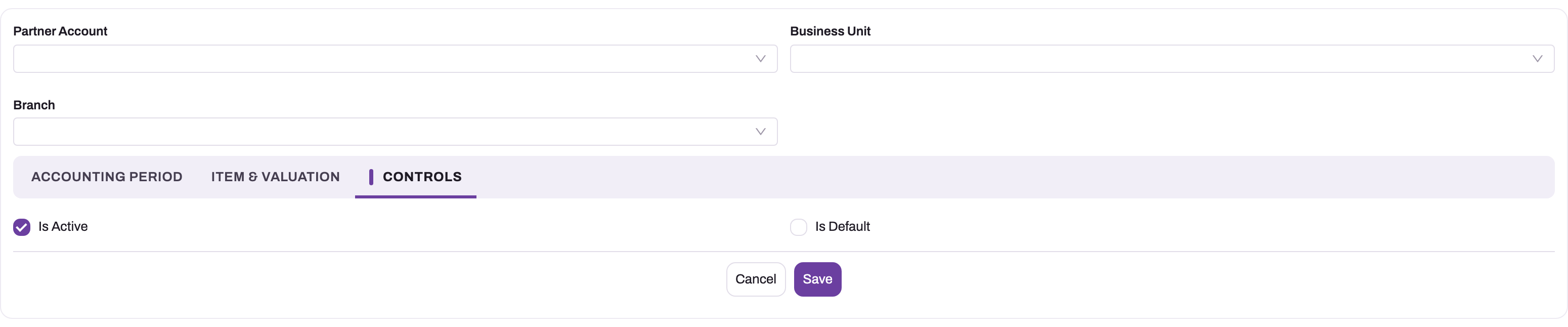
- Is Active: leave it ticked for a policy you want applied.
- Is Default: optional. It is stored but doesn't affect which policy wins.
- Select Save.
The policy is saved with a number such as INP-29102026-000001 as its Name. When you open it, the record page header shows Partner Account, Business Unit and Branch, and the page has three sections: Accounting Period, Item & Valuation and Controls. If something is wrong, the save is refused with The inventory valuation policy cannot be saved. and the reason. See Common problems.
The policy applies from the next costing of each item and branch it covers. Stored cost layers change at the next posting for that item and branch. The Valuation Statement changes the next time it is opened.
Step 6 — Change a policy
Open the policy and select Edit in the page header, or Edit on its row in the list. The edit form is the same as the New form. Saving an active policy runs the same checks as a new one. To change the method from a date, don't edit the old policy's method. Set the old policy's Effective To, then create a new policy that starts the next day.
Step 7 — Retire or delete a policy
To stop a policy applying, clear Is Active on the Controls tab and save. An inactive policy is never checked, so this works even for an old policy that wouldn't pass today's checks. Delete (record page header, list row, or several rows selected in the list) removes the policy without any check. Either way, the items it covered fall to the next matching policy, or to moving average, from their next costing.
Clone copies a policy, but the copy has the same scope and dates. If the original is active, change the copy's scope or dates before you save it, otherwise the copy is refused as an overlap.
Fields
| Field | What it means | Notes |
|---|---|---|
| Name | The policy's number. | Set on save from the numbering setting, as INP- + date (DDMMYYYY) + a six-digit counter that restarts each day. Not on the form. |
| Partner Account | The company the policy applies to. | Optional scope key. When filled, only that company's movements match. Adds nothing to specificity. |
| Business Unit | Narrows the policy to branches of one business unit. | Optional. Matches the business unit set on the movement's branch. Specificity 1. |
| Branch | Narrows the policy to one branch. | Optional. Specificity 2. |
| Effective From | First date the policy applies. | Optional. Empty means from the beginning. |
| Effective To | Last date the policy applies. | Optional. Empty means no end. Must not be before Effective From. |
| Accounting Book | The book this policy values stock for. | Required on save for an active policy. Only this book's policies are considered for it. |
| Costing Level | The cost-pool level you intend. | Free text. Accepted: Company, Business Unit, Branch, Storage Location, Item, Batch, Serial Number (spaces and case ignored). Checked against the method, but stock is always pooled per book, item and branch. |
| Item | Narrows the policy to one item. | Optional. Specificity 16, the strongest key. |
| Item Group | Narrows the policy to the members of an item group. | Optional. Any group type. Members switched inactive are ignored. Specificity 8. |
| Valuation Method | The costing method. | Picklist: FIFO, LIFO, Weighted Average, Moving Average. Empty means moving average. Spaces and case are ignored when the method is read. |
| Storage Location | Not usable. | An active policy with a storage location is refused. |
| Is Active | Whether the policy is applied. | Only a cleared box excludes the policy. Inactive policies are never checked on save. |
| Is Default | A marker for the company-wide policy. | Stored only. It doesn't affect which policy wins. |
| Priority | Tie-breaker between equally specific policies. | Lower number wins. Empty ranks last. Not on the shipped form (add it with Design Studio if you need it). |
Business rules
- Checks on save. An active policy, new or edited, is refused when:
- it has no Accounting Book, or the book no longer exists;
- the method is LIFO and the book's Gaap Framework is Ind AS or IFRS, or the book doesn't have Allows Lifo;
- the method is Weighted Average and the book is the primary book (the primary book posts cost of goods sold as goods leave, before a period's average is known);
- the method is Standard Cost on an Ind AS or IFRS book without Allows Standard Cost;
- the method is Specific Identification and Costing Level isn't Batch or Serial Number, or the method is FIFO, LIFO or an average and Costing Level is Serial Number;
- the method or Costing Level isn't one of the accepted values;
- it has a Storage Location;
- Effective To is before Effective From;
- another active policy of the same book has exactly the same scope (all six keys equal, empty counting as a value) and an overlapping window. Empty dates count as open-ended.
- Spelling doesn't matter. Moving Average, moving average and
MovingAverageare the same method. The value is stored as you picked or typed it. The same goes for Costing Level and the book's Gaap Framework. - Methods the engine treats differently. An older active Weighted Average policy on the primary book is costed as moving average when movements post. Standard Cost and Specific Identification aren't in the picklist. A policy that ends up with Standard Cost leaves its items uncosted. See Costing methods.
- A method change re-costs history. One method applies to an item and branch's whole history. It is the method in force on the date being costed. When a new policy takes over, the next costing replays earlier receipts and issues under the new method too, and the old method's layers stay behind. See Inventory valuation and costing.
- Partner Account and specificity. A policy with Partner Account filled and one without it are different scopes, so both can be active for the same dates. They score the same, so Priority decides, then the later Effective From.
- No cascade on delete. Deleting a policy changes nothing until the next costing of the items it covered.
Example
A company values all stock at moving average in its statutory book (no policy), but wants its spare parts at FIFO from 1 April.
- The finance administrator opens Finance Setup → Books & Posting → Inventory Valuation Policies and selects New.
- They choose the company in Partner Account, leave Business Unit and Branch empty, set Effective From to 1 April and Accounting Book to the company's primary book.
- On Item & Valuation, they choose the Spare Parts item group and Valuation Method FIFO. They save. The policy is numbered
INP-…. - A goods receipt for a spare part posts on 3 April. The item group policy (score 8) is the only match, so the item and branch are costed FIFO, including their history before April. Other items still match nothing and stay on moving average.
- Later, someone tries to add a second FIFO policy for the same group and book from 1 May. The save is refused because the first policy covers the same scope for overlapping dates. They set the first policy's Effective To instead.
Training
Practice exercise
In a sandbox company with an active primary book (Gaap Framework IndAS):
- Create a policy on the primary book with Valuation Method LIFO. Expected: the save is refused with a message that LIFO is prohibited under IndAS.
- Change the method to Weighted Average and save. Expected: refused, because periodic weighted average can only be used on a secondary book.
- Change the method to FIFO and save. Expected: saved, with a
INP-number. - Create a second FIFO policy with the same empty scope and no dates. Expected: refused, naming the first policy.
- Clear Is Active on the first policy and save. Expected: saved. The items fall back to moving average from their next costing.
Quick reference
- No matching policy means moving average.
- Accounting Book is required on an active policy.
- Most specific wins: Item 16, Item Group 8, Branch 2, Business Unit 1. Then lower Priority, then later Effective From.
- Never scope a policy to a storage location.
- No Weighted Average on the primary book. No LIFO on Ind AS or IFRS books, or without Allows Lifo.
- One active policy per exact scope and date range in a book.
- Is Default and Costing Level don't change which pool or policy is used.
- Retire a policy by clearing Is Active. Inactive policies are never checked.
- A method change re-costs the item and branch's whole history.
Permissions
A user needs the Finance Setup app and access to Inventory Valuation Policy in their security profile. New, Edit and Delete follow the profile's create, edit and delete access on the entity. The seeded System Admin, Standard User and Sales Executive profiles have full access. Because a policy changes cost of goods sold and stock value, consider reducing this to read-only for everyone except finance administrators. Costing itself needs no grant: it runs as part of each posting.
Configuration
| What | Where | Effect |
|---|---|---|
| Policies | Finance Setup → Books & Posting → Inventory Valuation Policies | The method per book and scope. |
| Accounting books | Finance Setup → Books & Posting → Accounting Books | Which book is primary. Gaap Framework, Allows Lifo and Allows Standard Cost decide which methods a policy may use. See Accounting books. |
| Item group members | Item group Members tab | Decides which items an Item Group policy covers. See Item groups. |
| Branch business unit | The branch record | Decides which branches a Business Unit policy covers. See Business units. |
| Policy numbering | Setup → Feature Hub → Platform → Document settings, the Inventory Valuation Policy setting | Series INP, date {DD}{MM}{YYYY}, six digits. See Document numbering. |
| Form and list | Setup → Design Studio → Entities → Inventory Valuation Policy | Add Priority to the form if you use tie-breaks. |
| Re-cost after a change | Rebuild inventory cost job | Re-costs layers and consumptions under the current methods without waiting for postings. See Inventory valuation configuration. |
Common problems
"Choose the accounting book this policy values stock for."
The policy has no Accounting Book. Pick the book on the Accounting Period tab and save again.
"LIFO is prohibited under IndAS" or "LIFO requires the accounting book to explicitly allow it"
LIFO is never allowed on an Ind AS or IFRS book. On another book, tick Allows Lifo on the book first. Otherwise choose FIFO or Moving Average.
"Periodic Weighted Average can only be used on a secondary book"
The book is the primary book. Use Moving Average, which is the perpetual weighted average, or FIFO. Weighted Average stays available on secondary books.
"A valuation policy cannot be scoped to a storage location"
Clear Storage Location on the Item & Valuation tab and scope the policy by branch instead.
"… is not a costing level" or "Specific Identification requires CostingLevel Batch or SerialNumber"
Costing Level is free text. Clear it, or type one of the accepted values. FIFO, LIFO and the averages can't use Serial Number.
"EffectiveTo cannot be before EffectiveFrom."
Correct the dates on the Accounting Period tab.
"Policy '…' already covers the same scope of this book for overlapping dates."
Another active policy of the book has identical scope keys and overlapping dates. Narrow the new policy's scope, set the other policy's Effective To to the day before, or clear its Is Active.
My policy saved but items are still on the old method
Check, in order: that the policy's book is the company's active primary book (for posted costs) or the book chosen on the statement; that its dates include the date being costed; that a more specific policy doesn't win (Item beats Item Group, which beats Branch); that the item really is an active member of the group, or that the branch has the business unit you scoped. Stored layers only change at the item and branch's next posting, or when Rebuild inventory cost runs.
Two policies tie and the wrong one wins
Equally specific policies are decided by Priority, then by the later Effective From. This includes a policy with Partner Account and one without it. Add Priority to the form, or give one policy a narrower scope.
Common questions
Do I need a policy to get costing at all?
No. Costing needs an active primary accounting book for the company. Without any matching policy, the book values stock at moving average, a perpetual average recalculated at each receipt. You need a policy only when you want FIFO, LIFO (on a book that allows it) or a periodic weighted average on a secondary book, or when part of the company should use a different method from the rest. A secondary book with no policy also values at moving average, so it shows the same figures as a primary book without a policy.
Can I switch from moving average to FIFO from next month only?
You can make a FIFO policy start next month, but the change isn't prospective in the costed figures. From the first costing after the start date, each item and branch's whole history is replayed under FIFO, and the old moving-average layers stay behind. Postings before the start date keep the cost journals they already posted. The Valuation Statement shows past columns under the method that was in force on each column's date. Plan the change for a period boundary and check the figures afterwards. See Inventory valuation and costing.
Why can't I pick Specific Identification or Standard Cost?
Neither is in the shipped Valuation Method picklist. The engine can cost specific identification, keyed by the lot each movement names, and the save checks accept it when Costing Level is Batch or Serial Number. Adding it needs a picklist change by an administrator. Standard cost passes the checks on a book that allows it, but the engine doesn't compute it, so items under it get no cost layers and no cost journal. Don't use it.
Does Is Default make a policy the fallback?
No. Is Default is stored but nothing reads it. A policy with no scope keys is the fallback anyway, because it matches every movement with the lowest specificity. Any more specific policy beats it. If two unscoped policies are active in one book, the second is refused as an overlap unless their dates don't overlap.