
xMatix items carry two standard inventory classifications: ABC, which ranks items by value contribution, and FSN, which ranks them by movement speed (fast, slow, non-moving). They are maintained attributes — your team sets them, by hand, import or integration; xMatix does not recompute them — and the platform reads them in two places: automatic purchase-order generation can exclude categories, and cycle counts can scope their item population by them. Reports use them as analysis dimensions. Because those features match the stored text exactly, the value that matters is the one on the item inventory attribute for the branch, spelled exactly as listed below.
Where the classifications live
- 1
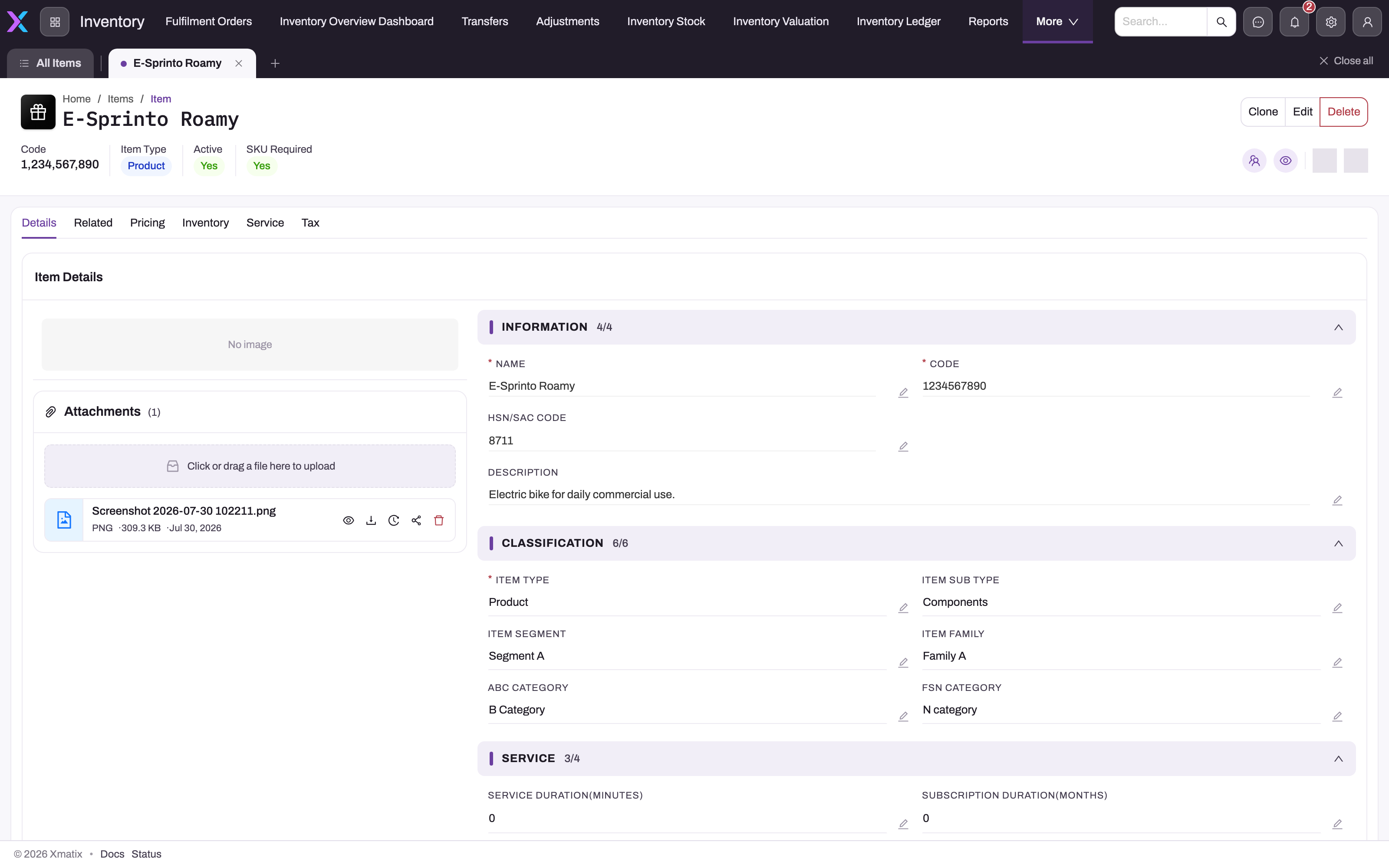
The header shows the item's code, type, active and SKU-required flags.
- 2
Details is the saved-record tab; Classification is one of its sections.
- 3
Classification groups the descriptive taxonomy of the item.
- 4
Item Segment and Item Family are reporting dimensions (profitability by family).
- 5
ABC Category on the item is a label only — no process reads it.
- 6
FSN Category on the item uses the F/S/N category vocabulary and is likewise not read by auto-ordering or counting.
The Item record's Details tab has a Classification section with Item Type, Item Sub Type, Item Segment, Item Family, ABC Category and FSN Category. These item-wide values are descriptive: no inventory process reads the item master's ABC or FSN category (its seeded FSN vocabulary is even different — F category, S category, N category). Use them as a label for people and reports, not as the control.
- 1
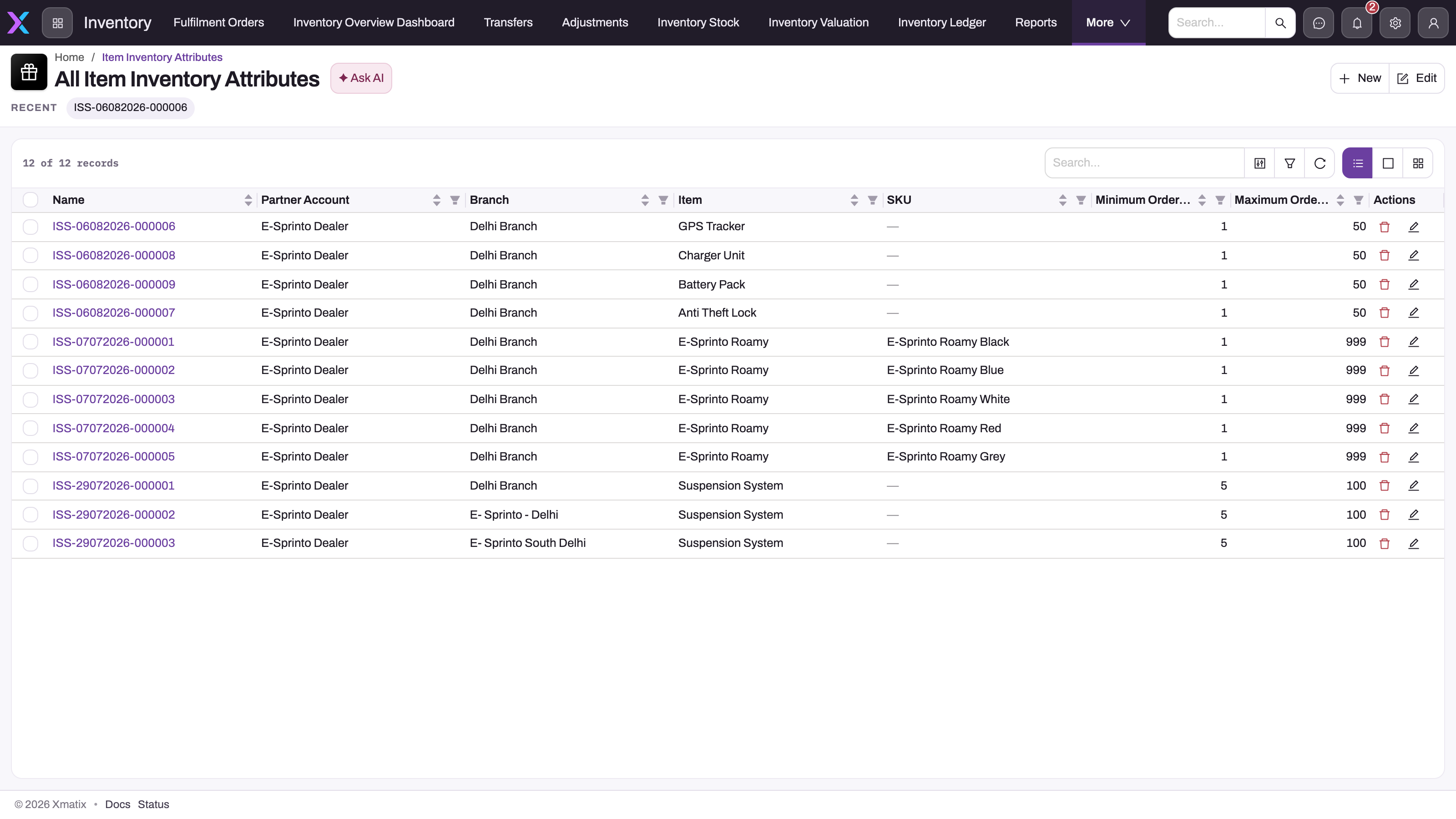
Name opens the row; the ABC and FSN values are on its Classification section.
- 2
Partner Account and Branch define the scope — empty means the row applies to all.
- 3
Item and optional SKU — the same item can carry different categories per branch or SKU.
- 4
Minimum and Maximum Order Quantity are enforced on purchase-order lines from this row.
- 5
New adds a row; imports are the usual way to apply a periodic reclassification.
- 6
Search and column filters find the row for an item and branch before you interpret a category.
The Item Inventory Attributes list (reachable from the Inventory app's search or the entity's list) is the operative register: one row per item, optionally narrowed by SKU, lot type, partner account and branch, carrying the classification alongside the branch's replenishment policy — minimum and maximum stock level, minimum and maximum order quantity, lot quantity, reorder quantity, lead time and average consumption. An empty partner account or branch means the row applies to all.
- 1
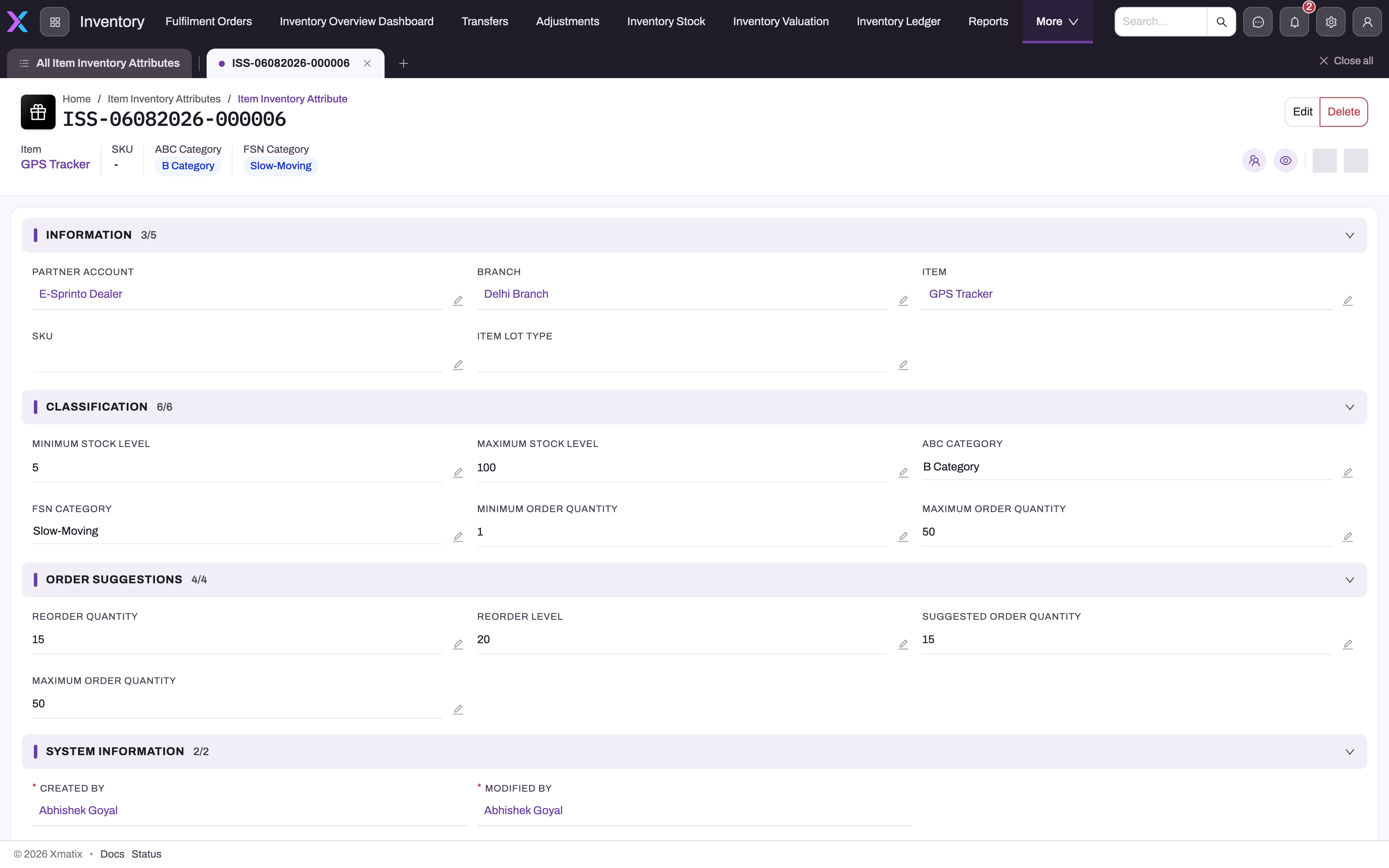
The header repeats item, SKU and the ABC and FSN categories for this scope.
- 2
Information: partner account, branch, item, SKU and lot type — check the scope before trusting the category.
- 3
Minimum Stock Level triggers min/max replenishment; Maximum Stock Level is stored but not read.
- 4
ABC Category: A Category, B Category or C Category — matched exactly by auto-order exclusions and count filters.
- 5
FSN Category: use Fast-Moving, Slow-Moving or Non-Moving; the F/S/N category variants are not matched by auto-ordering.
- 6
Order Suggestions: Reorder Quantity is used by min/max replenishment; Reorder Level and Suggested Order Quantity are stored only.
Open a row to see its sections: Information (partner account, branch, item, SKU, lot type — the scope), Classification (minimum and maximum stock level, ABC and FSN category, minimum and maximum order quantity), Order Suggestions (reorder quantity, reorder level, suggested order quantity) and System Information. Check the scope before interpreting a category: a correctly spelled value on the wrong branch is still the wrong input.
| Location | What it holds | Who reads it |
|---|---|---|
| Item master | Item-wide ABC and FSN labels. | Nobody in code; reporting and people. |
| Item inventory attribute | Per-branch (and per-SKU) ABC and FSN alongside replenishment data. | Auto purchase orders, cycle counts, reports. |
The branch-level attribute is the one that matters because the same item can legitimately be an A-category fast mover in one branch and a C-category slow mover in another, and replenishment and counting respect that.
The values
| Classification | Values on the attribute | Meaning |
|---|---|---|
| ABC | A Category, B Category, C Category | Value contribution: A items carry the most working capital and deserve the most attention. |
| FSN | Fast-Moving, Slow-Moving, Non-Moving | Movement speed, from items that turn constantly to items that have stopped moving. |
The attribute's FSN picker also offers the item-master vocabulary (F category, S category, N category). Auto-order exclusions compare against the hyphenated values only, so use those; a cycle count's Filter FSN offers only F category, S category and N category, and matches attribute rows holding exactly that value. If you scope counts by FSN, the attribute rows must carry those values.
Where they are used
| Feature | How the classification is used |
|---|---|
| Auto purchase-order exclusions | An auto-order run carries six exclusion flags — exclude A/B/C-category items and exclude fast/slow/non-moving items. An item whose branch attribute matches a flagged category is skipped when the run proposes lines. Typical use: keep Non-Moving items out of automatic replenishment so the program does not reorder dead stock. See xMatix Procurement. |
| Cycle count scope | A count's scope filters include an ABC class and an FSN class; the count's item population is filtered to attribute rows with exactly that value, treating rows with no partner account or branch as wildcards. This is how count programs give A-category and fast-moving items more frequent attention. See Cycle counting. |
| Reports | The report library includes an FSN–ABC–Branch Inventory Movement Analysis, and both categories are available as grouping and filter dimensions when building your own reports. |
The rest of the attribute row
The classification shares its row with the branch's replenishment policy. How to create and maintain the rows, which row each process uses and every save rule are on Item inventory attributes. In short:
| Field | Read by |
|---|---|
| Minimum Stock Level | Min/max replenishment: a purchase suggestion is raised when available stock falls below it. |
| Reorder Quantity | The fixed quantity proposed when min/max triggers; when zero the engine orders up to the minimum stock level instead. |
| Minimum / Maximum Order Quantity | Enforced on purchase-order lines (a line outside the range is rejected); the forecast reorder point adds the minimum, and forecasting orders up to the maximum. |
| Lot Quantity | A purchase-order line whose quantity is not a multiple of it is rejected. |
| Lead Time, Average Consumption | Forecast reorder point = lead time × average consumption + minimum order quantity. Average consumption is an input you maintain, not computed from history. |
| Reorder Level | The web Take order catalogue: an item at or below the highest Reorder Level among its rows shows as low and gets a Reorder chip. |
| Maximum Stock Level, Suggested Order Quantity | Stored and shown, but read by no process. Validation checks that maximum stock is not below minimum stock. |
Maintaining the classifications honestly
Because the platform reads but does not compute these attributes, they are only as good as their upkeep. A workable pattern: run the movement-analysis report on a fixed cadence (quarterly is common), decide reclassifications from the evidence, and apply them by import to the branch-level attributes. Treat a reclassification as the operational change it is — moving an item to Non-Moving typically also means excluding it from auto-ordering and reducing its count frequency, and those are exactly the features that read the new value.
Common questions
Does xMatix compute ABC or FSN automatically?
No. The classifications are attributes your organization maintains; the platform's role is to use them consistently — in auto-order exclusions, cycle count scoping and reports — and to give you the movement reporting from which to decide them. Stale values are acted on faithfully, which is why a review cadence matters.
The item shows one category but the branch behaves differently — why?
Auto-ordering and cycle counting read the item inventory attribute for the branch, not the item master's classification. The two can differ on purpose. When behavior surprises you, check the attribute row for the item and branch first — and check the spelling: Non-Moving is matched, N category is not.
Why is an item ignored by auto-ordering although its category is not excluded?
Check every attribute row for the item, and the engine. Exclusion is decided per row. In Forecasting, an excluded row is dropped and the item's other matching rows still produce a suggestion. The Minimum Stock Level engine ignores rows with an empty branch altogether. The Replenish engine uses one row per item, preferring a row for the line's SKU, then one for the order's branch, so an all-branch row for the SKU can carry an excluded category that the branch row does not. Also check the spelling of the FSN value. See Item inventory attributes.