
xMatix values stock with a perpetual costing engine that replays the inventory ledger into cost layers (one per receipt, or one pool for the average methods) and consumptions (each issue's draw against those layers). The method — FIFO, LIFO, moving average, weighted average or specific identification — is chosen by a valuation policy inside an accounting book, and the result is read on the Inventory Valuation page. This page explains the engine, the configuration that steers it, the reading surface, and the honest limits of the current implementation.
Read the screen
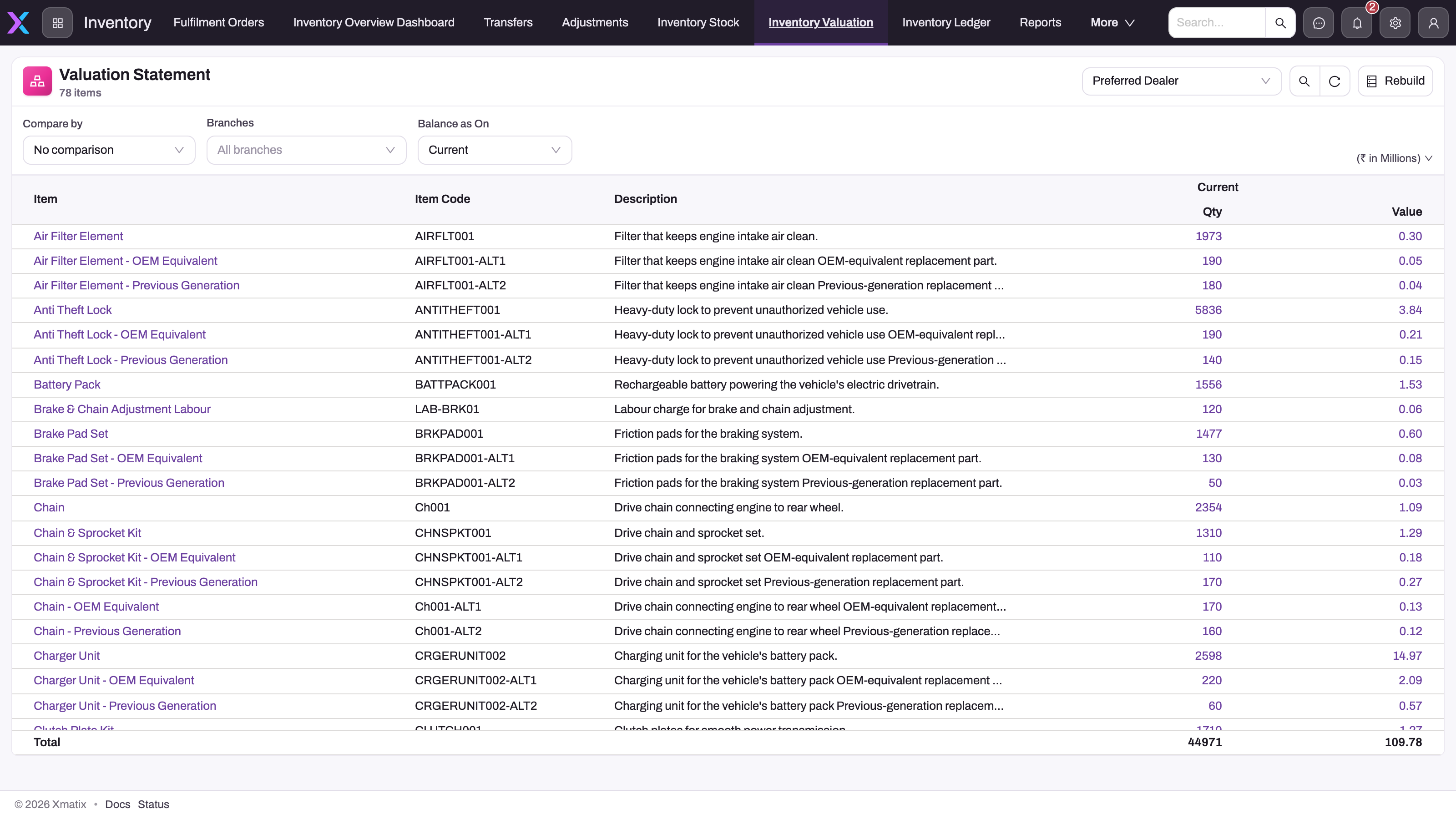
- 1
Company picker — valuation is per partner account and, when more than one exists, per accounting book.
- 2
Rebuild recomputes the period-balance cache the By period / By years comparisons read.
- 3
Compare by, Branches and Balance as On scope the statement exactly as on the Inventory Stock page.
- 4
Money scale — values here are shown in millions.
- 5
Qty is the on-hand quantity the layers account for; click it for the Valuation lots drill.
- 6
Value is remaining quantity × unit cost over surviving layers, less any recorded NRV write-down; the total is for the selected scope.
Inventory → Inventory Valuation shows the Valuation Statement: one row per item with Qty and Value for the selected company, and a total. The controls match the Inventory Stock page — Compare by (no comparison, by branch, by period or by years, each with a (movement) variant showing opening, change and closing), Branches and Balance as On (current, to-date presets, previous month, a fiscal-year end, custom) — plus a money-scale selector and, when the company has more than one accounting book, a book picker. Every column, including the period and year comparisons, is replayed live from the ledger each time the statement loads. Rebuild only rewrites the stored period balances for the current fiscal year, which no standard screen reads (see Inventory period balances). Clicking a value opens a drill: Valuation lots (the cost layers behind the figure, with remaining quantity and unit cost; filter to open lots or all, month/quarter/year to date or all dates) or Consumption lots (the issues that drew from those layers, with quantity, unit cost and cost amount), and View ledger where an Item Ledger page is configured.
How the engine costs stock
Every inventory posting hands its new ledger rows to the costing hook. For each affected item and branch of a company with an active primary accounting book, the hook works out the costing method and brings two kinds of stored rows up to date:
- Cost layers (Inventory Cost Lot records): under FIFO, LIFO and specific identification, one layer per receipt with its original quantity, remaining quantity, unit cost and receipt date, linked to the ledger row that created it. Under moving average, a single pool layer whose remaining quantity is the whole on-hand balance at the running average cost.
- Consumptions (Inventory Cost Consumption records): one row per layer an issue drew from, with quantity, unit cost and cost amount. The rows sharing an issue's ledger entry add up to that issue's cost of goods sold, and that is the amount the engine puts on the cost journal. See Consumptions.
Incremental or full replay. When the item and branch already have a costing checkpoint for the current method, and every new movement is dated after the last one costed, the hook applies only the new movements to the open layers (or the pool) and adds their consumptions. Otherwise it replays the item and branch's whole ledger and rewrites the stored rows to match. That happens on the first posting, for a back-dated movement, after a method change, or when the checkpoint is missing or doesn't match the stored rows. Both paths produce the same rows. A full replay that would cover 5,000 or more movements isn't run during the posting. The posting hands it to the Rebuild inventory cost background job, and the cost journal for that posting appears when the job finishes (see Configuration).
Carrying value at any moment is the sum over surviving layers of remaining quantity times unit cost, less any recorded NRV write-down. Stored layers and consumptions are derived state: the ledger is the fact, the layers are its valuation. A nightly check, Verify inventory cost, replays a sample of items from scratch and compares the result with the stored rows.
Costing is best-effort by design. The inventory posting commits first; if costing fails for a scope — most commonly because the company has no active primary accounting book — the movement still commits and the costing error is logged. A ledger movement with no valuation rows behind it therefore means "check the book and policy", not "the stock did not move".
The Valuation Statement does not read the stored layers. It replays the ledger again for every column, up to that column's date, so its figures are true for past dates. The stored layers always show the position after the most recent posting. They are what the Valuation lots drill lists.
Cost layers
A cost layer (an Inventory Cost Lot record) is the engine's answer to "how much of this stock is left, and at what cost". Each layer belongs to one company, one accounting book, one item, one branch and one costing method.
How layers are built. Each time an inventory posting writes ledger entries for an item at a branch, the engine does the following for that item and branch:
- It finds the company's active primary accounting book. If there is none, nothing is costed.
- It works out the costing method from your valuation policies, for the latest document date among the entries just posted.
- On a full replay, it reads the item and branch's entire inventory ledger, in document-date order. Receipts are Inward, Transfer Inward, Excess, Sale Return, Assemble and stock-up Adjustment entries. Issues are Sold, Outward, Transfer Outward, Purchase Return, Disassemble, Shortage, Damaged, Expired and stock-down Adjustment entries. Allocations, picks, in-transit, on-hold and on-loan entries move no cost. A reversal entry, which is linked to the entry it undoes, moves stock the other way: a cancelled sale comes back in, and a reversed receipt goes out.
- It rewrites the stored layers and consumptions for that book, item, branch and method to match the replay. Rows that still match are kept, changed ones are updated, new ones are added and the rest are deleted. On the incremental path it skips steps 3 and 4 and applies only the posting's own movements.
Under FIFO and LIFO every receipt becomes its own layer, and fully issued layers stay with a remaining quantity of 0. Under moving average there is one pool layer. Its original quantity is everything ever received, its remaining quantity is the on-hand balance and its unit cost is the closing average. A receipt takes its cost from the unit cost on its ledger entry.
Layers are named ICL- plus the receipt date and a running number within the item and branch. The name is regenerated at every rebuild, so don't use it as a reference.
Who reads cost layers.
- The Valuation lots drill and the Inventory Valuation Lot page (below).
- Cost Plus pricing on quote lines and service order lines. When the line has no purchase order line for the job, the cost is the unit cost of the item's most recently received layer that still has stock, preferring the line's branch. If no such layer exists, a cost price list is used. See Service order lines.
See the layers behind a figure
You can open the layers from the statement or on their own page.
- From the statement. On Inventory → Inventory Valuation, click an item's value and choose Valuation lots. The drill opens with the item, company, branch and book already set.
- On their own page. In the Inventory app, open Settings and choose Inventory Valuation Lot. The page is titled Inventory Valuation Lots. Inventory Consumption Lot in the same list shows the issues drawn from the layers.
On the page, pick the Company (hidden when your organization runs one company) and the Item, which are required. Then set the optional filters and select Submit:
- Branch: one branch, or All branches. The picker is hidden when your organization runs one location.
- Accounting book: shown only when the company has more than one book. Keep the primary book. A secondary book has no layers.
- Lots: Open lots only (remaining quantity above 0, the default) or All lots.
Rows are listed oldest receipt first, and the footer totals the remaining quantity and value.
| Column | What it shows |
|---|---|
| Receipt Date | The document date of the receipt that created the layer. For an average-method pool, the first receipt's date. |
| Method | The method the layer was built under: FIFO, LIFO, MovingAverage or WeightedAverage. |
| Lot | The item lot's internal identifier, under specific identification only. Blank for the other methods. |
| Original Qty | The quantity received into the layer. For a pool, everything ever received. |
| Remaining Qty | The quantity not yet issued from the layer. |
| Unit Cost | The receipt's unit cost, or the closing average for a pool. |
| Landed / Unit | Always empty. Landed cost is never added to a layer. |
| Effective Cost | The unit cost used for value. Always equal to Unit Cost. |
| Remaining Value | Remaining Qty × Effective Cost. |
Cost layer fields
The record also has its own form, but it is in no app menu. Read layers through the drill or the page above.
| Field | What it means | Notes |
|---|---|---|
| Item | The item the layer values. | Set by the engine. |
| Item Lot | Not used. | Never filled. Specific identification keeps the lot in Lot Key. |
| Storage Location | Not used. | Never filled. Layers are per branch, whatever Costing Level a policy names. |
| Effective Unit Cost | The unit cost used for value. | Always equal to Unit Cost. |
| Landed Cost Per Unit | Meant for capitalised freight and duty. | Never filled. |
| Unit Cost | The receipt's unit cost from its ledger entry. | For a pool, the closing average cost. |
| Receipt Date | The receipt's document date. | FIFO issues the oldest first, LIFO the newest. |
| Original Quantity | The quantity the layer started with. | For a pool, all receipts. |
| Remaining Quantity | The quantity still in the layer. | For a pool, the on-hand balance. |
| Branch, Partner Account, Accounting Book | The branch, company and book the layer belongs to. | Only the primary book has layers. |
| Method, Lot Key | The costing method token and the specific-identification lot. | See the column table above. |
| Name | A generated name such as ICL-05072026-000002. | Regenerated at every rebuild. |
Every field is written by the engine. Hand edits are discarded the next time the item and branch are rebuilt. Hand-created layers outside the current method are never removed, so they add to drill totals.
Consumptions
A consumption (an Inventory Cost Consumption record) is one draw an issue took from one cost layer: which layer, how many units and at what unit cost. Consumptions answer the question "why did this sale cost what it cost". An issue that spans two FIFO layers has two consumptions at two costs. Under moving average, every issue has one consumption against the pool layer, at the average in force when the issue was costed.
How consumptions are written. The engine writes them in the same posting as the layers, for the same company, primary book, item, branch and method. Nobody creates them by hand.
- Each row records the issue's ledger entry, its document date (Issue Date), the layer drawn (Cost Lot), the quantity drawn from that layer, the layer's unit cost and Cost Amount. Cost Amount is quantity × unit cost, rounded to two decimals.
- The cost of an issue is the sum of the Cost Amount of its rows. That is the amount on the issue's cost journal. Each draw is rounded on its own, so the journal ties exactly to the rows.
- Rows are named ICC- plus the issue date and a running number within the item, branch and method, such as ICC-08072026-000003. A full replay renumbers them, so don't use the name as a reference.
- Reversals. When a posted issue is cancelled or its line is changed, the reversal entry brings the goods back at exactly the costs the issue drew. Under FIFO and LIFO they come back as new layers. The original issue keeps its consumptions, the reversal gets none, and its cost journal is the original's with the debit and credit swapped. A reversed receipt is costed as an issue, so it has consumptions of its own. Under FIFO and LIFO it draws from that receipt's own layer first.
Who reads consumptions.
- The Consumption lots drill and the Inventory Consumption Lot page (below).
- The item ledger's Value column. A stock-out is valued at the total Cost Amount of its consumptions, not at the entry's unit cost, which on an invoice line is the selling price. See The inventory ledger.
- The engine itself. When a cancelled issue comes back, the engine reads that issue's consumptions to know which costs to restore.
- The nightly Verify inventory cost check.
The Valuation Statement, the stored period balances and a secondary book's Recompute don't read stored consumptions. They replay the ledger themselves.
See the consumptions behind a figure
- From the statement. On Inventory → Inventory Valuation, click an item's value and choose Consumption lots. The drill opens with the item, company, branch and book already set. When the figure covers a period, the drill opens on that period. For a balance figure it opens on Year to Date.
- On their own page. In the Inventory app, open Settings and choose Inventory Consumption Lot. The page is titled Inventory Consumption Lots.
Pick the Company (hidden when your organization runs one company) and the Item, which are required. Then set the optional filters and select Submit:
- Branch: one branch, or All branches. The picker is hidden when your organization runs one location.
- Accounting book: shown only when the company has more than one book, and set to the primary book by default. A secondary book has no consumptions.
- Period: Month to Date, Quarter to Date, Year to Date (the default), All dates or Custom range…, which adds a required From – To picker. Quarter and year follow the company's fiscal calendar. The period filters on Issue Date.
Rows are listed newest issue first, up to 500 rows. The heading line totals them, for example 3 consumptions · Qty 12 · COGS 1,260.00. When nothing matches, the page says No lots for this scope.
| Column | What it shows |
|---|---|
| Issue Date | The document date of the issue. |
| Method | The method the row was costed under, such as FIFO or MovingAverage. |
| Quantity | The quantity drawn from one layer. An issue over two layers has two rows. |
| Unit Cost | The drawn layer's unit cost, or the pool's average. |
| Cost (COGS) | Quantity × unit cost, rounded to two decimals. |
The drill doesn't name the source document or the layer. For those, open the record list All Inventory Cost Consumption from the app launcher search. It has the columns Name, Partner Account, Branch, Issue Date, Quantity, Unit Cost, Cost Amount, Created By, Created On and Modified By. A record's page shows the company, branch and item in its header and a Details card with Unit Cost, Quantity, Cost Amount, Cost Lot, Accounting Book and Issue Date.
Consumption fields
| Field | What it means | Notes |
|---|---|---|
| Name | A generated name such as ICC-08072026-000003. | Renumbered on a full replay. |
| Item | The item issued. | |
| Partner Account | The company that owns the stock. | Not the customer or supplier. |
| Branch | The branch the stock left. | Consumptions are kept per branch. |
| Accounting Book | The book the row belongs to. | Always the company's primary book. |
| Cost Amount | Quantity × Unit Cost, rounded to two decimals. | The rows of one issue add up to its cost journal. |
| Cost Lot | The cost layer the units came from. | Under moving average, always the single pool layer, so it can't trace an issue back to a purchase. |
| Unit Cost | The cost per unit of the drawn layer. | Under moving average, the running average when the issue was costed. Four decimal places. |
| Quantity | The quantity drawn from this one layer. | Not the whole issue. Add the rows of one issue to get its quantity. |
| Issue Date | The document date of the issue. | The drill's period filter uses it. |
| Method | The costing method token, such as FIFO, LIFO, MovingAverage or SpecificIdentification. | On no form. Shown in the drill. |
| Source Ledger | The inventory ledger entry of the issue. | On no form. Several rows share it when an issue spans several layers. |
Every field is written by the engine. An edited or cloned row keeps its Method and Source Ledger, so it changes the drill totals and the item ledger's value until the next full replay rewrites or deletes it. A row added with New has no Method, because Method is on no form. No replay ever matches such a row, so it stays and adds to the drill totals for good. Don't create, edit, clone or delete consumptions.
Opening lot snapshots
An Inventory Opening Lot State record describes one open cost layer at the start of a fiscal period, for one company, accounting book, item, branch and costing method. The record type is meant to let a single period be re-costed from a stored opening position plus that period's own movements. A period's closing layers would then become the next period's opening rows.
Nothing in xMatix creates or reads these records today. Inventory posting, the Inventory Valuation statement, the lots drills, Recompute for a secondary book and period close don't use them. Each of these replays the inventory ledger from the first movement, so an empty list is normal and expected. A secondary book's values come from that full replay under the book's own policies, compared with the primary book and stored as overlay adjustments (see Accounting books).
The record type has a list, All Inventory Opening Lot State, with the columns Name, Method, Lot Key, Receipt Date, Remaining Quantity and Unit Cost. It is in no app menu and ships with no designed form. Integration sync refuses it because it is computed state. Don't create rows by hand or through an import: no valuation figure would change, and the rows would only mislead anyone who reads them later.
Opening lot snapshot fields
| Field | What it means | Notes |
|---|---|---|
| Name | An identifier for the row. | Required. Meant to be generated, starting with IOLS-. |
| Partner Account, Accounting Book | The company and book the snapshot belongs to. | |
| Fiscal Period | The period the snapshot opens. | A period's closing layers are recorded against the following period. |
| Item, Branch | The cost scope the layer belongs to. | |
| Storage Location | An optional storage location scope. | Cost layers themselves are kept per branch. |
| Method | The costing method token, such as FIFO or MovingAverage. | Up to 50 characters. The same item and period can hold separate rows per method. |
| Lot Key | The item lot, under specific identification only. | Blank for the other methods. Up to 100 characters. |
| Source Cost Lot | The cost layer the row was taken from. | A loose link: removing cost layers doesn't affect the row. |
| Receipt Date | The original receipt date of the layer. | Kept across the period boundary so FIFO and LIFO keep their order. |
| Sequence | The order in which the layer would be consumed. | Rows are read by Sequence first, then Receipt Date. |
| Remaining Quantity | The quantity still unissued at the period boundary. | Four decimal places. |
| Unit Cost | The cost per unit the layer carries into the period. | Four decimal places. |
The only action on the record is Clone, which copies a row.
Costing methods
| Method | How issues are costed | Notes |
|---|---|---|
| FIFO | Oldest receipt layers consumed first. | |
| LIFO | Newest layers first. | Not permitted under Ind AS or IFRS; the book's Allows LIFO flag records the opt-in. |
| Moving average | A perpetual average recomputed at every receipt. | The engine's fallback when no policy matches. |
| Weighted average | A periodic average over the replayed window. | Secondary books only. A primary book posts cost of goods sold as goods leave, before the period's average is known, so saving it on a primary book is refused. An older primary-book policy with it is costed as moving average. |
| Specific identification | Each issue costed at the exact lot it drew, keyed by the movement's item lot. | Needs Costing Level Batch or Serial Number. Implemented by the engine but not offered in the seeded method picker. |
| Standard cost | — | Can be saved (on an Ind AS or IFRS book only with the book's standard-cost opt-in), but the engine doesn't compute it. Items it applies to get no layers, no consumptions and no cost journal. |
Accounting books
An accounting book is a valuation perspective for one company. Inventory-cost posting takes the company's first active primary book and skips costing when there is none. Only the primary book keeps cost layers. A secondary book is worked out by replaying the same movements under its own policies, and the difference is stored as per-period overlay adjustments. Those adjustments are refreshed only with Recompute on a statement. xMatix does not check that a company has only one primary book, so check this whenever a company's valuation looks wrong. Setup and statements by book are covered in Accounting books.
Valuation policies
A valuation policy selects the method for a scope within a book. Its scope keys are Partner Account, Business Unit, Branch, Item Group and Item, plus an Effective From / Effective To window, and an empty key matches everything. The most specific matching policy wins (item 16, item group 8, branch 2, business unit 1), then the lower Priority, then the later Effective From. When nothing matches, the book uses moving average. How to create and change policies, every field, and every check a save makes are on Inventory valuation policies.
A method change is not prospective. One method applies to an item and branch's whole history. At posting, it is the method in force on the latest document date being posted. On the statement, it is the method in force on each column's date. So once a new method takes effect, the earlier receipts and issues are re-costed under it too. The layers stored under the old method are not rebuilt or removed, so the Valuation lots drill then shows both sets (see Common problems).
Current limits to know before you rely on it
- No storage-location scope. Stock is costed per branch, so an active policy with a Storage Location can't be saved. Scope it to the branch instead. Business Unit scope matches the branch's business unit, and Item Group scope matches any group the item belongs to.
- Costing level does not create pools. Layers are keyed by book, item, branch and method. Setting Costing Level to batch, serial or storage location does not create separate pools; only specific identification is lot-aware, through the movement's lot.
- Method values ignore spaces and case. Moving Average, moving average and
MovingAverageare the same method, and the same goes for Costing Level. The value is stored as you picked it. - A policy save is checked. An active policy with no book, a method the book doesn't allow, a method that doesn't suit its Costing Level, a storage location, inverted dates or an overlap with another policy is refused. The full list is under Business rules on the policies page. Inactive policies aren't checked, so you can always switch off an old invalid policy without fixing it first.
- Net realizable value is entered by hand and is not posted. No screen or process calculates NRV or creates Inventory NRV Assessment records; you enter them, and the form calculates nothing. The Valuation Statement subtracts the Outstanding Write Down of each item's latest assessment for the selected book, dated on or before the statement date. Nothing posts an assessment to the general ledger, and closing a period does not either, so post a manual journal if the books must show the write-down. The shipped form also lacks the Accounting Book field the statement needs. See Inventory NRV assessments.
Example
An item is costed FIFO at one branch. Two goods receipts are posted, 10 units at 100 on 1 July and 10 units at 110 on 5 July. Then a sale of 12 units is posted on 8 July.
- After the receipts, Valuation lots shows two layers: 10 remaining at 100 and 10 remaining at 110, a remaining value of 2,100.
- The sale consumes the whole first layer and 2 units of the second. Consumption lots shows two rows for the sale, 10 × 100 = 1,000 and 2 × 110 = 220, a cost of 2,320 (heading 2 consumptions · Qty 12 · COGS 2,320.00). Both rows point at the sale's ledger entry, and the sale's cost journal is 2,320.
- If the sale is then cancelled, the 12 units come back as two new layers, 10 at 100 and 2 at 110. The sale's two consumption rows stay, and the cancellation posts the same 2,320 journal with the sides swapped.
- With Open lots only, the drill now shows one layer: the 5 July receipt with 8 remaining, a remaining value of 880. All lots also shows the 1 July layer with 0 remaining.
Had the item been on moving average, the drill would show a single pool layer: Original Qty 20, Remaining Qty 8, unit cost 105, remaining value 840. The sale would have cost 12 × 105 = 1,260.
Training
Practice exercise
In a sandbox company with an active primary accounting book and no valuation policy (so moving average applies), pick a stock item with no history at one branch.
- Post two goods receipts for it at that branch: 10 at 100, then 10 at 110.
- Open Inventory → Settings → Inventory Valuation Lot, pick the company and item, select Submit.
- Post a sale or stock issue of 12 for the same item and branch, then select Submit again.
Expected result: after step 2 you see one layer with Method MovingAverage, Original Qty 20, Remaining Qty 20 and Unit Cost 105. After step 3 the same layer shows Remaining Qty 8 and a remaining value of 840. Inventory Consumption Lot shows one row of 12 at 105, cost 1,260.
Quick reference
- One layer per receipt under FIFO and LIFO, one pool layer under the average methods.
- Layers belong to the primary book, an item and a branch, never to a storage location.
- A posting applies only its new movements when it can. Otherwise it replays the item and branch's whole ledger.
- An issue's cost is the sum of its consumption rows' Cost Amount, and that is its cost journal.
- A cancelled sale comes back at exactly the costs it drew. It never posts a second cost-of-goods-sold journal.
- The statement replays the ledger itself and is true for past dates. The drill shows the layers as of the last posting.
- Landed / Unit is always empty and Effective Cost always equals Unit Cost.
- A method change re-costs the whole history and leaves the old method's layers behind.
- Never create, edit or delete layers or consumptions by hand.
- Inventory Opening Lot States stay empty: no part of costing writes or reads them.
Permissions
The Valuation lots and Consumption lots drills and the two lot pages read the Inventory Cost Lot and Inventory Cost Consumption records directly, so a user needs read access to both. Without it, the drill can't load any rows. The seeded standard user, sales executive and system administrator profiles have full access to both records. Since layers are engine-written, consider reducing other profiles to read-only in Security profiles. Costing itself runs as part of inventory posting and needs no grant of its own. The same three profiles also have full access to Inventory Opening Lot State. Nothing reads those records, so access to them changes no figure, and read-only or no access is a safe setting for every profile.
Configuration
- Accounting books and valuation policies decide whether an item is costed and by which method. See Accounting books and Inventory valuation policies.
- Rebuild inventory cost re-costs items' layers and consumptions from their full movement history, under each item's current method on the primary book. Use it after a costing fix, or when a valuation looks wrong. Open Setup → Platform → Monitoring → Jobs, go to the Schedules tab and select New schedule. Give the schedule a Name, choose Rebuild inventory cost as the Job type, pick any Frequency, switch Active off for a one-off run and save. Then select Run now on the row. With no payload it re-costs every costed item. An optional Payload JSON narrows or extends it:
itemIdsandbranchIds(lists of record ids),partnerAccountId(one company),reversalAffectedOnly(only items with a cancelled or reversed movement),repairReversalJournals(also correct cost journals that older cancellations posted the wrong way) anddryRun(report only, write nothing). Re-running is safe: an unchanged history writes nothing. The run summary is on the Runs tab. The same job also runs on its own, started by a posting, for an item and branch with 5,000 or more movements to replay. - Verify inventory cost compares a sample of recently moved and random items with a full replay. A schedule, Verify inventory cost (nightly), ships for it and runs daily at 03:15 IST. Select Run now on that row to run it at once. An item that differs is re-costed from its full history on its next posting. Report a difference to your xMatix support contact with the run summary. It isn't a setting you can fix.
- Both jobs require the Finance product.
Common problems
The Valuation lots drill says "No lots for this scope."
- A secondary book is picked. Only the primary book has layers. Switch Accounting book to the one marked (primary).
- Everything has been issued. With Open lots only, fully used layers are hidden. Switch Lots to All lots.
- The company has no active primary book. Nothing is costed. Set up the book in Accounting books, then post any movement for the item and branch so it is rebuilt.
- Costing failed for the item and branch. See the next problem.
An item's lots stopped changing, or the item is missing from the Valuation Statement
Costing replays the item and branch's ledger in document-date order. When an issue is larger than the stock on hand at that point, for example a sale dated before the receipt that supplied it, the whole item and branch fails. Posting then keeps the previous layers and logs the error. The statement leaves out that branch's stock of the item in every column dated on or after the issue. The same happens when the winning policy stores a method token the engine doesn't recognise (see Current limits).
To fix it, make the history consistent: post the missing receipt, or a stock-up adjustment, dated no later than the issue. The next posting for the item and branch replays everything and rebuilds the layers.
Remaining quantity doesn't match the stock on hand
First check whether layers of more than one method are listed (next problem). Then check whether the item and branch were last costed before cancellations were handled as reversals. The inventory ledger undoes a posted line with a reversing entry linked to the original. The engine now moves that entry's stock the other way, so a cancelled sale comes back in. Layers and consumptions written by earlier postings may still count the reversal as one more movement in the same direction. Run Rebuild inventory cost for the item, or for every item with reversalAffectedOnly (see Configuration). Add repairReversalJournals to also correct cost journals that older cancellations posted as a second cost of goods sold.
Two methods show for the same item
The method that applies to the item and branch changed, through a new policy or the end of an old policy's window. The engine now builds layers and consumptions under the new method and leaves the old set exactly as it was at its last posting. Read only the rows whose Method matches the method in force, and ignore the old set's totals. The Consumption lots drill lists both sets, so its COGS total counts each issue twice. The item ledger's Value column adds up every consumption of an issue, whatever its method, so stock-outs costed under both methods are counted twice there too. The Valuation Statement uses only the method in force and is not affected.
A sale has no cost journal, or it appeared later
- The company has no active primary book, or the item's method can't be costed (Standard Cost). The sale is posted without a cost journal. Fix the book or policy, and later postings are costed again. Running Rebuild inventory cost re-costs the layers and consumptions, but it doesn't post cost journals for sales that were posted earlier. If the books need them, post a manual journal.
- The item and branch have a long history. When a posting needs a full replay of 5,000 or more movements, the Rebuild inventory cost job does it in the background after the posting. The cost journal appears when that run finishes. It is listed on the Runs tab of Setup → Platform → Monitoring → Jobs.
- Costing failed, for example because of negative stock at some date. See the previous problems.
Common questions
Why isn't stock value just quantity times the latest cost?
Because cost flow matters. Under FIFO the remaining stock is valued at the costs of the latest receipts (the oldest were consumed first); under moving average at an average every receipt has shifted; under specific identification at the actual costs of the exact lots on hand. Two items with the same quantity and the same latest purchase price can carry different values. The Valuation lots drill shows the layers behind any figure, so the arithmetic is inspectable.
A movement is in the ledger but has no valuation rows — what happened?
Costing is best-effort. Check, in order: that the company has an active primary accounting book; that the policy's stored method token is one the engine recognizes; and the application logs for the costing error. Fix the cause, then post another movement for the item and branch (or re-post) so the scope is rebuilt — the rebuild replays the whole ledger for that scope, so earlier movements are picked up too.
Where do I see why an issue was costed the way it was?
The Consumption lots drill on the Valuation Statement. Every issue has consumption rows naming the layer drawn, the quantity and the unit cost — under FIFO an issue spanning two receipt layers shows two rows at two costs. Under the average methods every row points at the single pool layer, so the drill explains the average, not a specific receipt.
Does a cancelled sale disappear from Consumption lots?
No. The sale's consumption rows stay, because they record what the sale drew when it was costed. The cancellation brings the goods back at those same costs. Under FIFO and LIFO they come back as new layers, which Valuation lots shows, and the cancellation posts the original cost journal with the debit and credit swapped. So the drill's COGS total for a period counts the cancelled sale's cost, and it isn't netted against the return. To see the net cost of goods sold, read the general ledger, where the sale's journal and its reversal cancel out.
Can two books show different values for the same stock?
Yes — that is the point of books. The primary book is the statutory truth that posts to the general ledger; a tax or management book values the same movements under its own policies, stored as per-period overlay deltas on top of the primary. The Accounting book picker on the Valuation Statement appears when a company has more than one active book. On a secondary book the statement adds one overlay row to the primary book's item values. See Accounting books.
Why is the Inventory Opening Lot State list empty?
Because nothing writes to it. The record type was designed to store each period's opening cost layers, so a single period could be re-costed without replaying earlier history. No posting, statement, drill, recompute or period-close step creates or reads these rows. Every one of them works from the full inventory ledger instead. An empty list is therefore correct and doesn't mean that costing is broken. To check costing, use the Valuation lots and Consumption lots drills. Don't add rows by hand or import them: no figure would change, and the rows would only confuse anyone who reads them later.
What are Price Lots and Price Lot Lines, and should I use them?
No, don't use them. They describe an older design for receipt-cost layers: a lot per goods receipt line with a unit price and a sold quantity, plus lines that allocate invoice quantities to a lot. That design was never implemented. Neither record type has storage, a menu or a form. Goods receipts and invoices never create them, and costing never reads them. Any attempt to save or read one, including through the data API or an import, is refused with "Entity type … not found in model." Receipt layers and their consumption are the cost layers described above, and you can see them in the Valuation lots and Consumption lots drills.
Can I add freight and duty to stock cost with a landed cost voucher?
Not in the current product. You can create Landed Cost vouchers from the app launcher search. A voucher holds freight, duty and other amounts, an allocation method (by value or by quantity), and one line per item. But no screen, action or job allocates the charges or posts the voucher, so a saved voucher stays Draft and creates no journal. Costing never reads it either: a cost layer's value is the receipt's unit cost, and the Landed / Unit column in the Valuation lots drill stays empty. If freight or duty should be part of stock cost, include it in the goods receipt line's unit cost. Otherwise, book it through the purchase bill or a journal and accept that inventory valuation will not show it.