
Inventory configuration in xMatix has three layers. The inventory ledger settings define which document lines post which stock movements — platform-managed and read-only, with a setup screen that exists so you can see the rules. The item master flags decide, item by item, whether stock is kept at all and how finely. The valuation configuration — accounting books and valuation policies — is yours to author and holds the consequential choices: which books each company keeps and which costing method applies to which stock. This page is the reference for all three, plus the engine-written records you should know not to touch.
Inventory ledger settings
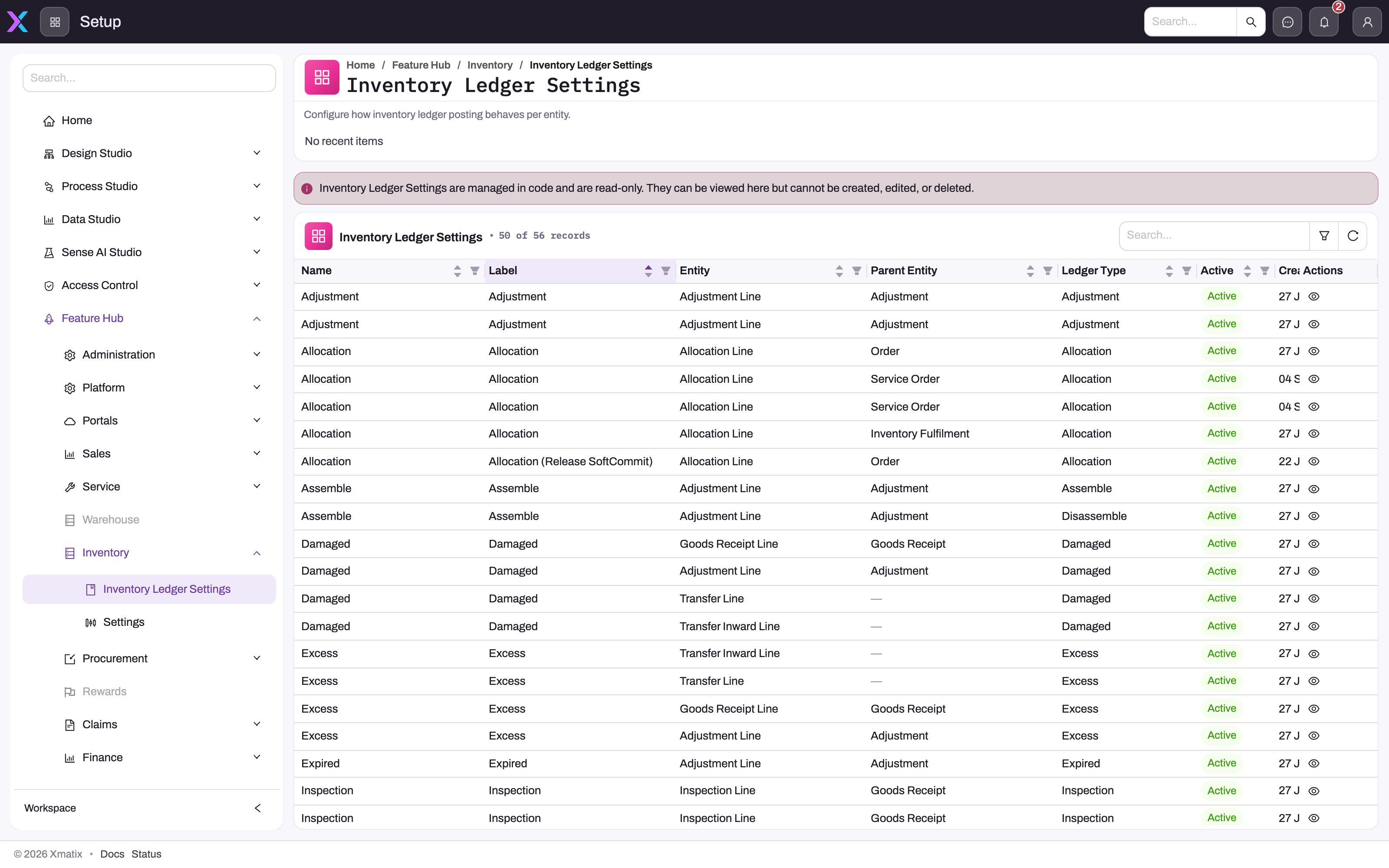
- 1
The notice states the rules are managed in code and read-only — there is no New, Edit or Delete.
- 2
Path: Setup → Feature Hub → Inventory → Inventory Ledger Settings.
- 3
Entity is the document line the rule watches; Parent Entity is the header it takes partner account and branch from.
- 4
Ledger Type is the movement the rule posts — the same value you see in the Inventory Ledger list.
- 5
Active tells you whether the rule is in force.
- 6
View opens the rule's remaining fields: quantity field, incremental/decremental counters, condition, on-create/update/delete and sequence.
Setup → Feature Hub → Inventory → Inventory Ledger Settings lists the 56 posting rules that connect document lines to the inventory ledger. Each rule names a document line, the Ledger Type it writes, the quantity it posts, the condition the line must meet, the save events it answers and the stock buckets it adds to and takes from. The screen is view-only, and the server refuses changes from every user. Use it to diagnose why a document posted, or did not post, a movement.
The full guide is Inventory ledger settings (posting rules). It covers how to find and read a rule, the effect of every seeded rule on the stock buckets, and how to trace a ledger entry back to the rule that wrote it. Credit note lines have no rule. The sales order SoftCommit and transfer InTransit rules ship inactive.
Item master flags that govern stock keeping
Several settings on the item itself decide how inventory treats it. They are edited on the item record's Details tab — the Inventory Settings, Behaviour and Specification groups (Warehouse app → Items, or Settings → Items in the Inventory, Sales, Procurement and Service apps; see Items):
| Flag | Effect |
|---|---|
| Track Inventory | The item keeps stock balances and posts ledger movements. Services, charges and other non-stock items leave it off; a line for such an item is skipped by posting. |
| Track Lots | Stock is held per item lot; every stock-moving line must name a lot. See Item lots and lot types. |
| Track Asset | Units become serialized asset records after receipt or sale; requires Track Lots. |
| SKU Required | Every line must carry one of the item's SKUs; stock balances are then kept per SKU. |
| Maximum Lot Quantity | Caps how much a goods receipt may put into a single lot (a SKU-level value takes precedence). |
| Inspection On Receipt | Received quantity is held as pending inspection until inspected; the receipt cannot complete while any line has uninspected quantity. |
| Primary Unit Of Measure, UOM decimal precision | The base unit stock is expressed in, and the rounding applied to derived quantities. |
The item's own ABC Category, FSN Category and Inventory Valuation fields are descriptive labels that no inventory process reads; the operative classification lives on item inventory attributes (see Item classifications) and the operative costing method comes from valuation policies (below). Item lot types — the commercial grades carried on lines and lots — are maintained in the Inventory settings or Warehouse Settings app; see Warehouse configuration.
Accounting books
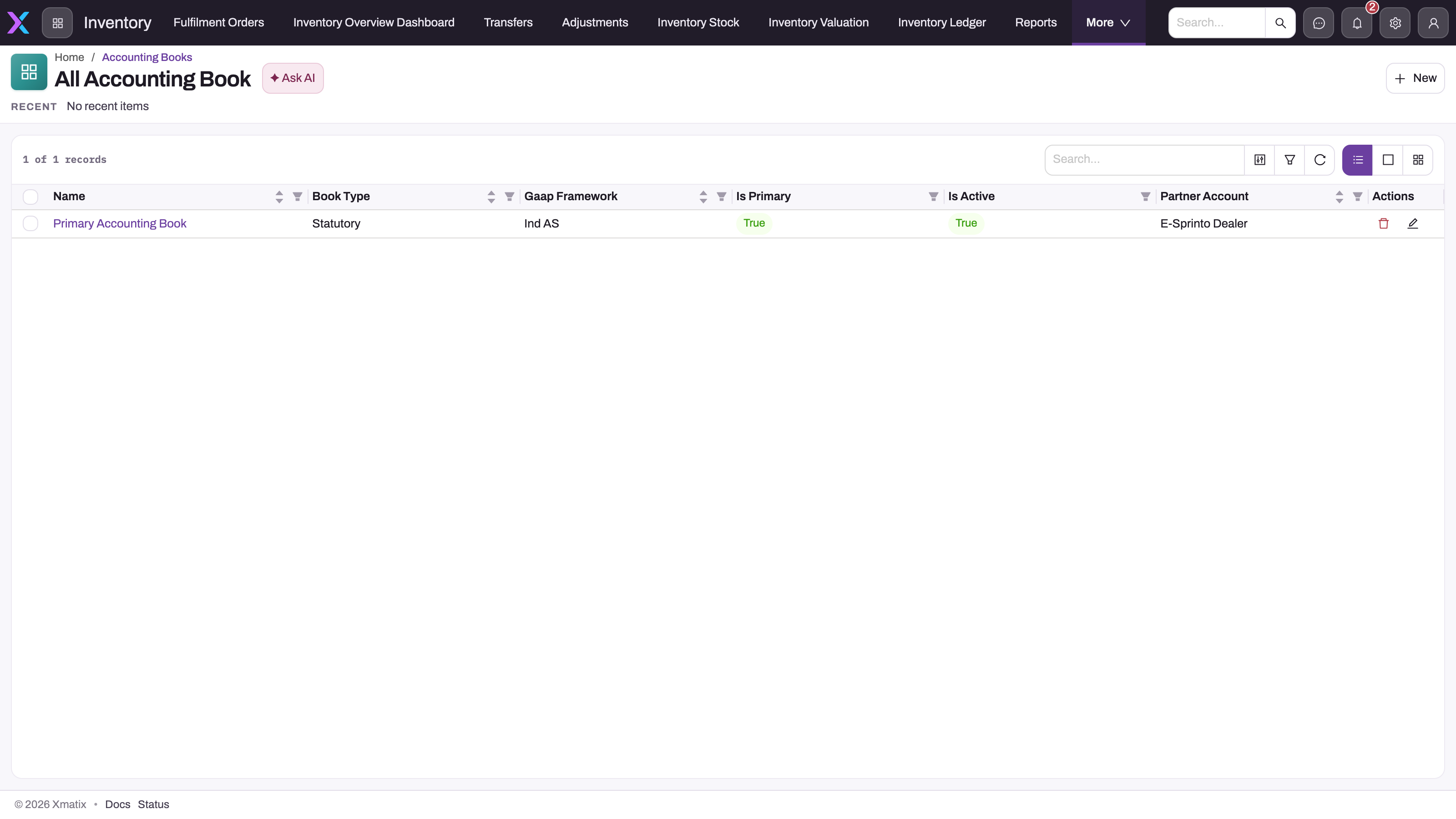
- 1
Name opens the book; the policy list and the valuation statement refer to books by this name.
- 2
Book Type (Statutory / Tax / Management) and Gaap Framework — the framework decides whether LIFO or standard cost may be opted in.
- 3
Is Primary — the book cost posting uses and the only one that persists cost layers. Uniqueness is not enforced; verify it here.
- 4
Is Active — inactive books are skipped by cost posting.
- 5
Partner Account — the company the book belongs to.
- 6
New creates a book; books belong to the Finance Setup app.
Accounting books and valuation policies are in the Finance Setup app under Books & Posting. An accounting book is authored per company. The one that matters for inventory is the company's active primary book: costing posts to it, and it is the only book that keeps cost layers. A company with no active primary book still has its stock movements posted, but they are not costed, and the valuation statement has no layers to report. Keep exactly one active primary book per company; xMatix does not check this. Book Type and Currency are recorded on the book but do not change any calculation. Gaap Framework, Allows Lifo and Allows Standard Cost decide which methods the book's valuation policies may use.
The full procedure, the field table and statements by book are in Accounting books.
Valuation policies
A valuation policy selects a costing method (FIFO, LIFO, Weighted Average or Moving Average) for a scope within a book. Policies are in Finance Setup → Books & Posting → Inventory Valuation Policies. The scope keys are Partner Account, Business Unit, Branch, Item Group and Item, with an effective window. The most specific matching policy wins, and with no match the book uses moving average. A save is checked: an active policy needs a book, LIFO is refused on Ind AS and IFRS books and on books without Allows Lifo, Weighted Average is refused on the primary book, storage-location scopes are refused, and two active policies of a book can't share a scope for overlapping dates.
The procedure, the field table, every save check and its message are in Inventory valuation policies.
Two checks remain yours: keep exactly one active primary book per company (cost posting takes the first it finds), and give lot-tracked items a specific-identification policy only after adding that method to the picklist (see Common questions).
Engine-written records — leave them to the engine
Inventory Cost Lots and Inventory Cost Consumptions are written by the costing engine. A posting either applies its new movements to them or replays the item and branch's whole ledger and rewrites them. They are derived state: a hand edit only makes the stored rows disagree with the algorithm until the next full replay overwrites it, and a consumption added with New is never removed (see Consumptions). Rebuild inventory cost under Setup → Platform → Monitoring → Jobs re-costs them from history. Read them through the Valuation lots and Consumption lots drills on the Inventory Valuation page.
Inventory Opening Lot States stay empty. Costing, statements, recompute and period close all replay the full ledger and never write or read these rows. Don't add any by hand or by import. See Opening lot snapshots.
Book Valuation Adjustments are derived too, but postings don't refresh them. They are rewritten only when someone selects Recompute next to Valuation overlay on a statement for a secondary book. Statements add every stored row of the chosen book, so a hand-made row changes the figures until someone deletes it. See Accounting books.
Inventory NRV Assessments are the exception: no product process computes them, so if your organization applies lower-of-cost-and-NRV, you enter them by hand. The valuation statement subtracts each item's latest outstanding write-down from cost. Assessments are not posted to the general ledger, by saving or by period close. Before anyone uses them, add the Accounting Book field to the entity's Create and View layouts, because without it an assessment never reaches the statement. See Inventory NRV assessments.
Common questions
Why can't I edit the inventory ledger settings?
Because they define stock truth. A changed posting rule silently changes what every future document does to inventory, so the rules ship as managed platform configuration rather than tenant-editable data. If a posting behavior genuinely needs to differ for your organization, raise it through your implementation or support channel. See Inventory ledger settings for what each rule does.
Which book do valuation screens use when I don't pick one?
The primary book. The Inventory Valuation page and the Profit and Loss, Balance Sheet and Trial Balance screens show an Accounting book picker only when the company has more than one active book. Cost posting always uses the first active primary book for the company. Because uniqueness is not enforced, verify that exactly one active primary exists before trusting the implicit selection. See Accounting books.
Where do I switch lot tracking or inventory tracking on?
On the item record — Track Inventory and Track Lots are item flags, not module settings. Turning Track Lots on for an item with existing untracked stock does not create lots for that stock; plan the change with an adjustment or receipt that establishes the lots.