
An asset service contract is one asset's entitlement under a service contract: the dates, usage limits, grace and covered items that xMatix checks when a service order, opportunity or quote claims contract cover for that asset. It sits between two other records. Before it comes the service contract definition, the reusable terms you set up on the contract item you sell. After it come the service jobs that use it, which consume its covered quantities as they are invoiced. The definition is the product, and the asset service contract is what the customer actually holds.
Overview
Each asset service contract records:
- Which contract and which asset. The definition (Service Contract), the contract item that was sold (Service Contract Item) and the covered Asset.
- When cover runs. Activated Date, Due Date (when the next service falls due) and Val Till Date (when cover ends).
- Usage limits. Hours and reading ceilings (Val Till Hours, Val Till Usage Reading) and the due-in values, plus a grace allowance for days, hours and reading.
- What is covered. Scope lines on the Lines tab, one per component item, each with a Quantity, a Utilized Quantity and a Pending Quantity.
- Who pays and how lines are filled. A Billing Account for claims, and the Populate Contract Lines switch that copies the scope onto new jobs.
When to use it
You rarely create one by hand. Selling a contract item on an invoice creates the entitlement for you. Open asset service contracts to:
- check what cover a customer's asset holds before you accept a job;
- find out why a covered line was refused;
- correct a generated entitlement (a wrong date, limit or scope quantity);
- record an entitlement that was not sold through an xMatix invoice, such as cover carried over from another system;
- retire an entitlement that should no longer give cover.
How xMatix handles it
Creation from a sale. When a sales invoice runs Post Inventory, xMatix looks at every invoice line whose item has Item Type Service Contract. The line needs an Asset, or must sit in a package whose parent line has one. Each definition whose Item (or SKU) matches the line and whose Date Effective From and Date Effective Till include the invoice date creates one asset service contract. Two matching definitions give two entitlements.
| Field on the new entitlement | Where it comes from |
|---|---|
| Name | The next number in the asset service contract series (shipped prefix SC) |
| Asset | The invoice line's asset, or its package parent line's asset |
| Item | The package parent line's item, when the contract was sold inside a package; otherwise blank |
| Service Contract Item | The definition's Item |
| Service Contract | The definition |
| Activated Date | The invoice's document date |
| Due Date | Activated Date + the definition's From Days |
| Val Till Date | Activated Date + the definition's To Days |
| Due In Hours / Val Till Hours | The definition's Minimum Usage (Hours) / Maximum Usage (Hours) |
| Due On Usage Reading / Val Till Usage Reading | The definition's Minimum Usage (Reading) / Maximum Usage (Reading) |
| Grace Usage Days / Hours / Reading | Copied from the definition |
| Scope lines | One per definition line (component item and quantity), unless the definition's Restrict Asset Contract Lines Generation is on |
| Is Utilized | Off |
| Billing Account, Posting Type, Populate Contract Lines | Not set |
The values are copied once. Changing the definition later does not change entitlements that already exist.
Matching a job to the entitlement. A service order or opportunity names a definition in its header Service Contract field. Lines name one in Item Service Contract. When you save, xMatix links the asset's entitlement under that definition that is not marked Is Utilized and has not lapsed. If someone picked an entitlement under a different definition, it is cleared and matched again. An entitlement has lapsed when:
- the job's failure date (or its document date when no failure date is recorded) is after Val Till Date plus Grace Usage Days; or
- the job's usage hours reach Val Till Hours plus Grace Usage Hours; or
- the job's usage reading reaches Val Till Usage Reading plus Grace Usage Reading.
A limit of 0 is still a limit. An entitlement whose Val Till Hours is 0 has lapsed as soon as a job records any hours reading. The Status field is not part of the match (see Business rules).
Consuming the scope. The covered quantity is used up when the service order is invoiced, not when the line is saved. Each Invoice or Selective Invoice run adds the quantity that run processed to the Utilized Quantity of the scope line the service order line was raised against, and Pending Quantity (Quantity minus Utilized Quantity) falls with it. Lines posted as claims are counted once, on the first run that reaches them. Cancelling a service invoice with Cancel gives the cancelled quantity back to the scope line. That return never goes below zero. Only service order lines linked to a scope line consume it. A line gets that link when it was filled from the entitlement (see Populate Contract Lines) or copied from an opportunity, quote or estimate line that had it. A line you add by hand with an Item Service Contract is checked against the entitlement but does not reduce it.
Prerequisites
- The service contract definition exists. For entitlements created by a sale, the contract item has Item Type Service Contract.
- The asset exists. Sold vehicles and equipment become assets when their sales invoice is posted.
- Your security profile grants the Asset Service Contract entity (see Permissions).
Procedure
Step 1 — Find an asset's entitlements
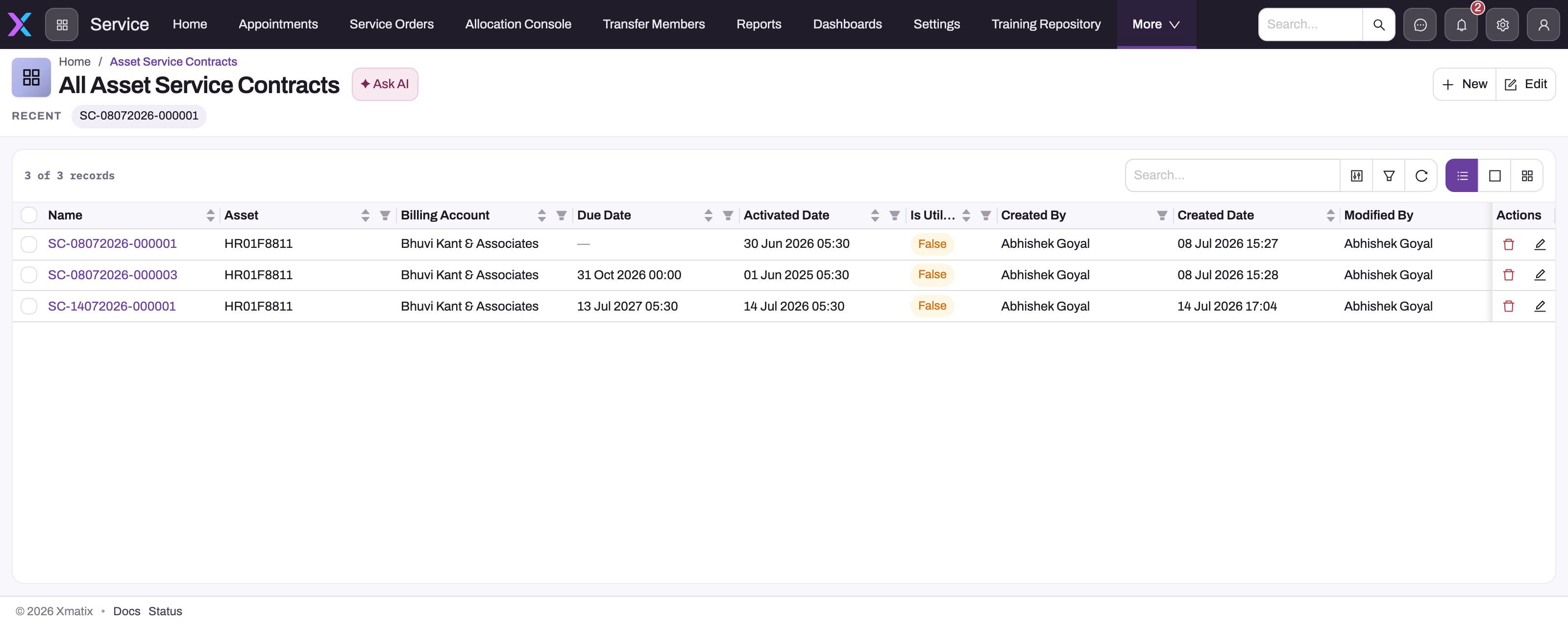
Open the All Asset Service Contracts list. It is not on the menu of any shipped app, so search for Asset Service Contracts in the App Launcher, or ask your administrator to add it to an app (see Configuration). The list shows Name, Asset, Billing Account, Due Date, Activated Date and Is Utilized. Filter on Asset to see one asset's entitlements.
You can also start from the record that holds them:
- the asset's Related tab lists its asset service contracts (read only);
- the contract item's Service tab lists the entitlements sold for that item, with New;
- the vehicle console's Contracts tab shows the asset's current entitlements, leaving out cancelled and expired ones.
Step 2 — Read an entitlement
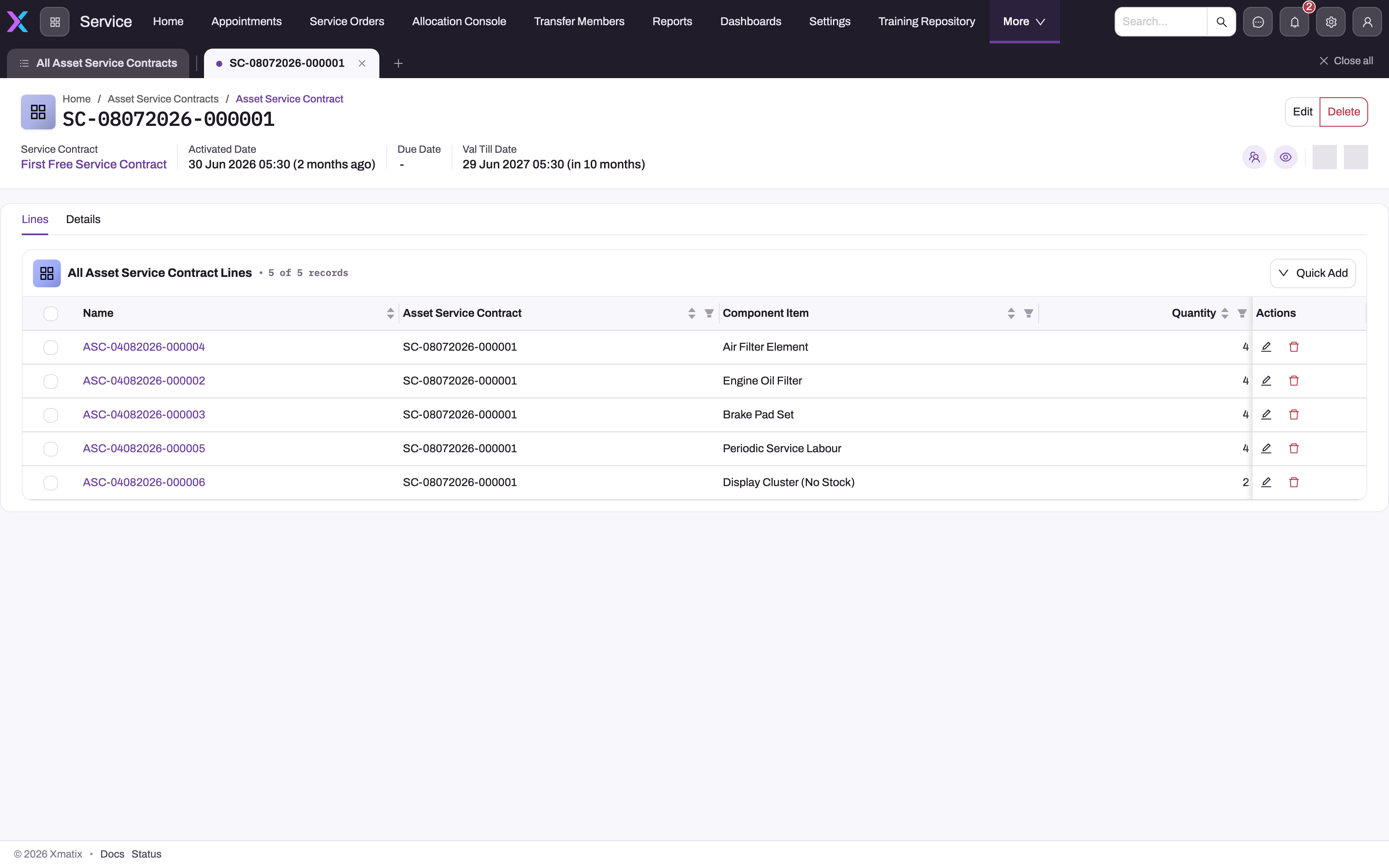
Open the record by its name. The header shows Service Contract, Activated Date, Due Date and Val Till Date, with Edit and Delete on the right.
- Lines lists the scope: one row per component item with its Quantity. Open a row by its name to see Pending Quantity and Utilized Quantity.
- Details holds the fields in panels: Key Information, Valid Till, Due In, Grace Usage (which also holds Billing Account) and System Information.
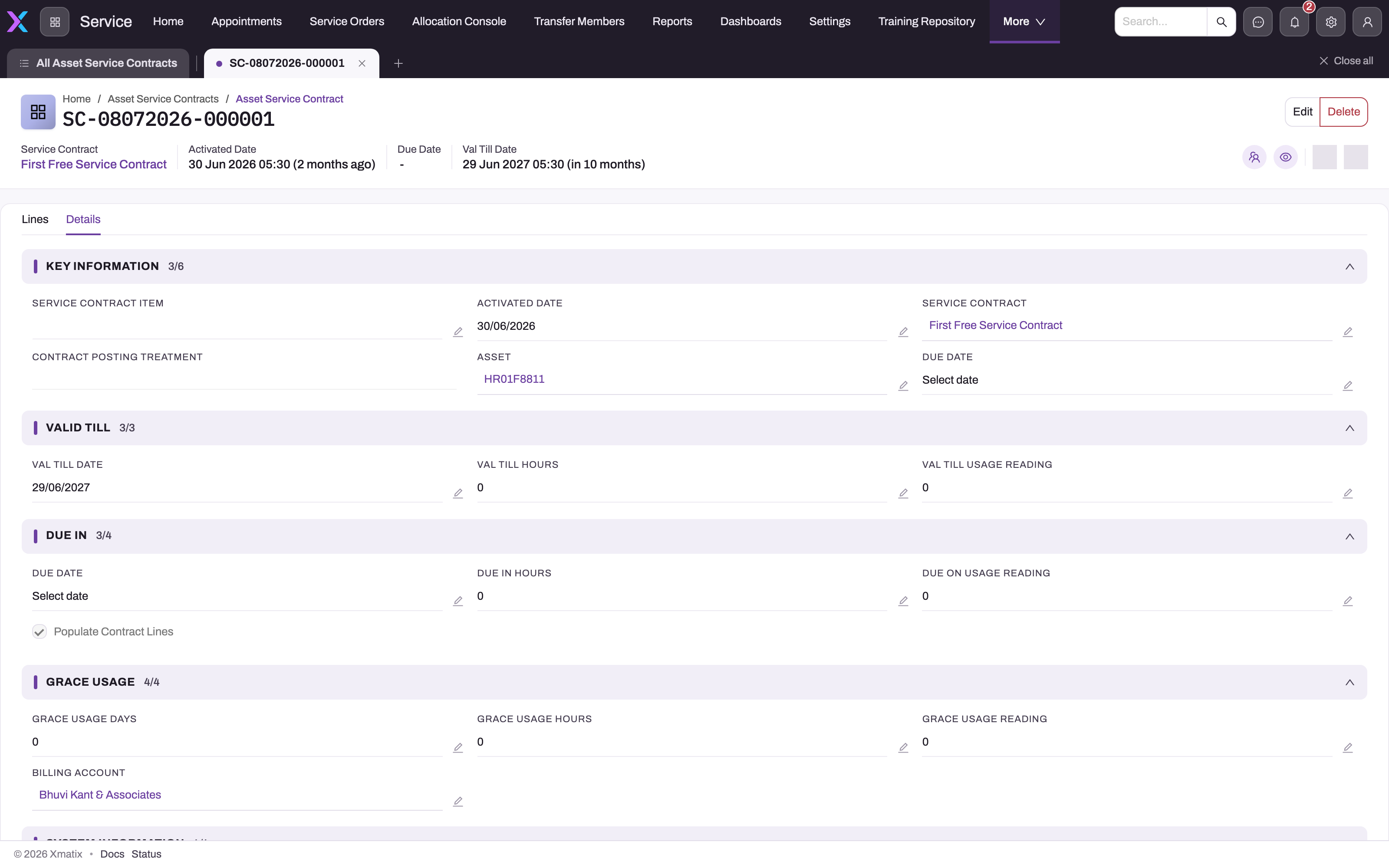
Before you approve covered work, compare the dates and limits with the job: the job date with Val Till Date plus Grace Usage Days, and the job's hours and reading with the Val Till values plus grace.
Step 3 — Create an entitlement by hand
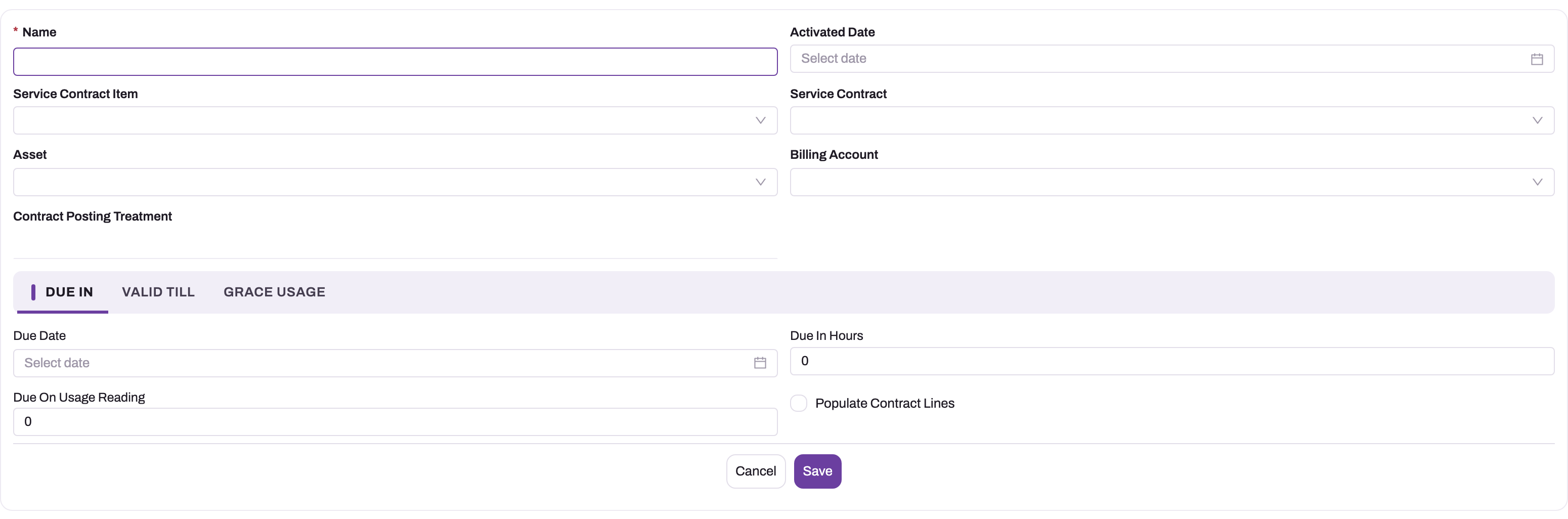
Use this only for cover that was not sold on an xMatix invoice.
- On the All Asset Service Contracts list, select New. You can also use New on the contract item's Service tab.
- Fill in Activated Date, Service Contract Item, Service Contract and Asset. Add a Billing Account if claims for this cover go to a specific payer.
- On the Due In tab, enter Due Date and, if you use them, Due In Hours and Due On Usage Reading. Switch on Populate Contract Lines if new jobs for this asset should be filled from the scope.
- On the Valid Till tab, enter Val Till Date, Val Till Hours and Val Till Usage Reading. Enter the real ceilings. These fields default to 0, and 0 makes any recorded reading lapse the entitlement.
- On the Grace Usage tab, enter Grace Usage Days, Grace Usage Hours and Grace Usage Reading.
- Save. The record gets the next number in the series and opens on its Lines tab.
Name is required, but the number from the series replaces whatever you type.
Step 4 — Add or correct the covered items
On the Lines tab, select Quick Add and enter Component Item and Quantity for each covered item. To change a quantity, use the pencil on the row, or open the row and edit it. Pending Quantity is recalculated as Quantity minus Utilized Quantity whenever the line is saved.
A generated entitlement already has one line per definition line. Edit them only to correct the entitlement, for example to grant extra quantity as goodwill.
Some things to know about scope lines:
- The Quick Add and Edit forms show only Component Item and Quantity. Each line gets the next number in the scope line series (shipped prefix ASC), so you never type a name.
- Quantity starts at 0, and a line saved at 0 covers nothing. A restricted-scope job line for that item is then refused on quantity.
- Component Item offers every item, with no filter. Use the same items that the definition lines use, and add each item only once. The scope check reads one line per item, so a second line for the same item is not added to the first.
- To correct Utilized Quantity, for example after work was invoiced outside xMatix, open the scope line by its name and change the value in place with the field's pencil. Pending Quantity follows when you save.
Step 5 — Use the entitlement on a job
- On the service order or opportunity, choose the Asset and pick the definition in Service Contract. Record Usage Reading and Usage Reading (Hours), and Failure Date if there is one.
- Save. xMatix links the eligible entitlement in Asset Service Contract, or refuses the save with the reason (see Common problems).
- For covered parts and labour, pick the definition in each line's Item Service Contract. The line is linked to the entitlement and checked the same way.
- Invoice the service order with Invoice or Selective Invoice. The scope lines' Utilized Quantity goes up and their Pending Quantity goes down.
Step 6 — Retire an entitlement
To stop an entitlement giving cover, open it and either set Val Till Date to the last day of cover or mark it Is Utilized. Is Utilized is in the list but on neither seeded form, so an administrator has to add it to the layout first. Delete removes the record from view. Jobs that still name the definition then find no entitlement, and definitions marked Active Service Contract Required refuse them.
Fields
New form
| Field | What it means | Notes |
|---|---|---|
| Name | The entitlement's number | Required. Set from the asset service contract numbering series when the record is saved. |
| Activated Date | When cover began | The invoice date on generated entitlements. Informational: no check reads it. |
| Service Contract Item | The contract item that was sold | Generated entitlements copy the definition's item. The quote populate matches on it. |
| Service Contract | The definition this entitlement belongs to | Matching keys on this and Asset. The definition's switches and usage band apply. |
| Asset | The covered asset | Matching keys on this. |
| Billing Account | Who claims for this cover are raised against | Optional. On claims it outranks the definition's BillingAccount. Not used for customer invoices. |
| Contract Posting Treatment | The definition's posting treatment, shown for reference | Filled from the definition when the record is saved, and a value picked here is replaced. Line posting reads the definition, not this copy. |
Due In tab
| Field | What it means | Notes |
|---|---|---|
| Due Date | When the next service falls due | Activated Date + From Days. Contract-schedule campaigns send reminders against it. |
| Due In Hours | The hours at which service falls due | Copied from Minimum Usage (Hours). Not checked. |
| Due On Usage Reading | The reading at which service falls due | Copied from Minimum Usage (Reading). Not checked. |
| Populate Contract Lines | Fill new jobs for this asset from the scope lines | Off on generated entitlements. See Business rules. |
Valid Till tab
| Field | What it means | Notes |
|---|---|---|
| Val Till Date | Last day of cover | Activated Date + To Days. Grace days are added before the lapse check. |
| Val Till Hours | Hours ceiling | Default 0. A job's hours at or above this plus grace lapse the entitlement. |
| Val Till Usage Reading | Reading (for example kilometres) ceiling | Default 0. A job's reading at or above this plus grace lapses the entitlement. |
Grace Usage tab
| Field | What it means | Notes |
|---|---|---|
| Grace Usage Days | Days of tolerance after Val Till Date | Default 0. Extends cover; the date itself does not move. |
| Grace Usage Hours | Hours of tolerance over Val Till Hours | Default 0. |
| Grace Usage Reading | Reading tolerance over Val Till Usage Reading | Default 0. |
Record page only
| Field | What it means | Notes |
|---|---|---|
| Is Utilized | The entitlement is used up | Shown in the list, not on the forms. Matching skips it. Set by hand: nothing sets it automatically. |
| Created By, Created Date, Modified By, Modified Date | Audit stamps | Read only, in System Information. |
Scope line (Lines tab)
| Field | What it means | Notes |
|---|---|---|
| Name | The scope line's number | Set from the ASC series when the line is saved. Not on the forms. |
| Asset Service Contract | The entitlement the line belongs to | Filled in when you add the line from the Lines tab. Shown on the line's own page. |
| Component Item | A part or labour item the entitlement covers | Restricted-scope checks look for the job line's item here. No lookup filter. |
| Quantity | How much of it is covered | Copied from the definition line on generated entitlements. Defaults to 0. |
| Utilized Quantity | How much invoicing has consumed | Raised by service order invoicing, lowered by invoice cancellation (never below 0). Defaults to 0. You can correct it in place on the line's page. |
| Pending Quantity | What is left | Quantity minus Utilized Quantity, recalculated on save. |
Fields on the record but not on the forms
Status has no seeded values. The only automatic value is Cancelled (see Business rules). Posting Type is free text that a populated or checked job line takes when its own posting type is blank. Item holds the package parent's item. Description is free text. Service Type and Single Use Contract are always blank on this record; the switches that count are on the definition. The full list is in the Asset Service Contract reference.
Business rules
Checks when a job names the contract. On a service order or opportunity header, and on each opportunity or service order line that names a definition, the checks run in this order:
- the definition must exist (Missing Contract. Please check if the Service Contract exists and try again.);
- a lapsed entitlement gives the specific reason: The validity of this contract has lapsed!, The Usage Hours for this contract has lapsed! or KM reading exceeds service contract usage limit;
- Active Service Contract Required on the definition refuses a job with no eligible entitlement: No Active Asset Service Contract. This Service Contract requires an active Asset Service Contract! When there is one, its limits plus grace are checked against the job;
- Is Scope Restricted refuses a job with no eligible entitlement (No Active Asset Service Contract. A Restricted Scope Contract requires an active Asset Service Contract!). On lines, the item must be a scope line (The Item is not in scope of active Service Contract!) and the line's quantity must not exceed that scope line's Pending Quantity (The quantity of the Item exceeds the quantity allowed under this Service Contract!);
- Single Use Contract refuses a used entitlement (This is a Single Use contract and has already been utilised!). On lines, a missing entitlement is also refused (No Active Asset Service Contract. Single Use Contract requires an active Asset Service Contract for the Asset!).
The header also checks the job's readings against the definition's usage band; that rule is on Service contract definitions. Service order lines are also fenced to the definition's own lines; see Contract definition lines.
How the scope check reads the lines. The check finds the scope line by the job line's item. It compares that one job line's quantity with the scope line's current Pending Quantity. It does not add up other lines of the same job, or of other open jobs. The quantity is only used up at invoicing, so two open service orders can each pass the check for the full pending quantity. When both are invoiced, Utilized Quantity can go above Quantity and Pending Quantity below 0. After that, every covered line for the item is refused until the quantity is raised. Nothing stops a scope line from being saved with a negative pending quantity.
Populate Contract Lines. When the switch is on, the entitlement's scope lines that still have a Pending Quantity above 0 are copied onto new jobs, each line taking the pending quantity, the entitlement's Posting Type and a link to its scope line:
- a service order that is created with an Asset and a Service Contract and has no lines yet, unless it was created from an estimate. Entitlements marked Is Utilized are skipped. If you change the Service Contract on a saved service order, the old contract's lines are removed and the new definition's own lines are added instead. Those lines are not linked to the entitlement, so they don't consume it;
- an opportunity, when it is created with a Service Contract or its Service Contract changes. This path does not skip entitlements marked Is Utilized;
- a saved quote, when its Item Service Contract changes. The quote takes entitlements whose Service Contract Item matches the quote's and that are not marked Is Utilized.
None of these checks lapse dates or Status.
Cancelled status. Saving a sale-return credit note line with an Asset (or changing a return line's asset) sets Status to Cancelled on every asset service contract of that asset. Contract checks, line population and campaigns do not read Status, so a cancelled entitlement can still give cover. Only the vehicle console hides it. To stop cover for a returned asset, also follow Step 6. Cancelling the invoice that sold the contract does not remove the entitlement either.
Posting type on job lines. A line whose item is on the definition's lines takes the definition's Contract Posting Treatment. A line that reaches the contract check with a blank Posting Type takes the entitlement's Posting Type, then the definition's treatment. Generate Claims and Auto Generate Claims lines become claims. A claim's supplier account is the entitlement's Billing Account if set, then the definition's BillingAccount, then the service order's customer.
Numbering and editing. Names come from the asset service contract numbering series. No field is locked after creation, and no validation runs on the record itself.
Example
A dealer sells a utility vehicle with a free-service plan. The plan's definition, Free Service Plan 1Y, has To Days 365, From Days 90, Maximum Usage (Reading) 10000 with Grace Usage (Reading) 500, Maximum Usage (Hours) 400, and two lines: engine oil filter (quantity 2) and periodic service labour (quantity 2). Is Scope Restricted is on.
On 2 May the vehicle and the plan item are invoiced together and Post Inventory is run. The vehicle becomes an asset, and the asset gets entitlement SC-02052026-000014: activated 2 May, due 31 July, valid till 2 May next year, reading ceiling 10,000, with two scope lines of quantity 2.
The service advisor wants the first visit's lines filled in automatically, so they open the entitlement and switch on Populate Contract Lines. On 28 July the customer returns at 3,100 km. The advisor creates a service order with the asset, Service Contract Free Service Plan 1Y and Usage Reading 3100. On save the order links the entitlement and gets two lines, one filter and one labour line, each for quantity 2.
The advisor reduces both lines to quantity 1, because this is the first of two services, and invoices the order. Each scope line now shows Utilized Quantity 1 and Pending Quantity 1. At the second visit, an order line for 2 filters is refused with The quantity of the Item exceeds the quantity allowed under this Service Contract!; 1 is accepted.
Training
Practice exercise
In a sandbox with a definition that has Is Scope Restricted switched on and one line (an oil filter, quantity 2):
- Create an asset service contract by hand for a test asset under that definition. Set Val Till Date a year ahead, Val Till Usage Reading 10000 and Val Till Hours 500, switch on Populate Contract Lines, and add a scope line for the oil filter with quantity 2.
- Create a service order for the asset with that Service Contract and Usage Reading 2000.
- Change the populated filter line's quantity to 3 and save.
- Set it back to 2, save, and invoice the order.
- Open the scope line.
Expected result: step 2 creates one service order line for 2 filters, linked to the entitlement. Step 3 is refused with The quantity of the Item exceeds the quantity allowed under this Service Contract! After step 4 the scope line shows Utilized Quantity 2 and Pending Quantity 0. A second service order for the asset then gets no populated lines.
Quick reference
- Selling a Service Contract item on an invoice and running Post Inventory creates the entitlement.
- One entitlement per matching definition; values are copied once.
- Matching = same asset + same definition + not Is Utilized + not lapsed.
- Grace extends every limit; a limit of 0 is still a limit.
- Utilized Quantity moves only on service order invoicing and invoice cancellation.
- Only lines linked to a scope line consume it; hand-added lines do not.
- The scope check compares each job line alone with Pending Quantity; open jobs don't reserve it.
- Populate Contract Lines is off on generated entitlements.
- Cancelled status does not stop cover; use Is Utilized or Val Till Date.
- The entitlement's Billing Account decides who claims go to.
Permissions
Asset service contracts use the standard entity permission. The seeded Sales Executive, Sales Manager, Service, Standard User and System Admin profiles grant full access to Asset Service Contract and its lines: view, create, edit and delete. The record has no server actions, so there is nothing to grant on a profile's Actions tab. A user whose profile does not grant the entity can't open the list, the record or the related lists that show it. A hand edit changes what jobs are checked against, so keep edit access to the people who own contract cover. See Security profiles.
Configuration
- A menu entry. No shipped app lists Asset Service Contracts. To add one, go to Setup → Design Studio → Apps, open the app (for example Service) and use Manage Items to add the entity (see the create-an-entity walkthrough).
- Layouts. Is Utilized, Status and Posting Type are on no seeded form. Add them to the Asset Service Contract View layout in the layout designer if your team maintains them.
- Numbering. The SC series comes from the shipped Asset Service Contract name setting, and the ASC series for scope lines from the Asset Service Contract Line name setting. Change the prefix or length in the document numbering settings.
- Definitions. Limits, scope, enforcement switches and posting treatment come from the service contract definition, including Restrict Asset Contract Lines Generation, which stops scope lines being created on sale.
- Reminders. Contract-schedule campaigns generate reminder leads for entitlements whose Due Date is coming up, skipping entitlements marked Is Utilized or past Val Till Date.
- Claim generation. The shipped claim generation setup for contract claims groups claim lines by service order, invoice group and asset service contract. See Claim generation setups.
Common problems
"No Active Asset Service Contract. This Service Contract requires an active Asset Service Contract!"
The asset has no entitlement under that definition that is free to use. Check, in this order: an entitlement exists for this Asset with this Service Contract (not only a similar one); it is not marked Is Utilized; and its limits plus grace have not been reached. If the contract was sold but no entitlement exists, see Selling the contract created no asset service contract.
"The validity of this contract has lapsed!"
The job date, or its failure date, is after Val Till Date plus Grace Usage Days. If the cover really is still valid, correct the entitlement's Val Till Date. A definition with To Days 0 creates entitlements that lapse the day after the sale.
"The Usage Hours for this contract has lapsed!" or "KM reading exceeds service contract usage limit"
The job's Usage Reading (Hours) or Usage Reading has reached the entitlement's ceiling plus grace. Check the reading on the job. A hand-created entitlement whose Val Till Hours or Val Till Usage Reading was left at 0 lapses on any recorded reading; enter the real ceiling.
"The Item is not in scope of active Service Contract!"
The definition has Is Scope Restricted on and the line's item is not on the entitlement's Lines tab. Add the line without an Item Service Contract (paid work), or add the item to the scope if it should be covered.
"The quantity of the Item exceeds the quantity allowed under this Service Contract!"
The line's quantity is more than the scope line's Pending Quantity. Earlier invoiced jobs have used the rest. Reduce the quantity, split the excess onto a paid line, or raise the scope line's Quantity if extra cover was agreed.
A scope line shows a negative Pending Quantity
Two or more jobs for the same item passed the scope check while all of them were still open. Each was checked against the full pending quantity, and invoicing then consumed both. If the extra work was agreed cover, raise the scope line's Quantity. If it should have been paid, leave the line as it is. Future covered lines for that item are refused until Pending Quantity is above 0 again. To avoid it, invoice one contract job before you open the next for the same asset.
"This is a Single Use contract and has already been utilised!"
The entitlement is marked Is Utilized. If that was set by mistake, clear it.
A new service order did not get any lines from the contract
Populate Contract Lines is off on the entitlement (it is off on every generated one); or every scope line has Pending Quantity 0; or the entitlement is marked Is Utilized. Lines are also not added when the order was created from an estimate or already had lines. If the Service Contract was picked after the order was first saved, the order gets the definition's own lines instead, and those don't consume the entitlement.
The customer returned the vehicle but the contract still gives cover
The sale return marked the entitlements Cancelled, but the checks don't read Status. Set Val Till Date to the return date or mark the entitlements Is Utilized.
Common questions
Where do asset service contracts come from?
Mostly from sales. Posting the inventory of an invoice that sells a Service Contract item against an asset creates one entitlement for each matching definition, with dates, limits, grace and scope worked out from the definition. You can also create one by hand for cover that was sold elsewhere. Either way, the same checks apply when a job names the contract. Changing a definition later does not change entitlements already created, so correct an existing entitlement on the entitlement itself.
When is the covered quantity used up?
When the service order is invoiced. Each Invoice or Selective Invoice run adds the quantity it processed to the scope line's Utilized Quantity, and Pending Quantity drops by the same amount. Claim lines are counted once. Cancelling the invoice gives the cancelled quantity back. Saving an order, or releasing it from an opportunity, does not consume anything. Only lines linked to a scope line count, which means lines filled from the entitlement or copied from a linked opportunity, quote or estimate line.
What does the grace allowance do?
It extends each limit before the entitlement counts as lapsed: days past Val Till Date, hours past Val Till Hours and reading past Val Till Usage Reading. It covers a customer who arrives slightly over the limit. The stated dates and ceilings stay as they are, and campaigns still treat Val Till Date as the end of cover. Grace is copied from the definition when the entitlement is created, so you can change it on one entitlement without affecting others.
Who pays for contract-covered work?
That depends on each line's Posting Type. Generate Invoices lines are billed on a customer invoice. Generate Claims and Auto Generate Claims lines become claims at invoicing time. The claim goes to the entitlement's Billing Account if it has one, otherwise to the definition's BillingAccount, otherwise to the service order's customer. One order can bill the customer for consumables and claim the covered repair from the manufacturer. Customer invoices follow the definition's Bill To Partner Account and BillingAccount, not the entitlement.
What are Contract Line item records, and do they affect cover?
No, they don't affect cover. A Contract Line item is a separate record holding an item, an asset, an asset service contract, a quantity, a contract year and prices. Nothing in xMatix creates, prices or reads it, and it is in no shipped app, so the checks, posting and claims ignore it. Covered items and quantities belong on the entitlement's Lines tab. The field list is on the Contract Line item reference.