
The Contracts app is a records module: a structured register of your service agreements — the contract document, its commercial lines, the terms text, the SLA commitments and the planned preventive-maintenance visits — with the platform's full list, view, field and reporting machinery on top. Being a records module is the honest frame: these records describe agreements; they do not run them. Nothing here auto-renews, auto-bills or auto-dispatches — the enforced, self-acting entitlement mechanism in xMatix is the asset service contract, and the two are different tools for different jobs.
Read the register
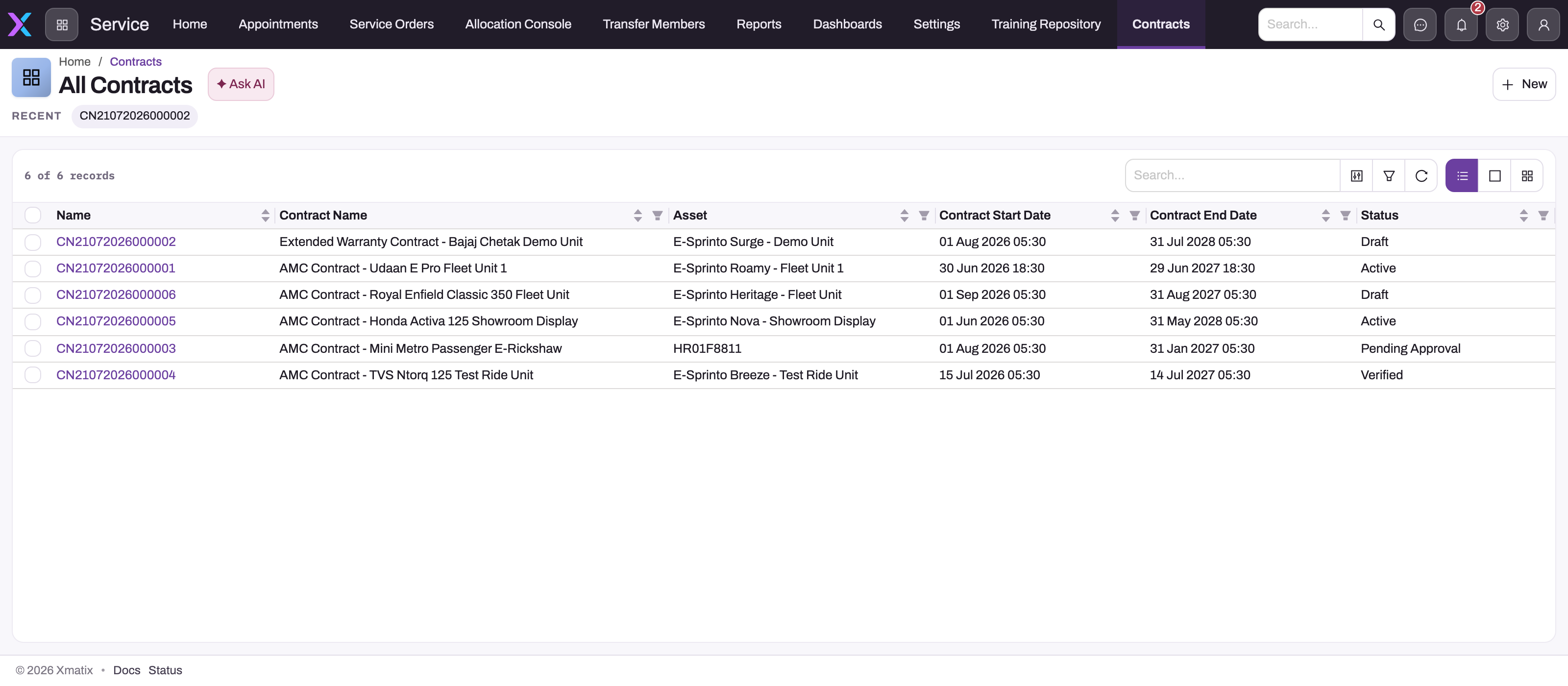
The All Contracts list is the register's entry point. Contract number and name locate the agreement; asset, start and end dates and status describe its recorded scope and lifecycle; search and filters isolate the agreements that need review. Open the exact row before interpreting obligations: the list tells you which agreement exists, while its Scope, Terms & SLAs, PM Tasks, Checklists and Details tabs hold the supporting records and fields.
The five record types
| Record | What it holds |
|---|---|
| Contract | The agreement: an automatic CN number and a contract name, account and asset, start and end dates, activated date, the signature facts (Customer Signed Title, Customer Signed Date, Company Signed Date), billing and shipping addresses, special terms, description, line of business (LOB), and a status you maintain — Draft (the default), Pending Approval, Verified, Active. The form also shows Contract Terms (Months), but that value is not saved — see Managing contracts |
| Contract Line | One commercial position: an automatic SCL number, the item and description, quantity, unit price, discount, contract years and hours, asset count and the customer account. Cost price, billed amount, billing treatment, visit frequency, year number, series, vendor name, the under-warranty and parts-supply flags, remarks and the bill-to and ship-to accounts also exist but are on no shipped form. A line has no Contract field — see Contract lines |
| Term | A block of reusable terms text in a library: a name, terms type, sequence number, line of business, contract duration (a picklist — 6, 12 or 24 months as shipped), the text itself, two display switches (show item breakup, show scope) that nothing reads as shipped, and an Is Template flag that marks your standard blocks. A term has no Contract field; you copy its text into agreements — see Terms records |
| SLA | A service-level commitment as a reference record: type (Customer Based, Service Based, Multi Level as shipped), priority (Critical, High, Medium, Low), severity level, response time (4, 8, 12 or 24 hours as shipped) and resolution time (12, 24, 36 or 48 hours as shipped), and remarks — see SLA records |
| PM Task | A planned preventive-maintenance visit: task type (as shipped: B Check, C Check, D Check, B and C Check, Coolant Topup, OOS, Preventive Maintenance, Performance Qualification, Operational Checks), a service-request number, due date and the scheduled window, the asset and its site address, the partner account and technician, a status, and the contract line it belongs to. Nothing creates PM tasks for you, and saving one dispatches no one — see PM task records |
Contract lines link to their PM tasks, so the register can answer "what visits does this line owe?" through views and reports. Every picklist above is tenant-maintained, so the values in your tenant may differ from the shipped ones.
A contract record page offers Edit and Delete in its header. Delete is a soft delete: the contract goes to the Recycle Bin and can be restored until its purge date, while its lines, terms, SLAs and PM tasks, which are separate records, stay as they are. A superseded agreement is usually better kept as history. Clone exists but is not on the shipped record page, so a renewal is normally entered as a new contract — the full procedure is in Managing contracts.
What this module does — and does not do
Does: everything the platform gives any entity. Lists and views, filters and search, record security, reporting and dashboards over contract data, custom fields and layouts, and — because status changes are ordinary field updates — approval processes and business rules where you configure them.
Does not: act on its own. There is no server logic behind these five entities: the status is a field you set, not a workflow the platform advances; reaching the end date changes nothing by itself; no invoice is generated from a contract line; a PM task does not dispatch a technician or create a service order. When you need the platform to enforce an entitlement — refuse uncovered work, check scope and quantities, route billing to claims — that is the asset service contract, created when a service contract item is invoiced. When you need crews scheduled against planned visits, that is Field Service. And SLA enforcement on support cases — timers, breaches, escalations — runs on the separate SLA policy records documented with cases in Support; the SLA records here are the commitments catalog you quote in agreements.
One shipped-layout caveat matters when you read a contract: the lists on the Scope, Terms & SLAs and PM Tasks tabs are not filtered to the open contract — they show the tenant-wide contract-line, term, SLA and PM-task registers with a New button. Read a row's own fields (or filter the list) before treating it as this agreement's, and expect the same rows on every contract. A contract line has no Contract field at all, so the Scope list cannot be bound to the contract until your administrator adds one; until then, identify a contract's lines by their description and account, as Contract lines explains.
Common questions
Will xMatix bill or renew a contract from this module?
No. Contract records carry the dates and amounts, and reports over them tell you what is due for renewal or billing — but generating the invoice, or the renewal, is a deliberate act elsewhere (invoicing happens on service orders and sales documents). Treat the module as the register you work from, not an engine that works for you.
What is the difference between a Contract record and an asset service contract?
The Contract record is the documented agreement — parties, dates, signatures, terms — maintained for the record. The asset service contract is the operational entitlement the platform checks when service work claims cover: eligibility, lapse, scope and quantity, billing routing. A real-world agreement often exists as both: the signed document here, the enforceable entitlements there.
Can the Pending Approval status trigger an actual approval?
The status itself is just a field — but the platform's approval processes are configured per entity, so an administrator can put Contract under an approval process like any other record. Without one configured, moving the status is a manual bookkeeping step.