
A visit is one call on one outlet: the record that says which customer the executive goes to, when they are expected, when they actually arrived and left, what they did there and how it went. Visits sit inside a visit plan, which is the executive's day. The plan comes first and creates the visits. The executive then works each visit on the mobile app, or on the visit's web page, through its tasks and activities, and ends it with an outcome. Orders, service orders and evidence captured during the visit stay linked to it.
Overview
A field day in xMatix has four levels:
| Object | What it is | Where it comes from |
|---|---|---|
| Visit plan | One executive's day: the ordered list of outlets | Generated from the beat's schedule, created by hand, created in the Route Planner, or created by a van run |
| Visit | One stop: an outlet, a planned slot, a status and an outcome | Built when the plan is saved, or created by hand |
| Task and activity | A unit of work inside a visit: checklist, photo, signature, order, payment and so on | Read from the visit's task template each time the visit is opened, and saved the first time the executive works it |
| Order | The commercial result of a productive visit | Captured in the Take Order activity and linked to the visit |
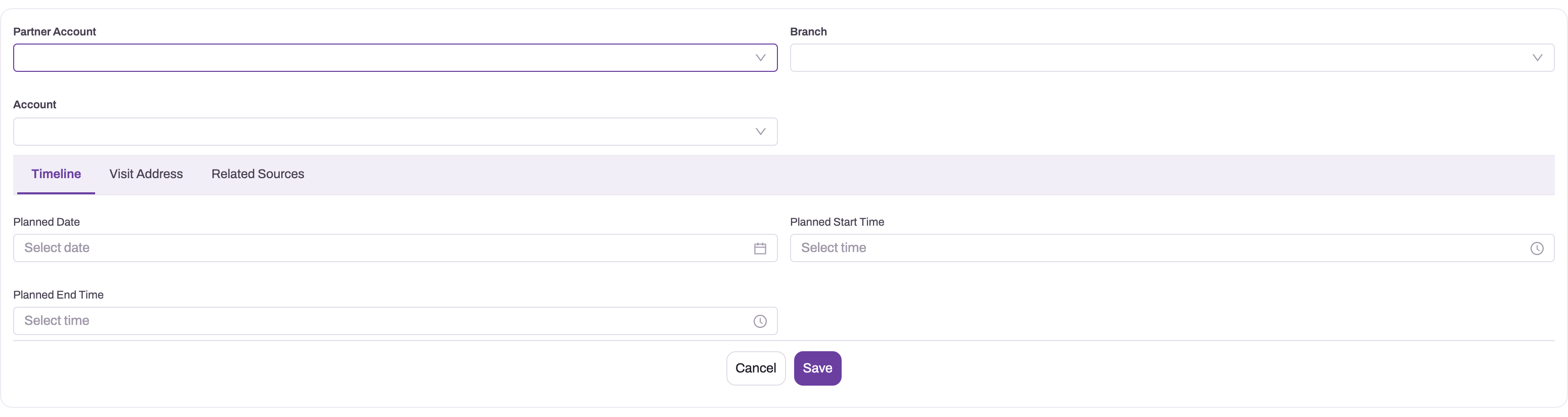
- 1
Partner Account identifies the outlet organization being visited.
- 2
Branch selects the exact physical outlet in a multi-branch account.
- 3
Account carries the commercial context used by orders and follow-up activities.
- 4
Timeline, Visit Address and Related Sources separate schedule, place and plan provenance.
- 5
Planned date and start/end times are the baseline for actual visit execution.
When to use it
- Every working day. Executives open today's plan on the mobile app and work its visits one by one. See Complete a visit on mobile.
- Checking what happened. Supervisors open a visit on the web to see when it started and ended, how far it was from the outlet, which activities were done and what was ordered.
- A one-off call. To add an outlet that is not on the beat, create a visit by hand and link it to the day's plan, or leave it standalone.
- Desk-based execution. A user who works a visit from a browser can start, pause and end it on the web record page in the same way as on the phone.
How xMatix handles it
Creating visits. When a visit plan is saved for the first time, it builds its visits from its sources:
- Visit route. One visit per approved stop. The visit gets the stop's outlet, start and end time, purpose, position in the beat and check-in tolerance, the outlet's map position, the plan's start date and the plan's task template.
- Account group. One visit per member, with the plan's task template. These visits get no planned date.
- Order Delivery purpose. One visit per pending delivery order, with the delivery address. The planned slot is the scheduled delivery time plus one hour.
A van run creates its own plan with one visit per outlet. Those visits start with the status Planned. Visits built by a plan start with an empty status, which the apps show as not started. See Visit plans for how plans are built.
Starting. The executive starts the visit, and then:
- the status becomes Started;
- xMatix stamps Start Time on your organization's clock;
- the device's position is saved in Visit Location if it could be read.
Before the start, the app compares the device position with the outlet's planned position. If the device is further away than the visit's Geofencing Tolerance, the app warns that the start will be off-site, and the button reads Start anyway (Start Visit anyway on mobile). This warning never blocks the start.
Pausing. A paused visit has the status Paused. Resuming sets it back to Started and keeps the original start time.
Ending. End Visit asks How did the visit go? and offers three outcomes:
- Productive — "Visit done, order captured".
- Non-productive — "On site, but couldn't sell".
- Cancelled — "Didn't happen — pick a reason".
Non-productive and Cancelled need a reason. You can pick Store closed, Owner away or Other, add a note, or both.
Every outcome sets the status to Completed and stamps End Time. The outcome is recorded by which reason field is filled:
| Outcome | Visit Status | Reason stored in |
|---|---|---|
| Productive | Completed | — |
| Non-productive | Completed | Non-Productive Reason |
| Cancelled | Completed | Visit Cancellation Reason |
Linking documents. The first sales order created against a visit is linked as the visit's Order, and the first service order as its Service Order. Neither link is replaced later. Further orders stay linked through their own visit reference and are listed under the visit.
Closing visits nobody finished. Open visits are cancelled automatically in three cases:
- when their plan is ended (End plan, which sets the plan to Completed);
- when their plan lapses;
- 48 hours after their planned date, by default.
The cancellation sets the status to Cancelled and fills no reason. Visits that are Completed, Cancelled or Rescheduled are never touched.
Prerequisites
- The Field Sales app, and a security profile with access to Visit (see Permissions).
- To execute a visit that belongs to a plan, the plan must be assigned to you (or to nobody), and it must be started. Your user must be linked to an active resource.
- For the off-site warning and directions to the outlet: the visit needs a planned position, and the device or browser must be allowed to share its location.
- A visit task template on the visit, if the executive has work to record at the outlet.
Procedure
Step 1 — Find a visit
- Web: in the Field Sales app, open Visits. The All Visits view lists Name, Partner Account, Branch, Account, Visit Purpose, Visit Status and the audit columns. The Visits view lists Name, Account, Visit Date, Visit Status, Start Time and End Time. You can also open a plan and use its agenda.
- Mobile: open Visit Plans, then the plan. The agenda lists the plan's visits as a timeline or on a map.
Executives linked to a resource see only visits on plans that are assigned to them or to people who report to them. They also see visits whose plan is unassigned and visits with no plan.
Step 2 — Read the visit record
Open a visit on the web. The header shows the account, Start Time and End Time, with the buttons Edit and Delete.
On the left, Details groups the fields:
- Information — plan, template, account, purpose, status and route stop.
- Plan — planned date, times, duration and check-in tolerance.
- Visit Location — address and the two map positions.
- Actual — actual times and the deviation from the planned start.
- Remarks — the cancellation reason and notes.
- System Information — who created and last changed the visit.
On the right are four tabs:
- Visit Tasks — the start, pause and end controls and the task cards.
- Activity — calls, notes and other activities logged against the visit.
- Related — the visit's saved task records.
- Info — the outlet's details, order history and recommendations.
On mobile, the visit has the tabs Visit Tasks, Outlet Info, Related (orders, invoices and delivery orders), Details and Activity.
Step 3 — Create a visit by hand
- In Field Sales → Visits, select New.
- Choose the Account (the outlet). Choose Partner Account and Branch if your organization uses them. The Branch list shows only branches of the chosen partner account. Both fields are hidden on tenants that run one company or one location.
- On Timeline, set Planned Date, Planned Start Time and Planned End Time.
- On Visit Address, choose a Visit Address, or type Visit Street and choose Visit City, Visit State and Visit Country, and type Visit Postal Code. Choosing a Visit Address does not fill the other address fields.
- On Related Sources, choose the Visit Purpose. Choose the Visit Plan to add the visit to an existing day, the Visit Task Template that holds the work to do, and the Visit Route if it applies.
- Select Save. The visit is numbered automatically and opens with an empty status.
A hand-created visit has no planned map position, so the app cannot show the off-site warning or measure distances for it.
Step 4 — Start, pause and end a visit on the web
Open the visit and go to the Visit Tasks tab.
- Select Start Visit. If the browser's position is outside the check-in zone, the button reads Start anyway. You see Visit started, or Visit started (off-site). The task cards unlock.
- Work the activities as described in Checklists and tasks.
- To step away, select Pause. The status becomes Paused. Select Resume to continue.
- Select End Visit, choose Productive, Non-productive or Cancelled, give a reason where asked, and select Confirm & end visit. You see Visit completed, and End Time is filled.
On the web, the dialog tells you how many mandatory activities are still pending, but lets you end the visit as Productive anyway. The mobile app does not. If the visit has Show Accept/Reject Option ticked, the start button is replaced by Reject and Accept & start. Reject asks Reject visit? and ends the visit with the reason Rejected by rep.
To work a visit on the phone instead, follow Complete a visit on mobile.
Step 5 — Change, reschedule or cancel a visit
- Change details. Select Edit to open the visit form, or use the pencil beside a field on the record page to change it in place. Supervisors can change a visit on someone else's plan, as long as they don't move its status into Started, Paused or Completed.
- Reschedule. Change Planned Date and the planned times. The mobile day-end screen has Carry to tomorrow for missed outlets. It sets the status to Rescheduled, moves the planned date to the next day, and records Carried to tomorrow as the reason.
- Cancel. Set Visit Status to Cancelled. Choosing a Visit Cancellation Reason on its own does not cancel the visit.
Step 6 — Delete a visit
Select Delete on the record, or Delete in the list. Delete only visits created by mistake, such as duplicates. Cancelling keeps the visit in the plan's history and in coverage reports.
Fields
The form fields, in the order of the record page:
| Field | What it means | Notes |
|---|---|---|
| Visit Plan | The day this visit belongs to | The plan's assigned executive is the only person who can execute the visit. Empty for a standalone visit. |
| Visit Task Template | The work to do at the outlet | Copied from the plan. Changing it later removes the tasks already started under the old template. |
| Account | The outlet | Copied from the route stop, group member or delivery order. |
| Visit Purpose | Why the outlet is visited | Order Capture, Courtesy Visit, Order Delivery, Field Service, Product Demo, Service Touch, Payment Collection. Descriptive only. |
| Visit Status | Where the visit is in its life | Picklist: Planned, Assigned, Started, Completed, Rescheduled, Cancelled. The apps also write Paused. Plan-built visits start empty. |
| Visit Route Stop | The beat stop the visit came from | Empty for visits from other sources. |
| Planned Date | The planned day | Copied from the plan's start date. Account-group visits have none. |
| Planned Duration | Planned minutes | Calculated from the planned times. Read-only. |
| Planned Start Time / Planned End Time | The planned slot | From the route stop, or the scheduled delivery time plus one hour. |
| Geofencing Tolerance (KM) | How far from the outlet a start counts as on-site | Copied from the route stop. Read in metres by the apps despite the label. Empty or 0 means 100 m. Only warns. |
| Visit Address | A customer address record | Not narrowed to the outlet. Doesn't fill the fields below it. |
| Visit Street, Visit Region, Visit City, Visit State, Visit Postal Code | The visit's address | Delivery visits copy them from the delivery order. City and State are short delivered picklists. |
| Visit Location | Where the executive was when they started | Captured from the device or browser. |
| Assigned Location | The outlet's planned position | Stamped when the plan builds the visit. Used for directions, distance and the off-site warning. |
| Visit Date | A date in the Actual section | Not filled by starting the visit. Van-run visits get the delivery date. |
| Visit Duration | Actual minutes on site | Calculated from Start Time and End Time. Read-only. |
| Start Time | Actual start | Stamped on first start, on your organization's clock. Kept on resume. |
| End Time | Actual end | Stamped when the visit is completed. |
| Visit Time Deviation | Minutes started early (positive) or late (negative) | Calculated from Planned Start Time and Start Time. Read-only. |
| Visit Cancellation Reason | Why the visit didn't happen | Written by the Cancelled outcome or Reject. Picklist values: Insufficient Information, Non Availability. The apps store their own reason text. |
| Remarks | Notes | The note button on a running mobile visit writes here. |
On the create form only:
| Field | What it means | Notes |
|---|---|---|
| Partner Account | The distributor or company the visit is for | Only active partner accounts. Plan-built visits leave it empty. |
| Branch | The branch | Only branches of the Partner Account. |
| Visit Country | Country of the address | Picklist. |
| Visit Route | The beat | Plan-built visits leave it empty. |
Fields filled by the system and not on the delivered forms include:
- Non-Productive Reason — the reason for a Non-productive outcome or a carry-over.
- Order and Service Order — the first documents created on the visit.
- Delivery Order — for delivery visits.
- Sequence Number, Planned Sequence, Optimized Sequence and Mostly Followed Sequence — the visit's position in the day.
- DocumentDate — the actual start as a date and time.
Show Get Direction Option, Show Reschedule Option, Show Visit Start/End Option and Show Progress Panel are stored but no screen reads them. Every field is listed in the entity reference.
Business rules
- Only the assignee executes. Moving a visit into Started, Paused or Completed is refused for anyone except the resource the plan is assigned to. If the plan has no assignee, the plan's Executed By Resource counts as the assignee. These users are never checked: users with no resource record, and anyone working on a visit with no plan or on a plan with nobody assigned.
- The plan comes first. The web and mobile apps refuse to start or resume a visit until its plan is started. They also refuse while the plan is paused, and after it has ended. Visits without a plan have no such gate.
- Start and end are stamped by the server. Start Time is set the first time a visit enters Started, and End Time when it enters Completed. Both use the default time zone in your organization's settings. A visit that is resumed after a pause keeps its first start.
- Ending always means Completed. Productive, Non-productive, Cancelled and Reject all set the status to Completed. A plan's Visit Compliance counts every Completed visit, so non-productive and cancelled outcomes count as completed there.
- Productive needs the mandatory work on mobile only. The mobile app blocks a Productive close while a mandatory activity is pending; the web warns.
- One order per visit is linked. The first order and the first service order are stamped on the visit and never replaced.
- Changing the template retires started work. Pointing a visit at another task template removes the tasks and activities already saved under the old one. Nothing is created in their place; the new template's cards appear when the visit is opened.
- Automatic cancellation. Open visits are cancelled when their plan is completed or lapses, or once their planned date is older than the cleanup margin (48 hours by default). Visits with no planned date, such as those built from an account group, are only cancelled through their plan.
- Numbering. Visits are numbered by the Visit document name setting: series V, a six-digit counter and the date.
Example
The executive Field Executive 12 has the plan North Market - 14 Oct 2026. The third stop is the outlet Sunrise Provisions, planned from 11:00 to 11:30, with a check-in tolerance of 150.
- At 09:00 they open the plan and select Start plan. After two outlets they open the Sunrise Provisions visit.
- They are 90 metres from the outlet, inside the 150-metre zone, so the button reads Start Visit. They select it. Start Time becomes 10:55, and Visit Time Deviation shows 5 (five minutes early).
- They complete the shelf checklist and take an order worth 18,400. The order is linked as the visit's Order.
- They select End Visit, choose Productive, and confirm. End Time becomes 11:20, Visit Duration shows 25, and the status is Completed.
- The fourth outlet is shut. They start that visit, select End Visit, choose Non-productive and the reason Store closed. Its status is also Completed, with Store closed in Non-Productive Reason.
Training
Practice exercise
In a sandbox where your user is linked to a resource:
- Create a visit plan for today, assigned to yourself, and start it. See Visit plans.
- In Field Sales → Visits, create a visit for any account. Set Visit Plan to your plan and choose a task template, then save.
- On the visit's Visit Tasks tab, select Start Visit, then Pause, then Resume.
- Select End Visit, choose Cancelled, pick Owner away, and confirm.
Expected result: after step 3, Start Time is filled and did not change when you resumed. After step 4, Visit Status is Completed, End Time is filled, and Visit Cancellation Reason reads Owner away.
Quick reference
- A visit is one outlet on one day; the plan is the day.
- Plans build their visits when first saved; hand-made visits are created from Field Sales → Visits → New.
- Start the plan before you start its visits.
- Only the plan's assignee can start, pause or end its visits.
- Off-site starts are allowed, with a warning.
- Every outcome ends as Completed; the reason field tells the outcome.
- Geofencing tolerance is read in metres.
- Open visits are cancelled 48 hours after their planned date unless an administrator changes it.
Permissions
The seeded Sales Executive, Sales Manager, Standard User and System Admin profiles have full access to Visit: view, create, edit and delete. The server actions on Visit need a grant on the profile's Actions tab:
| Action | Sales Executive | Sales Manager | Standard User | System Admin |
|---|---|---|---|---|
| Get Nearby To Onboard (the mobile agenda's nearby outlets feed) | Yes | Yes | Yes | Yes |
| Clone | Yes | — | Yes | Yes |
Clone is not on the delivered visit page. See Security profiles.
Two further controls apply:
- Who sees which visits. The Visit security policy has the rule ScopeToAssignedResource. A user linked to a resource sees visits whose plan is assigned to them or to people below them in the hierarchy, plus visits on unassigned plans and visits with no plan. Users without a resource see all visits. Manage it under Setup → Access Control → Policies, on the Visit policy's Rules. See Record security.
- Who executes. The assignee check is built in and can't be turned off.
Configuration
Automatic cancellation
Go to Setup → Feature Hub → Sales → Settings, Schedulers group:
| Setting | Default | What it changes |
|---|---|---|
| Auto-cancel Visit after (hours, 0 = off) | 48 | An open visit whose planned date is older than this becomes Cancelled. 0 turns the visit sweep off. |
| Auto-cancel Visit Plan after (hours, 0 = off) | 72 | An open plan this far past its end date lapses, and its open visits are cancelled. |
The cleanup runs at most once an hour. See Visit plans for the other plan settings.
Mobile app behaviour
On the Mobile App record (Setup → Design Studio → Apps → Mobile Apps), see Mobile admin configuration:
- Check-In tab, Visit locations:
- Allow visit start without location and Allow visit end without location. Switched to Location required, the app blocks the action until the device gives a position, with Your location is required to start a visit. (or to end a visit.).
- Allow visit plan start without location and Allow task start without location work the same way for plans and tasks.
- All four are Allowed by default.
- Settings tab:
- Allow pausing visit plans (off by default). It adds Pause plan, which also pauses the running visit. The mobile visit screen has no Pause button of its own.
- Allow visit re-sequencing (on by default). It lets the executive drag stops into a new order.
- Allow rearranging visits by location (on by default) and Allow nearby outlet search (off by default) shape the agenda.
Forms, lists and numbering
- Forms. New and Edit use the Visit Create layout. The record page is the View Visit layout, and the mobile app uses its mobile variant. To show the Non-Productive Reason, the linked Order or the actual start date on the web page, add those fields to the View layout. To let users set Show Accept/Reject Option, add it to a layout. See Design a form layout.
- Visit Tasks widget. In the form designer, the widget on the record page has properties for its default check-in radius (100 m) and for requiring the browser location to start or end a visit. Both location properties are off in the delivered layout.
- Picklists. Extend Visit City, Visit State, Visit Country and Visit Purpose to match your territory. You can also add Paused to Visit Status so paused visits show cleanly in filters. See The data model.
- Numbering. The Visit Document Name Setting is delivered switched on. Change its series or format under Setup → Feature Hub → Platform → Document Settings. See Email templates and document numbering.
- Time zone. Start and end times follow the default time zone under Setup → Feature Hub → Administration → Org Settings. Without one they are recorded in UTC.
Common problems
"Start the visit plan first, then start this visit."
The visit belongs to a plan that hasn't been started. Open the plan and select Start plan, then start the visit. On mobile the same check reads Start the visit plan to enable this visit. If the plan is paused, you see The visit plan is paused — resume it to work on its visits. If it has ended, you see This visit plan has already ended.
"This visit is assigned to … Only the assigned resource can execute it."
The visit's plan is assigned to someone else. Ask a supervisor to change the plan's Assigned To Resource, or work the visit from the assignee's login.
"Your location is required to start a visit."
Your organization requires a device location to start (or end) a visit, and the device didn't provide one. Allow location access for the app or the browser, wait for a position, and try again.
Start Time shows a time several hours off
Your organization has no default time zone, so times are recorded in UTC. An administrator sets it in Org Settings. Visits started before the change keep their recorded times.
A visit I cancelled from the app shows Completed
Ending a visit always sets Completed. The outcome is in the reason: Visit Cancellation Reason for Cancelled, Non-Productive Reason for Non-productive. To see outcomes in a list, add those columns to a view.
My visit was cancelled on its own
Either its plan was ended or lapsed, or the visit was more than Auto-cancel Visit after hours past its planned date. Such visits have no cancellation reason.
The off-site warning appears even at the outlet
The tolerance is read in metres. A route stop with a tolerance of 1 gives a one-metre zone. Set the stop's Allowed Geofencing Tolerance (KM) to the radius in metres, for example 150, so the next plans pick it up.
Common questions
Can I add a visit to today's plan from the phone?
No. The mobile agenda lets you propose a nearby outlet for the beat with Add to Route, but that creates a proposed route stop, not a visit. Only plans built after an administrator approves the stop include it. To cover the outlet today, someone creates a visit on the web in Field Sales → Visits, with Visit Plan set to today's plan.
Why are the activities greyed out?
On the web and the mobile app, a visit's activities unlock only while the visit is in progress. Start the visit first; if the start button is disabled, start the plan. If the visit is paused, resume it. See Checklists and tasks.
Does a non-productive visit count towards compliance?
Yes. A plan's Visit Compliance is the share of its visits with the status Completed, and every outcome ends as Completed. Only visits that were cancelled automatically, rescheduled or never closed lower it. To measure productive calls, report on visits with an empty Non-Productive Reason and an empty Visit Cancellation Reason.
What happens to the orders taken on a visit?
They are normal sales orders, linked to the visit and visible to the back office once they sync. The first one is also stored on the visit as its Order. Later orders for the same visit stay linked through their own visit reference and appear on the visit's Related tab on mobile. Ending the visit with any outcome doesn't change its orders.