
A beat — a Visit Route in xMatix — is the reusable definition of a recurring field journey: a named list of outlets, owned by one sales executive, with a weekly schedule that says on which days it runs. Beats are the planning layer. The daily visit plans executives work from are generated from them, one plan per beat per scheduled day, and each plan holds one visit for every approved outlet on the beat. Related beats can be collected into a Visit Route Group, the level at which territory planning works.
Overview
A visit route brings together four things:
| Part | Where it lives | What it decides |
|---|---|---|
| Owner | Resource (or a Position, for seat-based ownership) | Who generated plans are assigned to |
| Schedule | The seven day switches, Day Numbers, Week Numbers, Effective From / Effective To | On which dates plans are generated |
| Defaults | Partner Account, Visit Purpose, Visit Task Template, Visit Route Group | What every generated plan and visit carries |
| Outlets | The Visit Route Stops tab | Which outlets are visited, in what order and at what times |
The outlets themselves are covered step by step in Route stops. Stored stop orders and road-network optimization are covered in Optimize a route.
When to use it
- Setting up field sales: create one route per recurring journey an executive drives, for example North Market — Tuesday.
- Changing an executive's rhythm: change the route's days or week numbers. Plans generated from then on follow the new schedule.
- Handing a beat to another executive: change Resource, or move the beat to seat-based ownership so handovers follow the seat (see Step 6).
- Retiring a beat: switch Active off, or set Effective To. History stays intact.
- Starting a beat from a similar one: use Clone, then add the outlets.
How xMatix handles it
When automatic generation is switched on (see Configuration), a background job looks at every route and creates the plans that are due. A route produces a plan for a date only when all of these are true:
- the route is Active and not deleted;
- the date is inside Effective From and Effective To (an empty date means no limit on that side);
- the route has at least one stop whose status is Approved (or older stops with no status);
- the date's weekday is switched on for the route — Monday Available through Sunday Available;
- if Week Numbers is filled in, the date falls in one of those weeks of the month;
- no plan already exists for that route on that date — generated, created by hand, or even cancelled.
Each generated plan has status Planned and receives from the route: the route itself, its Visit Route Group, Partner Account, Visit Purpose and Visit Task Template. It is assigned to the route's Resource or, on a seat-owned route, to the person who holds the Position that day. A vacant seat gives an unassigned plan. The plan's branch is the assigned executive's default branch. Its end time is the latest End Time among the route's stops. Every approved stop becomes one visit, and every visit gets the route's task template.
Account Group, Item Group, Partner Account Group and Routing Priority are stored on the route but are not copied to plans, and nothing in plan generation or optimization reads them.
Plans are copies. Changing a route or its stops changes plans generated afterwards; plans that already exist keep what they were built with.
Prerequisites
- The executive exists as an active Resource. The route's Resource picker offers only active resources.
- If the beat serves a distributor or channel partner, that partner exists as an active account with Partner Account switched on. The Partner Account picker offers only those.
- Optionally, a visit task template describing the work at each outlet.
- Access to the Visit Route entity in your security profile (see Permissions).
- For plans to appear on their own, an administrator has switched on automatic generation (see Configuration).
Procedure
Step 1 — Open the route list
In the Field Sales app, open the Visit Route list. Two list views are delivered: All Visit Routes (Name, Partner Account, Resource, Effective From, Effective To and audit columns) and All Active Routes (Name and the seven day switches). Despite its name, All Active Routes has no filter on Active, so it shows inactive routes too. Add a filter on Active if you need one.
Step 2 — Create the route
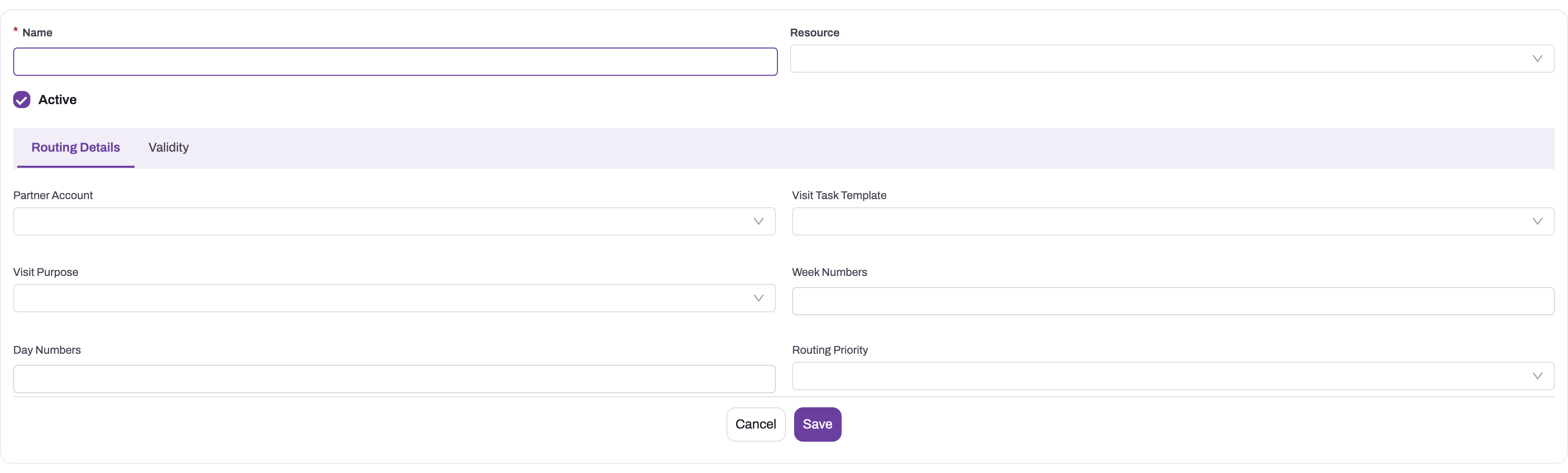
Select New. The form shows:
- Name — required. Use a name the field team recognises, for example the area and weekday.
- Resource — the executive who runs the beat.
- Active — on by default.
On the Routing Details tab:
- Partner Account — the distributor or channel partner the beat serves. It is copied onto every plan.
- Visit Task Template — the work expected at each outlet. It is copied onto every plan and every visit.
- Visit Purpose — one of Courtesy Visit, Order Capture, Field Service, Service Touch, Product Demo, Order Delivery, Payment Collection. It is copied onto every plan.
- Week Numbers — leave empty for every week, or enter weeks of the month separated by commas, for example
1,3for the first and third weeks. - Day Numbers — the weekdays the beat runs, as numbers separated by commas without spaces: 1 = Monday through 7 = Sunday. For example
2for Tuesdays or1,4for Mondays and Thursdays. - Routing Priority — Shortest Time or Shortest Distance. This is recorded only; optimization does not use it.
On the Validity tab, set Effective From and Effective To if the beat should run only for a period.
Select Save. xMatix sets the day switches from Day Numbers (so 1,4 switches on Monday Available and Thursday Available) and opens the route.
Step 3 — Read the route page
The route page header shows Visit Purpose, Visit Task Template, Partner Account, Resource and Active at a glance, and offers Optimize Route Sequence, Recompute Sequences, Clone, Edit and Delete. The page has four tabs:
- Timeline — a map of the beat's stops with a Planned / Optimized / Mostly Followed switch. When the route has never been optimized, the Optimized view is a preview computed in the browser, and the summary says so. If maps are not configured for your organization, the tab says the map is unavailable.
- Route Sequences — the stored stop orders computed for this route (see Optimize a route).
- Details — the route's fields in the panels Basic Details (Partner Account, Resource, Visit Task Template, Visit Purpose, Visit Route Group, Position), Visit Schedule (Week Numbers, Day Numbers), Availability (Monday Available through Sunday Available) and System Information.
- Visit Route Stops — the outlets on the beat, with New to add one.
Step 4 — Add the outlets
Open the Visit Route Stops tab and select New for each outlet. Give every stop a Sequence Number and, if the outlet has a fixed slot, a Start Time and End Time. A stop created on the web is Approved, so it is included from the next plan. The full procedure, including field proposals and approvals, is in Route stops.
Step 5 — Change the schedule
Fields on the Details tab edit in place, and Edit in the header opens the same fields as the create form. To change the days, do one of the following:
- switch the day switches in the Availability panel on or off — Day Numbers is rewritten to match; or
- change Day Numbers — all seven switches are reset to match it.
Change Week Numbers the same way. The new schedule applies to dates the generation job has not yet covered. Plans already generated for the coming days stay as they are; delete or cancel those you no longer want.
Step 6 — Change the owner
Person-owned route: change Resource. Plans generated from then on go to the new executive. Existing plans keep their assignee.
Seat-owned route: set Position on the Details tab. From then on, each generation run assigns new plans to whoever holds the seat when the run happens, and Resource is kept in step automatically:
- when a Resource Position record (who holds a seat, and from when) is saved, xMatix restamps Resource on the seat's routes and moves open, future, not-started plans to the new holder, unless a supervisor has already moved them by hand;
- if the Position-based route assignment (nightly reconcile) setting is on, a nightly job also applies dated handovers on their start day. With it off, a future-dated handover doesn't move routes or already-generated plans.
On a seat-owned route, don't edit Resource by hand: the next reconcile overwrites it. Setting up seats and handing them over is described in Positions.
Step 7 — Copy a route with Clone
Select Clone on the route page and confirm. xMatix creates a copy of the route's own fields. Although the confirmation mentions line items, the stops are not copied, and the copy keeps the original's Active setting. Rename the copy, add its stops, and check its schedule before the next generation run, because an active copy with approved stops starts generating plans.
Step 8 — Retire a route
To stop a beat while keeping its history, switch Active off or set Effective To. The route stops generating plans from the next run. Past plans, visits and orders are not touched, and plans already generated for future dates remain until you cancel them. Delete removes the route itself. Prefer deactivating when the beat has history.
Step 9 — Use the field app
In the field app, executives see the plans generated from their routes, not the routes themselves. Two field-app screens act on routes:
- Outlet Transfer moves outlets between beats after a manager's approval — see Route stops.
- Visit Route Regularization, when your administrator has set it up, lets an executive ask for a route's frequency, weeks and days to change. Submitting only files a request and the route is unchanged. When the manager selects Approve, the route's Day Numbers and Week Numbers are rewritten ("Approved — the Visit Route now runs on the new schedule.") and the day switches follow. A decline leaves the route unchanged.
Fields
| Field | What it means | Notes |
|---|---|---|
| Name | The beat's name | Required on the form. Shown in lists and on the Route Optimization page. |
| Resource | The executive who owns the route | Only active resources can be picked. Generated plans are assigned to them. On a seat-owned route it is kept in step with the seat's holder automatically. |
| Active | Whether the route can generate plans | On by default. Off stops generation; nothing historical changes. |
| Partner Account | The distributor or channel partner the beat serves | Only active partner accounts can be picked. Copied onto every plan. Outlet Transfer moves outlets only between beats of the same partner. |
| Visit Task Template | The work expected at each outlet | Copied onto every plan and every visit. A template set on an individual stop is not used. |
| Visit Purpose | Why the beat is run | Values: Courtesy Visit, Order Capture, Field Service, Service Touch, Product Demo, Order Delivery, Payment Collection. Copied onto every plan. Each visit takes its purpose from its stop. |
| Week Numbers | Weeks of the month the beat runs | Comma-separated, for example 1,3. Empty means every week. How weeks are counted is an organization setting (see Configuration). |
| Day Numbers | Weekdays the beat runs | 1 = Monday … 7 = Sunday, comma-separated without spaces. Kept in step with the day switches. |
| Routing Priority | Shortest Time or Shortest Distance | Recorded only. Optimization does not read it. |
| Effective From | First date the route may generate plans | Empty means no start limit. A validation that refuses past dates is delivered switched off. With the cycle week-numbering mode, this date anchors week 1. |
| Effective To | Last date the route may generate plans | Empty means no end. |
| Visit Route Group | The group of beats this route belongs to | On the Details tab. Copied onto every plan. Territory planning creates and retires routes per group. |
| Position | The seat that owns the route | On the Details tab. When set, plans go to the seat's current holder. See Positions. |
| Monday Available … Sunday Available | The weekdays the beat runs | On the Details tab, Availability panel. These switches decide generation. Kept in step with Day Numbers. |
Fields stored on the route but not on the delivered forms: Route Name (used as the name of generated plans when set), Start Time (the plan's start time on the day; without it a plan starts at midnight), Coverage Midpoint Location (written by territory planning and used as the starting point for optimization), Coverage Midpoint Distance, Account Group, Item Group, Partner Account Group and Remarks. An administrator can add them to the layout. See the entity reference.
Business rules
- Day switches and Day Numbers stay in step. When a route is created with Day Numbers, the switches are set from it. When it's created without them, Day Numbers is built from the switches. On later edits, changing Day Numbers resets all switches to match, and changing a switch patches Day Numbers.
- Generation reads the switches. A route with at least one day switch on is scheduled by its switches. Day Numbers is read directly only when the Use Day Numbers when a route has no weekday flags setting is on and no switch is on, which mainly matters for imported routes.
- One plan per route per day. Any existing plan for a route and date suppresses generation for that date, even a cancelled one. Deleting or cancelling a day doesn't bring it back.
- No approved stops, no plans. A route whose stops are all Proposed, Rejected or deleted is skipped.
- Copies, not links. Plans and visits copy the route's and stops' values when they are created. Later edits apply only to plans generated afterwards.
- No manual generate button. Plans come from the background job, or are created by hand on the Visit Plan list.
- Seat ownership follows the holder. On a seat-owned route, plans are assigned to the seat's holder when they are generated, open future plans move when the seat changes hands, and Resource is restamped automatically.
- Clone copies the header only. Stops are not copied; Active is kept.
- Optimizing is separate from scheduling. Optimize Route Sequence and Recompute Sequences store new stop orders but never create, move or reorder existing plans.
Example
A distributor's sales team covers the north market on Tuesdays and the lake district on the first and third Friday of each month.
The sales manager selects New on the Visit Route list and enters Name North Market — Tuesday, Resource Field Executive 07, and leaves Active on. On Routing Details they pick the Partner Account Sunrise Distributors, the Visit Task Template Standard outlet visit, Visit Purpose Order Capture, and Day Numbers 2. They save. Tuesday Available is now on.
On Visit Route Stops they add six outlets with Sequence Numbers 1 to 6 and time slots from 10:00 to 13:00.
For the second beat, Lake District — Friday, they enter Day Numbers 5 and Week Numbers 1,3. With the default week numbering, it runs on Fridays falling on days 1–7 and 15–21 of the month.
Automatic generation runs with a lead of one day, so on Monday evening the job creates Tuesday's plan North Market with six visits, assigned to Field Executive 07, ending at 13:00. When that executive moves to another area, the manager changes Resource to Field Executive 12. Plans from the next run go to the new executive, and the plan already generated for tomorrow is reassigned by hand on the Visit Plan.
Training
Practice exercise
In a sandbox where automatic generation is on:
- Create a route named Practice Beat for an active resource, with Day Numbers
1,3,5and Effective From today. - Open the route's Details tab and check the Availability panel.
- Add one stop for an active customer account.
- Switch Wednesday Available off and look at Day Numbers again.
Expected result: after step 2, Monday, Wednesday and Friday Available are on. After step 4, Day Numbers reads 1,5. After the next generation run, a plan appears for the route on each upcoming Monday or Friday inside the lead window, with one visit.
Quick reference
- One route = one beat = one plan per scheduled day.
- Day Numbers: 1 = Monday … 7 = Sunday, commas, no spaces. Kept in step with the day switches.
- Week Numbers empty = every week;
1,3= first and third week. - Plans need: Active, inside the validity dates, a matching day, at least one approved stop, and no plan already for that day.
- Partner Account, Visit Purpose, Visit Task Template and Visit Route Group are copied onto every plan.
- Edits apply to future plans only.
- Deactivate rather than delete to keep history.
- Clone copies the route, not its stops.
Permissions
Viewing, creating, editing and deleting routes follows access to the Visit Route entity in your security profile. The delivered Sales Executive, Sales Manager, Standard User and System Admin profiles have full access. Which routes a user sees also follows record security.
The route's server actions are granted separately on each profile's Actions tab. Delivered grants:
| Action | Sales Executive | Sales Manager | Standard User | System Admin |
|---|---|---|---|---|
| Optimize Route Sequence | — | — | Yes | Yes |
| Recompute Sequences | — | Yes | Yes | Yes |
| Clone | Yes | — | Yes | Yes |
| Assign Positions from Owners | Yes | Yes | Yes | Yes |
| Activate (on a route sequence) | Yes | Yes | Yes | Yes |
A user without a grant doesn't see the button. Changing the Sales settings below needs setup.featurehub.settings.manage.
Configuration
Automatic plan generation
Go to Setup → Feature Hub → Sales → Settings, Schedulers group:
| Setting | Default | What it changes |
|---|---|---|
| Auto-create Visit Plans from route schedules | Off | Switches automatic generation on. Off means plans are only created by hand. |
| Visit Plan generation lead (days ahead) | 1 | How far ahead plans are created: 0 = today only, 1 = today and tomorrow, up to 30. |
| Visit Plan generation run days (CSV, blank = every hour) | Blank | Blank runs the job every hour. Weekday names, for example Sunday, run it once on each listed day and create at least the next seven days of plans. |
| Visit Plan generation run hour (local, 0–23) | 0 | The earliest local hour the weekly run starts. Used only when run days are set. Local time is the organization's default time zone. |
| Visit Route week numbering | DayOfMonth | How Week Numbers match a date. DayOfMonth: days 1–7 are week 1, 8–14 week 2, and so on. FirstSundayOfMonth: week 1 runs from the 1st to the first Sunday, then each Monday–Sunday is the next week (weeks 5 and 6 can occur). Cycle4FromAnchor: a rolling four-week cycle where week 1 is the week of the route's Effective From; a route without Effective From uses DayOfMonth. |
| Use Day Numbers when a route has no weekday flags | Off | When on, a route with no day switch on is scheduled by its Day Numbers. |
| Refresh stored route orderings in the background | Off | Keeps each route's stored Optimized and Mostly Followed orders up to date as stops and visit history change. See Optimize a route before switching it on. |
| Route orderings refreshed per pass | 50 | How many out-of-date routes one background pass refreshes. |
The same group holds the auto-cancel margins for stale plans and visits, described in Visit plans.
Seat-based ownership
The Territory Planning group holds Position-based route assignment (nightly reconcile), off by default. It controls only the nightly job that applies dated seat handovers. Saving a Resource Position record updates routes immediately whatever this setting says.
The Assign Positions from Owners action converts selected person-owned routes to seat ownership. For each route it reuses the executive's open seat, or creates a seat named after the executive plus a Resource Position record, and then sets Position. Routes already on a seat, or with no Resource, are skipped. The delivered screens don't place this action: an administrator adds it to the Visit Route list or record page before using it. See Entity behavior.
Forms, lists and lookups
- The create form (also used by Edit) has no day switches, Visit Route Group, Position or Start Time. Add fields to the layouts in Design a form layout if your team needs them there.
- Resource uses the active-resource lookup filter, and Partner Account the active partner-account filter.
- Visit Purpose and Routing Priority values are picklists on the Visit Route entity. A stop's Visit Purpose has its own, longer list.
Route Optimization and Route Planner pages
The Field Sales app also has a Route Optimization page, which lists every route with its current optimized order and offers Optimize route, Optimize all and Plan territory, and a Route Planner page. See Optimize a route and Territory planning.
Outlet Transfer
Approving an Outlet Transfer in the field app runs the Transfer Stops server action on the beat. On some tenants that action isn't among the delivered Visit Route actions. If approvals fail, an administrator adds a server action named TransferStops on Visit Route (Logic → Actions) and grants it on the approvers' profiles. The transfer rules themselves are in Route stops.
Common problems
No plan appeared for my route today
Check in this order: automatic generation is switched on; the route is Active; today is inside Effective From and Effective To; today's day switch is on (Details → Availability); if Week Numbers is set, today falls in one of those weeks under your week-numbering setting; the route has at least one Approved stop; and no plan already exists for the route today, including a cancelled one. If the job runs on set run days only, plans for the week are created on the run day.
I typed Day Numbers but the wrong days are switched on
Day Numbers must be digits 1–7 separated by commas without spaces. A space after a comma stops that day from being recognised. Re-enter the value as 1,4, or switch the days on in the Availability panel instead.
The route generates on the wrong week
Week Numbers are counted by the Visit Route week numbering setting. With DayOfMonth, "week 1" is days 1–7 whatever weekday the month starts on. With Cycle4FromAnchor, weeks count from the route's Effective From.
Plans still go to the previous executive
Plans already generated keep their assignee; reassign them on each Visit Plan. On a seat-owned route, check the seat's Resource Position records: a future-dated handover moves plans on its start day only when the nightly reconcile setting is on, and a manual change to Resource is overwritten.
A cloned route has no outlets
Clone copies the route's own fields only. Add the stops on the copy's Visit Route Stops tab.
"Route optimization is not configured for this environment."
Road-network optimization isn't set up for your organization. Recompute Sequences still works, because it doesn't use the routing service. See Optimize a route.
Common questions
What is the difference between a route and a visit plan?
The route is the template; the plan is one dated instance of it. A route says who visits which outlets on which days. A plan is one executive's day with one visit per outlet, created from the route by the generation job or by hand. Editing a route changes only plans generated afterwards. Days already generated keep the stops, times and order they were built with.
What happens when I deactivate a route?
It stops generating plans from the next generation run. Nothing historical is touched: past plans, visits and orders stay. Plans already generated for future dates are not removed, so cancel those you no longer want. Territory planning uses the same approach when it replaces a group's routes: the old routes are deactivated, not deleted.
Can the same outlet be on two routes?
Yes. Nothing prevents an account from being a stop on several beats, which is common during route transitions. Each active beat generates its own visits, so an outlet on two active beats running on the same day is visited twice. Within one beat, xMatix refuses a field proposal for an account that is already on it.
Does changing the schedule regenerate plans?
No. The generation job only adds missing days. Plans already created for the lead window stay even if they no longer match the new schedule. Delete or cancel them, and remember that a cancelled plan still blocks that day.
Can a stop run on a different day from the rest of its route?
No. The schedule belongs to the route. A stop's own day and week fields are saved but not read by plan generation. Put an outlet that needs a different rhythm on a route with that rhythm.