
Territory planning splits a set of outlets across several sales executives and builds one road-ordered beat for each of them, balanced so that no executive's day is much longer than anyone else's. It answers a question that a single-route optimizer cannot: "I have a hundred outlets and five executives in one city. Who visits what, and in what order?" The beats it creates are ordinary visit routes, held together by a Visit Route Group. Once you give each beat a weekly schedule, they generate visit plans like any other beat.
Overview
Territory planning involves two things:
- Visit Route Group. A named container for a set of beats, for example one city or one distributor's area. It holds the defaults the planner copies onto every beat it creates (Partner Account, Visit Task Template, Visit Purpose) and an optional Branch that serves as a fallback start point. A beat names its group in its Visit Route Group field, and every visit plan generated from the beat carries the same group.
- Plan Territory. The planning run. You choose a group, the executives (or seats) and the outlets. xMatix computes real road travel times between every pair of points, solves the split and the stop order together, and writes one beat per executive into the group.
When to use it
- You are setting up beats for a new city, territory or distributor and want a fair first split.
- The outlet list or the team has changed and the existing beats are out of balance.
- Executives sell from a van and the van's load genuinely limits a day (optional capacity mode).
To reorder the stops of one existing beat without changing who visits what, use Optimize a route instead.
How xMatix handles it
Outlets. In the planning dialog you either pick customer accounts one by one or pick one customer account group, in which case every member account is included. Accounts without a Geo Location are left out and counted in the result. If none of them has coordinates, the run stops.
Executives and seats. One beat is created per selected resource. If you plan by Positions instead, each seat's current holder supplies the working hours and becomes the beat's executive, and the beat is also stamped with the seat. See position-based assignment on the beats page.
Working day. Each executive's window comes from the Business Hours record on their Resource (its day start and end). An executive with no Business Hours gets the default shift from the Territory Planning settings (09:00 to 18:00 unless changed). A window is never shorter than one hour.
Where each beat starts and ends. The first of these that has coordinates is used:
- on a position run, the seat's Operating Location, then the seat's branch;
- the executive's Default Branch;
- the group's Branch;
- the centre point of all the selected outlets.
Time at each outlet. For each outlet, the planner uses the average length of past visits that have both a start and an end time. An outlet with no such history gets the default service time (15 minutes unless changed). The group's Visit Task Template does not affect timing.
Balance. Beats are balanced on total time (driving plus time in the outlet), not on the number of stops. The balance tolerance setting says how far one executive's day may exceed an equal share before the solver works to rebalance it.
Outlets that don't fit. When a feasible day can't include every outlet, the leftovers are dropped and reported, never squeezed in. A Stops per route cap in the dialog drops the overflow of any longer beat in the same way.
Van capacity (optional, off by default). When it is on, each executive's van is the active storage location marked Mobile whose Default Resource is that executive. Its Capacity Weight (kg) and Capacity Volume (m3) cap the beat. Each outlet's load per visit is estimated as its average order over the demand lookback window: the ordered quantity less cancelled quantity, times the item's unit weight and volume. Cancelled orders are ignored. An outlet with no orders adds no load. Items without unit weight or volume count as zero and are reported, so the loads shown are optimistic until the item master is complete. An executive without a van, or a van without capacity figures, is planned without a cap.
Where the run happens. Plan Territory runs on the background worker. The dialog waits for it (usually under a minute) and then shows the result.
Prerequisites
- Your administrator has configured the road-routing provider for your environment. Without it, every run fails.
- The outlets you want to plan have a Geo Location.
- Each executive is a Resource. Give them a Business Hours record if their day differs from the default shift, and a Default Branch with a Geo Location if their beats should start from their branch.
- To plan by seat, each seat (Position) has a current holder in Resource Position, and no two selected seats share a holder.
- You can open the Route Optimization page in the Field Sales app (see Permissions).
Procedure
Step 1 — Open the planning dialog
In the Field Sales app, open Route Optimization. The page lists your beats with their latest optimization figures. Select Plan territory in the page header. The Plan Territory dialog opens.
Step 2 — Choose or create the group
Under Territory group:
- Existing Route Group (the default once any group exists): pick the group in Select Group.
- New Route Group: fill Group Name (required), and optionally Branch, Visit Task Template and Visit Purpose. The group is saved as soon as you start the run, even if the run then fails.
Branch is not shown on a tenant that runs a single location.
Step 3 — Choose who will run the beats
Under Resources, choose Resources and pick at least one in the Resources list, or choose Positions and pick at least one seat. Your picks appear under Resources Selected or Positions Selected, where you can remove them. One beat is created for each.
Step 4 — Choose the customers to cover
Under Customers to cover, choose Customer Account and pick the accounts in Select Customer Accounts, or choose Customer Account Group and pick one group in Select Customer Account Group. Individually picked accounts appear under Customers Selected.
Step 5 — Set the options and run
Under Options:
- Stops per route is an optional cap (1–999; empty means no cap).
- Replace the group's existing routes (kept for history, marked inactive) is ticked by default. Leave it ticked to retire the group's current beats. Untick it to add the new beats next to them.
Select Plan Routes. The button shows Planning… and a note says the run is on the background worker. While it runs, you can't close the dialog.
Step 6 — Review the result
When the run finishes you see "Territory planned — one route per executive created" and a Routes created panel. It shows one row per executive with the number of stops, the total minutes (driving plus service) and the road kilometres. A capacity run also shows Weight and Volume bars against the van's limits. Warnings below the rows tell you:
- how many customers did not fit and were dropped;
- how many items lack unit weight or volume;
- how many customers were skipped because they have no coordinates.
Select Done. The Route Optimization list refreshes with the new beats.
Step 7 — Give each new beat its weekly schedule
The run does not set which days or weeks a beat runs. Open each new beat (its name is the group name, a "·" and the executive's name) and set its weekly schedule as described in Beats and routes. Its stops are already in order and approved. Plans are generated only for beats that have a schedule.
Step 8 — Look at a group and its beats
A Visit Route Group has no menu entry of its own in the seeded apps. Open it from the Visit Route Group field on a beat's Details tab. The group page shows Partner Account, Branch and Visit Purpose in the header and lists the group's visit routes below. From the list, New creates a beat in the group by hand.
Step 9 — Change or remove a group
On the group page, select Edit to change its fields in a dialog, then Save. The changes apply to beats created by later runs; beats that already exist keep the values they were given. Delete removes the group. It does not deactivate or delete the group's beats, so retire those first if you are closing the territory.
Fields
The group's form has a main section and a System Details tab.
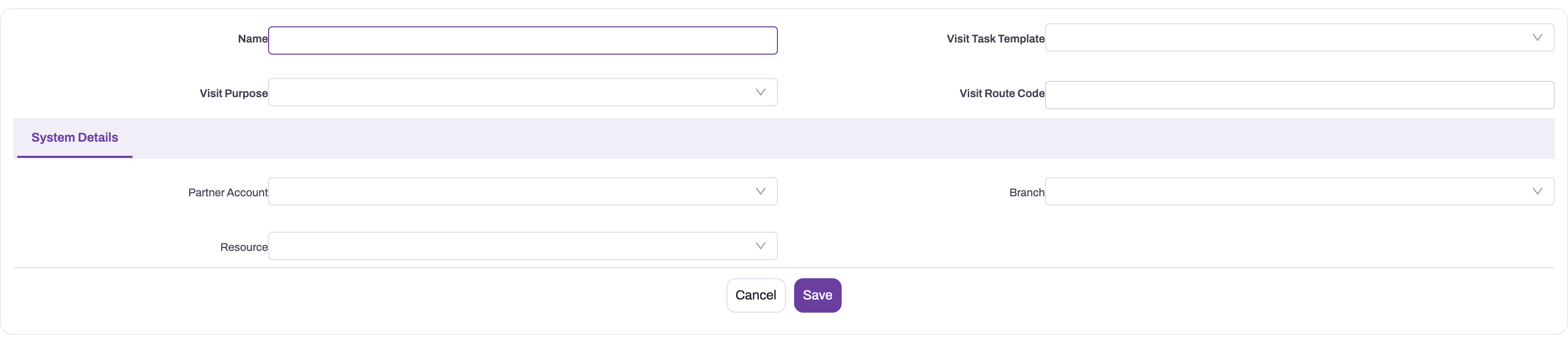
| Field | What it means | Notes |
|---|---|---|
| Name | The group's name, for example the city or area | Not required by the form, but the planning dialog requires it for a new group. It is also the first part of every beat name the planner creates, and the beat picker in Visit Route Regularization shows it. |
| Visit Task Template | The task template copied onto every beat the planner creates | Visits then take their task cards from it. See Checklists and tasks. It does not change the time allowed per stop. |
| Visit Purpose | The reason for the visits, copied onto every planned beat | Values: Order Capture, Order Delivery, Product Demo, Ready Stock Sales, Van Sales. A beat's own list doesn't offer Ready Stock Sales or Van Sales. |
| Visit Route Code | A short code for the group | Shown in the Visit Route Regularization beat picker only when the group has no Name. Nothing else uses it. |
| Partner Account | The distributor or company the group serves | Copied onto every planned beat. |
| Branch | The group's branch | Start and end point of a beat when neither the seat nor the executive's default branch has coordinates. Not copied onto beats. Hidden on single-location tenants. |
| Resource | An executive associated with the group | Informational only. Planning, beats and plans never read it. |
Business rules
- A run needs at least one executive or seat and at least one outlet. Seats must each have a current holder, and the holders must be different people.
- Each beat the run creates is named
<group name> · <executive name>. It is active, effective from the day of the run and assigned to the executive (and, on a position run, to the seat). It carries the group's Partner Account, Visit Task Template and Visit Purpose. Its stops follow the solver's order, each one has status Approved and a sequence number, and it records an Optimized route sequence (algorithm, road distance, estimated duration) as its current ordering. - With Replace the group's existing routes ticked, every active beat in the group is made inactive before the new ones are saved, including beats added by hand. Inactive beats keep their history. Visit plans already generated from them are not changed.
- An outlet that is dropped or has no coordinates is in none of the new beats.
- The run does not set a beat's days or weeks.
- Every visit plan generated from a beat copies the beat's Visit Route Group.
- The mobile and web Visit Route Regularization screens list as Beats only the groups of the executive's active routes. A route with no Visit Route Group can't be selected there.
Example
A beverage distributor's area manager has to cover 84 outlets in the east of a city with three executives. The executives share one depot.
- They open Field Sales → Route Optimization, select Plan territory and choose New Route Group. They name it "East City", pick the branch "East Depot", the task template "Standard outlet visit" and the purpose Order Capture.
- Under Resources they pick the three executives. Under Customers to cover they choose Customer Account Group and pick the group "East City outlets".
- They leave Stops per route empty, leave Replace… ticked and select Plan Routes.
- About forty seconds later the result shows "East City · executive A: 29 stops · 478 min · 61.4 km" and two similar rows, plus "3 customer(s) skipped — no coordinates".
- They add coordinates to the three accounts and run the dialog again with Existing Route Group "East City". The first three beats become inactive and three new ones include all 84 outlets.
- They set each new beat to run on Monday and Thursday. From the next generation onwards, plans for those days follow the new beats.
Training
Practice exercise
In a sandbox, make sure five customer accounts have a Geo Location and that two resources exist. Open Field Sales → Route Optimization, select Plan territory, create a group called "Practice Territory", pick the two resources and the five accounts, and set Stops per route to 2.
Expected result: two beats named "Practice Territory · <resource>", each with at most two stops, and a warning that at least one customer did not fit and was dropped. Open one beat and check that its stops are Approved and numbered, and that its Visit Route Group is "Practice Territory". Run the dialog again with the existing group, no cap and Replace ticked: the first two beats become inactive.
Quick reference
- Start from Field Sales → Route Optimization → Plan territory, not from the group's own page.
- One beat per selected resource or seat; dropped outlets are always reported.
- Balance is total time (driving plus time in the outlet), not stop count.
- Time in each outlet = average of past visits, else the default service time.
- Accounts without Geo Location are skipped.
- Replace retires every active beat in the group, including hand-made ones.
- Give each new beat a weekly schedule before you expect plans.
- The group's Resource field is never used; its Branch is only a start-point fallback.
Permissions
| Task | Who can do it in the seeded profiles |
|---|---|
| Open the Route Optimization page | System Admin |
| Run Plan Territory | Standard User, System Admin |
| View, create, edit and delete Visit Route Groups | Sales Executive, Sales Manager, Standard User, System Admin |
A user who can't open Route Optimization doesn't see it in the Field Sales app. Grant other profiles the page, and the Plan Territory server action on Visit Route Group, in their security profile. Changing the Territory Planning settings needs the Feature Hub settings permission.
Configuration
Territory Planning settings. Go to Setup → Feature Hub → Sales → Settings, Territory Planning group. Each setting applies to every later run.
| Setting | Default | Effect |
|---|---|---|
| Default service time per stop (minutes) | 15 | Time assumed at an outlet with no completed-visit history (1–240). |
| Default shift start (minutes since midnight) | 540 (09:00) | Working-day start for an executive without Business Hours. |
| Default shift end (minutes since midnight) | 1080 (18:00) | Working-day end for an executive without Business Hours. |
| Route with the truck profile | Off | Uses roads legal for heavy vehicles. Leave off for cars, vans and two-wheelers. |
| Solver time limit (seconds) | 10 | Search time per run (1–120). Raise it for very large territories. |
| Workload balance tolerance (%) | 15 | How far one executive's total time may exceed an equal share before the solver rebalances (0–100). |
| Constrain routes by van capacity | Off | Turns on the van capacity limit described above. |
| Demand lookback window (days) | 90 | Order history used to estimate each outlet's load per visit (7–730). |
The same group also holds Position-based route assignment (nightly reconcile), described on Beats and routes.
Data the planner reads. Keep these up to date:
- Geo Location on accounts and branches, and Operating Location on positions;
- Business Hours and Default Branch on each executive's Resource;
- for capacity runs, Mobile, Default Resource, Capacity Weight (kg) and Capacity Volume (m3) on each van's storage location, and unit weight and volume on items. The seeded storage-location forms don't show the capacity and default-resource fields, so add them with Design a form layout.
Customer account groups. To plan a fixed outlet list repeatedly, keep it as an account group and pick the group in the dialog.
Navigation. To give users a Visit Route Groups list, add the entity to an app with Setup → Design Studio → Apps → Manage Items (see Create an entity).
Common problems
The Plan Territory button on the group page fails
The button in the group's page header sends no executives and no outlets, so the run stops with a message that starts "At least one executive". Run territory planning from Field Sales → Route Optimization → Plan territory, where you choose them.
"Territory planning needs the routing provider … configured for this environment"
Road travel times can't be fetched in this environment. Ask your administrator to configure the routing provider. Nothing is created.
"No accounts matched the requested source"
The chosen account group has no member accounts. Add members to the group, or pick accounts one by one.
"None of the … account(s) has coordinates"
No selected outlet has a Geo Location. Fill in Geo Location on the accounts and run again.
"Position(s) without a current holder" or "Two of the selected positions are held by the same executive"
Every seat needs its own current executive. Assign one in Resource Position, or leave the seat out of the run.
"… accounts is too many for a synchronous run (limit 60…)"
Your administrator has switched the Plan Territory action from asynchronous to synchronous, which caps a run at 60 routable outlets. Mark the action asynchronous again, or plan fewer outlets per run.
"The planning job did not finish within 5 minutes — check the group later."
The dialog stopped waiting, but the run may still finish. Check the Route Optimization list or the group's routes later before running again, so you don't replace a fresh result.
Some customers were dropped
Their visits did not fit in the executives' working days or vans. Add executives, lengthen the shift (Business Hours or the default shift), raise Stops per route, or plan a smaller set of outlets.
No visit plans appear for the new beats
The run doesn't set days or weeks. Give each new beat its weekly schedule (Step 7).
Common questions
How is "balanced" measured?
By total time, which is driving plus the expected time in each outlet, not by the number of stops. Ten small shops close together can be a lighter day than four large stores across town. Time in each outlet is the average of that outlet's past visits that have both a start and an end time, so the split improves as visit history builds up. Outlets that have never been visited get the default service time from the Territory Planning settings. Use Workload balance tolerance (%) to say how strict the balance should be.
Does a rerun lose anything?
No. With Replace ticked, the group's active beats are marked inactive, not deleted. Their stops and history stay, and visit plans already generated from them keep running as they are. Note that every active beat in the group is retired, including beats someone added to the group by hand. Untick Replace if you only want to add beats. After a rerun, give the new beats their weekly schedule; until then, no new plans come from them.
Do I have to use van capacity?
No. It is off by default. Turn on Constrain routes by van capacity when executives sell from a van and the van really limits the day. For it to bind, each van needs to be a storage location marked Mobile with the executive as Default Resource and with capacity figures, and items need unit weight and volume. Executives without such a van are planned without a cap, and the result warns about items without weight or volume.
Can I plan the outlets of one distributor without listing them?
Not from the dialog. It offers individual customer accounts or one customer account group. To plan a distributor's outlets, put them in an account group (an account group can add members by rule) and choose that group.