
xMatix CRM is where you win new business: you capture interest as a lead, qualify it into an opportunity, price it as a quote, and hand the agreed deal to Sales as a sales order or to Service as a service order. The customer is an account throughout, the same record every other module reads, and calls, tasks and notes are logged against each record along the way. This page shows what is in the CRM app, how a deal moves through it, who can open each part and where each topic is documented.
Overview
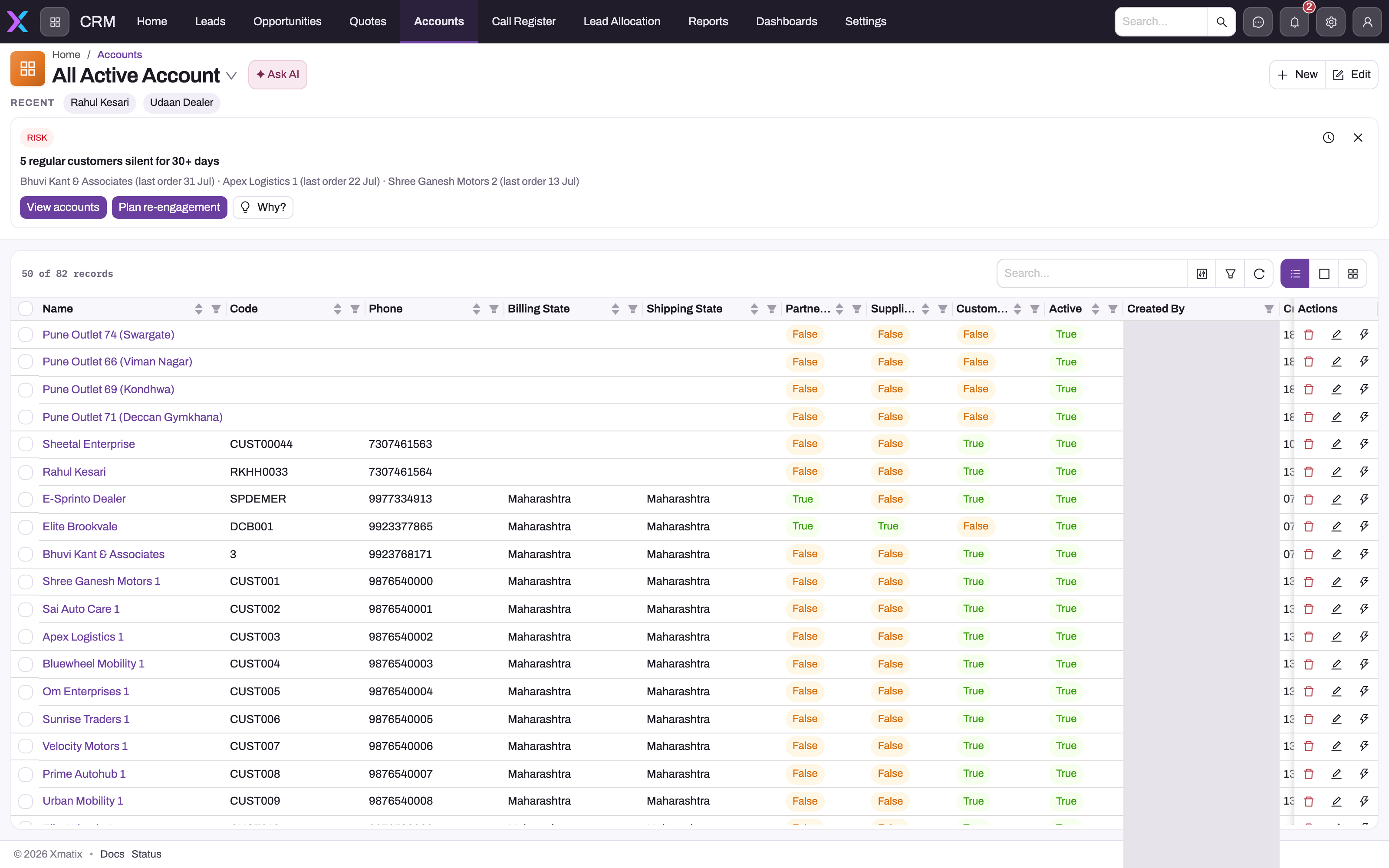
Open CRM from the App Launcher. The shipped app has these entries, in this order:
| Entry | What it holds | Where it is documented |
|---|---|---|
| Home | The CRM dashboard | Dashboards |
| Leads | Enquiries that are not qualified yet: captured, worked, then converted, released or lost | Leads |
| Opportunities | Qualified deals with their lines and prices, from which quotes and orders are raised | Opportunities |
| Quotes | Priced offers for the customer, from which the sales order or service order is created | Quotes |
| Accounts | The customer master that every module shares | Accounts |
| Call Register | Every inbound and outbound phone call, linked to the record it was about | Activities |
| Lead Allocation | A board and a timeline for handing open leads to executives | The dispatch console |
| Reports and Dashboards | Reporting on CRM data | Analytics |
| Settings | The CRM setup list: Contacts, Queues, Appointments and Lead Scoring | CRM configuration |
The CRM app is available on the web and in the mobile app. On mobile, you can open lead, opportunity and quote lists, create leads and convert them. Your organization can rename, reorder, hide or add entries, so your menu may differ from this list.
Several CRM records also appear in other apps. Leads and opportunities are in the Service app (for service enquiries) and the Partner Onboarding app (for prospective dealers and service centres). Accounts are in Sales, Support, Field Sales and the settings lists of other modules.
How a deal moves through CRM
1. Lead
A lead is created by hand with New, from a campaign, or from a support case. Saving it routes it: the postal code can set its Branch and Partner Account, and an assignment rule or the partner's resource assignments pick the Executive. Logging a call or email moves Status from New to Contacted. You then do one of four things:
- Opportunity (sales and service leads) opens the Convert Lead dialog. It creates or reuses an account, a contact and an opportunity. The lead becomes Converted and cannot be converted again. If it still shows its earlier status, save it once.
- Convert Lead (partner leads) does the same in one step and creates a partner opportunity.
- Order or Service Order releases the lead straight to a sales order or service order when there is nothing to negotiate. The lead's status does not change.
- Lead Lost closes it. Converted and Lost are final states.
2. Opportunity
The opportunity carries the deal's Lines. Each line's price comes from the price list in force on the price date, and the header totals add up the lines. The opportunity starts as Prospecting. Shipped rules move it to Appointment/Quote when a quote, product demo or appointment exists, and to Closed Won when its Order or Service Order field is filled. From the opportunity you can:
- Click Quote to create a quote with every line. Each click creates another quote.
- Click Order (sales) or Service Order (service) to go straight to the order. Only quantity not yet released is copied, so you can run either again after adding lines.
3. Quote
The quote is the formal priced offer. Print it with Print Quote, and record the customer's decision with Approve. Approving sets flags on the quote and its lines; it does not change Status, which stays Draft until someone sets it. Order creates the sales order once; a second run is refused. Service Order creates the service order and later adds only new lines to that same order. A declined quote is skipped without a message, and neither button requires the quote to be approved.
A service order created from a quote is also recorded on the quote's opportunity, which moves it to Closed Won. A sales order created from a quote is linked to the quote only. The opportunity's Order field stays empty, so its status stays at Appointment/Quote until someone changes it.
4. Handover
The sales order or service order belongs to Sales or Service from this point on. Accounts, items, price lists and branches are shared masters, so the order reads the same customer, prices and branch as the deal did. Nothing is typed in again.
Opportunity and quote Partner Account and Branch lock once saved. Choose your selling company and branch carefully before the first save.
Who can see what
Access comes from the user's security profiles. In the shipped profiles:
- The CRM app is visible to Standard User, Sales Executive, Sales Manager, Service and System Admin.
- Home is visible to the same five profiles.
- Lead Allocation is visible only to Sales Executive and System Admin.
- Settings is visible only to System Admin. Other users do not see the entry, even though they may still open contacts from an account.
- Leads and opportunities are private by default: a user sees their own records, those shared with them, those of people below them in the role hierarchy, and everything if their profile has View All.
- Each button (Opportunity, Quote, Order, Approve and so on) needs its own grant on the profile's Actions tab. The leads, opportunities and quotes pages list the grants for each button.
To give a user CRM, assign them a profile that can view the CRM app and has access to the entities they work with. See Security profiles and Roles.
Setting up CRM
An administrator usually works through these in order. Each item links to the page with the full procedure.
- Branches, partner accounts and postal codes. Every lead, opportunity and quote needs a selling company and branch. Map postal codes to branches if leads should route themselves. See Postal codes and branch postal codes.
- Executive assignment. Set up Partner Resources on each resource, or write an assignment rule under Setup → Process Studio → Assignment rules. See Automatic owner assignment.
- Prices. Lines are priced from sale price lists, discount groups and tax groups. See Pricing, discounts and taxes.
- Document numbering. Leads, opportunities and quotes are numbered with the series
L,OPandQT, which you can change under Setup → Feature Hub → Platform → Document Settings. See Email templates and document numbering. - Picklists and status rules. Lead and opportunity statuses are moved by shipped business rules that match status values exactly. If you rename a status value, update those rules as well. See Business rules.
- Lead scoring (optional). Open CRM → Settings → Lead Scoring to build and publish a scoring model. See Leads.
- Appointments (optional). Configure appointment types, slot templates and bookable resources. See Appointments and CRM configuration.
- Forms, buttons and menu. Record forms, the buttons in each record header, list views and the app menu are all metadata you change in Design Studio. See Apps, entities and records.
Section map
| Page | What it covers |
|---|---|
| Accounts | The customer master: roles, relationships, hierarchy, merge and transfer |
| Contacts | The people at your accounts, the primary contact, and how documents pick a contact |
| Contact addresses | An account's billing and shipping addresses, defaults and per-address GST details |
| Leads | Capturing, routing, qualifying, converting and releasing leads, and lead scoring |
| Opportunities | Working the deal and raising quotes, sales orders and service orders |
| Opportunity lines | Adding and pricing an opportunity's lines, and tracking what has been released to orders |
| Quotes | Pricing, printing, approving and converting quotes |
| Quote lines | Adding and re-pricing a quote's lines, and what they carry onto orders |
| Product configurator and demos | Configuring package products on deals, and booking product demos |
| Product demos and appointments | Booking demos and service appointments at branch slots, the appointment record and its actions |
| Appointments | Appointment types, slot templates, bookable resources and the booking lifecycle |
| Activities | Calls, tasks, meetings and notes on a record's timeline, and the call register |
| CRM configuration | Administrator reference for scheduling setup, and where account groups are set up |
| Troubleshooting | The blocks CRM users actually hit, and what each one means |
Training
Practice exercise
In a sandbox, take one enquiry through the whole funnel:
- In CRM → Leads, create a sales lead with a name, phone number, partner account, branch and an Interested Item.
- Click Opportunity and complete the Convert Lead dialog with a new account and contact.
- Open the new opportunity, check that it has one line for the interested item, then click Quote.
- On the quote, click Approve, then Order.
Expected result: the lead's status is Converted. The opportunity's status is Appointment/Quote, because a sales order created from a quote is not linked back to the opportunity. The quote's Related tab lists the new sales order, and running Order on the quote a second time is refused with "Order has already been generated for this quote."
Quick reference
- Lead → Opportunity → Quote → Order. You can skip the quote, or the opportunity, when nothing needs negotiating.
- One opportunity per lead; Converted and Lost leads are final.
- Every Quote click on an opportunity creates another quote.
- Opportunity Order releases only quantity that has not been released yet.
- Quote Order runs once; Approve does not change the quote's Status.
- A sales order from a quote does not mark the opportunity Closed Won; a service order from a quote does.
- Partner Account and Branch lock after the first save on opportunities and quotes.
- Settings is visible only to System Admin in the shipped profiles.
Common questions
Do I have to go through every stage?
No. A lead can be released straight to a sales order or service order, and an opportunity can raise the order without a quote. Use the full lead, opportunity and quote path when the customer needs a formal priced offer. Use the shortcuts when they have already agreed. Whichever path you take, the order is linked back to the record it came from, so you can still trace where it came from.
Why can't I see Settings or Lead Allocation in my CRM menu?
Entries that open an app page are shown only to profiles granted that page. In the shipped configuration, Settings is granted only to System Admin, and Lead Allocation only to Sales Executive and System Admin. Ask your administrator to grant the page on your security profile if you need it. Contacts remain reachable from each account's Contact & Address Info section and through App Launcher search.
Where is the pipeline view?
There is no separate pipeline board for opportunities. Use the Opportunities list: its views, filters and the Status column show where each deal stands, and the stage bar on each record shows its progress. For a chart of the pipeline, build a report or dashboard on Opportunity under Reports or Dashboards.
Is CRM the same customer list as Sales and Finance?
Yes. An account created in CRM, for example by converting a lead, is the same record Sales invoices, Finance collects from and Field Sales visits. Its customer, supplier and partner roles are flags on that one record. See Accounts.
What lives elsewhere
- Support cases, queues, SLA policies and the knowledge base: Support.
- What happens after the handover (order fulfilment, invoicing, pricing rules and trade schemes): Sales, starting with creating a sales order.
- Service orders and workshop jobs: Service.
- Field visits and beat plans: Field Sales.
- Campaigns that raise leads and opportunities in bulk: Running campaigns.