
A quote is the priced offer you send a customer: it names the customer, the items or services offered and their prices and taxes, and it is the record you create the sales order or service order from once the customer agrees. It usually follows an opportunity and comes before a sales order or a service order. You find quotes in the CRM app, under Quotes.
Overview
A quote has a header and Lines. The header holds the customer (Account) and their contact details, the opportunity it came from, the Executive handling it, the billing and shipping addresses, and — on the System Details tab — your selling company (Partner Account), its Branch and the quote's Status. Each line is one item or service with its quantity, price, discount and tax. The money figures on the header are totals of the lines, so you change amounts by changing lines.
Every quote has one of two record types, and each has its own form:
| Record type | Used for | Buttons on the record |
|---|---|---|
| Sales | Offering products to a customer | Print Quote, Order, Approve, Edit, Delete |
| Service | Offering repair or maintenance work on a customer's asset, such as a vehicle or machine | Print Quote, Service Order, Approve, Edit, Delete |
The record page shows a stage bar for Status under the header and, beside the content, an Amount Summary, an Activities panel and an approvals panel. Service quotes also show Sense AI insights. The tabs are Lines, Details and Related — on a sales quote, Related lists the orders created from it; on a service quote, the service orders.
When to use it
Use a quote when the customer needs a formal, priced offer before they commit — a written price for products, or an estimate for work on their asset. If the customer has already agreed and no offer is needed, create the order directly from the opportunity instead.
How xMatix handles it
Where quotes come from
- From an opportunity. The Quote button on an opportunity creates a quote with the customer, partner account, branch, executive, asset and service details and every opportunity line. Its Document Date is set to the day it is created. Each click creates another quote.
- Directly. Choose New on the Quotes list and fill in the header, then add lines.
- By linking an opportunity later. If you save a quote whose Opportunity was empty and then pick one, the opportunity's lines whose item service contract matches the quote's are added to the quote.
What happens when a quote is saved
- Customer details fill in. Choosing an Account fills the names, business name, account name, email and phone, and the billing and shipping addresses — first from the account, then from its default contact address for anything still blank. Values you typed yourself are kept. With no account chosen, xMatix takes the account from the selected Asset's owner. Entering a Billing Postal Code fills the billing city, state, region and country from the postal-code master.
- Pricing context is set when the quote is created: the applicable sale price list and discount group are chosen for the customer, partner account and branch.
- Tax context is worked out. For businesses in India, the place of supply comes from the billing address (else the account), the source of supply from the branch, and the Tax Supply Type is recalculated on every save — Within State, Outside State, Exempt or Exports, depending on the two places and the customer's registration.
- Account, Partner Account, Branch, Opportunity and Asset lock. Once one of them holds a value and the quote is saved, it cannot be changed. A field left empty can still be filled in later.
- A document number is assigned from document numbering — shipped series
QT, the date as day, month and year, and a six-digit counter, with no separator (for exampleQT10102026000042). - The total in words is written for printing, in the Indian numbering system.
How lines are priced
When you pick an item on a line, its Unit Price comes from the price list in force on the pricing date, and the discount group's discounts and the line's tax are applied on save. The header totals and the Amount Summary update. Changing the header Price As On Date reprices every line, and changing a line's item, price list or price-as-on date reprices that line. Hourly service lines take their hours from the item's standard duration. See Pricing, discounts and taxes.
Recording the customer's decision
Approve marks the quote and every line approved and clears declined. Decline (not on the shipped forms) does the reverse. These are flags on the record, separate from Status: neither button changes Status, and nothing in the shipped configuration moves Status from Draft — set it yourself to Pending Approval, Approved or Declined. Both buttons do nothing on a quote that has no lines.
Creating the order
| Button | Creates | What is copied | Limits |
|---|---|---|---|
| Order (sales) | A sales order linked to the quote | The customer, partner account and branch, and every quote line with its item, quantity, prices, discounts, tax group, SKU and lot type | Works once: a second run is refused. A declined quote is skipped without a message. It does not require Approve, and a quote with no lines gives an order with no lines |
| Service Order (service) | A service order linked to the quote as its estimate | The customer, asset, partner account, branch, executive, usage readings, service contract and service type, and every line that is not declined | Refused when the quote has no lines. A declined quote is skipped without a message. Running it again adds only the lines added since to the same service order — it never creates a second one |
A service order created from a quote is also written to the quote's opportunity, so the opportunity moves to Closed Won. A sales order created from a quote is not: the opportunity's Order field stays empty and its status stays at Appointment/Quote until you change it yourself.
Prerequisites
- Access to the CRM app and permission to create quotes (see Permissions).
- The customer as an account, or the details to enter for a new prospect.
- Your selling company (partner account) and branch.
- Items with prices on a sale price list, for the lines.
- For a service quote, the customer's Asset.
Procedure
Step 1 — Find a quote
Open CRM → Quotes. The shipped list views are All Quotes, Sales Quotes, Service Quotes and High-Value Quotes (a total of 10,000 or more). The summary cards above All Quotes count quotes created in the last 30 days, by Status. A quote raised from an opportunity also appears on that opportunity's Related tab.
Step 2 — Create a quote
To create one from an opportunity, open the opportunity, check its lines and its Related tab for existing quotes, and choose Quote — then continue at Step 3. To create one directly:
- Choose New and pick Sales or Service if you are asked.
- Fill the main fields: First Name, Last Name, Business Name, Account, Phone Number, Email, Opportunity, Executive and Remarks. A service quote also has Asset.
- On a service quote, fill the Service Details tab: Service Type, Item Service Contract, Usage Reading and Usage Reading Hours.
- Check the Billing and Shipping tabs. If you picked an account, they fill from it on save.
- On System Details, choose the Partner Account and Branch carefully — you cannot change them later — and leave Status as Draft.
- Save. The quote opens with its document number and the Status stage bar at Draft.
Step 3 — Add and correct lines
- On the Lines tab, choose Quick Add.
- Pick the Item, and the SKU or Item Lot Type if the item has them. The Unit Price fills from the price list; change it only if the offer has a negotiated price. The Item 360 panel beside the form shows the item's context.
- Enter the Quantity, check the Tax Group, and add a Description if needed.
- Save. The line gets its number (series
QL), its tax and discounts, and the header totals and Amount Summary update.
To change a line, use Edit on its row; to remove it, Delete. A package's mandatory components cannot be removed, and deleting a package line removes its component lines. Quote lines covers pricing, re-pricing, every line field and what the lines carry onto orders.
Step 4 — Print and send it
Choose Print Quote to produce the printable quote and share it with the customer. Log the call, email or meeting in the Activities panel with a dated follow-up — see Activities. If you track sending, set Status to Pending Approval with Edit.
Step 5 — Record the customer's decision
When the customer accepts, choose Approve: the quote and all its lines are marked approved. Then use Edit to set Status to Approved, because Approve does not change it. If the customer turns the offer down, set Status to Declined and record why under Details → Rejections in Estimate Rejection Reason and Rejection Remarks — the Quotes Lost Sale By Reason report groups lost quotes by those remarks.
Step 6 — Create the sales order or service order
- Check the lines and totals — they are copied as they are.
- On a sales quote choose Order; on a service quote choose Service Order.
- Wait for the result instead of clicking again.
- Open the new order from the Related tab and check the customer, branch, lines and totals. The order then follows the normal sales order lifecycle or service order process.
Step 7 — Use quotes on mobile
In the xMatix mobile app, quotes appear in the CRM app through their mobile forms, where you can view and create them. Line prices are worked out from the sale price list on the device. Whether quotes are available offline depends on how your organization has set up the mobile app.
Fields
Fields as they appear on the record's Details tab. Totals are calculated from the lines and are read-only.
| Field | What it means | Notes |
|---|---|---|
| First Name, Last Name | The person the offer is for | Filled from the account; used to build Account Name when there is no business name |
| Business Name | The firm the offer is for | Filled from the account |
| Phone Number, Email | How to reach the customer | Filled from the account |
| Account | The customer | Only active customer accounts can be picked; filled from the asset's owner when empty; locked once saved |
| Opportunity | The deal the quote came from | Choosing one on a saved quote adds the opportunity's lines; locked once saved |
| Executive | The person handling the quote | Shown in the header; activities are assigned to them |
| Document Date | The quote's business date | Set to the creation day when raised from an opportunity; no default on a direct quote |
| Remarks | Free notes | — |
| Service Type | Kind of work (service) | Paid Repair, PDI, Warranty Repair, Accidental Repair |
| Asset | The customer's asset (service) | Limited to the account's assets; locked once saved |
| Service Order | The service order created from the quote | Set by the Service Order button |
| Usage Reading, Usage Reading Hours | The asset's reading for the estimate | Copied to the service order |
| Item Service Contract, Service Contract Item | The contract the work falls under | Choosing an item service contract adds that contract's lines |
| Total Amount | Lines plus tax | Calculated |
| Total Line Gross Amount, Total Tax Amount, Total Discount Amount | Line totals, tax and discounts | Calculated |
| Total Labour Amount | The total of work-item lines | Calculated |
| Total Amount In Words | The total written out, for printing | Written on save |
| Billing and Shipping address fields | Street, city, state, region, postal code, country | Filled from the account; a billing postal code fills city, state, region and country |
| Estimate Rejection Reason, Rejection Remarks | Why the customer turned the quote down | Shown under Rejections; the shipped reason list has only None, so your organization adds its own |
| Document Number | The quote's number | Assigned on save from document numbering |
| Status | Where the quote stands | Draft (default), Pending Approval, Approved, Declined; changed by hand |
| Partner Account | Your selling company | Only active partner accounts; locked once saved |
| Branch | The selling branch | Must belong to the partner account; locked once saved |
Line fields. Item, SKU, Item Lot Type, Quantity, Unit Price, Tax Group and Description on the Quick Add form; the line record also shows Alternate Item, Discount, Discount Amount, Scheme Discount, Tax Amount, Amount, Price List and, on service lines, Service Contract and Asset Service Contract Line. Hourly service lines have a Rate Basis (Fixed Price, Standard Hours, Actual Hours, Capped Actual, Cost Plus).
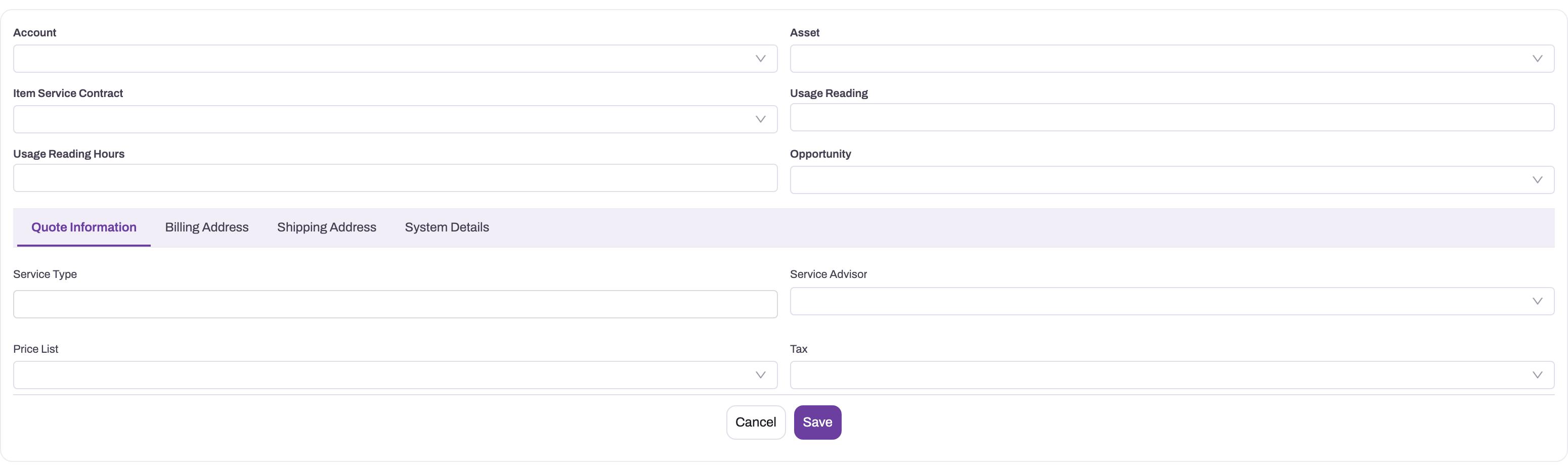
Not on the shipped form. The header Price List, Discount Group, Discount (a percentage), Price As On Date, Tax Group and Tax Supply Type are set automatically and are not shown on the shipped layouts. An administrator can add them; see Configuration. A create form with the pricing and tax fields added looks like this:
- 1
Account is the customer receiving the commercial offer.
- 2
Opportunity preserves the originating deal; review related quotes because this link does not prevent duplicate quote generation.
- 3
Service Type distinguishes the kind of work or sale being quoted.
- 4
Price List supplies line prices as of the quote's pricing date.
- 5
Tax supplies the header tax context that later flows to lines and the order.
Business rules
- Numbering. Quotes are numbered from the Quote Document Name Setting (series
QT, no separator) and lines from the Quote Line Name Setting (seriesQL, with hyphens). - Locked header fields. Account, Partner Account, Branch, Opportunity and Asset cannot change once they hold a saved value.
- Partner and branch checks. On every save the partner account and branch must exist, be active and belong together, and a partner account with branches needs one.
- Header changes that reach the lines. Changing Price As On Date reprices every line. A header Discount is copied into each line's discount when the line is added; changing it later does not change the discount on lines already on the quote.
- Decision flags. Approve and Decline set the approved and declined flags on the quote and every line; they never change Status.
- Status. Starts at Draft and changes only by hand. The shipped business rule Set Quote Status to Approved has no actions, so it does not change anything.
- Order once. Order creates one sales order per quote; a second run is refused.
- One service order. Service Order creates one service order per quote; later runs add only new, not-declined lines to it.
- Declined quotes are skipped by both Order and Service Order, without a message.
- Package lines. Package components keep to their minimum and maximum quantities, mandatory components cannot be removed or set to zero, and some components' quantities cannot be changed.
Example
A tractor dealer's service advisor receives a request from a farmer for a 500-hour service and a replacement hydraulic pump. They open the service opportunity for the farmer's tractor and choose Quote. A service quote numbered QT10102026000073 is created at Draft with the opportunity's two lines — the service package and the pump — priced from the dealer's sale price list.
The advisor adds a third line for a filter kit, chooses Print Quote and sends it. The farmer agrees to the service and the filter kit but wants to wait on the pump, so the advisor deletes the pump line, chooses Approve, and sets Status to Approved. They choose Service Order: a service order is created for the tractor with the two remaining lines, and it appears on the quote's Related tab. A week later the farmer agrees to the pump; the advisor adds the line to the quote and chooses Service Order again, and the pump is added to the same service order.
Training
Practice exercise
In a sandbox, as a user with the Sales Executive profile:
- Create a sales quote directly for any test customer account, with a partner account and branch.
- Add two lines with different items, quantity 2 each. Expected: the Amount Summary shows the lines' totals and tax.
- Choose Approve. Expected: the quote is approved, but Status still shows Draft.
- Choose Edit and set Status to Approved. Expected: the stage bar moves to Approved.
- Choose Order. Expected: a sales order with both lines appears on the Related tab.
- Choose Order again. Expected: "Order has already been generated for this quote."
- Try to change the quote's Branch. Expected: the save is refused because the field is locked.
Quick reference
- Account, Partner Account, Branch, Opportunity and Asset lock once saved — check them first.
- The opportunity's Quote button creates a new quote on every click.
- Approve sets flags only; set Status yourself.
- Order works once per quote; a declined quote is skipped silently.
- Service Order never creates a second order — a re-run adds new lines to the same one.
- Changing Price As On Date reprices every line.
- Record lost quotes in Estimate Rejection Reason and Rejection Remarks.
Permissions
Access is set on security profiles:
- Entity access. The shipped Sales, Service and System Admin profiles have full access to Quote and Quote Line, including View All and Modify All. Sales Executive, Sales Manager and Standard User have Read, Create, Update, Delete, Share and Assign.
- Record sharing. Quotes are owned by a user and private by default: a user sees their own quotes and those of people below them in the role hierarchy. Quote lines follow their quote.
- Actions. Approve, Decline, Order, Service Order, Reprice, Clone and the package configuration actions are granted on the shipped Sales Executive, Sales Manager, Standard User and System Admin profiles. The sales Print Quote is granted on Sales Executive, Sales Manager and System Admin, but not Standard User. The shipped Sales and Service profiles have no action grants, so their users can edit quotes but cannot run these buttons until an administrator grants them on the profile's Actions tab.
Configuration
Administrators tailor quotes in these places:
- Document numbering. Setup → Feature Hub → Platform → Document Settings: Quote Document Name Setting (series
QT) and Quote Line Name Setting (seriesQL). See Email templates and document numbering. - Status and picklists. Status, Estimate Rejection Reason and Service Type are picklists you can extend in the entity's field settings. Add your own rejection reasons — only None is shipped.
- Status automation. To move Status automatically — for example to Approved when an order is created — add actions to a business rule in Setup → Process Studio → Business Rules. See Business rules.
- Internal approval. No approval process is shipped for quotes. To require sign-off, for example on large quotes, set one up in Setup → Process Studio → Approvals; the record page's approvals panel shows its progress. See Approval processes.
- Layouts and views. The Sales and Service create forms and record pages, the buttons in each header and the list views are tenant metadata you change in Design Studio. Add Decline, Reprice, Clone, the header Price List, Discount, Price As On Date or Tax Group there if users need them. Clone copies the quote with its lines, including its link to an order or service order and the marks that one was created, so a clone of a converted quote cannot create its own order.
- Print formats. The sales record page's Print Quote uses the Quote Sales Print document report. The service record page's Print Quote is set to the Pre Service Order Print report; check that it shows what your customers should receive and change the action's report if not. See Document reports.
- Lookup filters. The shipped filters limit Account to active customer accounts, Partner Account to active partner accounts, Branch to the partner account's branches, and Asset to the account's assets.
- Pricing, discounts and taxes. Sale price lists, discount groups and tax groups decide line prices and taxes — see Pricing, discounts and taxes.
- Mobile. Quotes reach the mobile app through the CRM app; your mobile configuration decides whether they are kept offline.
Common problems
"Order has already been generated for this quote."
The quote already has its sales order. Open it from the Related tab. If the customer wants more, add the lines to that order or raise a new quote.
"Service order has already been generated for this quote."
The quote is marked as having created a service order but is no longer linked to one. Check the service orders for the customer's asset before raising new work.
"No Quote Line found for Service Order generation."
The quote has no lines. Add at least one line and try again. Reprice shows the equivalent message, "No Quote Line found for Repricing."
I chose Order or Service Order and nothing happened
The quote is declined, and declined quotes are skipped without a message. Choose Approve if the customer has accepted, then try again.
"Key fields are not editable once the related objects are added. Field Name : …"
You tried to change Account, Partner Account, Branch, Opportunity or Asset on a saved quote. They cannot change. Create a new quote with the right values.
"Invalid Branch for Partner Account." or "Partner account is Inactive."
The branch does not belong to the chosen partner account, or the partner account or branch is inactive ("Branch is Inactive."). Pick a branch of that partner account, or ask an administrator to reactivate it. "Branch is required for this Partner Account." means the partner account has branches and you left Branch empty.
The Pending Quotes card always shows 0
The shipped card counts the status value "Pending", but the Status value is "Pending Approval". An administrator can correct the card's filter on the All Quotes view.
"Quantity cannot be less than … for this component." or "Mandatory package component cannot be removed."
The line is a component of a package item, and the package sets its allowed quantities and which components are mandatory. Keep the quantity in range, or remove the whole package line instead.
Common questions
Does approving a quote change its status?
No. Approve marks the quote and every line as approved — and clears any earlier decline, so Order and Service Order work again — but the Status field and its stage bar stay where they were. Set Status yourself with Edit, or ask an administrator to add actions to a business rule that sets it for you. Approval is also separate from internal sign-off: if your organization needs a manager to approve quotes before they go out, that is an approval process.
Can I approve or decline individual lines?
No. Approve and Decline act on the whole quote and mark every line with it. If the customer wants only part of the offer, delete or change the lines they do not want, then approve the amended quote. On a service quote, a line that is declined is not copied to the service order.
Can I create a second order from the same quote?
Not a second sales order: Order works once per quote. A service quote can keep adding work to its one service order — add the lines to the quote and choose Service Order again, and only the new lines are added. For a genuinely new offer, raise a new quote from the opportunity.
Should I create the order from the quote or the opportunity?
When the customer received a formal offer, create the order from the accepted quote so it links to the quote and carries the prices you offered. The opportunity's own Order button is still available and does not check for quotes, so decide which path you follow before clicking — see Opportunities.