
A payslip is the record of one employee's pay for one payroll run: the month's gross earnings, deductions and net pay, the days paid, year-to-date totals and a masked bank account. You don't type payslips. Generate payslips on a calculated payroll run creates them, one per employee row. After you review them and the run is posted, Publish payslips on the run turns each slip into a PDF, attaches it to the slip, marks it Published and tells the employee by push notification and email. Print payslip on a slip prints the same document.
Overview
A payslip copies its figures from the run's employee row (the Payroll Run Detail) when it is generated. It holds totals only. The component-by-component breakdown (Basic, HRA, PF, TDS and so on) stays on the run's component lines, which you reach through the slip's Payroll Run Detail.
Each slip carries a Publish Status of Draft or Published. Generation always writes Draft. Publish payslips on the run sets it to Published once the slip's PDF is stored in its File Asset. While any slip of a run is Published, the run can no longer be recalculated.
When to use it
- After you calculate a run and review its register, generate payslips so each employee has a record of the month.
- Once the run is posted, publish the payslips so every employee gets a PDF and a notification.
- Print a single slip with Print payslip when someone needs a paper copy.
- Use the Payslip Summary report for a month's or a department's slips in one table.
How xMatix handles it
- One slip per employee row. Generate Payslips walks the run's employee rows and skips any row that already has a slip. You can click it again safely: it only fills the gaps.
- Figures are a snapshot. Payable Days, Lop Days, Gross Earnings, Total Deductions and Net Pay are copied from the run detail. The bank account is masked and copied from the employee's Resource. Nothing refreshes a slip later. If the inputs change, recalculate the run and generate again.
- Recalculation retires Draft slips. Calculate on the run deletes the run's existing slips along with the old employee rows. It refuses to run at all if any slip of the run is Published.
- Year-to-date is scoped to the fiscal year. YTD Gross and YTD Tax add up the employee's run rows in every payroll period of the fiscal year that contains this run's period, for the same company. The company's fiscal year is used if one is defined, otherwise April to March.
- Numbering. A slip gets its Document Number from the Payslip document numbering setting if your tenant has an active one. Otherwise it is numbered
PS-followed by the generation date (DDMMYYYY) and a six-digit running number, for examplePS-30062026-000041.
Prerequisites
- A payroll run that has been calculated. Generate Payslips on a run with no employee rows fails with "Run has no details to generate payslips from (calculate first)."
- Your security profile grants the Generate payslips action on Payroll Run, and access to the Payslip records. See Permissions.
- The employee's Resource has a bank account number, if you want the masked account on the slip.
- For publishing: the run is posted, and each employee's Resource has a linked user if you want them notified.
- The Payslip print template is active (it ships active). See Configuration.
Procedure
Step 1 — Generate the payslips
- Open the Payroll app (App Launcher → search Payroll) and choose Payroll Runs.
- Open the calculated run and click Generate payslips.
One Draft payslip is created for each employee row that doesn't have one yet. If some slips already exist, only the missing ones are added. The run's status does not change.
Step 2 — Find and review a payslip
- In the Payroll app, choose Payslips. The All Payslip list shows Document Number, Partner Account, Resource, Payable Days, Lop Days, Gross Earnings, Total Deductions, Net Pay and the audit columns.
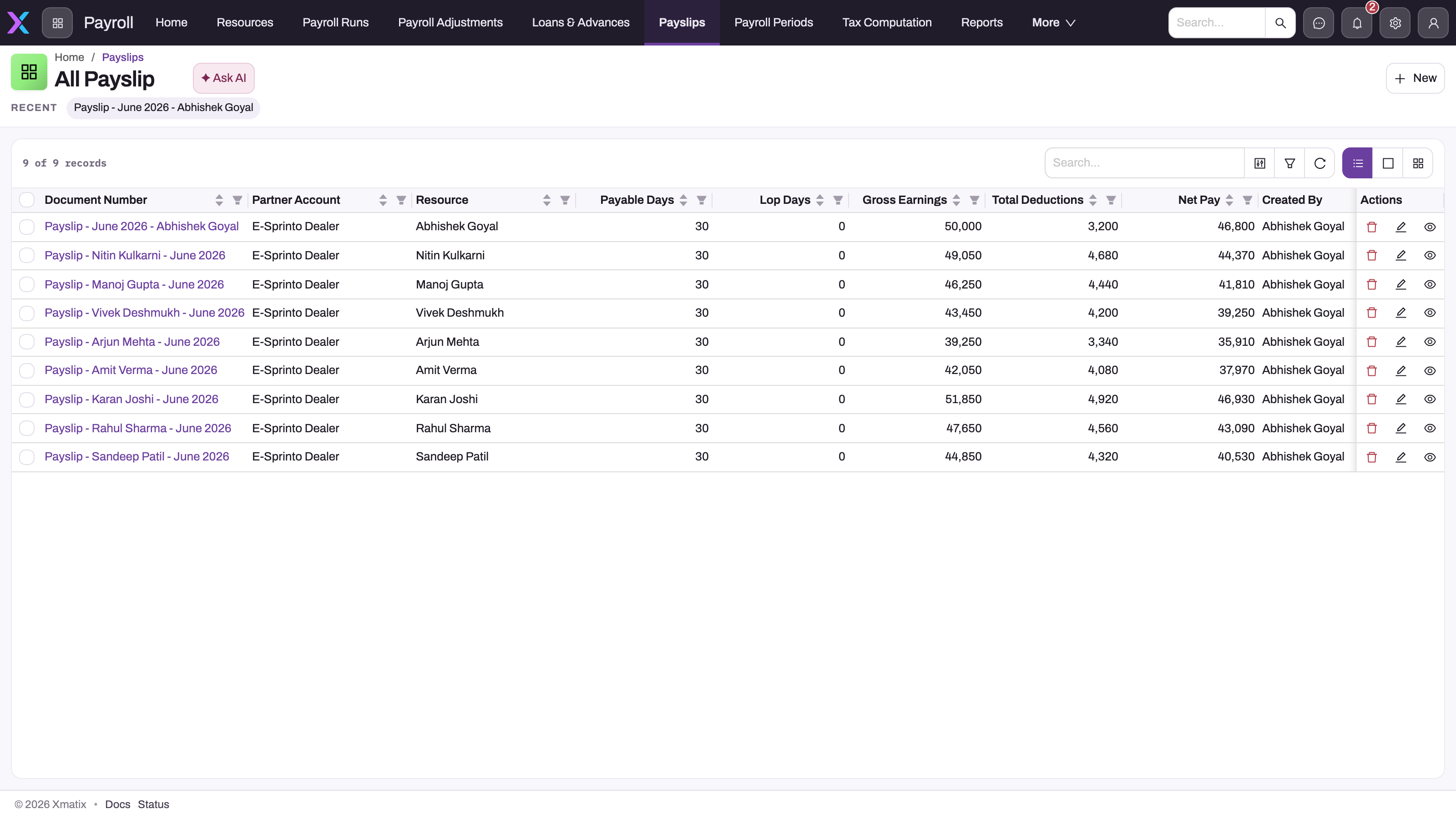
- Use the list search or the column filters to narrow to one employee. The list has no Payroll Run or Publish Status column. To see a month's slips with their status, use the Payslip Summary report (Step 6).
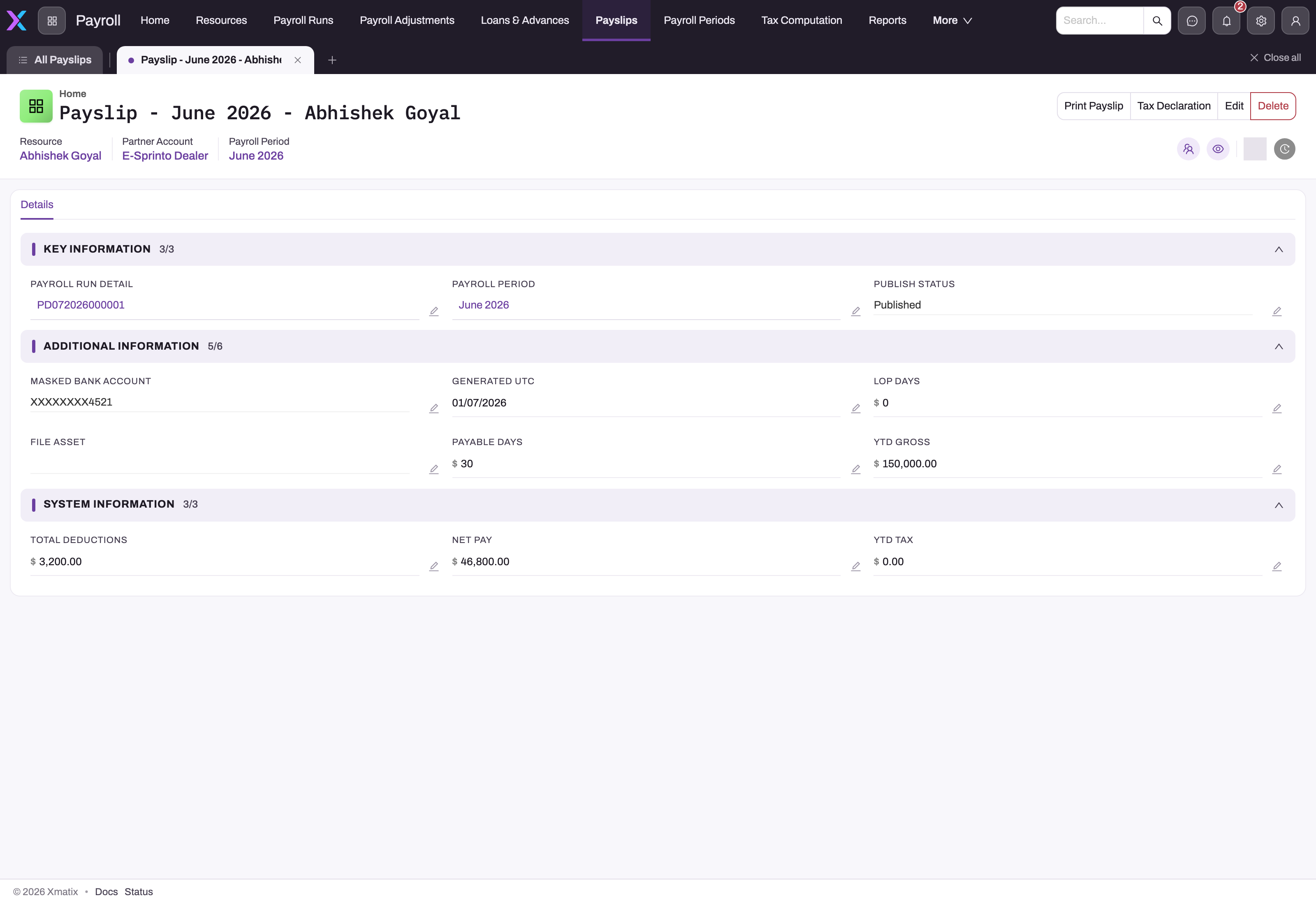
- Click a Document Number to open the slip. The header shows Resource, Partner Account and Payroll Period. The Details tab has three sections:
- Key Information: Payroll Run Detail, Payroll Period, Publish Status.
- Additional Information: Masked Bank Account, Generated Utc, Lop Days, File Asset, Payable Days, Ytd Gross.
- System Information: Total Deductions, Net Pay, Ytd Tax.
Step 3 — Check the component breakdown
The slip itself has no earning or deduction lines. Click the Payroll Run Detail link on the slip, then open that record's Component Line tab. It lists the components the calculation produced for this employee. See Running payroll for how those lines are built.
Step 4 — Correct a payslip
Fix the cause, not the slip:
- Correct the input (salary structure, compensation, adjustment, loan or leave).
- On the run, click Calculate. The run's Draft slips are deleted together with the old employee rows.
- Click Generate payslips again.
This works only while the run is not posted and no slip of the run is Published. Once the run is posted, put the difference into a payroll adjustment in the next period.
You can also click Edit on a slip, or the pencil next to a field, and change its figures by hand. Nothing recalculates or checks those figures, and they then disagree with the run, the journal and the payment batch. Avoid this except to fix a typo in a slip you are about to reissue.
Step 5 — Publish the payslips
When the run is posted:
- Open the run and click Publish payslips, then confirm.
- xMatix renders each Draft slip with the Payslip print template, stores the PDF on the slip (its File Asset), sets Publish Status to Published and sends the employee a push notification and an email saying the payslip is available. The message contains no pay figures.
- The result says how many slips were published, how many were already published, how many employees were notified, and lists any slip that could not be published or any employee who could not be told (for example, a Resource with no linked user).
Click Publish payslips again at any time: slips that already have their PDF are skipped and their employees aren't notified twice, so a second click only finishes what is left.
From now on, Calculate on the run is refused with "This run's payslips are published — recalculating would invalidate documents employees have already seen."
You can still set Publish Status by hand on a slip (the field is a text box; type Published exactly). That blocks recalculation but stores no PDF and tells no one. The next Publish payslips renders and sends such a slip.
Step 6 — See a month's payslips in one table
- In the Payroll app, choose Reports and open Payslip Summary (folder Payroll).
- Filter by Pay Period, Date Range, Department, Employee or Status.
Each row shows Emp Code, Employee Name, PAN, Emp Type, Period, From, To, Pay Date, Gross, Total Ded., Net Pay, YTD Gross, YTD Tax, Payable Days, LOP Days, Bank Account, Status and Generated. Export it from the report viewer if you need a file.
Step 7 — Delete a payslip
Open the slip and click Delete, or tick slips in the list and use Delete in the list header. Nothing stops you deleting a Published slip, and deleting it lifts the recalculation block. Clicking Generate payslips on the run creates the slip again with the current figures.
On mobile
If your mobile app includes the Payroll app, a Payslips tab lists the slips. A slip opens with the same Key Information, Additional Information and System Information sections, all read-only.
Printing and distributing slips
- Publish payslips (on the run) is the way to distribute: every employee gets the PDF on their payslip and a notification. Employees who can open payslips in xMatix, on the web or the mobile app, find the PDF in the slip's files.
- Print payslip (on a slip) prints the Payslip template: the employee's name, ID, designation, PAN and UAN, payable and LOP days, the masked bank account, gross earnings, PF, ESI, TDS and loss of pay from the run row, total deductions, net pay in words, and the year-to-date figures.
- Tax Declaration (on a slip) prints the Form 12BB template pre-filled with the employee's name, PAN, designation and pay period, for the employee to complete and sign.
- Print register (on the run) prints the Payroll register: one line per employee with PF, ESI, TDS, loss of pay, deductions and net pay, with totals.
Publishing doesn't limit who can see payslips. See Permissions.
Fields
| Field | What it means | Notes |
|---|---|---|
| Document Number | The slip's number | Set at generation from the Payslip numbering setting, or PS-DDMMYYYY-NNNNNN when there is none. Required, and unique across the tenant |
| Partner Account | The company that pays the employee | Copied from the run. Hidden on tenants that run one company |
| Resource | The employee (the person record) | Copied from the run detail |
| Payroll Run Detail | The employee row of the run this slip came from | One slip per detail. Your route to the component lines |
| Payroll Run | The run the slip belongs to | Copied at generation. On the Edit form only |
| Payroll Period | The pay period the slip covers | From the run detail, or the run's period if the detail has none. Group slips by this, not by Generated Utc |
| Publish Status | Draft or Published | Generation writes Draft. Publish payslips writes Published once the PDF is stored. Can also be edited in place as free text. Published blocks recalculation of the run |
| Payable Days | Days paid in the period | Calendar days minus unpaid leave, copied from the run detail |
| Lop Days | Loss-of-pay days | Copied from the run detail |
| Gross Earnings | Total earnings for the month | Copied from the run detail |
| Total Deductions | Total deductions for the month | Copied from the run detail |
| Net Pay | Gross earnings minus deductions | Copied from the run detail |
| Ytd Gross | Gross earnings so far in the fiscal year | Sum over every run detail of the same employee and company in the fiscal year, including this run |
| Ytd Tax | Salary TDS so far in the fiscal year | Same scope as Ytd Gross, summing the TDS on each run detail |
| Masked Bank Account | The salary account, masked | XXXX plus the last four digits of the Resource's bank account when the slip was generated. Empty if the Resource has none. Not updated if the account changes later |
| Generated Utc | When the slip was generated | Not the pay date |
| File Asset | The payslip's PDF | Written by Publish payslips. Publishing again after a correction stores a new version of the same file |
Business rules
- Generate Payslips needs at least one employee row on the run. It creates one Draft slip per row that has none and never changes existing slips.
- YTD figures count every run row in the fiscal year for that employee and company, whether or not the run is posted. An extra run in the same period (for example a supplementary run) adds to them.
- YTD figures are fixed when the slip is generated. Recalculating an earlier month doesn't update later slips.
- Calculate on a run deletes all of the run's slips that are not Published. If one or more slips are Published, Calculate is refused for the whole run.
- Publish Payslips needs a posted run with payslips, an active Payslip print template, and file storage. It publishes per slip: a slip that fails stays Draft and is listed in the result; the others are published.
- Publishing skips slips that are already Published with a PDF and never notifies an employee twice for the same slip.
- Posting, Generate Payment and paying the batch don't touch payslips.
- Deleting a slip has no side effects. Generate Payslips recreates it.
- Payslips can also be created with New in the list. A hand-made slip has no run detail, so nothing fills or checks its figures, and Generate Payslips ignores it.
Example
Your company runs payroll for ten people. The June 2026 run is calculated and reviewed.
- The payroll officer clicks Generate payslips. Ten Draft slips appear under Payslips, numbered
PS-30062026-000031toPS-30062026-000040. - One employee's slip shows Lop Days 2, but the leave was approved as paid leave. The officer fixes the leave record, clicks Calculate on the run (all ten Draft slips are deleted), then Generate payslips again. Ten new slips appear, and that employee's shows Lop Days 0.
- The run is approved and posted, and the salary batch is paid on 1 July.
- The officer clicks Publish payslips on the run. Ten PDFs are attached to the slips, every slip shows Published, and the ten employees get a notification.
- In July someone tries to recalculate the June run. It is refused because the run is posted, and the slips are Published too. The correction goes into a July payroll adjustment.
Training
Practice exercise
In a sandbox with a calculated run that has at least two employees:
- Click Generate payslips on the run. Expected: one Draft slip per employee row.
- Click Generate payslips again. Expected: no new slips.
- Delete one slip, then click Generate payslips. Expected: exactly one slip is created.
- Click Publish payslips before posting. Expected: "Post the payroll run before publishing its payslips."
- Post the run and click Publish payslips. Expected: every slip is Published and has a PDF under File Asset. Click it again. Expected: nothing new is published.
- Click Calculate on the run. Expected: the message "This run's payslips are published — recalculating would invalidate documents employees have already seen."
Quick reference
- Payslips come from Generate payslips on a calculated run, one per employee row.
- Running it again only fills gaps.
- A slip holds totals. The breakdown is on its Payroll Run Detail → Component Line tab.
- Recalculating deletes Draft slips. Generate again afterwards.
- Publish payslips on a posted run: PDF on every slip, Published, employee notified. Safe to click again.
- Published slips lock the run against recalculation.
- Print payslip prints the Payslip template; Tax Declaration prints Form 12BB.
- YTD = every run in the fiscal year for that employee and company.
- Correct posted months with an adjustment, never by editing the slip.
Permissions
| To do this | The user's security profile needs |
|---|---|
| See the Payslips list and open slips | Read access to Payslip |
| Edit, delete or create slips by hand | Edit, Delete or Create access to Payslip |
| Generate payslips | The Generate payslips action on Payroll Run (Actions tab) |
| Publish payslips | The Publish payslips action on Payroll Run (Actions tab). Standard User and System Admin have it |
| Use Print payslip or Tax Declaration | Those actions on Payslip (Actions tab) |
| Run Payslip Summary | Access to the report |
Payslips have no record-level rule out of the box. In the standard profiles, Standard User, Sales Executive and System Admin all have full access to Payslip, so anyone on those profiles can open every employee's slip. Before you go live, remove Payslip access from profiles that shouldn't see pay, and add a record security rule if some payroll users should see only part of the workforce. See Security profiles.
Configuration
Payslip print format. Payslips print, and publish, from the Payslip print template, listed under Setup → Entities → Payslip → Layouts with Type Print. The shipped template can't be edited. To change what the slip shows, use Duplicate Print Template on it, edit the copy (facts, totals, notes) in the print template editor, and make it the default or point Print payslip at it (Setup → Payslip → Actions → edit Print payslip → Print layout). Publish payslips renders with the template Print payslip names, so the published PDFs follow the same change.
Tax Declaration format. The Tax Declaration button prints the Form 12BB template. Duplicate it the same way to change the wording, or remove the button from the Payslip page header.
Numbering. To use your own payslip numbers, add an active document numbering setting for Payslip in Design Studio → Entities → Payslip → Logic → Document Settings. Without one, slips are numbered PS-DDMMYYYY-NNNNNN.
Fiscal year. YTD figures follow the company's fiscal year. If none is defined, they use April to March.
Publish Status as a list. The record page shows Publish Status as a text box. An administrator can change it to a list (Draft, Published) in the Payslip view layout so users can't mistype it.
Access. Tighten Payslip access in the security profiles as described under Permissions.
Common problems
"Run has no details to generate payslips from (calculate first)."
The run has no employee rows. Click Calculate on the run first, then Generate payslips.
"This run's payslips are published — recalculating would invalidate documents employees have already seen."
A slip of the run has Publish Status Published. If the slip was never handed out, set it back to Draft and recalculate. Otherwise correct the difference with a payroll adjustment in the next period.
My payslips disappeared from the list
The run was recalculated, which deletes its Draft slips. Click Generate payslips on the run again.
"Post the payroll run before publishing its payslips."
Publishing needs a posted run, so employees never see pay that can still change. Approve and post the run, then click Publish payslips.
"Payslip has no active print template…"
The Payslip print template was deactivated and no other template is active. Ask your administrator to reactivate Payslip under Setup → Payslip → Layouts (Type Print).
An employee didn't get the payslip notification
The result of Publish payslips lists employees whose Resource has no linked user. Link the user on the Resource, set the slip back to Draft, and click Publish payslips again. Push notifications also need the employee to be signed in to the mobile app.
Print Payslip opens an empty window
The action doesn't name an active print template. Ask your administrator to check Print payslip under Setup → Payslip → Actions: its Print layout should be the Payslip template (or your own copy).
The recalculation went through even though I published the slip
Publish Status must read exactly Published. Any other text is treated as not published, and the slip was deleted with the old pass. Generate the slips again and use Publish payslips rather than typing the status.
Ytd Gross looks too high
YTD adds every run row in the fiscal year for that employee and company, including unposted runs and extra runs in the same period. Check the employee's other runs in the year. Delete or recalculate any run that shouldn't count, then delete the slip and generate it again.
The masked bank account is empty or out of date
The account is copied from the Resource when the slip is generated. Update the Resource's bank account, delete the slip and click Generate payslips again.
Common questions
How does an employee get their payslip?
Click Publish payslips on the posted run. Each employee gets a push notification and an email saying the payslip is ready, and the PDF is stored on their payslip. Employees open it from the payslip in xMatix if their profile can read payslips. The email doesn't attach the PDF, and xMatix doesn't yet limit employees to their own payslips: see Permissions.
Does publishing a payslip lock the payslip?
No. It locks the payroll run against recalculation, nothing more. The slip itself can still be edited or deleted, and deleting a Published slip lifts the lock. If you need slips to be unchangeable after distribution, remove Edit and Delete access to Payslip from the profiles of users who shouldn't change them.
Why doesn't the payslip show Basic, HRA and the other components?
The payslip stores totals only. The breakdown lives on the run's component lines for that employee, reached through the slip's Payroll Run Detail and its Component Line tab. The printed payslip shows the statutory deductions (PF, ESI, TDS) and loss of pay from the run row.
Where does the year-to-date tax figure come from?
It adds the TDS on the employee's run rows for every payroll period in the fiscal year that contains this run's period, for the same company. These are the same TDS figures the salary TDS challans deposit. For the full-year computation, see Income tax on salary.
Why is the bank account masked?
The payslip is meant to be handed out, so it shows only the last four digits, prefixed with XXXX. The full number stays on the employee's Resource, where the salary payment batch reads it.