
A Full & Final Settlement is the one document that closes out an employee who is leaving. It posts the final amounts owed to and recovered from the person, and takes them off payroll. It comes after the person's last regular payroll run. After it, the net amount is paid through a salary payment batch and any recovered loan is closed.
Overview
You enter each amount as a line. Payables are what the company still owes: salary up to the last working day, leave encashment, gratuity, pending reimbursement. Deductions are what the person owes back: notice-period recovery, an unrecovered loan, final tax. Post then does four things in one save:
- writes one Payroll journal, dated on the last working day;
- raises a payable open item against the person for the net amount;
- marks the settlement Posted;
- sets the employee's Settlement Status to Settled and Employment Status to Exited, so later payroll runs leave them out.
The settlement does not calculate anything. It checks, nets, posts and closes; you work out every amount yourself under your own policies. Generate payment batch on the posted settlement then puts the net on a salary payment batch, and paying that batch posts the bank payment and sets the settlement to Paid.
When to use it
- An employee resigns, retires or is released and you need one auditable record of the final dues.
- You want the leaver excluded from payroll at the same moment their final dues hit the ledger.
To take someone off payroll with nothing to settle, set Employment Status to Exited on their employee record instead (see Employees).
How xMatix handles it
- Lines decide the direction. A line whose Component Type is exactly Deduction (any letter case) is a recovery. Any other value, blank included, is a payable. The amount is always entered as a positive figure.
- Accounts come from the lines. A payable line debits its GL Account. A deduction line credits its PayableGL Account. The net is credited to the company's Payroll Payable control account, looked up among the GL accounts of the settlement's Partner Account.
- Lines with no amount, or zero, are ignored.
- One post only. Once the settlement holds a journal in its GL field, Post refuses to run again.
- The employee is found through the Resource. Posting updates the employee record whose Resource matches the settlement's. If the person has no employee record, the settlement still posts but closes nobody.
- Payroll exclusion. A payroll calculation skips every employee whose Employment Status is Exited. That includes recalculating a run that was already calculated.
- The net is paid by its own batch. Generate payment batch on a posted settlement creates a salary payment batch that is not tied to any payroll run and pays only the settlement's open item. A payroll run's batch never pays a settlement, and a settlement's batch never pays salary. See Step 6.
Prerequisites
- The person has an employee record linked to their Resource (see Employees).
- The employing company has a GL account whose control type is stored as
PayrollPayable(see Configuration). This is the same account monthly payroll posts to. - You know the expense account for every payable and the liability account for every recovery.
- The person's last regular payroll run is done. The settlement replaces another month's salary; it is not paid in addition to it.
- Loans and advances are reviewed, so the recovery amounts are current (see Loans and advances).
- An administrator has corrected the shipped employee exit-date validation (see Common problems). Until then every post is refused.
Procedure
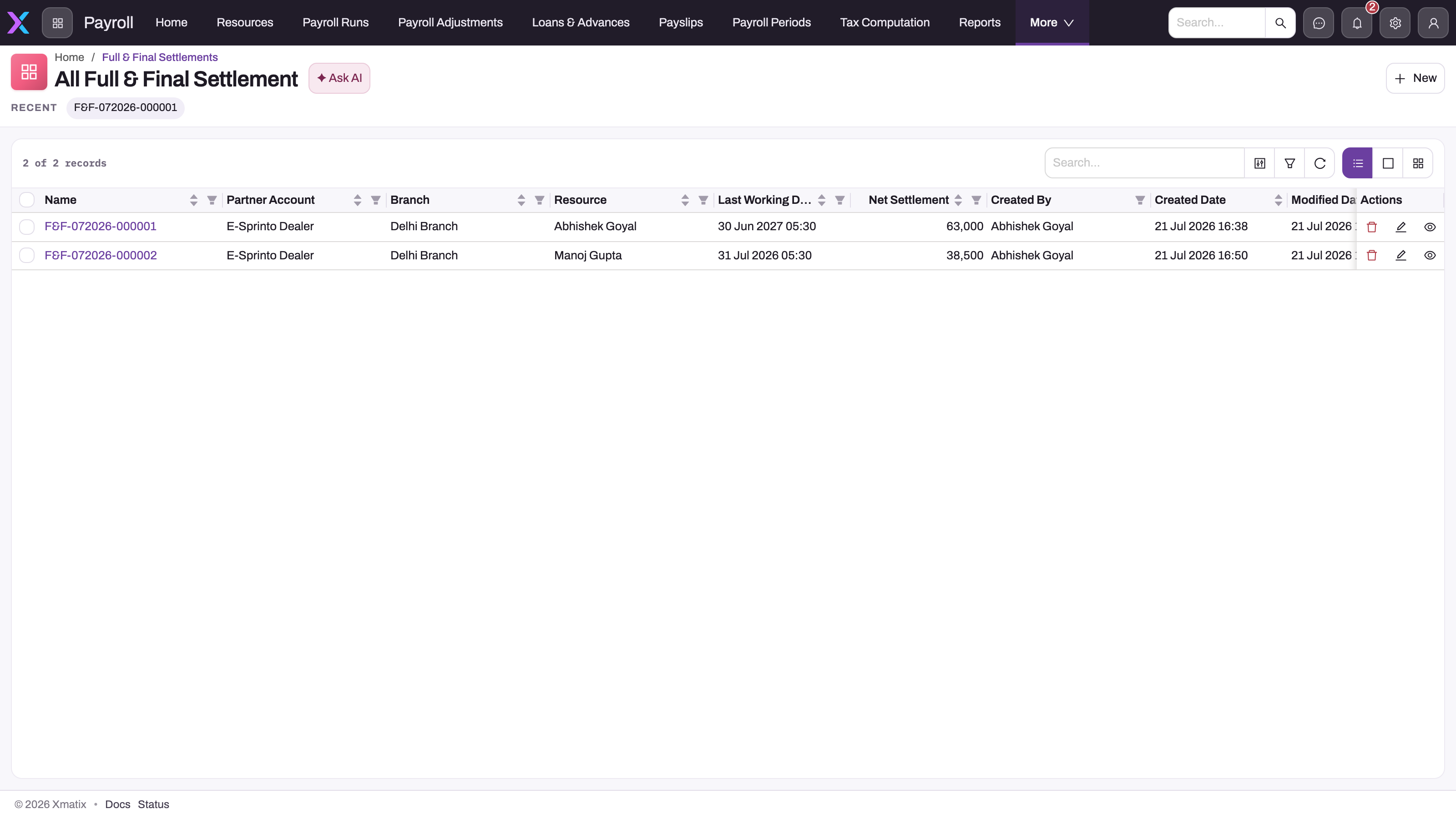
Step 1 — Open the settlement list
Open the Payroll app from the App Launcher, choose Settings, and select Full & Final Settlement under People. You can also type Full & Final in the App Launcher search. The All Full & Final Settlement list shows Name, Partner Account, Branch, Resource, Last Working Day, Net Settlement, Created By, Created and Modified Date. Check here first that the person does not already have a settlement.
Step 2 — Create the settlement
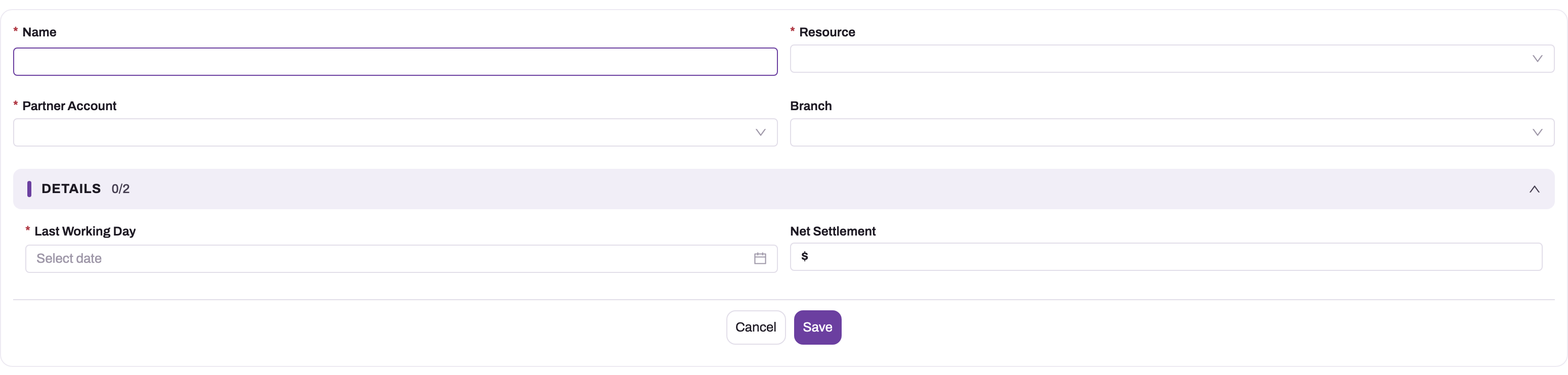
Click New. The form asks for:
- Name — the settlement number. It is assigned when you save (for example F&F-102026-000003), so whatever you type is replaced.
- Resource — the person leaving.
- Partner Account — the company that employs them. Only partner accounts are offered.
- Branch — only branches of the chosen Partner Account are offered.
- In the Details group: Last Working Day, and Net Settlement. Leave Net Settlement blank, because Post calculates it.
Click Save. The record opens with Edit, Delete and Post in the header, Partner Account and Branch under the title, and two tabs: Lines and Details. The settlement is in Draft.
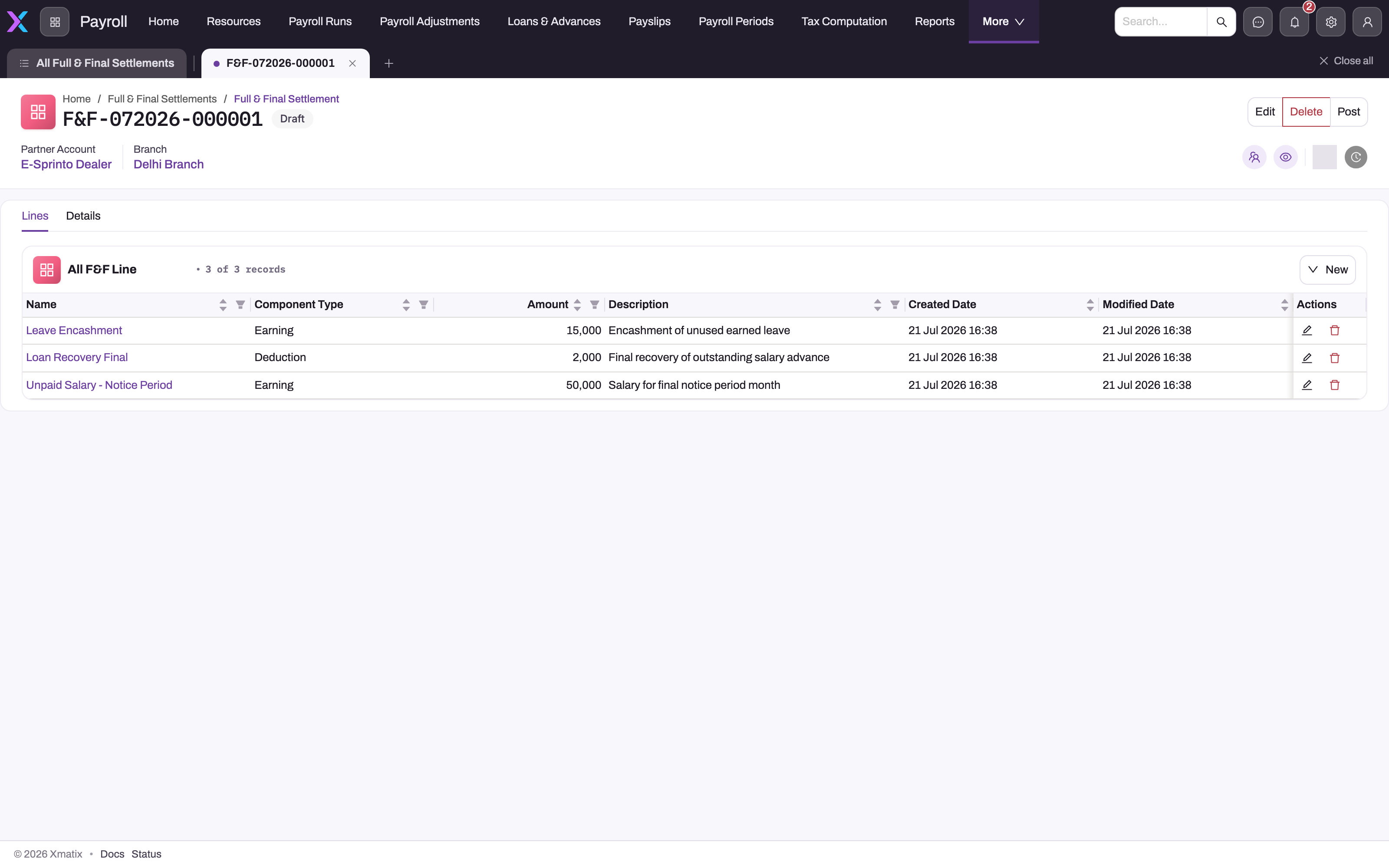
Step 3 — Add the lines
On the Lines tab, click New. An inline card asks for three fields:
- Component Type — a free-text box. Type exactly
Deductionfor a recovery. For a payable, type a word such asEarningorPayable. A misspelt "Deduction" turns a recovery into a payment to the person. - Amount — always positive.
- Description — the basis of the figure, for example "18 days earned leave at the daily rate".
Save the card. The line gets a number from the FFL series and appears in the All F&F Line list (Name, Component Type, Amount, Description, Created Date, Modified Date). Add one line per component, so the posted journal stays readable.
To correct a line's type, amount or description, use the row's Edit icon. Use the row's Delete icon to remove it.
Step 4 — Give every line its account
The New card does not ask for accounts, so set them on each line's own page. Click the line's Name to open it. The page shows Amount, Description, GL Account and PayableGL Account. Click into a field to edit it in place:
- Payable line — set GL Account to the expense account to debit, for example salary, leave encashment or gratuity expense.
- Deduction line — set PayableGL Account to the account to credit. Use the loan's control account for a loan recovery, or the salary TDS payable account for tax.
The account pickers show every GL account, so make sure you choose accounts of the settlement's company. The line page does not show Component Type; check it in the Lines list.
Step 5 — Check and post
Before posting, total the lines yourself: payables minus deductions is the net that will be paid. Then click Post on the settlement header.
Post refuses, and changes nothing, if:
- the settlement is already posted;
- it has no Resource;
- it has no line with an amount;
- a payable line has no GL Account, or a deduction line has no PayableGL Account;
- the company has no Payroll Payable control account;
- the deductions exceed the payables.
When it succeeds:
- a Payroll journal is posted, dated on the Last Working Day: one debit per expense account, one credit per deduction account, and a credit for the net to Payroll Payable;
- for a net above zero, a payable open item for exactly the net is raised against the person;
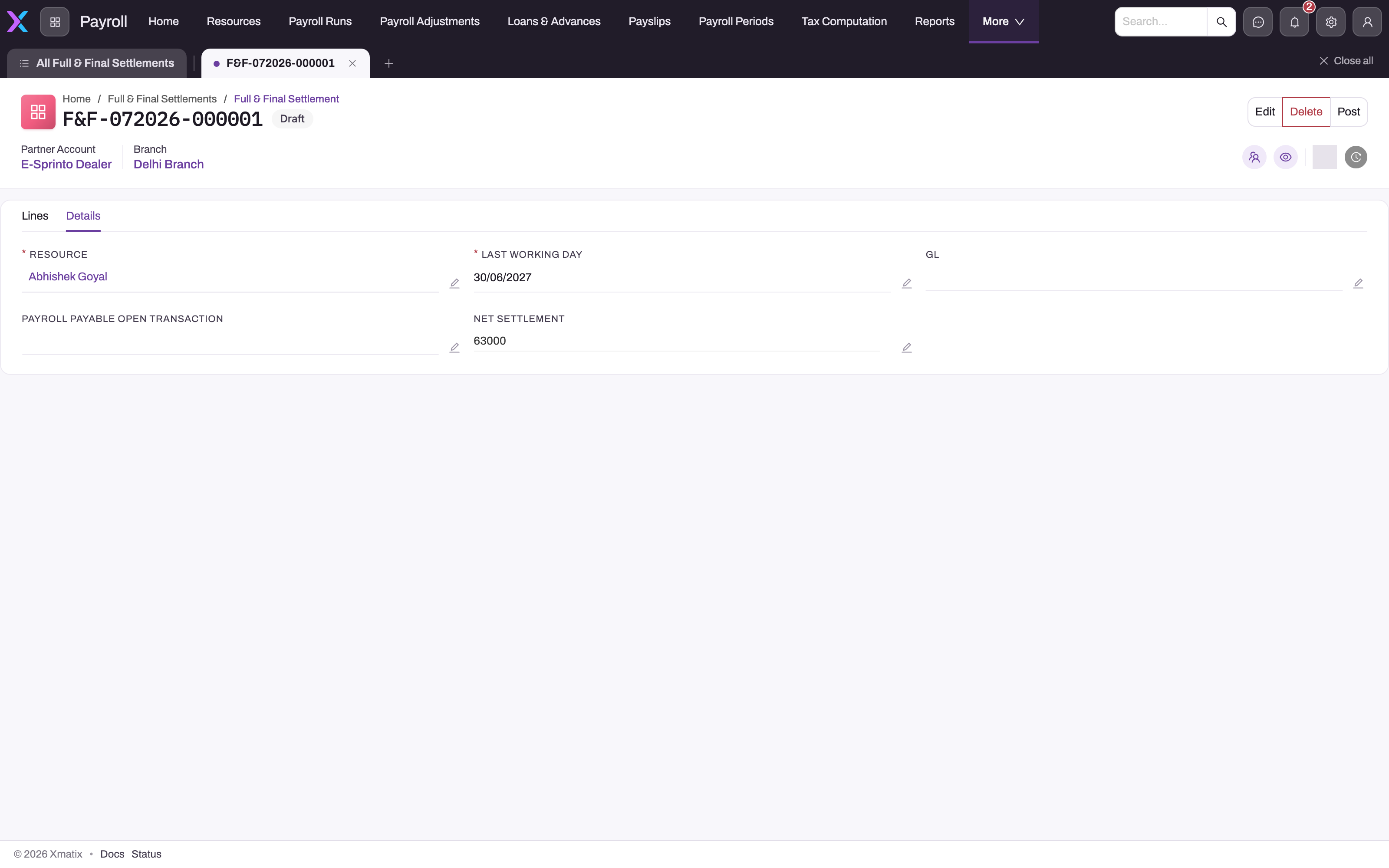
- Status becomes Posted, and the Details tab shows the journal in GL, the open item in Payroll Payable Open Transaction and the computed Net Settlement;
- the employee becomes Settled and Exited. If their Date Of Exit is empty, it is filled from the Last Working Day;
- Generate payment batch appears in the settlement header (it stays hidden until Status is Posted).
All of this is saved together: if any part fails, nothing is posted.
Step 6 — Pay the net amount
The net sits on the Payroll Payable control account as an open item against the person. Pay it through a salary payment batch:
- On the posted settlement, click Generate payment batch and confirm "Create a payment batch for this settlement's net amount? Pay the batch to post the bank payment."
- xMatix creates a Draft salary payment batch named PPB-FNF-<settlement name>. Its Payroll Run is blank and its label reads "Full-and-final payment". It has one line for the person: the settlement's open net amount, with the bank account and IFSC from the person's Resource. The bank GL is the company's default bank GL account, or its only Bank control account when there is no default — the same derivation as a salary batch.
- Open the batch in Payroll → Pay and comply → Salary payment batches, check the line and the bank details, and enter the UTR on the line once the transfer is made, as for salary.
- Click Pay on the batch. xMatix posts a Payroll journal, debit Payroll Payable and credit the bank, settles the settlement's open item and sets the settlement's Status to Paid. See Salary payment batches.
Generate payment batch refuses, and creates nothing, when:
- the settlement is not posted: "Settlement … is not posted — post it before generating its payment.";
- nothing is left open on it (the net was zero, or it is already paid): "Settlement … has no net amount left to pay.";
- it is already on a batch that has not been paid: "Settlement … is already on payment batch …, which is not paid yet. Pay or delete that batch first."
Step 7 — Close a recovered loan
A deduction line that credits a loan's control account clears the loan's balance in the ledger. It does not update the Loan / Advance record: its Outstanding Amount, its receivable open item and its Active status stay as they were. Open the loan from Loans & Advances and set Outstanding Amount to zero on its Details tab, so that no later payroll run recovers it again. The standard forms can't change the loan's status, so it stays Active, and its open item keeps its balance. See Loans and advances.
Fields
Settlement
| Field | What it means | Notes |
|---|---|---|
| Name | The settlement number. | Required. Assigned on save from the F&F series (F&F-<month><year>-<number>); typed text is replaced. |
| Resource | The person leaving. | Required. Post refuses without it. The employee with this Resource is the one closed. |
| Partner Account | The employing company. | Required. Decides which company's Payroll Payable account is used, and stamps the journal and open item. Only partner accounts are offered. |
| Branch | The branch the journal lines and open item carry. | Optional. Filtered to branches of the Partner Account. |
| Last Working Day | The person's last day. | Required. The journal date and open-item date (today if blank), and the employee's Date Of Exit when that is empty. |
| Net Settlement | Total payables minus total deductions. | Written by Post; a value typed before posting is replaced. Never negative. |
| GL | The journal created by Post. | Read-only in practice. Once filled, the settlement cannot be posted again. |
| Payroll Payable Open Transaction | The open item for the net. | Filled by Post. Empty when the net is exactly zero. |
| Status | Draft, Posted or Paid. | Not on the standard forms. Draft on creation; Post sets Posted; paying the settlement's payment batch sets Paid. Generate payment batch shows only while Status is Posted. Approved and In Progress are in the list but nothing sets or reads them. |
F&F Line
| Field | What it means | Notes |
|---|---|---|
| Name | The line number. | Assigned on save from the FFL series. Not on the New card. |
| Component Type | Payable or recovery. | Free text. Exactly Deduction (any case) is a recovery; anything else is a payable. On the New/Edit card and the list, not on the line page. |
| Amount | The line amount. | Positive. Blank or zero lines are skipped at posting. |
| Description | The basis of the amount. | Free text. |
| GL Account | Expense account debited by a payable line. | Required on payable lines at posting; ignored on deductions. Set on the line page. |
| PayableGL Account | Liability account credited by a deduction line. | Required on deduction lines at posting; ignored on payables. Set on the line page. |
Business rules
- Numbering. The settlement and each line are numbered on save by the F&F Document Setting and F&F Line Document Setting numbering settings.
- Direction. Only Component Type
Deduction(case-insensitive) is a recovery. Everything else is a payable. - Net. The net is the payables minus the deductions, each amount rounded to two decimals. A negative net refuses the post. A net of exactly zero posts the journal but raises no open item.
- Journal. One journal of type Payroll, dated on the Last Working Day, for the settlement's Partner Account and Branch. Lines with the same account are added together.
- Posted once. A filled GL field blocks a second post. Nothing reverses a settlement.
- No edit lock. Edit and Delete stay available after posting, and lines can still be changed. None of that changes the posted journal, the open item or the employee record. Treat a posted settlement as read-only.
- Deleting a posted settlement leaves its journal, its open item and the employee's Exited status in place.
- Employee closure. Settlement Status becomes Settled and Employment Status becomes Exited. Date Of Exit is filled only when it is empty.
- Loans. Posting never touches Loan / Advance records (see Step 7).
- Payment. Generate payment batch works only on a posted settlement with an open net, and not while the person is on another unpaid full-and-final batch. Paying the batch settles the open item and sets the settlement to Paid; a paid batch cannot be paid again.
Example
A sales coordinator in the head-office branch resigns, with a last working day of 31 October.
- In Payroll → Settings → People → Full & Final Settlement, HR clicks New, picks the person's Resource, the company and the branch, sets Last Working Day to 31 October and saves. The record opens as F&F-102026-000004, Draft.
- On Lines they add three lines:
Earning, 42,000, "Salary 1–31 October";Earning, 18,500, "Leave encashment, 12 days";Deduction, 9,000, "Balance of salary advance".
- They open each line. The two earnings get GL Account Salaries and Wages and Leave Encashment Expense. The deduction gets PayableGL Account Employee Advances, the advance's control account.
- They click Post. The journal dated 31 October debits 42,000 and 18,500 and credits 9,000 to Employee Advances and 51,500 to Payroll Payable. Net Settlement shows 51,500 and the employee shows Settled / Exited.
- They click Generate payment batch. A Draft batch PPB-FNF-F&F-102026-000004 is created with one line of 51,500 and the person's bank details.
- Finance makes the transfer, enters the UTR on the batch line and clicks Pay. The journal debits Payroll Payable and credits Bank for 51,500, and the settlement shows Paid. HR then edits the salary advance to Outstanding 0 (Step 7).
Training
Practice exercise
In a sandbox company with a Payroll Payable control account:
- Create a settlement for a test employee, with last working day today.
- Add a payable line of 10,000 with an expense GL Account, and a
Deductionline of 12,000 with a PayableGL Account. - Click Post. Expected: it is refused because recoveries exceed payables, and nothing changes.
- Change the deduction to 2,500 and post again. Expected: Status is Posted, Net Settlement is 7,500, GL and Payroll Payable Open Transaction are filled, and the test employee shows Settled and Exited.
- Click Post once more. Expected: "Settlement is already posted."
- Click Generate payment batch. Expected: a Draft batch PPB-FNF-<settlement name> with one line of 7,500.
- Click Generate payment batch again. Expected: it is refused because the settlement is already on an unpaid batch.
- Pay the batch. Expected: the settlement's Status is Paid and its open item is settled.
Quick reference
- Path: Payroll → Settings → People → Full & Final Settlement.
- Type
Deductionexactly for recoveries; anything else pays the person. - Accounts go on each line's own page, not on the New card.
- Payable line → GL Account; deduction line → PayableGL Account.
- Last Working Day = journal date = Date Of Exit (if empty).
- Post works once; edits after posting change nothing in the ledger.
- Deductions may not exceed payables.
- Pay the net with Generate payment batch on the posted settlement, then Pay on the PPB-FNF batch.
- Close recovered loans by hand.
Permissions
| What | Who can do it in the shipped profiles |
|---|---|
| See the list, create, edit and delete settlements and lines | Standard User, System Admin and Sales Executive. All three have full access to both records. |
| Post | Standard User and System Admin. Sales Executive has no Post permission. |
| Generate payment batch | Standard User and System Admin. |
| Pay on the batch | The Pay action on Salary Payment Batch (see Salary payment batches). |
Without the Post or Generate Payment permission, the server refuses the action. Payroll data is sensitive, so an administrator should narrow these profiles. Remove access to Full & Final Settlement and F&F Line, and the Post permission, from every profile that should not handle exits, in Setup → Access Control → Security Profiles (see Security profiles).
Configuration
- Payroll Payable control account. Post finds it by an exact match on the stored control type
PayrollPayable(no space) among the GL accounts of the settlement's Partner Account. The Control Type list on the GL account form offers Payroll Payable with a space, and posting does not recognise that spelling. The chart templates do not tag it either. Set the value through the Setup Copilot or a data import, as described in GL accounts. Keep one such account per company. - Numbering. Setup → Feature Hub → Platform → Document Settings holds F&F Document Setting (series F&F, month and year, six digits) and F&F Line Document Setting (series FFL). Change the series there. Do not deactivate the line setting: the line card has no Name field, and Name is required. See Email templates and document numbering.
- Employee exit-date validation. The shipped Date Of Exist validation on Employee refuses every post until it is corrected (see Common problems).
- Forms. To show Status, or Component Type on the line page, add the field to the layout in Setup → Design Studio (see Design a form layout).
Common problems
Post is refused: "Date of exist cannot be less than Date of confirmation"
The message comes from the employee record. The shipped Date Of Exist validation on Employee has its condition reversed, so it refuses any exit date after the joining date. Posting writes that date, so the whole post is rolled back. An administrator changes the condition to DateOfExit < DateOfJoining, or deactivates the rule, in Setup → Design Studio → Entities → Employee → Logic → Validations. Then post again. See Employees.
Post is refused: "No Payroll Payable control account … is configured"
The settlement's Partner Account has no GL account whose control type is stored as PayrollPayable. Often the account exists but was tagged Payroll Payable from the list, with a space. Fix the value as described under Configuration.
Post is refused: "Net settlement is negative; recoveries exceed payables"
The deduction lines add up to more than the payable lines. Common causes are a large loan balance against a short final month, or a payable line whose Component Type was typed Deduction by mistake. Reduce the recovery to what the payables cover and recover the rest separately, or add the missing payable.
Post is refused: "F&F payable line … has no expense GL account" (or "deduction line … has no payable GL account")
A line is missing its account. The message quotes the line's internal ID, not its name, so open each line from the Lines list and fill GL Account (payables) or PayableGL Account (deductions).
Post is refused: "Settlement has no lines to post"
There are no lines, or every line has no amount or zero. Add the lines with their amounts.
Post is refused: "Settlement must be anchored on a Resource"
Edit the settlement, pick the Resource and save.
A recovery was paid to the person instead
The line's Component Type was not exactly Deduction, so it was posted as a payable: it debited its GL Account and raised the net instead of lowering it. The settlement cannot be posted again. Ask finance to post a correcting journal, and record the reason on the settlement. Before posting, always check the Component Type column in the Lines list.
The employee still appears in this month's run
The run was calculated before the settlement was posted. Post the settlement, then recalculate the run; the recalculation leaves the person out.
The employee did not change to Exited
The settlement's Resource has no employee record, or a different Resource was picked. Set Employment Status to Exited on the right employee record by hand.
Common questions
Does the settlement calculate leave encashment, gratuity or notice recovery?
No. You enter each amount as a line, worked out under your own policies. The settlement checks the lines, nets them, posts the journal, raises the open item and closes the employee. Put the basis of each figure in the line's Description so the journal can be explained later. A line with no amount is ignored, so you can keep placeholder lines while you collect figures, but delete them before posting to keep the record clear.
Can I pay the settlement through the salary payment batch?
Yes, through its own batch. Generate payment batch on the posted settlement creates a batch named PPB-FNF-<settlement name> that is not tied to any payroll run. A payroll run's Generate payment batch batch never includes a settlement, and the settlement's batch never pays salary. Paying the batch settles the open item and sets the settlement to Paid.
What if something comes up after posting?
The settlement cannot be posted again and has no reverse action. Editing its lines afterwards does not change the ledger. Handle a late amount the way finance handles any posted document: post a correcting journal, or a further payment, for the difference. Leave the original settlement as the record of what was decided at exit.
Where does TDS on the settlement go?
Enter it as a Deduction line whose PayableGL Account is the salary TDS payable account. Prepare TDS challan on a payroll run adds up only that run's posted details, so the settlement's TDS is not included in the drafted challan. Add it to the deposit yourself. See Statutory deductions and challans.
Can I settle someone who was never on payroll?
Yes. The settlement only needs a Resource, and it posts the same way. Nothing is closed afterwards, because posting updates only an employee record linked to that Resource.