
Indian payroll deducts for several statutory schemes — provident fund (PF), employee state insurance (ESI), state professional tax (PT), labour welfare fund (LWF) and income tax at source (TDS, covered on its own page). In xMatix every one of them rides the salary structure's component machinery and posts to its own payable control account, and each is deposited through a Statutory Challan. The salary structure decides which schemes an employee has — a line per scheme — and the statutory rule tables decide how much.
What the run computes
| Scheme | How the amount is produced in a run |
|---|---|
| PF | From the PF Rule in force on the payroll period's end date: the employee's PF wage capped at the rule's PF Wage Ceiling (or the employee's PF wage-cap override) × the employee rate, and the same capped wage × the employer rate for the employer share. The employer share is split: the EPS (pension) part — 8.33% of the wage up to the EPS ceiling — is written as its own Employer EPS (Pension) line, and the rest stays on the employer PF line. Whole rupees. |
| ESI | From the ESI Rule: the month's earned gross × the employee and employer rates, rounded up to the next rupee, when gross is at or below the rule's Wage Threshold (₹21,000). An employee who had ESI earlier in the same contribution period (April–September or October–March) stays covered to the end of that period even if the wage rises above the threshold. |
| PT | From the Professional Tax Slabs of the employee's work state, matched against the gross accumulated by the lines before the PT line, using the slab's February amount when the period ends in February. |
| LWF | From the LWF Rule of the employee's work state: the flat employee and employer amounts, deducted only in the rule's deduction months. |
| TDS | A component whose statutory type is TDS takes the employee's Monthly TDS Projection for the period, produced from the financial year's tax rule tables and verified declarations. |
How it fits together:
- A line per scheme. A scheme is deducted only if the salary structure carries a component of that statutory type — a
Deductionfor the employee share and anEmployerContributionfor the employer share. While a rule exists the rule sets the amount, and the line's own Value, Min Amount and Max Amount are ignored. With no PF, ESI or LWF rule for the company, the line's own calculation applies, as it always did. - The PF wage is the component the PF line's percentage is of — normally Basic — as actually earned in the month, after loss-of-pay days. If the line has no Percentage Of, the component's Based On codes are used, then all earned wages.
- Applicability flags. Unticking PF applicable, ESI applicable, PT applicable or LWF applicable on the Employee record makes that scheme's lines zero for the person (for PF: employee, employer and EPS). Blank or ticked means applicable.
- Work state is the state code on the contact address of the employee's Branch — or, if the employee has no branch, of the resource's default branch. Branches carry no state of their own, so give every branch an address with its state code.
- Rules belong to a company or to none. A rule with no Partner Account applies to every company that has no rule of its own.
Employer-side contributions cost the employer without reducing the employee's net, and post as an expense and a payable in the same journal. The run detail sums deduction components typed PF, ESI and TDS into per-employee PF, ESI and TDS totals — the figures the register, the payslip's year-to-date tax and the TDS challan read.
Not yet in the product: the Labour Codes' wage definition (adding back allowances above 50% of total pay before the PF ceiling), a split when a rule changes in the middle of a period, and EDLI or administration charges as cost lines.
Where the records live
Open the Payroll app (App Launcher → search Payroll) and choose Settings. The Statutory rules group holds PF rules, ESI rules, Professional tax slabs and LWF rules; Payroll components are under Pay structure. Statutory challans are on the Pay and comply menu.
Provident fund (PF)
Provident fund is a percentage of the employee's PF wage, capped at a wage ceiling, deducted from the employee and matched by the employer every month. The ceiling rose from ₹15,000 to ₹25,000 on 17 September 2026; EPS, the pension part of the employer share, is 8.33% of the wage up to the ceiling — at most ₹1,250 under the old ceiling and ₹2,083 under the new one.
PF Rules: one row per ceiling
Under Payroll → Settings → Statutory rules → PF rules, each PF Rule holds one company's rates and ceiling for a span of dates. A run uses the active rule whose Effective From … Effective To span contains the payroll period's end date — the company's own rule first, then a rule with no company. Keep one row per ceiling:
| Rule | PF Wage Ceiling | Employee Rate | Employer Rate | EPS Rate | Effective From | Effective To |
|---|---|---|---|---|---|---|
| Old ceiling | 15,000 | 12 | 12 | 8.33 | (your start date) | 16 Sep 2026 |
| New ceiling | 25,000 | 12 | 12 | 8.33 | 17 Sep 2026 | (blank) |
The release that brought this behaviour created the second row and closed the first for every company that had an open-ended ₹15,000 rule. Check the list after upgrading.
A September 2026 run — 1 to 30 September — takes the ₹25,000 rule, because the rule is chosen for the period's end date. The month is not split at the 17th; if your payroll lead decides otherwise, correct the difference with a payroll adjustment.
| Field | What it means | Notes |
|---|---|---|
| Partner Account | The company the rule is for | Blank = every company without its own rule. Hidden on a tenant with a single company. |
| Employee Rate | The employee's contribution, % of the capped PF wage | Type 12 for 12 per cent. |
| Employer Rate | The employer's total contribution, % of the capped PF wage | 12. The EPS part is carved out of it, not added to it. |
| EPS Rate | The pension (EPS) share of the employer contribution, % | 8.33. Blank = no split: the whole employer share is EPF. |
| EPS Wage Ceiling | The wage cap for EPS | Blank = the PF Wage Ceiling. |
| PF Wage Ceiling | The wage above which PF is not calculated | 15,000 or 25,000 (above). |
| Effective From, Effective To | The dates the rule applies | Effective To is the last day, inclusive; blank = open-ended. |
| Edli Rate, Admin Charge Rate | EDLI insurance and administration charge rates | Reference only: no cost line is produced from them. |
| Is Active | Whether the rule can be chosen | |
| Name | The rule's number | Assigned on save from the PFR series. |
Set up the deduction
- Under Payroll → Settings → Pay Structure → Payroll Components, create an employee-side component with Component Type
Deductionand Statutory TypePF, and give it a PF payable control account as its Payable GL account. For the employer's share, create a second component with Component TypeEmployerContribution, Statutory TypePF, an expense GL Account and the same payable account. See Payroll components. - On each salary structure, add a Percentage line for each component with Percentage Of
Basic, after the Basic line in the sequence. The Value you type is used only when the company has no PF rule. - Create the PF rules (above) and calculate a run. Each employee shows the employee PF line, the employer PF line and an Employer EPS (Pension) line on the same accounts; the employer PF plus the EPS equals the full employer contribution, so the posting is the same as before the split.
Example — Basic 30,000 in October 2026: employee PF 3,000 (12% of 25,000); EPS 2,083; employer PF 917. In August 2026: employee PF 1,800; EPS 1,250; employer PF 550.
Exceptions
- No PF for an employee: untick PF applicable on the Employee record.
- PF above the ceiling (an employee contributing on full Basic): set PF Wage Cap Override on the Employee record to the wage to contribute on. It replaces the ceiling for the employee and employer PF; EPS stays at the EPS ceiling.
- The old way of capping PF with a Max Amount of 1,800 on the structure line no longer applies once a PF rule exists. You can leave it or clear it.
Employee state insurance (ESI)
Under Payroll → Settings → Statutory rules → ESI rules, record the Wage threshold (21,000), Employee rate (0.75) and Employer rate (3.25) with an Effective from date. The run takes the company's own rule before a rule with no company, and within that the latest Effective from on or before the period's end date. Add ESI Deduction and EmployerContribution lines to the structure after the earnings; the rule sets their amounts on the month's earned wages before the ESI line (reimbursements and adjustments excluded), rounded up to the rupee:
| Gross | Employee ESI | Employer ESI |
|---|---|---|
| 20,999 | 158 | 683 |
| 21,000 | 158 | 683 |
| 21,001 | 0 | 0 — unless ESI was deducted earlier in the contribution period |
Untick ESI applicable on the Employee record for someone who is not covered. If the threshold changes, add a new rule with a later Effective from rather than editing the old one. Creating the rule, every field, the contribution-period carry-over and the save errors are covered in ESI rules.
Professional-tax slabs
A Professional Tax Slab row belongs to a company (Partner Account) and carries a gross-wage band, the monthly PT amount, an optional February amount, a State Code and an active flag. The run uses the slabs of the employee's work state — the state code on the address of the employee's branch — and never mixes two states' bands. A state with no bands of its own uses the bands with no state code; an employee whose state is unknown uses the state-less bands too, or, when every band belongs to one state, that state's. State codes are the two-digit GST codes (27 Maharashtra, 29 Karnataka), the same code the address carries. Untick PT applicable on the Employee record to exempt someone. Effective From is still not read, so revise a schedule by adding new rows and deactivating the old ones. Setting up the bands, the February amount (which is not on the standard form) and every reason PT comes out as zero are covered in Professional tax slabs.
Labour welfare fund (LWF)
Labour welfare fund is a flat contribution set by each state, collected from the employee and the employer monthly, half-yearly or once a year. Under Payroll → Settings → Statutory rules → LWF rules, each LWF Rule holds one state's contribution for one company (or for every company, with no Partner Account). The run uses the rule of the employee's work state, else a rule with no state code.
| Field | What it means | Notes |
|---|---|---|
| Name | The rule's identifier | Typed by you and required, unique across the tenant, for example MH-2026. |
| Partner Account | The company the rule is for | Blank = every company without its own rule. |
| State Code | The state | The two-digit GST state code, as on the branch address. |
| Employee Amount, Employer Amount | The flat contribution per collection | |
| Frequency | How often the state collects | Monthly, HalfYearly or Annual. Used when Deduction Months is blank: Monthly = every month, HalfYearly = June and December, Annual = December. |
| Deduction Months | The months the contribution is deducted | Month numbers separated by commas, for example 6,12. Overrides Frequency. |
| Effective From | The date the amounts apply from | The latest effective rule per state is used. |
| Is Active | Whether the rule can be chosen |
Set up the deduction
- Under Payroll → Settings → Pay Structure → Payroll Components, create an employee-side component with Component Type
Deductionand Statutory TypeLWF, with an LWF payable control account as its Payable GL account. If the employer also contributes, create a second component with Component TypeEmployerContribution, Statutory TypeLWF, an expense GL Account and the same payable account. - Add a line for each component to the salary structures (any calculation type — the rule sets the amount).
- Create the LWF rule for each state and calculate a run. The LWF lines carry the amounts in the deduction months and zero in every other month.
If you used payroll adjustments to deduct half-yearly LWF before this behaviour, stop adding them, or the contribution is deducted twice. LWF deductions are not added to the register's PF, ESI or TDS totals; they are credited to the LWF payable account when the run posts. Deposit them with an LWF Statutory Challan (below).
From deduction to payable control
When the run posts, every statutory deduction and employer contribution is credited to the Payable GL account mapped on its Payroll Component. Give each scheme its own control account with the matching control type — PF payable, ESI payable, professional-tax payable, salary-TDS payable, LWF payable — so the ledger answers "how much do we owe each authority" as an account balance, and so a challan without an explicit payable account can find the right control by its statutory type.
Challans: recording what you deposit
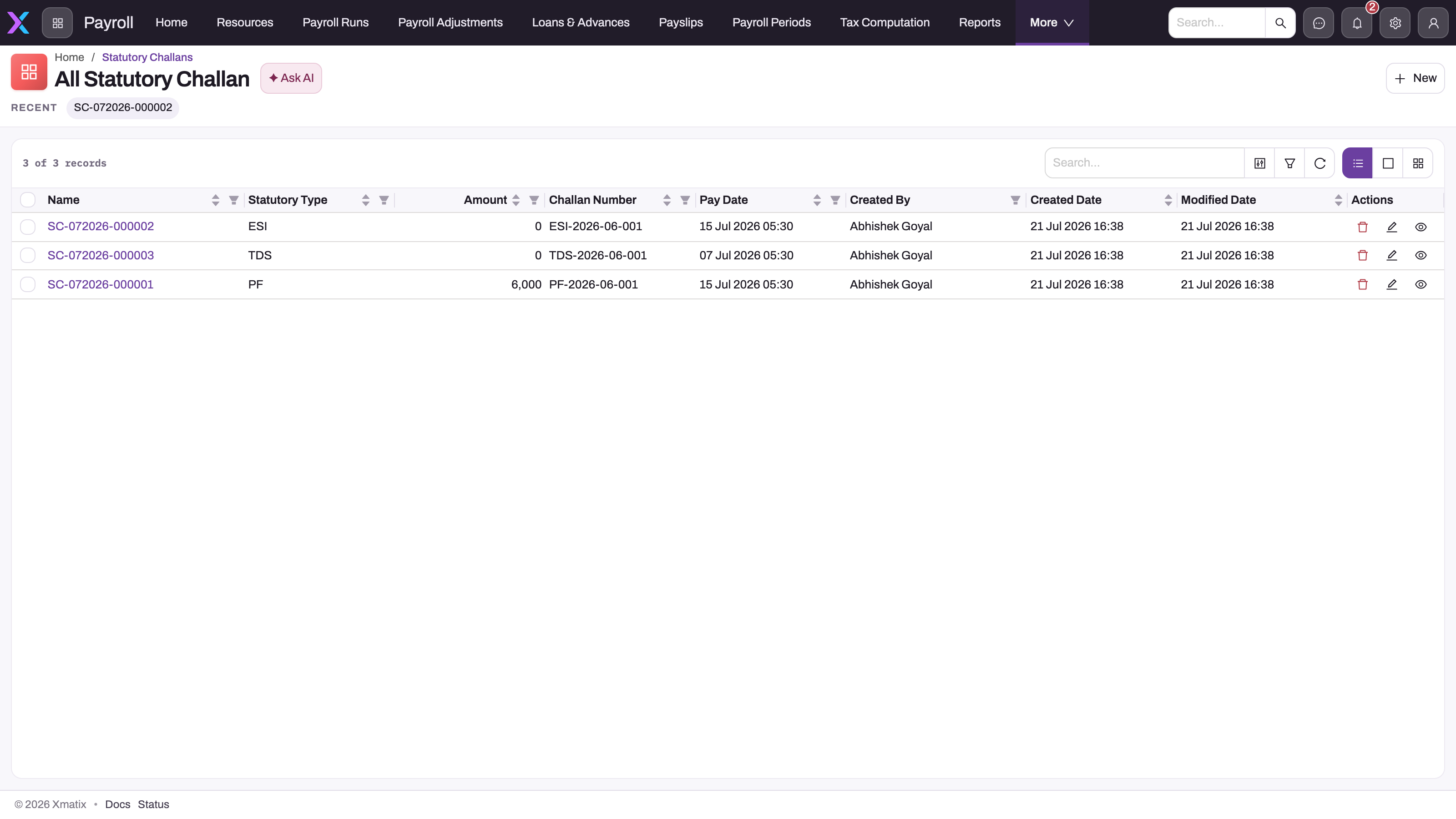
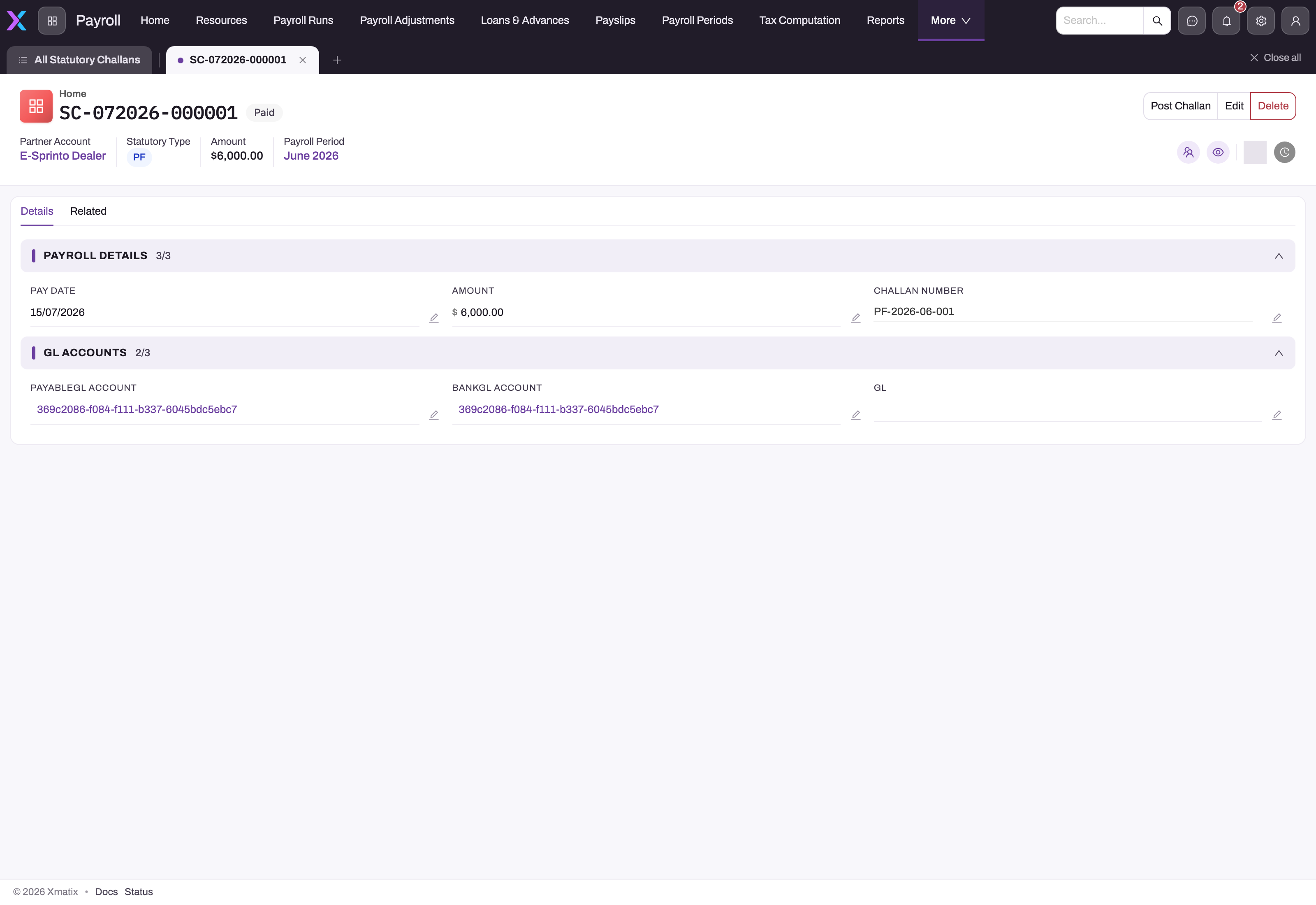
A Statutory Challan records one deposit to one authority for one payroll period. The salary TDS challan is drafted from a posted run with Prepare TDS challan, which totals the TDS of every posted run in the company's period. PF, ESI, PT, LWF and gratuity challans are entered by hand with New, with the amount you deposited; reconcile it to the payable account's balance for the period first, because xMatix does not compute those amounts. Post challan then debits the payable account, credits the bank and marks the challan Paid.
Creating, completing, posting and correcting challans, every field, and every error message are covered in Statutory challans.
Common questions
Where do I change a rate when the law changes?
In the rule tables. For PF, close the current rule with an Effective To and add a new rule from the change date; for ESI and LWF, add a rule with a later Effective From; for PT, add new Professional Tax Slab rows and deactivate the old ones; for TDS, the financial year's tax rule tables (see Income tax on salary). Runs calculated after the change pick up the new configuration; recalculate an unposted run to apply it. A posted run keeps the amounts it was posted with.
PF is still 1,800 for October — why?
Check the PF Rules list: there must be an active rule at 25,000 whose Effective From is on or before the period's end date, for the run's company or with no company. Then recalculate the run. If the company has no PF rule at all, the structure line's own percentage and Max Amount still decide the amount.
Why is there an "Employer EPS (Pension)" line?
It is the pension part of the employer PF, split out so the deposit can be reported to EPFO by fund. The employer PF line and the EPS line together equal the employer's full 12%, on the same accounts.
An employee's PF should cap at a different wage than the rest — possible?
Yes: set PF Wage Cap Override on the Employee record.
PT is zero for some employees — why?
Usually their branch has no address, or the address has no state code, or the state has no slabs and there are no state-less slabs. Check the employee's branch (or the resource's default branch) and its address.
Why does the February professional tax differ?
Some states collect a different amount in February so the year totals to the statutory annual figure. The slab row carries both the monthly amount and an optional February amount, and the calculation uses the February amount for periods ending in that month. February PT is not on the standard slab form, so an administrator adds it to the layout first — see Professional tax slabs.
One period had two payroll runs — how many TDS challans?
One, if you prepare it after both runs post. The challan is per company and period, and Prepare TDS Challan sums posted TDS across all of the period's runs. If a correction run posts after the challan was already posted, the challan is left unchanged and the screen does not show the difference: compare the posted TDS with the challan yourself and deposit the difference on a second challan. See Statutory challans.
Does a full-and-final settlement's TDS reach the challan?
Not automatically — Prepare TDS Challan reads run details only. Add the settlement's TDS deduction to the deposit yourself. See Full and final settlement.