
An SLA policy in xMatix is a promise with a clock: respond to a case within so many working minutes, resolve it within so many more. When a case is created, xMatix picks the best-matching active policy, works out the due date-times on a business-hours calendar, and creates a milestone for each promise. From then on the clocks run on their own. They pause while the case waits on someone else, warn before a deadline, and record a breach when one passes. Every one of these events is stored against the case, so you can read it back later.
Overview
Three kinds of record work together:
- SLA Policy — the promise: which cases it covers (a match formula and a rank), the first-response and resolution targets, the warning point, the calendar, and which case statuses stop the clock.
- Milestone Config — optional extra promises on a policy, beyond first response and resolution. Each one has its own target and a completion formula.
- Case milestones and Case SLA Events — created by xMatix on each case. A milestone tracks one promise on one case. An event records each thing that happened to it (applied, warning, paused, resumed, breached, met, cancelled).
Agents see the result on the case's SLA tab. Administrators maintain the policies under Support → Settings.
These policies are not the SLA records of the Contracts app. Those are a catalog of commitments you quote in agreements, and they start no timers; see SLA records in the Contracts app.
When to use it
Use SLA policies when you promise customers response or resolution times, or when you want the support desk to see which cases are about to miss a target. If you don't make time promises, you can leave policies out. Cases still work normally, they simply have no SLA status.
How xMatix handles it
How a policy is chosen
Each policy has a Match Formula and a Rank. The formula is an expression evaluated against the new case, such as Priority == "High" && Type == "Incident". Use the field names, not the on-screen labels (the Case Type field is Type). When a case is created, xMatix tries the active policies from the highest rank down, with Default breaking ties between equal ranks. The first policy whose formula is true wins. A blank formula matches every case, so keep one blank-formula policy at the lowest rank as a catch-all. A formula that can't be evaluated (for example, one that names a field that doesn't exist) counts as false, and xMatix moves on to the next policy.
The chosen policy is stamped on the case's SLA Policy field and is never re-matched. If no policy matches, the case gets no milestones and no SLA status. When a policy attaches, its calendar is copied to the case's Business Hour field unless the case already names one, and the case's SLA Status starts at OnTrack.
Milestones
Two milestones are built in. Each is switched on by giving it a target in working minutes (0 means not tracked):
- First response — met the first time the case moves to In Progress, which stamps First Response Date. If someone fills in First Response Date by hand, the milestone is met at that date.
- Resolution — met when the case moves to Resolved, which stamps Resolution Date.
A policy can also have custom milestones (Milestone Config records). Each has its own target in working minutes from case open, a warning percentage, an order, an active flag and a Completion Formula. While a custom milestone is open, xMatix evaluates its completion formula every time the case is saved, and marks the milestone met the first time the formula is true. A custom milestone with no completion formula can only end by breaching or by being cancelled when the case is closed, so always give it one. See Custom milestones for the details.
Each milestone starts as Pending. It moves to Warning at the warning point and to Breached at the deadline, or to Met when completed. It shows Paused while the clock is stopped. Closing or cancelling a case cancels every milestone that is still open (Pending, Warning or Paused).
Met, Breached and Cancelled are final. Once the background job has marked a milestone Breached, completing the work later does not turn it into Met, and closing the case does not cancel it. A milestone is Met with its breach flag set only when the work was completed after the deadline but before the job got to it.
The case's SLA Status sums up its milestones: Breached if any milestone is Breached, otherwise Warning, otherwise Paused, otherwise OnTrack while anything is open, and Met once nothing is open. A case with a Breached milestone therefore reads Breached for good, even after it is resolved and closed. To report on every late milestone, including ones met late, filter on each milestone's Breached flag.
Custom milestones
A custom milestone is a promise that first response and resolution don't cover, such as "assigned to an agent within 30 working minutes" or "a root cause recorded within two working days". You define it once on the policy as a Milestone Config record. Every new case that the policy attaches to then gets its own milestone for it.
When it is created. When a policy attaches to a new case, xMatix reads the policy's milestone configs that are Active and have a Target (min) above 0, in Order, and creates one milestone for each. Each gets its own deadline: Target (min) working minutes from the moment the case was opened, on the policy's calendar. Its warning point is the config's Warning % of that target, rounded to whole minutes. If the config's Warning % is 0 or above 100, the policy's Warning % is used instead. Custom milestones are created alongside first response and resolution, never instead of them.
How it is met. The Completion Formula is an expression on the case, written with field names rather than on-screen labels, for example AssignedToId != null or Priority == "Low". xMatix checks it each time an existing case is saved, for every custom milestone that is still Pending, Warning or Paused. The first time the formula is true, the milestone becomes Met and records that save's time as its completion. If that time is after the deadline, the milestone is Met with its Breached flag set, and the SLA event reads met (late). Some things to know:
- The formula is not checked on the save that creates the case. A formula that is already true when the case is created is met on the next save of the case, at that save's time.
- A Paused custom milestone can still be met by its formula. A Breached one is never checked again.
- On the save that closes or cancels the case, the formula is checked before open milestones are cancelled. If it is true then, the milestone is Met rather than Cancelled.
- A formula that can't be evaluated (a misspelt field name, a wrong type) counts as false. The milestone then stays open until it breaches or the case is closed. No error is shown.
What later changes affect. A case's milestone keeps the name, target and warning point it got when the case was created. Changing a config's Target (min), Warning %, Order or Name affects only cases created afterwards. The Completion Formula is different: xMatix reads it from the config each time the case is saved, so an edited formula applies to milestones that are already open. Clearing Active stops the config being added to new cases, but its open milestones keep running and can still be met. Deleting the config stops its formula from being read, so its open milestones can no longer be met and end only by breaching or by the case closing.
A case's milestones
Each milestone is a Case Milestone record that xMatix creates and keeps up to date. You don't create them yourself. Its name is the milestone's kind followed by the case's number (or name) in brackets. The kind is FirstResponse, Resolution, or the name the custom milestone config had when the case was created. A milestone config still carrying its generated ML code produces milestones named after that code, and renaming the config later doesn't rename them.
The standard case page has no milestone list, and Case Milestone is in no shipped app. To read milestones, an administrator adds a Milestones related list to the case layout, or adds Case Milestone to an app so the All Milestones list can be opened (see Configuration). That list shows Milestone (the kind), Status, Due, Warning, Completed and Breached. A milestone's record page shows Case, SLA Policy, Milestone Config, Target (min), Target, Warning At, Completed, Paused (min) and Breached, and has no header buttons.
Don't change milestones by hand. The background job reads a milestone's Target and Warning At, so an edit moves when it warns and breaches, but the case's First Response Due and Resolution Due don't follow until the next resume. A deleted milestone is no longer tracked. The case's SLA Status is worked out again from the remaining milestones on the case's next save, and isn't touched at all once none remain.
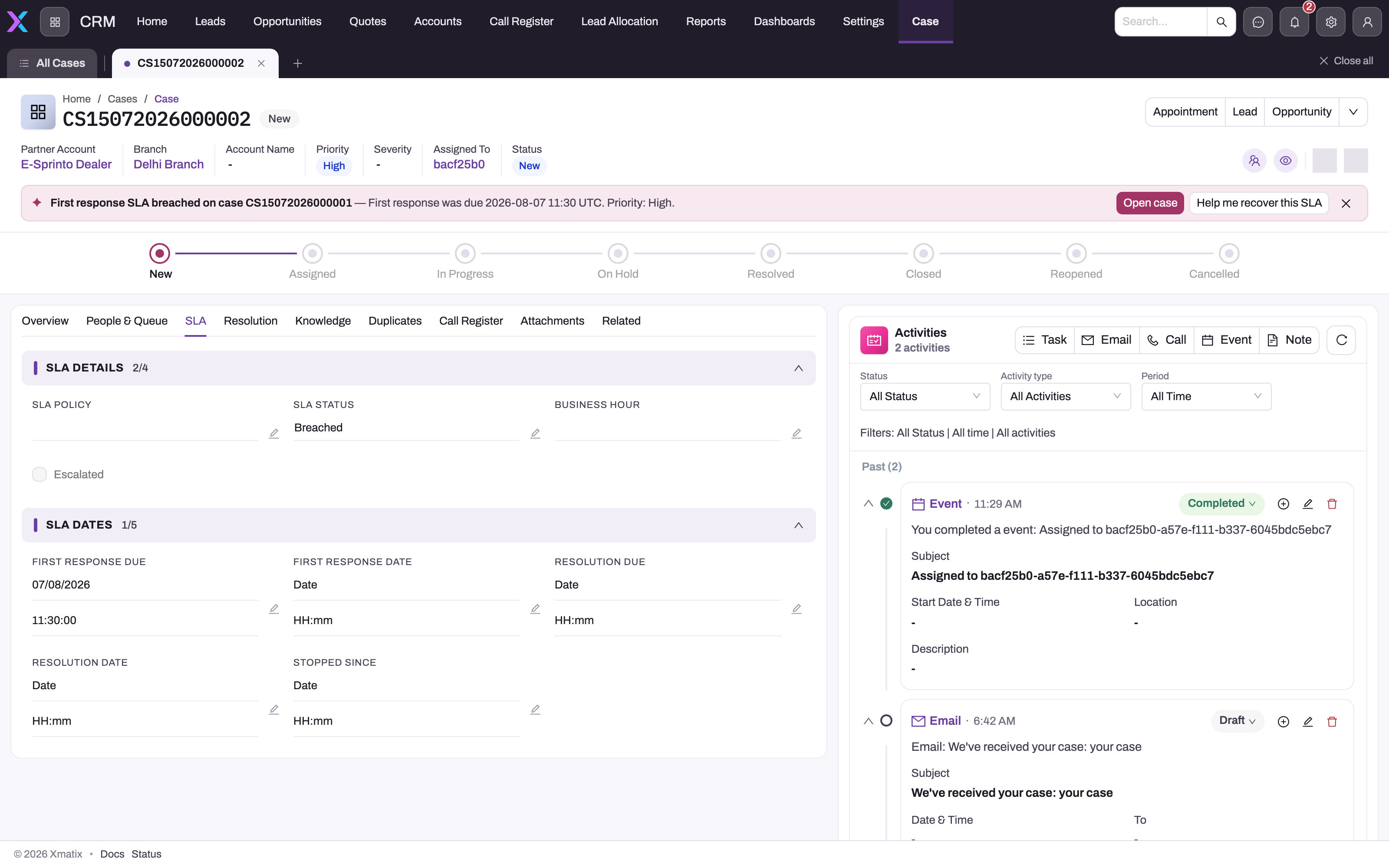
On a case, the SLA tab is the evidence. SLA Details shows the SLA Policy (the policy that attached at creation), the SLA Status, the Business Hour calendar and the Escalated flag. SLA Dates shows First Response Due, First Response Date, Resolution Due, Resolution Date and Stopped Since. Settle a disputed deadline from these fields and the case's SLA events. The policy list alone can't tell you what attached to a case or what happened afterwards.
Business hours and holidays
Due dates are counted in working time, not clock time, on the calendar named on the policy. A calendar sets a time zone, the working days and a daily working window. A policy with no calendar runs 24×7. Holidays linked to the calendar are skipped completely. For example, a four-working-hour target that starts an hour before a holiday weekend lands three hours into the next working day. The standard Holiday form has no Business Hours field, so an administrator has to add it before holidays can be linked. Due dates at creation always use the policy's calendar. The case's Business Hour field is used only when a paused clock resumes. See Business hours to set up a calendar and Holidays for the holiday list.
The warning point is the policy's (or custom milestone's) Warning % of the target, also counted in working minutes from case open.
Pausing and resuming the clock
The clock follows the case status:
- When the case moves into one of the policy's Pause Statuses, the clock stops. xMatix stamps Stopped Since and moves the open milestones to Paused. If the policy's list is empty, the built-in waiting statuses apply: On Hold, Waiting on Customer and Waiting on Third Party. The standard Status list contains only On Hold of these. An administrator has to add the other two to the picklist before agents can choose them (see the case lifecycle).
- When the case moves back to an active status (New, Assigned, In Progress, Escalated or Reopened), the clock restarts. Each paused deadline moves forward by the working minutes the case was paused, and First Response Due and Resolution Due are updated to match. Each milestone adds up the minutes it spent paused.
- Moving from a pause status to a status that is in neither list (for example Resolved) leaves the clock stopped.
There are also Pause SLA and Resume SLA case actions. They aren't on the standard case page header, but an administrator can add them to the case layout as buttons. A macro's Call server action step does not run them: it runs only automation scripts bound to the action. For a macro, use a Change status step instead. Both write a Paused or Resumed event. However, the status rule above is applied again in the same save, so in practice:
- Pause SLA on a case in an active status is undone at once. The event is written, but the clock keeps running.
- Resume SLA on a case in a pause status doesn't restart the clock. It also restarts Stopped Since, so the time already paused is not added back to the deadlines when the case does resume.
To stop or restart the clock reliably, change the case status.
How warnings and breaches surface
Warnings and breaches are applied by a background job, so a milestone turns Warning or Breached shortly after its threshold passes, not at the exact second. The job skips Paused milestones, so a deadline that falls during a pause doesn't breach. On resume the deadline moves later anyway. A milestone whose warning point and deadline have both passed by the time the job reaches it goes straight to Breached, without a warning event. A breach does three things. It marks the milestone breached, it turns the case's SLA Status to Breached, and it sets the case's Escalated flag (the status is left as it was). Business rules your administrator writes can react to either field. See Escalating a case.
Where Sense AI nudges are on, a case also gets a nudge banner (and an entry in the agent's home feed) when its first response or resolution is overdue or due within the next two hours. Paused and closed cases get none. The two-hour window is a nudge setting your administrator can change (see Sense governance).
The full trail is stored as Case SLA Event records linked to the case and its milestone, each with an event type, a UTC timestamp and a short detail line such as FirstResponse breached (due 2026-08-07 11:30:00Z). These events are not part of the case's Activities timeline, which holds only status changes, assignments and the activities agents log. See A case's SLA events for what each event means and how to read them.
A case's SLA events
xMatix writes one event each time something happens to a case's SLA. Nobody enters them by hand.
| Event type | Written when | Milestone | Detail line |
|---|---|---|---|
| Applied | A policy attaches to a new case. | Empty | The policy's name. |
| Paused | The case enters a pause status (one event per running milestone), or someone runs Pause SLA. | The milestone, or empty for the action | The status that paused it, or SLA clock paused. |
| Resumed | The case leaves a pause status (one event per paused milestone), or someone runs Resume SLA. | The milestone, or empty for the action | The paused working minutes and the new deadline, or SLA clock resumed. |
| Warning | The background job finds a milestone's warning point passed. | The milestone | The deadline. |
| Breached | The background job finds a milestone's deadline passed. | The milestone | The deadline. |
| Met | A milestone is completed. | The milestone | The completion time, with (late) when it was after the deadline. |
| Cancelled | The case is closed or cancelled while a milestone is still open. | The milestone | The case status. |
The detail line names the milestone by its kind: FirstResponse, Resolution or the custom milestone's name. Times inside it are in UTC. Pause SLA and Resume SLA write their event even when the status rule undoes them in the same save, so an action event on its own doesn't prove the clock stopped. Look for a Paused event with a milestone.
The events are read-only by intent, but nothing locks them. A profile with edit or delete access to Case SLA Event can change or remove one, so keep that access for administrators if you rely on the trail in disputes.
To read them:
- One case. The standard case page has no SLA events list. The shipped data model has no case-to-event relationship that a related list could use, so a case layout can't show them either. Open the All Case SLA Event list and filter on Case. The list shows Case, Milestone, Detail, Event Type, Occurred and SLA Policy. Case SLA Event is in no shipped app, so an administrator first gives the list a menu entry (see Configuration).
- Across cases. The Cases and SLA analytics dataset, in the Service and Support folder, has one row per Case SLA Event. Use it in reports and dashboards.
Prerequisites
- Access to SLA Policy (and Milestone Config, for custom milestones) on your security profile — see Permissions.
- A business-hours calendar for every promise that should count only working time.
- The case statuses your pause lists will name, in the case Status picklist.
Procedure
Step 1 — Open the SLA policies
Open Support → Settings and choose SLA Policies, or search for SLA Policy in the App Launcher. The All SLA Policy list opens.
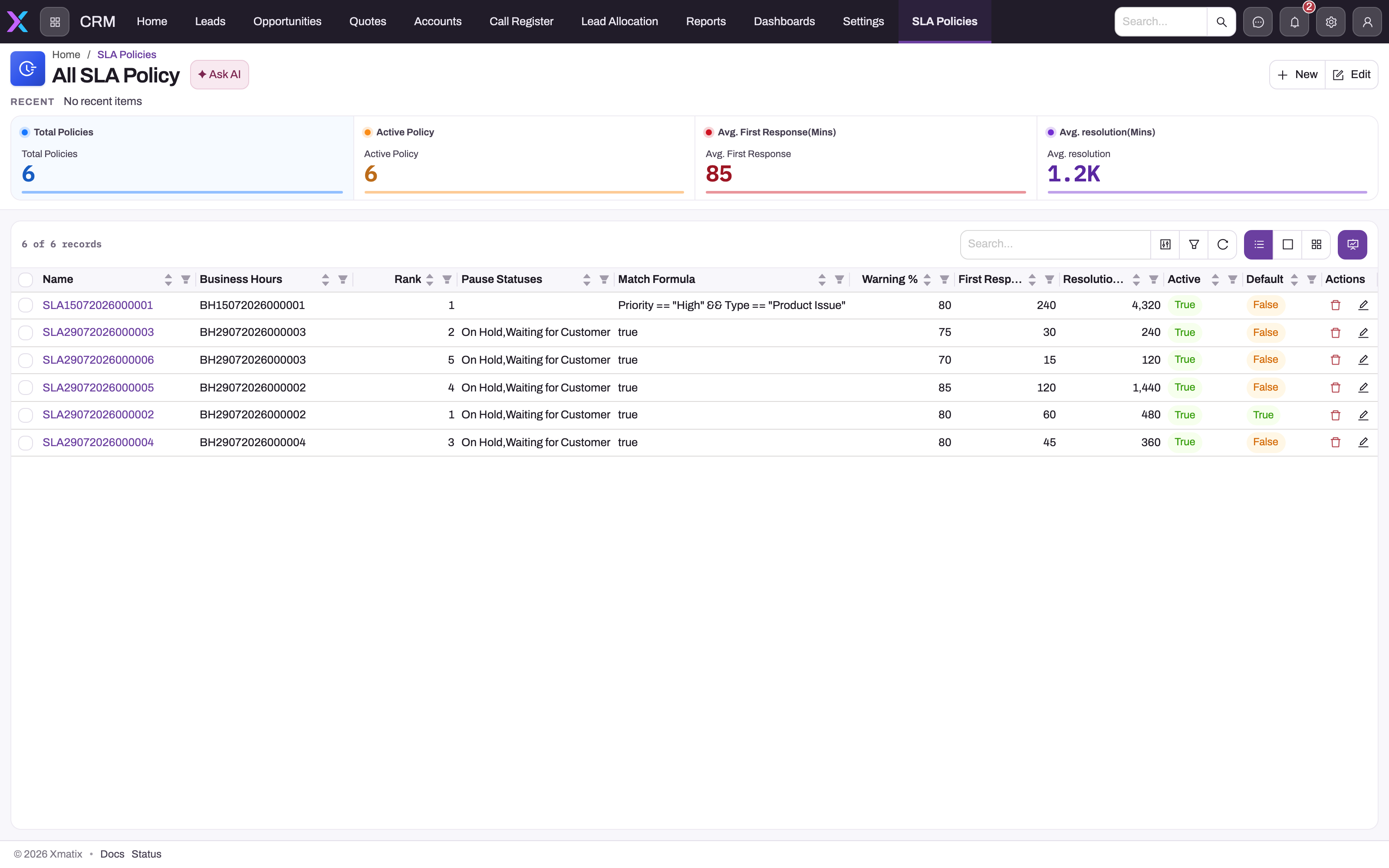
- 1
Summary cards count total and active policies and average the response and resolution targets in minutes.
- 2
Rank: active policies are tried from the highest rank down; Default breaks ties between equal ranks.
- 3
Match Formula is an expression over the case (here Priority and Type); the literal true, or a blank formula, matches every case, so keep such catch-alls at a low rank.
- 4
Pause Statuses lists the case statuses that stop this policy's clock; blank means the built-in waiting statuses apply.
- 5
Warning %, First Response and Resolution minutes create the milestones; a zero target means that milestone is not tracked.
- 6
Active and Default: only active policies are matched; exactly one low-rank default with a blank formula makes a safe catch-all.
The list shows every setting at once: Name, Business Hours, Rank, Pause Statuses, Match Formula, Warning %, First Response (min), Resolution (min), Active and Default. Use it to check for overlap before you add another policy. Two active policies with the same rank whose formulas are both true for a case are separated only by Default. If both are also Default (or neither is), which one wins is not predictable.
Step 2 — Create a policy
- In the list, select New. The New SLA Policy form opens.
- Choose Business Hours (leave it empty for 24×7).
- Enter the Match Formula, for example
Priority == "High". Leave it empty for a catch-all. - Enter First Response (min) in working minutes (240 is four working hours).
- Enter Pause Statuses as a comma-separated list of case statuses, for example
On Hold. Leave it empty to use the built-in waiting statuses. - Enter Warning % (leave it at 80 unless you want an earlier or later warning).
- Under Controls, keep Active ticked, and tick Default if this policy should win ties at its rank.
- Save.
The form also has a Name box. When you save a new policy, xMatix replaces the name with a generated code that starts with SLA (see Configuration).
Step 3 — Set the resolution target, rank and name
The New SLA Policy form has no Resolution (min) or Rank field, so finish the policy after saving:
- In the All SLA Policy list, use the list's inline edit to set Rank and Resolution (min), and to change Name to something readable. Save the row.
- Or open the policy and edit Resolution (min) in place in Key Information. Rank can only be set from the list.
Until you set a resolution target, the policy creates no resolution milestone. Until you set a rank, it has rank 0.
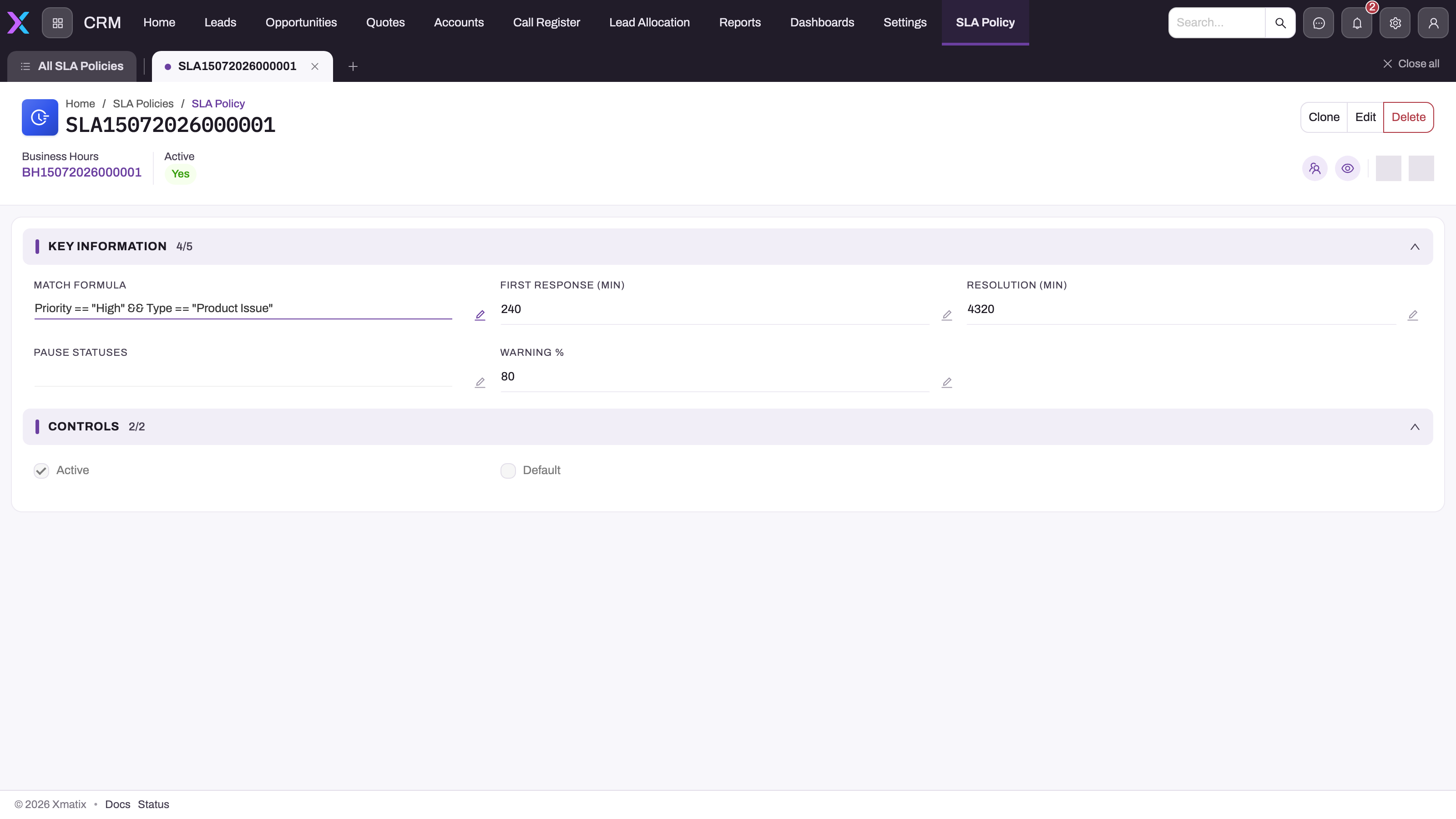
- 1
Business Hours names the calendar (time zone, working days, daily window, linked holidays) every target is computed against; none means 24x7.
- 2
Match Formula is evaluated against the new case; this one only claims High-priority Product Issue cases.
- 3
First Response and Resolution are working minutes from case open (240 = 4 working hours, 4320 = 9 working days on an 8-hour calendar).
- 4
Pause Statuses is empty here, so the built-in waiting statuses (On Hold, Waiting on Customer, Waiting on Third Party) pause the clock.
- 5
Warning % (80) sets the point at which a milestone flips to Warning: at 80% of the target's working minutes.
- 6
Active and Default checkboxes; Rank is not on this layout, so check it in the list view when two policies could both match.
The record page shows the calendar and the Active flag in the header, Key Information (Match Formula, First Response (min), Resolution (min), Pause Statuses, Warning %) and Controls (Active, Default). The header offers Clone, Edit and Delete.
Step 4 — Add custom milestones (optional)
- Open Support → Settings and choose Milestone Configs. The Milestone Config list opens, showing SLA Policy, Target (min), Completion Formula, Order and Active.
- Select New. The form shows, in order, Name, SLA Policy, Warning %, Completion Formula, Order, Target (min) and Active.
- Leave Name for now (it is replaced on save) and choose the SLA Policy the milestone belongs to.
- Enter Warning %, or leave it at 80.
- Enter the Completion Formula: an expression that is true once the milestone is done, for example
AssignedToId != nullfor "assigned within the target". Use field names, not labels. - Enter Order (the order the milestones are created in) and Target (min) in working minutes from case open. Keep Active ticked.
- Save. As with policies, the name is replaced by a generated code (starting ML).
- Open the new record and select Edit. Change Name to something readable, because the name becomes the milestone's kind on every new case and in its SLA events. Save again.
The record page shows the SLA Policy in its header, with Clone, Edit and Delete, and Target (min), Warning %, Completion Formula, Order and Active in the body. A milestone with Target (min) of 0, or that is inactive, is not created on new cases. Only cases created after you save get the milestone.
To see all of one policy's custom milestones, filter the Milestone Config list on SLA Policy. The standard data model has no relationship from a policy to its milestone configs, so the policy's record page can't list them.
To change a milestone, edit it from its record page or inline in the list. Changes to the target, warning, order or name apply to new cases only, while a changed Completion Formula also applies to milestones already open on cases (see Custom milestones). To retire one, clear Active rather than deleting it: deleting it leaves its open milestones unable to be met. Avoid Clone unless you change the copy straight away. The copy keeps the same SLA Policy and Active flag, so every new case would get the milestone twice.
Step 5 — Follow a case's SLA
Open a case and select its SLA tab. Read SLA Status for the overall state and the SLA Dates for the deadlines. To keep the clock honest:
- Move the case to In Progress when you start work. That records the first response.
- Move it to a pause status while you wait on the customer or a third party, and back to an active status when work resumes.
- Move it to Resolved (with a resolution summary) when it's fixed. That completes the resolution milestone.
Step 6 — Change or retire a policy
Edit a policy from its record page (Edit) or inline in the list. Changes apply to cases created afterwards. Existing cases keep their milestones and due dates, with one exception: a case reads its pause list from its policy on every save, so a change to Pause Statuses affects open cases straight away.
To retire a policy, clear Active. Cases that already carry it keep running their milestones. Clone copies the policy, including Active, Default, Rank and formula, so a clone is a live duplicate. Change the copy before your next case arrives, or clear its Active flag first. Custom milestones are not copied.
Fields
SLA policy
| Field | What it means | Notes |
|---|---|---|
| Name | The policy's name. | Replaced by a generated SLA code when a new policy is saved. Rename it afterwards. |
| Business Hours | The calendar due dates are counted on. | Empty = 24×7. Linked holidays are skipped. |
| Match Formula | An expression on the new case that decides whether this policy applies. | Empty matches every case. An invalid formula counts as false. Up to 1,000 characters. |
| First Response (min) | Working minutes from case open to the first-response deadline. | 0 or empty = no first-response milestone. |
| Resolution (min) | Working minutes from case open to the resolution deadline. | Not on the New form. Set it on the record or in the list. 0 = not tracked. |
| Pause Statuses | Comma-separated case statuses that stop this policy's clock. | Not case-sensitive. Empty = On Hold, Waiting on Customer and Waiting on Third Party. Up to 400 characters. |
| Warning % | How far through each target the Warning fires. | Defaults to 80. A value of 0 or over 100 is treated as 80. |
| Rank | Which policy is tried first. | Highest first. Only in the list view. Defaults to 0. |
| Active | Only active policies are matched. | Required. Clearing it doesn't stop cases that already carry the policy. |
| Default | Wins ties against other policies of the same rank. | It doesn't make the policy a fallback by itself; a blank formula does that. |
| Description | Free text. | On no standard form or list. Nothing reads it. |
Milestone config
Listed in the New form's order.
| Field | What it means | Notes |
|---|---|---|
| Name | The milestone's name. It becomes the milestone's kind on each new case and in its SLA events. | Replaced by a generated ML code on save. Rename it afterwards. Renaming doesn't rename milestones already on cases. |
| SLA Policy | The policy the milestone belongs to. | Required. Shown in the record page header. |
| Warning % | How far through the target this milestone warns. | Defaults to 80. 0 or over 100 uses the policy's Warning %. Not in the list. |
| Completion Formula | An expression on the case. The milestone is met on the first save of the case where it's true. | Up to 1,000 characters. Not checked on the save that creates the case. Read on every save, so an edit applies to open milestones. Without one, the milestone can never be met. |
| Order | The order milestones are created in. | Doesn't affect deadlines. Defaults to 0. |
| Target (min) | Working minutes from case open to this milestone's deadline. | 0 or empty = not created. Later edits apply to new cases only. |
| Active | Only active milestone configs are added to new cases. | Required, ticked by default. Clearing it doesn't stop open milestones. |
Case milestone
Every field is filled in by xMatix. The list calls Kind Milestone and Target Due.
| Field | What it means | Notes |
|---|---|---|
| Case | The case this clock belongs to. | Set at creation. |
| SLA Policy | The policy that attached to the case. | |
| Milestone Config | The custom milestone this clock came from. | Empty for first response and resolution. |
| Kind | FirstResponse, Resolution or the custom milestone's name. | Not on the record page. In the list as Milestone. |
| Status | Pending, Warning, Paused, Met, Breached or Cancelled. | Not on the record page. Met, Breached and Cancelled are final. |
| Start | When the clock started: the case's opened date-time. | Not on the record page or the list. |
| Target (min) | The target in working minutes when the milestone was created. | Later policy edits don't change it. |
| Target | The deadline. | Moves later by the paused working time on each resume. |
| Warning At | When the milestone turns to Warning. | Moves with the deadline. |
| Completed | When it was met, or cancelled by closing the case. | Stays empty on a breached milestone. |
| Paused (min) | Working minutes spent paused so far. | Adds up across pauses. |
| Breached | The deadline passed before completion. | Never cleared, also set on a late Met. |
See also the Case Milestone entity reference.
Case SLA event
Every field is filled in by xMatix.
| Field | What it means | Notes |
|---|---|---|
| Case | The case the event belongs to. | Filter the list on it to read one case's trail. |
| Milestone | The milestone the event is about. | Empty on Applied, and on events from the Pause SLA and Resume SLA actions. |
| SLA Policy | The policy attached to the case when the event was written. | |
| Event Type | Applied, Warning, Breached, Paused, Resumed, Met or Cancelled. | See A case's SLA events. |
| Occurred | When the event was written. | Stored in UTC. In the list, not on the record page. For Met, the completion time itself is in Detail. |
| Detail | A short description of what happened. | Up to 400 characters. Times in UTC. |
See also the Case SLA Event entity reference.
Business rules
- A policy attaches once, when the case is created through the application. It is never re-matched, and editing the case's SLA Policy field later doesn't rebuild milestones or due dates. It does change which pause list the case reads.
- A case that already carries an SLA Policy when it is created (for example from an import) is not matched, and gets no milestones.
- A first-response milestone is not created if the case already has a First Response Date when it is created. The same applies to resolution and Resolution Date.
- First response is met when the case first reaches In Progress. Resolution is met when it reaches Resolved. Closing a case (with a close reason) without resolving it cancels the resolution milestone instead of meeting it.
- Resolved doesn't cancel an open first-response milestone. A case resolved without ever being In Progress keeps its first-response clock running and will breach.
- Reopening a case doesn't restart milestones that were already met or cancelled.
- A case created directly in a waiting status is marked stopped, but its new milestones start running.
- A breach sets the case's Escalated flag permanently.
- A milestone the background job has marked Breached stays Breached: completing the work doesn't meet it and closing the case doesn't cancel it, so the case's SLA Status stays
Breached. - A Paused milestone can't breach. A Warning milestone that is paused comes back as Pending on resume, and warns again if its moved warning point has already passed.
- A custom milestone is created only from a milestone config that is Active and has a Target (min) above 0 when the case is created. Its completion formula is checked on every later save of the case while the milestone is Pending, Warning or Paused, never on the creating save.
- A completion formula that is true on the save that closes or cancels the case meets the milestone before the close cancels the rest.
- Edits to a milestone config's target, warning, order or name apply to new cases only. Edits to its completion formula apply to open milestones too. A deleted config's open milestones can no longer be met.
- Saving a new policy or milestone config replaces its Name with the next number from its document name setting.
Example
A support team works Monday to Friday, 09:00–18:00. They set up:
- A calendar Weekday desk with those hours.
- Policy High incidents: Match Formula
Priority == "High" && Type == "Incident", First Response 60, Resolution 480, Warning % 80, Rank 10, Business Hours Weekday desk, Pause Statuses empty. - Policy Standard: Match Formula empty, First Response 240, Resolution 2400, Rank 0, Default ticked.
A customer emails on Tuesday at 16:30 and a high-priority Incident case is created. High incidents is tried first (rank 10) and matches. The case gets:
- First Response Due Tuesday 17:30, with a warning at 17:18 (80% of 60 minutes).
- Resolution Due Wednesday 15:30: 90 working minutes on Tuesday plus 390 on Wednesday.
An agent moves the case to In Progress at 17:05. First response is met on time. On Wednesday at 10:00 the agent sets the case to On Hold while waiting for a log file, and back to In Progress at 12:00. The 120 working minutes on hold move Resolution Due to Wednesday 17:30. The agent resolves the case at 16:45 with a resolution summary. The resolution milestone is met and the SLA Status reads Met.
A low-priority question created at the same moment fails the High incidents formula and falls through to Standard.
Training
Practice exercise
In a sandbox:
- Create a calendar for your working week, or reuse one.
- Create a policy with Match Formula
Priority == "Low", First Response (min) 30 and your calendar. In the list, set Rank 5, Resolution (min) 120 and a readable name. - Create a case with Priority Low during working hours.
- Open the case's SLA tab.
Expected result: SLA Policy names your policy, SLA Status is OnTrack, First Response Due is 30 working minutes after the case opened and Resolution Due is 120 working minutes after. Move the case to On Hold and Stopped Since is filled in and SLA Status reads Paused. Move it to In Progress and Stopped Since clears, the due dates move later by the working time on hold, and First Response Date is stamped.
Then add a custom milestone:
- In Milestone Configs, create one for the same policy with Target (min) 60, Completion Formula
AssignedToId != null, and Active ticked. Rename it Assigned after saving. - Create a second case with Priority Low, leaving it unassigned. If your administrator has added the Milestones related list to the case layout, it shows Assigned as Pending.
- Assign the case to yourself and save.
Expected result: the Assigned milestone is Met. In All Case SLA Event, filtered on the case, there is a Met event whose detail starts Assigned met. A case that is already assigned when it is created keeps the milestone Pending until the case is saved again, because the formula isn't checked on the creating save.
Quick reference
- Targets are working minutes on the policy's calendar. Empty calendar = 24×7.
- Highest Rank is tried first, Default breaks ties, and a blank formula matches everything.
- A policy attaches once, at case creation, and edits only affect new cases (except Pause Statuses).
- New form: no Resolution or Rank. Set them in the list after saving, and rename the policy.
- In Progress = first response. Resolved = resolution. Closed or Cancelled = open milestones cancelled.
- Change the status to pause or resume the clock. The Pause SLA and Resume SLA actions don't override the status.
- A breach sets SLA Status
Breachedand the Escalated flag. A breached milestone stays breached. - Read disputes from the SLA tab and the Case SLA Events.
- Custom milestone = Milestone Config: Active, Target above 0, a completion formula on field names, renamed from its ML code.
- A completion formula is checked on every save after creation. An edited formula applies to open milestones, other edits to new cases only.
- Retire a milestone config by clearing Active. Don't clone it without changing the copy.
Permissions
- SLA policies and milestone configs. Seeing, creating, editing and deleting them follows the profile's access to the SLA Policy and Milestone Config entities. Clone needs its grant on the profile's Actions tab. In the shipped profiles, Standard User and System Admin (among others) have full access and every action on both. If only administrators should change your promises, remove that access from the other profiles. See Security profiles.
- The engine. Matching, milestone updates and breaches run inside the case save and the background job, whoever saves the case. Agents need no SLA permission for their cases to be tracked.
- Case side. Agents need read access on Case to see the SLA tab, and read access on Case SLA Event to read the events. Pause SLA and Resume SLA need their own grants on the Actions tab (shipped for Standard User, System Admin and the sales profiles).
Configuration
| What | Where | Effect |
|---|---|---|
| SLA policies | Support → Settings → SLA Policies | Which cases get which promises. Affects new cases. |
| Custom milestones | Support → Settings → Milestone Configs | Extra promises on a policy. Affects new cases. |
| Calendars | Support → Settings → Business Hours | Working time for due dates. See Business hours. |
| Holidays | Support → Settings → Holidays | Skipped days. Add the Business Hours field to the Holiday form first. See Holidays. |
| Case statuses | The Case Status picklist, in Setup → Design Studio → Entities (see the data model) | Add Waiting on Customer and Waiting on Third Party if you want them as pause statuses. |
| Policy numbering | Setup → Feature Hub → Platform → Document Settings (SLA Policy Name Setting, series SLA) | Switch it off if you want typed names kept on new policies. Milestone Config has the same kind of setting (series ML). See Email templates and document numbering. |
| SLA forms and list | The SLA Policy layouts and the All SLA Policy view | Add Rank and Resolution (min) to the New form. See Design a form layout. The policy page can't list its milestone configs, because the standard data model has no relationship for it; filter the Milestone Config list on SLA Policy instead. |
| Milestone Config form and list | The Milestone Config layouts and the Milestone Config view | Add Warning % to the list if you want to compare warning points across milestones. |
| Milestones on the case page | The case record layout: add a related list on the Milestones relation, with no actions | Lets agents see every milestone, including custom ones, with its status and due time. See Design a form layout. |
| Milestone and SLA event lists | Setup → Design Studio → Apps: open the Support app and use Manage Items to add Case Milestone and Case SLA Event | Gives the All Milestones and All Case SLA Event lists a menu entry for reading milestones and events across cases. |
| Who can change SLA events | The profile's access to the Case SLA Event entity, in Security profiles | Events are never locked. Keep edit and delete for administrators. |
| Case SLA buttons | The case record layout's header actions | Add Pause SLA / Resume SLA if agents should see them (they follow the status rule above). |
| Escalation on breach | Business rules on Case | Notify, re-route or change status when SLA Status turns Breached or Escalated is set. |
| Breach nudges | Sense nudge settings | The "due soon" window (two hours by default). |
Plan the set as a ladder: specific promises at high ranks, and one blank-formula Default at rank 0. Set up calendar first, then policies, then milestones.
Common problems
A new case has no SLA policy or SLA status
No active policy's formula was true for the case, or every formula failed to evaluate. Check that the formulas use field names (Type, not Case Type), that the text values match the picklist exactly, and that you have a blank-formula catch-all at rank 0. Cases created before the policy existed stay without one, because policies are never re-matched.
The wrong policy attached
A higher-rank policy also matched, or two policies at the same rank matched and Default decided. Check the Rank and Default columns in All SLA Policy. Rank isn't on the policy's record page, so a new policy left at rank 0 loses to every ranked one.
There is no resolution deadline on new cases
The policy's Resolution (min) is empty, because the New SLA Policy form doesn't have that field. Set it on the record or in the list. Only cases created afterwards get the milestone.
The case sat waiting on the customer and the clock didn't stop
The status isn't in the matched policy's Pause Statuses, or, when the list is empty, isn't one of the built-in waiting statuses. Also check the spelling in the list. Pause SLA won't help on a case in an active status, because the status rule restarts the clock in the same save. Put the case in a pause status instead.
I ran Resume SLA but the case still shows Paused
The case is still in a pause status, so the clock stays stopped. Move the case to an active status such as In Progress. If Resume SLA was run first, the paused time before it is not added back to the deadlines.
A resolved case breached its first response
The case was never moved to In Progress, so the first response was never recorded, and Resolved doesn't cancel an open milestone. Move cases through In Progress when work starts, or close the case. Closing cancels open milestones, but an existing breach stays recorded.
The case is resolved but its SLA Status still says Breached
One of its milestones was marked Breached by the background job before the work was done. A breached milestone is final, so neither resolving nor closing the case changes it, and the case's SLA Status keeps reading Breached. That is the record of the missed promise, not a fault. To see which promise was missed, read the case's milestones (Status and Breached) or its Case SLA Events.
We can't find a case's milestones
The standard case page has no milestone list and Case Milestone is in no shipped app. Ask your administrator to add the Milestones related list to the case layout (see Configuration). Until then, the SLA tab's due dates cover first response and resolution only. Custom milestones show nowhere on the standard case page.
We can't find a case's SLA events
The case page doesn't show them and they aren't on the Activities timeline. A related list on the case layout isn't possible either, because the standard data model has no case-to-event relationship. Ask your administrator to add Case SLA Event to the Support app (see Configuration), then open All Case SLA Event and filter on Case.
The trail shows a Paused event but the deadlines didn't move
The event came from the Pause SLA action (its Milestone is empty) on a case in an active status. The status rule restarted the clock in the same save, so no milestone was paused. Put the case in a pause status instead.
The due time is later than the target suggests
Targets are working minutes. Hours outside the calendar's window, non-working days, linked holidays and time spent paused don't count. A four-hour first response promised late on Friday is due on Monday morning on a Monday–Friday calendar.
A custom milestone never turns Met
Its completion formula is never true, or can't be evaluated. A misspelt field name, an on-screen label instead of a field name, or a text value that doesn't match the picklist exactly all count as false, with no error. Check the formula against the case's field names and save the case again. If the formula was already true when the case was created, the milestone is met only on the case's next save. You can correct the formula on the config: xMatix reads it on every save, so open milestones pick up the fix. A milestone that has already breached stays Breached.
A custom milestone doesn't appear on new cases
The config is inactive, its Target (min) is 0 or empty, or it belongs to a different policy from the one that attached to the case. Check the case's SLA Policy on its SLA tab, then filter the Milestone Config list on that policy. Cases created before you added or activated the config never get it.
Every new case gets the same custom milestone twice
The milestone config was cloned. Clone copies the SLA Policy and the Active flag, so both records are added to new cases. Clear Active on the copy, or delete it if no open case uses it. Milestones already created stay on their cases.
We changed a milestone's target but open cases still have the old deadline
A case's milestones keep the target and deadline worked out when the case was created. Edits to Target (min) and Warning % apply to cases created afterwards. Only the Completion Formula is read again on open cases.
Our policies show SLA codes instead of names
New policies and milestone configs get a generated name on save. Rename them, or switch off the name setting (see Configuration).
Common questions
We changed a policy. Why do existing cases still show the old deadlines?
Policies attach once, when a case is created, and its milestones keep the deadlines worked out then. Edits to targets, formula, rank or calendar apply to cases created afterwards. A promise already made to a customer doesn't move silently. The one exception is Pause Statuses: each case reads its policy's list on every save, so a changed list affects which statuses pause open cases straight away. If you need an existing case on new terms, there is no re-match action, so record the new commitment on the case itself.
Can a milestone be met and breached at the same time?
Only when the work is finished after the deadline but before the background job has marked the milestone Breached. Then the milestone's status becomes Met, its Breached flag is set, and the SLA event reads met (late). Once the job has marked it Breached, the milestone stays Breached even when the work is done, and the case's SLA Status stays Breached. Because the job runs shortly after each deadline, most late milestones end up Breached rather than Met. A report that counts every late milestone should filter on the Breached flag, which is set in both cases, not on Status or on the case's SLA Status.
The case shows an SLA status but no SLA policy. How?
SLA Status is a stored field, so a case imported with a status filled in can carry one without going through matching. The reverse can happen too: a case imported with an SLA Policy already filled in is not matched and gets no milestones, because xMatix only matches cases that arrive without a policy. Only cases created through the application, with no policy filled in and an active policy that matches, get milestones and events behind their status.
Do custom milestones replace first response and resolution?
No, they are added alongside them. A policy with First Response 60 and two active custom milestones creates three milestones on each new case, plus a resolution milestone if Resolution (min) is set. Each custom milestone is met only by its own completion formula, which is checked every time the case is saved. A milestone whose formula is never true stays open until it breaches or the case is closed or cancelled.
Does a custom milestone show on the case's SLA tab?
No. The SLA tab's dates cover first response and resolution only, and the case's SLA Status is the only place a custom milestone shows by default: a warned or breached custom milestone turns it to Warning or Breached like the built-in ones. To show each milestone with its own status and due time, an administrator adds the Milestones related list to the case layout (see Configuration). The milestone's kind in that list is the milestone config's name, which is why it is worth renaming each config from its generated ML code before cases arrive.