
A case is xMatix's record of one customer issue or request, from the moment it is reported to the moment it is closed. It is the centre of the support desk: an SLA policy attaches to it when it is saved, a queue routes it to an agent, the agent works it through its statuses, and the timeline on the right of the record keeps the whole story. Cases live in the Support app under Cases, next to Call, Account and Knowledge Base.
Overview
Every case carries a case number, a subject and description, classification fields (Case Source, Case Type, Case Reason, Category, Priority, Severity, Customer Tier), the customer it concerns (Account, Contact, Asset), the people working it (Owner, Assigned To, Queue) and a lifecycle Status. The status is what you move. The platform reacts to each move by stamping dates, starting or pausing SLA clocks and writing timeline entries, and it refuses moves that lack the information they need.
When to use it
Log a case whenever a customer reports something that needs follow-up — a fault, a complaint, a billing query, a question you cannot answer on the spot. If the issue was settled during the call, log it anyway with Closed When Created so the contact is counted. When a support conversation turns out to be new business, convert it to a lead or an opportunity; when it needs workshop time, raise a service order from it.
How xMatix handles it
Read the screen
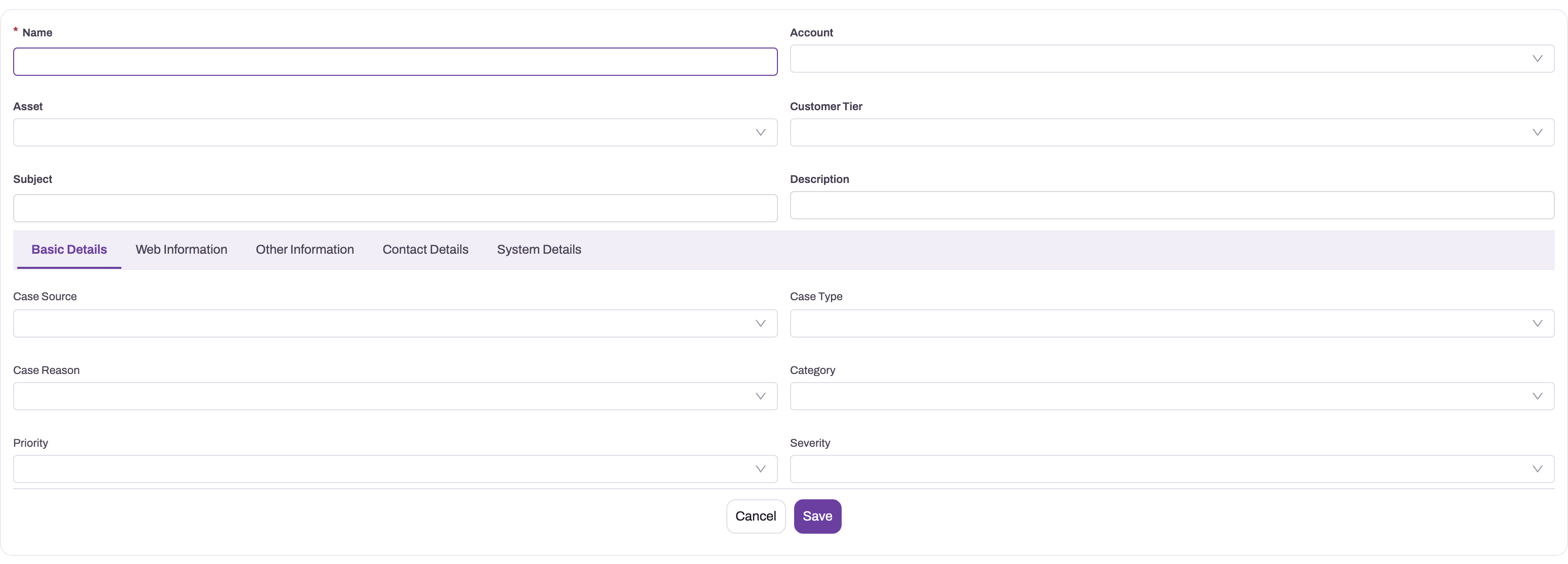
- 1
Name is required on the form; the formal Case Number is generated from document numbering when the case is saved.
- 2
Account (and Asset on the row below) locate the customer relationship and the equipment affected; Customer Tier carries commercial importance.
- 3
Subject and Description state the observable problem and the outcome the customer needs — write them so someone who did not take the call can act.
- 4
Case Source, Case Type, Case Reason and Category classify the issue; SLA policy match formulas can read any of them the moment the case is saved.
- 5
Priority is how fast the business should act; Severity is how serious the impact is — keep them distinct because routing and SLA policies may match on either.
The New Case form captures the facts every later decision inherits. The shipped form opens with Category, Account, Asset, Executive, Subject and Description, followed by three tabs: Case Details (Parent Case, Case Source, Case Type, Case Reason, Priority), Contact Details (Contact, Contact Name, Contact Number, Contact Email) and System Details (Partner Account, Branch, Status). Forms are tenant layouts, so yours may be arranged differently — the screenshot shows one such arrangement, with Customer Tier and Severity on the form. The classification fields are operational inputs: the SLA policy that attaches on save can match on any of them, and queue rules read them too. Keep Priority (how fast the business should act) distinct from Severity (how serious the impact is).
- 1
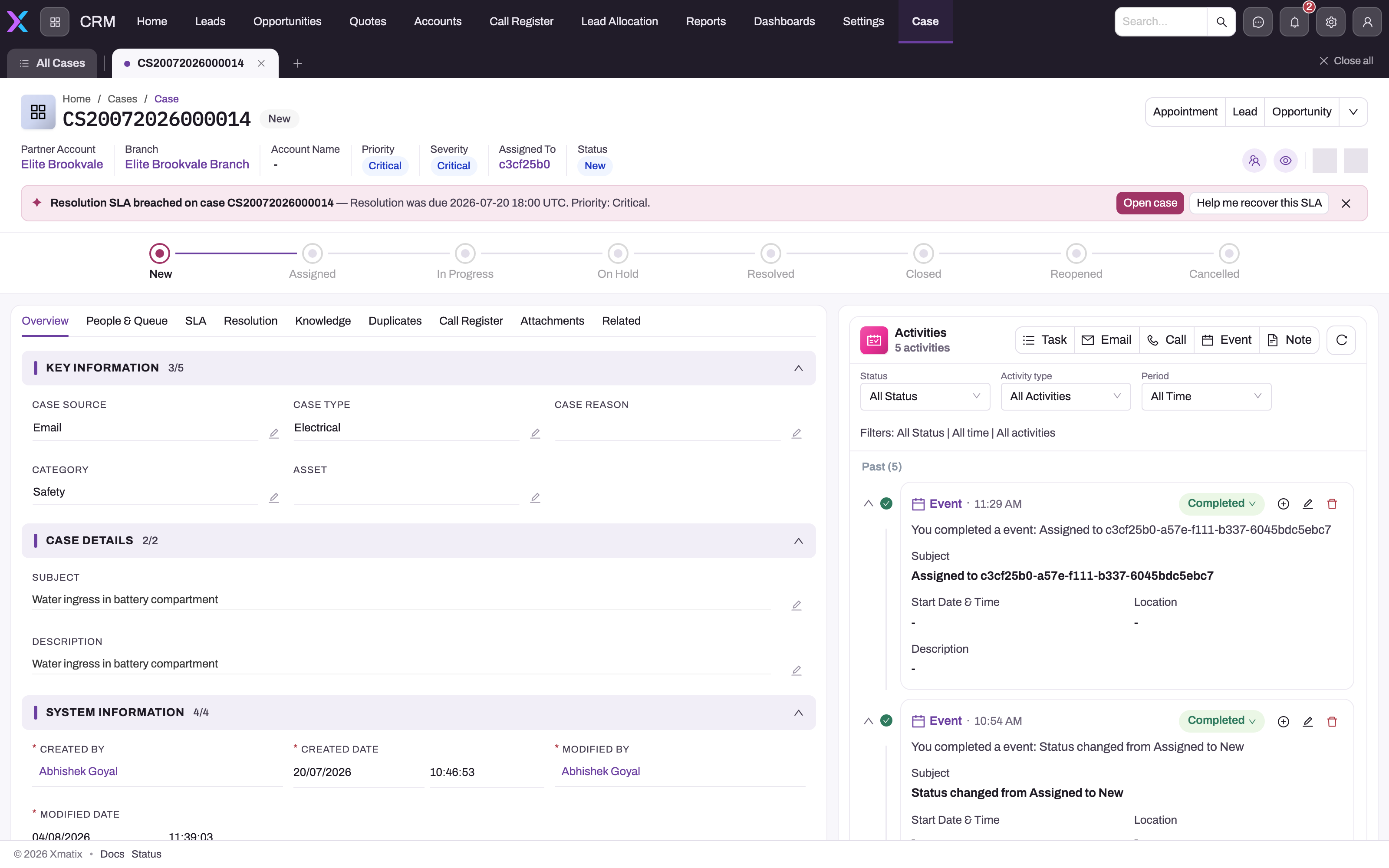
Priority, Severity, Assigned To and Status in the header; Assigned To is the working owner, distinct from the record Owner.
- 2
The stepper is the tenant's Status picklist — this tenant has no Waiting or Escalated steps, which the handler would still honour if added.
- 3
A breached resolution SLA surfaces as a banner on the record; the milestone detail is on the SLA tab.
- 4
Overview, People & Queue, SLA, Resolution and Duplicates each answer one lifecycle question; Resolution holds the summary and close reason the terminal states require.
- 5
Status changes and reassignments are written to the timeline as completed system entries — 'Status changed from Assigned to New' here — so history never has to be reconstructed.
The saved record is where the lifecycle is read. The header shows the case number with Partner Account, Branch, Account Name, Priority, Severity, Assigned To and Status, along with followers, collaborators and history; a status stepper sits beneath it. The tabs are:
- Overview — Key Information (Case Source, Case Type, Case Reason, Category, Asset, Service Order), Case Details (Subject, Description) and System Information (created and modified by and when).
- People & Queue — References (Account, Contact) and Assignment (Assigned To, Queue, Partner Account, Branch, Executive).
- SLA — SLA Details (SLA Policy, SLA Status, Business Hour, Escalated) and SLA Dates (First Response Due, First Response Date, Resolution Due, Resolution Date, Stopped Since).
- Resolution — Close Reason, Resolution Summary, Date/Time Closed and CSAT Score.
- Knowledge, Duplicates, Call Register, Attachments and Related.
The Activities panel on the right is the timeline. The header buttons on the shipped layout are Appointment, Lead, Opportunity, Service Order, Duplicate, Edit and Delete; the first three show directly and the rest sit in the overflow menu.
What happens when a case is created
One save does all of the following before anyone touches the case:
- Identity and timestamps. The case number is generated from document numbering (the shipped series is
CSfollowed by the date and a six-digit sequence) and copied into Case Number. The status defaults to New, and Date/Time Opened and Document Date are stamped. - Account and contact details. If you picked an Asset but no Account, the asset's owning account is filled in. From the account, the case fills any blank Account Name, Contact, Contact Name, Contact Email, Contact Number, Mobile and Phone — the named contact first, otherwise the account's most recently created contact, otherwise the account itself. Values you typed are kept. On the open form, changing the Account replaces these details with the new account's; clearing it clears them.
- SLA attachment. Active SLA policies are considered in rank order; the first whose match formula is empty or true attaches, its first-response and resolution milestones are created with due times in the policy's business hours, SLA Status becomes OnTrack, and an Applied SLA event is recorded. If no policy matches, the case has no SLA.
- Acknowledgement. An email activity named Case acknowledgement is written to the timeline. With a Contact Email it is recorded as Sent and the message — subject We've received your case: {subject}, quoting the case number — is sent after the save completes, so a slow mail service never delays creation; with no address it is recorded as Draft. The activity status is not delivery confirmation.
- Routing. The shipped Auto-route new cases rule hands the case to omni-channel routing after the save, provided the case has a Queue. A case with no queue is simply not routed, and a routing failure never undoes the save.
The operational states
| Status | Meaning | What the platform does |
|---|---|---|
| New | Just created, not yet picked up | Default at creation |
| Assigned | Given to an agent, work not started | — |
| In Progress | Actively being worked | Stamps First Response Date on first entry and completes the first-response milestone |
| On Hold | Parked | Pauses the SLA clocks |
| Waiting on Customer | Blocked on the customer | Pauses the SLA clocks |
| Waiting on Third Party | Blocked on someone outside | Pauses the SLA clocks |
| Escalated | Raised for urgent attention | Sets the Escalated flag — see Escalating a case |
| Resolved | Fixed | Requires a Resolution Summary; stamps Resolution Date |
| Closed | Finished | Requires a Close Reason; stamps Date/Time Closed; cancels open SLA milestones |
| Reopened | Brought back after Resolved, Closed or Cancelled | Sets the Reopened flag |
| Cancelled | Withdrawn without resolution | Cancels open SLA milestones |
These eleven values are the ones xMatix gives lifecycle behaviour. The Status picklist itself is tenant metadata: the shipped list holds eight of them — New, Assigned, In Progress, On Hold, Resolved, Closed, Reopened, Cancelled — so Waiting on Customer, Waiting on Third Party and Escalated appear in the drop-down only once an administrator adds them. A tenant may also carry older values such as Draft or Working, which gain none of the stamps above.
Which states stop the clock is configurable per SLA policy (Pause Statuses); when a policy leaves it blank, On Hold, Waiting on Customer and Waiting on Third Party pause. Moving back to New, Assigned, In Progress, Escalated or Reopened resumes the clocks and pushes each paused milestone's target forward by the business time spent paused, so a legitimate wait never counts against the team.
Owner versus Assigned To
A case has two people fields with different jobs. Owner is the record owner in the security sense — whose record it is. Assigned To is the working owner — who is handling it now. Omni-channel routing does not change either field when it offers work from a queue; the moment an agent accepts the offer, both are set to that agent's user.
How history is recorded
Every later save that changes the status writes a completed timeline activity — Status changed from {old} to {new} (or Status set to {new} when there was no previous value) — and every change of Assigned To writes Assigned to {user id}. SLA events (Applied, Warning, Breached, Paused, Resumed, Met, Cancelled) are a separate stream, and the Pause SLA / Resume SLA actions add SLA clock paused / SLA clock resumed events to it. Field-level edits are in the record's history (cases are audited).
Prerequisites
- Access to the Support app and a security profile with access to the Case entity (see Permissions).
- The account (and, for equipment issues, the asset) the case concerns already exists, or you can create it.
- For SLAs and routing to work, an administrator has set up business hours, SLA policies and queues — see Configuration.
Procedure
Step 1 — Log a new case
- Open Support → Cases and select New.
- Choose the Account. If you choose an Asset first, the account is filled from the asset's owner. Only assets of the selected account, and only contacts of that account, are offered.
- Enter a Subject a colleague can act on and a Description of what is observable and what the customer needs.
- Set Category, and on Case Details set Case Source, Case Type, Case Reason and Priority. Use Parent Case if this issue belongs under another case.
- On Contact Details, check the contact details filled from the account and correct them if the caller was someone else.
- On System Details, set Partner Account and Branch where your organisation works through them (Branch offers only branches of the chosen partner account). Leave Status empty — it becomes New.
- Save. The case receives its number, the SLA policy (if one matches) and an acknowledgement entry on the timeline.
To log an issue you already settled, switch on Closed When Created and pick a Close Reason before saving: the case is created directly as Closed.
Step 2 — Find a case
Open Support → Cases. The default view is All Cases; the shipped views also include Escalated Cases and SLA Breached Cases. Use the list's search, filters and column sorting to narrow it, or find a case from the App Launcher search.
Step 3 — Assign and start work
- Open the case and select Edit (or edit inline on the record).
- On People & Queue, set Assigned To to the agent who will work it, and Queue if it should be routed. Save; the timeline records the assignment.
- When you first respond to the customer, move Status to In Progress. This stamps the First Response Date and completes the first-response milestone.
If your desk uses routing, agents receive cases from the queue instead, and accepting a routed case sets Assigned To and Owner — see Queues and omni-channel routing.
Step 4 — Wait for the customer or a third party
Move Status to On Hold (or Waiting on Customer / Waiting on Third Party where your picklist has them). The SLA clock pauses and Stopped Since shows when. Move back to In Progress when the answer arrives; the clock resumes and the due times move forward by the paused business time.
Step 5 — Escalate when needed
Move Status to Escalated or run the Escalate action, which sets the status and the Escalated flag together and can reassign the case in the same step. See Escalating a case.
Step 6 — Resolve the case
- On Resolution, write the Resolution Summary — what was wrong and what fixed it.
- Move Status to Resolved and save. Resolution Date is stamped and the resolution milestone is met.
Step 7 — Close the case
- On Resolution, choose the Close Reason.
- Move Status to Closed and save. Date/Time Closed is stamped and any open SLA milestones are cancelled.
The Close action does the same in one step: it takes the close reason (and optionally a resolution summary) and closes the case. On the shipped layout it is not a header button; administrators can add it. A macro can't run it, but it can close a case with a Set field step for Close Reason and a Change status step to Closed — see Build and run macros.
Step 8 — Reopen a case
If a resolved, closed or cancelled case comes back, run Reopen (or move Status to Reopened). The Reopened flag is set and the closed and resolution dates are cleared, so the SLA picture shows that work restarted. Cases in any other status cannot be reopened.
Step 9 — Handle duplicates
Open the Duplicates tab. It lists up to 25 open, unmerged cases that share this case's contact, account or phone number, newest first, labelled Same contact, Same account or Same phone. Use Compare & merge to choose which values survive: the other case's activities, attachments and people move to the survivor, and the duplicate is closed with close reason Duplicate, keeps its own number and points at the surviving case through Master Case. See Collaborating on cases.
The Duplicate header action is different: it creates a copy of this case, and the copy records where it came from in Origin Case.
Step 10 — Turn the case into follow-up work
- Lead creates a lead from the case with its account, contact, branch, partner account and executive, linked both ways.
- Opportunity creates an opportunity with the account, contact, branch, partner account and asset, the case's executive as service advisor, linked back to the case.
- Service Order raises a service order for workshop work. The case needs a Partner Account and a Branch, and only one service order can be raised per case.
- Appointment books an appointment for the case.
None of these changes the case status. Lead and Opportunity can be run more than once.
Step 11 — Work cases on mobile
The Support app is included in the xMatix field app, and cases open there with the same New Case and case record forms, so agents can log and update cases away from a desk. See Mobile.
Fields
The New Case form, in order, then the fields shown on the record.
| Field | What it means | Notes |
|---|---|---|
| Category | Broad kind of issue | Shipped values: Service, Refund, Safety, Billing |
| Account | Customer the case is for | Filled from the asset's owner when left blank; drives the contact details |
| Asset | Equipment the issue concerns | Only the selected account's assets are offered |
| Executive | Your organisation's person responsible for this customer | Only active resources are offered; carried to leads and opportunities |
| Subject | One-line statement of the issue | Used in the acknowledgement email subject; up to 255 characters |
| Description | Full account of the issue | Long text |
| Parent Case | A broader case this one belongs under | Optional |
| Case Source | How the case reached you | Shipped values: Voice / Call, Email; used as the routing channel |
| Case Type | Nature of the request | Shipped values: Incident, Problem, Question, Task |
| Case Reason | Underlying cause category | Shipped values: Installation, Equipment Complexity, Performance, Equipment Design, Feedback |
| Priority | How fast the business should act | Shipped values: High, Medium, Low |
| Contact | Person at the account who raised it | Only the account's contacts are offered; defaults to the account's newest contact |
| Contact Name | Name of the person to reply to | Filled from the contact or account when blank |
| Contact Number | Phone to reply on | Filled from the contact or account when blank; values over 10 characters are not copied |
| Contact Email | Address the acknowledgement goes to | Holds up to 20 characters; a longer address on the account is not copied, and with no address the acknowledgement stays Draft |
| Partner Account | Partner (dealer) handling the customer | Only active partner accounts are offered; required for Service Order |
| Branch | Partner location handling it | Only the partner account's branches are offered; required for Service Order |
| Status | Where the case is in its lifecycle | Defaults to New; see the states table above |
| Severity | How serious the impact is | Shipped values: Critical, High, Medium, Low |
| Customer Tier | Commercial importance of the customer | Shipped values: Platinum, Gold, Silver, Bronze |
| Subcategory | Finer classification | Free text |
| Product | Product the case concerns | Optional |
| Closed When Created | Log an already-settled issue as closed | When on at creation, the case is saved as Closed with the closed time stamped; still needs a Close Reason |
| Case Number | The case's reference | Set at creation from document numbering; read-only |
| Service Order | Service order raised from this case | Set by Service Order |
| Assigned To | Agent working the case now | Changes are written to the timeline; set by accepting routed work |
| Queue | Queue the case is routed through | Needed for automatic routing and for Route |
| SLA Policy | Policy attached at creation | Set by the SLA engine; not re-matched later |
| SLA Status | Overall SLA state | OnTrack, Warning, Breached, Met, Paused; Breached also sets Escalated |
| Business Hour | Working calendar for SLA time | — |
| Escalated | The case has been escalated | Set by the Escalated status, the Escalate action or an SLA breach |
| First Response Due / Resolution Due | SLA targets | Calculated from the policy; move forward while paused |
| First Response Date | When work first started | Stamped on the first move to In Progress |
| Resolution Date | When the case was resolved | Stamped on Resolved; cleared on reopen |
| Stopped Since | When the current SLA pause began | Empty while the clock runs |
| Close Reason | Why the case was closed | Shipped values: Resolved, Duplicate, No Response from Customer, Not Reproducible, Works as Designed, Cancelled; required to close |
| Resolution Summary | What fixed the issue | Required to resolve; up to 4,000 characters |
| Date/Time Closed | When the case was closed | Stamped on Closed; cleared on reopen |
| CSAT Score | Customer satisfaction score | Number |
| Date/Time Opened | When the case was opened | Stamped at creation; the SLA clock starts here |
| Master Case | The case this one was merged into | Set by merge |
| Origin Case | The case this one was copied from | Set by Duplicate |
| Reopened | The case has been reopened | Set by reopening |
For every field, including system and web-form fields, see the Case entity reference.
Business rules
- Numbering. The case number comes from the Case Name Setting document setting and does not change, including through merges.
- Required to resolve and close. Saving a case as Resolved without a Resolution Summary, or as Closed without a Close Reason, is refused with the message naming the field.
- Allowed transitions. The shipped business rules named Block Case Transition From {status} (one per source status) refuse disallowed moves with This case can't move from {status} to that status. The defaults:
| From | Not allowed to |
|---|---|
| New | Reopened |
| Assigned, In Progress, Escalated | New, Reopened |
| Reopened | New |
| On Hold | New, Assigned, Reopened |
| Waiting on Customer | New, Assigned, Waiting on Third Party, Reopened |
| Waiting on Third Party | New, Assigned, Waiting on Customer, Reopened |
| Resolved | Anything except Closed and Reopened |
| Closed, Cancelled | Anything except Reopened |
- Shipped automation. Further active rules set values on save: Set Case Status To Assigned (when Assigned To is filled), Set Case Status to In Progress (when First Response Date is filled), Set Case Status to On Hold (when Close Reason is No Response from Customer), Set Case Status to Resolved (when Close Reason is Resolved and a Resolution Summary exists), Set Case Status to Cancelled (when Close Reason is Cancelled), and Set Case Queue To High Priority (on a new case with Priority High, sets the queue). Auto-route new cases routes cases that have a queue. Route High-Priority Cases ships inactive. Several of these rules can match the same save, so review them as a set before relying on them.
- Lifecycle stamps. Resolved stamps Resolution Date, Closed stamps Date/Time Closed, Escalated sets Escalated, Reopened sets Reopened; the Reopen action also clears the closed and resolution dates.
- SLA. The policy is chosen once, at creation. Pause statuses stop the clock; Closed and Cancelled cancel open milestones; a breach rolls up to the case as Breached and sets Escalated.
- Related records. Lead and Opportunity link back to the case; one service order per case; merged duplicates close with reason Duplicate.
Example
A customer calls to say their workshop compressor trips after ten minutes. The agent opens Support → Cases → New, picks the Asset Compressor CX-200 (serial 4471) — the account Northgate Engineering Works fills in — and enters the subject Compressor trips after 10 minutes of running. They set Category Service, Case Source Voice / Call, Case Type Incident, Case Reason Performance and Priority High, then save. The case becomes CS… number New, the desk's high-priority SLA policy attaches, the shipped queue rule puts it on the high-priority queue, and an acknowledgement entry appears on the timeline.
An agent accepts the routed case, which sets Assigned To, calls the customer back and moves the case to In Progress — the first response is recorded. A part has to be ordered, so the agent moves it to On Hold; the SLA clock pauses. Two days later the part arrives, the case goes back to In Progress, and because the work needs the workshop, the agent uses Service Order (the case already has its partner account and branch). When the service order is done, the agent writes the resolution summary Replaced thermal overload relay; ran 45 minutes without tripping, moves the case to Resolved, and after the customer confirms, sets Close Reason Resolved and closes it.
Training
Practice exercise
In a sandbox:
- Create a case for any account with Priority High, Case Type Incident and a clear subject. Confirm the case number starts with
CS, the status is New and the timeline shows Case acknowledgement. - Assign it to yourself and move it to In Progress. Expected: First Response Date is filled and the timeline shows the status change and the assignment.
- Move it to On Hold, save, then back to In Progress. Expected: Stopped Since fills and then clears.
- Try to set Resolved without a Resolution Summary. Expected: A resolution summary is required to resolve a case.
- Add the summary, resolve, then try to move it back to In Progress. Expected: This case can't move from Resolved to that status.
- Close it with a Close Reason, then run Reopen. Expected: status Reopened, Date/Time Closed and Resolution Date empty.
Quick reference
- Cases live in Support → Cases; default view All Cases.
- Priority is urgency; Severity is impact.
- In Progress records the first response.
- On Hold and the waiting states pause the SLA clock.
- Resolved needs a Resolution Summary; Closed needs a Close Reason.
- Only Resolved, Closed or Cancelled cases can be reopened.
- A case without a Queue is not routed automatically.
- Duplicate copies a case; Compare & merge on the Duplicates tab merges cases.
- One service order per case, and it needs Partner Account and Branch.
Permissions
Access to cases is set on security profiles:
- Entity access. Read, Create, Update and Delete on Case decide whether a user sees cases, can log them, edit them and delete them. View All and Modify All let a user see and change every case regardless of record-level scoping. In the shipped profiles, Standard User, Sales Executive and Sales Manager have Read, Create, Update, Delete, Share and Assign; Service and System Admin also have View All and Modify All.
- Actions. New, Edit and Delete follow entity access. Every other case action — Close, Reopen, Escalate, Route, Pause SLA, Resume SLA, Merge, Duplicate, Find Duplicates, Lead, Opportunity, Service Order, Appointment, Run Macro, Email Article, Follow, the team-member and side-conversation actions — needs its own grant on the profile's Actions tab. The shipped Standard User, Sales Executive, Sales Manager and System Admin profiles grant all of them; the shipped Service profile grants none, so add the actions your agents need if they use that profile.
Entity access is an allowlist: with no grant on any of the user's profiles, cases are denied. To work out why someone cannot see something, use this triage.
Configuration
Administrators tailor cases in these places:
- Support → Settings. Cards for Business Hours, Holidays, SLA Policies, Milestone Configs, Queues, Resource Groups, Resource Skills, Skills, Knowledge Base, Case Allocation and Lead Allocation. Field-by-field guidance is in the support configuration reference and SLA policies and milestones.
- Case Allocation. The Support app's Case Allocation page allocates open cases to resources, with board, timeline and account-map views.
- Picklists. Status, Category, Case Source, Case Type, Case Reason, Priority, Severity, Customer Tier, Close Reason and SLA Status are picklists on the Case entity. Add Waiting on Customer, Waiting on Third Party and Escalated to Status if your desk uses them — they already have lifecycle behaviour. Values outside the eleven lifecycle states get no stamps or clock behaviour. Picklists are edited on the entity in Setup → Design Studio → Entities — see the data model.
- Business rules. The transition and automation rules listed under Business rules are ordinary rules on the Case entity: edit, deactivate or add to them in the business rules screen. The Set Case Queue To High Priority rule names a specific queue — point it at a queue your tenant has. To route high-priority cases differently, activate Route High-Priority Cases and set its queue. See Business rules.
- Layouts and header actions. The New Case form (Case - Create), the record (Case -View) and the preview are tenant layouts. Add Close, Reopen, Escalate, Route, Pause SLA or Resume SLA to the header if agents should run them as buttons. Pause SLA and Resume SLA don't override the status: the clock follows the case status in the same save — see Pausing and resuming the clock. See Design a form layout.
- Document numbering. Case Name Setting (series
CS, date then a six-digit sequence) under Setup → Feature Hub → Platform → Document Settings — see Email templates and document numbering. - Macros. Agents' one-click sequences that set fields and status, add notes and tasks, and draft or send email. Their Call server action step runs only bound automation scripts, not Close, Pause SLA or Resume SLA — see Build and run macros.
- Duplicate detection. Rules under Setup → Feature Hub → Platform → Deduplication rules take precedence over the built-in contact/account/phone matching. See Deduplication rules.
- Acknowledgement email. Sent automatically on creation to the Contact Email; it needs outbound email to be set up for your organisation.
- Mobile. The Support app is part of the shipped field app; adjust which apps a mobile profile gets in mobile administration.
Common problems
"A resolution summary is required to resolve a case."
You set the status to Resolved with an empty Resolution Summary. Fill it in on the Resolution tab and save again.
"A close reason is required to close a case."
You set Closed (or ran Close) with no Close Reason. Choose one on the Resolution tab. This also applies to Closed When Created.
"This case can't move from {status} to that status."
A shipped transition rule forbids that move — for example, a resolved case can only be closed or reopened. Pick an allowed status, or ask your administrator to change the Block Case Transition From {status} rule.
"Only resolved, closed or cancelled cases can be reopened."
Reopen is for finished cases. An open case does not need it — change its status instead.
"Routing requires the case's QueueId, or a queueId/resourceId argument."
Route was run on a case with no Queue. Set the Queue on People & Queue and run it again.
"A service order has already been created from this case."
Each case can raise one service order. Open the existing one from the Service Order field.
"Partner Account is mandatory to generate a service order from a case." / "Branch is mandatory to generate a service order from a case."
Fill Partner Account and Branch on the case, then use Service Order again.
The customer did not get the acknowledgement email
Check Contact Email: it holds up to 20 characters, and a longer address on the account is not copied in. With no address the acknowledgement is recorded as Draft and nothing is sent. A Sent entry means the email was handed over for sending, not that it was delivered.
The case was never routed to anyone
Automatic routing needs a Queue on the case. Set one, or have your administrator add a rule that sets it, and check the queue has available agents — see Queues and omni-channel routing.
I can't pick Waiting on Customer or Escalated
They are not in the shipped Status picklist. Your administrator can add them — they already carry lifecycle behaviour.
Common questions
Can I edit the case number or the opened time?
No. Both are stamped at creation. The case number comes from document numbering and stays stable for the life of the case, including through merges, where a duplicate keeps its own number and links to the surviving case. The opened time is where the SLA clock starts, which is also why a case created from a lead does not take the lead's dates: an older date would make the first-response target already overdue.
Why did my case's SLA not change when I raised the priority?
Because the SLA policy is matched once, when the case is created. Changing Priority, Category or any other field later does not re-match the policy or move its due times. If a case was logged with the wrong classification and the promise must change, your administrator decides how to handle it; editing the policy affects future cases only.
The Assigned To entry on the timeline shows an identifier — is the case broken?
No. The timeline entry records the assigned user's identifier; the assignment itself is saved, and the Assigned To field on the record shows the user. Routing, ownership and the timeline all work from the same value.
What is the difference between Owner and Assigned To?
Owner is whose record it is for security purposes — it decides, with your profile, who can see and change it. Assigned To is the agent handling it now. They are often the same person, and accepting a routed case sets both. Reassigning a case to a colleague for a while does not have to change the owner.
Does converting a case to a lead or opportunity close it?
No. Lead, Opportunity, Service Order and Appointment leave the case status alone, so the case keeps its SLA and you still resolve and close it in the usual way. Leads and opportunities link back to the case, and you can create more than one of each.