
This guide is for the manager a sales team reports into. Your xMatix day is oversight: the orders your reps booked yesterday, the approvals waiting on you, the schemes and credit limits shaping what gets sold, and the dashboards that tell you whether the month is on track. You live mostly on the web app, with approvals following you to mobile.
Where you work
Apps and their entries are metadata your administrator can rearrange, but the first-party apps a sales manager uses are:
| App | Entries you use | Why |
|---|---|---|
| Sales | Orders, Invoices, Payments, Accounts, Bulk Conversion, Reports, Dashboards, Settings | The order-to-cash register and the bulk invoicing screen |
| Field Sales | Visit Plans, Visits, Orders, Accounts, Credit Limits, Positions and Executive Positions | The field team's coverage, and the credit-limit control records |
| Rewards | Schemes, Incentive Plans, Compensations, KPI Configuration | The promotions applying to orders and the incentive cycle |
| Claims | Claims, Claim Batches, Reconciliations, Generation and Settlement Setups | Trade claims raised from scheme spend — a separately licensed product |
| Data Studio and each app's Reports / Dashboards | The shared report library and dashboards | Your morning read on the team's numbers |
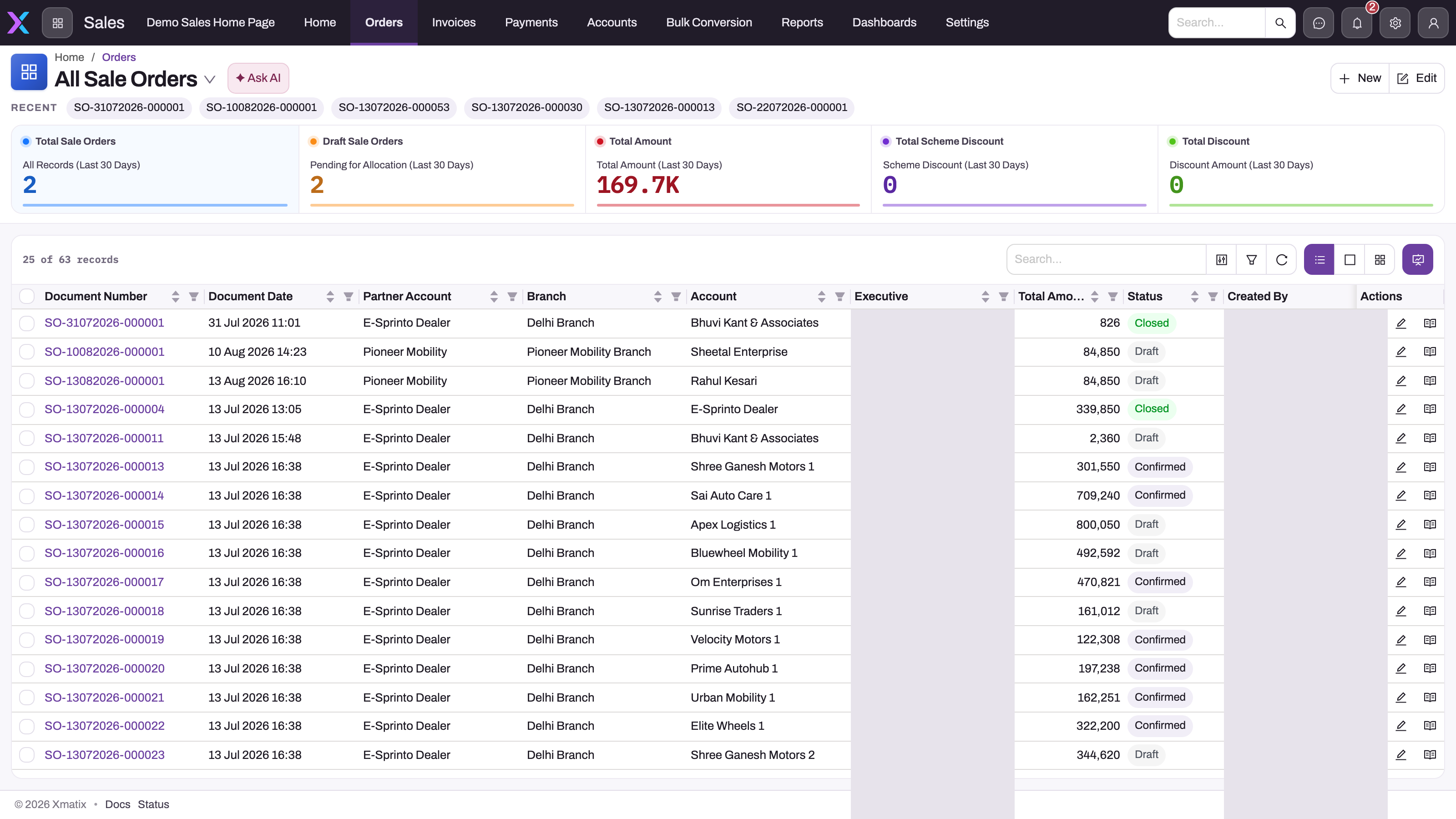
- 1
The Sales app bar carries the manager's documents — Orders, Invoices, Payments, Accounts — plus Bulk Conversion for invoicing many orders at once, and Reports and Dashboards.
- 2
All Sale Orders is the active saved view; switch to a branch, executive or status view deliberately before comparing teams or periods.
- 3
Summary cards are last-30-day signals: total and draft orders, booked amount, scheme discount and total discount. Use them to decide where to investigate, not as conclusions.
- 4
Search, column filters, refresh and the list, card and kanban layout toggles narrow the register; bulk actions apply to what is selected in the current view.
- 5
Executive, Total Amount and Status put ownership, value and lifecycle stage side by side — Draft, Confirmed and Closed here — so exceptions stand out row by row.
The All Sale Orders view in the Sales app is where oversight starts. The summary cards above the register are last-30-day signals — total and draft orders, booked amount, scheme discount and total discount — and the register underneath is the evidence: document number and date, partner account and branch, the customer account, the responsible executive, the amount and the status. Read the cards to decide where to look, then narrow the register with search, column filters or a different saved view before acting; bulk and row actions apply to what is selected in the current view, so an unscoped All view is easy to act on by mistake.
Access you need
xMatix ships a Sales Manager security profile alongside Sales Executive. The seeded Sales Manager profile grants every operation — read, create, update, delete, share, assign, view all and modify all — on the sales documents (Order, Invoice, Payment, Scheme, Credit Limit, Visit Plan and their lines) and view access to the Sales, Field Sales, CRM, Rewards, Claims, Data Studio and neighbouring apps. The seeded Sales Executive profile is not a restricted one: it also has every operation on orders, invoices and visit plans and view access to most apps. It differs mainly in its action grants, which are narrower than the manager's, and in having no View All or Modify All on leads, opportunities, quotes, accounts and cases. The separate Sales profile is the one limited to the Sales app. See Role-based guides for a summary of every shipped profile. Your administrator may have created organization-specific profiles instead; the shape is what matters — a manager needs View All or Modify All on the documents to see the whole team's work, and Assign to move an order between executives.
Record visibility beyond your own records comes from the org structure: the shipped sample role hierarchy runs CEO → Chief Revenue Officer → VP Sales → Regional Sales Director → Sales Manager, and a manager positioned above a rep's role sees that rep's records without any sharing. Approvals reach you because an approval process names you, your role or a team you belong to. Licensing is per product: Sales for orders and invoices, Rewards for schemes and incentives, Claims for the claims app — and a seat on each you use. If an app or button described here is missing, read Troubleshooting: a user can't see something before asking for a broader profile.
Your path
- xMatix Sales — the product overview; how orders, pricing, schemes and credit fit together.
- The sales order lifecycle — every stage an order moves through, the pending counters, and what the status means.
- Create a sales order — how your reps build an order, so you can read one critically.
- Bulk order processing — confirming, allocating and invoicing the day's orders at scale.
- Allocating stock to orders — why an order allocates or refuses, and how to release a reservation.
- Approval processes — how approval gates work and what your approve/reject does.
- Work with approvals on mobile — clearing the queue from your phone.
- Trade schemes — slabs, conditions, benefits, budgets, and why a scheme did or did not apply.
- Credit limits — what counts as exposure, how the gate works, and who can release a blocked customer.
- Trade claims — how scheme spend becomes claims, batches and settlements.
- Dashboards in xMatix — your morning read on the team's numbers.
- Tracking incentives — following your team's incentive attainment through the cycle.
Day to day
Mornings start on a dashboard — orders booked, coverage, pipeline against target. Then the approval queue: anything gated by an approval process waits on you, and mobile approvals mean it needn't wait long. Through the day you process orders in bulk and release the exceptions — usually a credit-limit block, an allocation that found no stock at the branch, or a scheme question — and check incentive tracking as the cycle progresses. What happens after you approve is the warehouse's day: picking and fulfilment turns the confirmed order into picked stock and a delivery order.
Common questions
An order is stuck — where do I look?
Check its status and pending counters against the order lifecycle first; most "stuck" orders are waiting on an approval, a credit-limit release or an allocation that found no eligible stock at the order's branch. Troubleshooting sales lists the exact refusals — no pending allocation quantities, item lot not found, available stock not found — and what each means.
Why did a scheme not apply to my rep's order?
Because the order did not qualify at pricing time: the scheme's period, conditions or slabs did not match, or its budget was exhausted. Trade schemes explains qualification, slabs, benefits and the scheme ledger; the order's own scheme section shows what was evaluated.
Who can see the dashboards I build?
Only the people they're shared with — and every backing report needs the same sharing, or viewers see gaps. Who can see a report or dashboard explains the model; subscriptions can mail the numbers out on a schedule.
How are my team's incentives actually calculated?
From incentive plans run against the period's results — Running an incentive cycle walks the calculation, and Incentive plans explains the rules underneath.
Related topics
- Territory planning — shaping the beats and coverage your reps work.
- Pricing, discounts and taxes — how an order's price is built.
- Invoicing and payments — what happens to an order after your approval.
- Claim generation setups — for the manager who also owns how claims are configured.
- Role guide: field sales representative — your team's side of the day.