
A credit limit caps how much one account may owe one of your companies: it is a Credit Limit record for a Partner Account (your company) and an Account (the customer, or a supplier), and xMatix checks its Credit Limit Amount against the live open balance when a sales order, sales invoice or purchase order is created. A customer who is over the limit cannot get a new order or invoice saved, and the message names the customer, the open amount, the document amount and the limit.
Credit limits sit between customer set-up and order taking. You create the account first, agree credit terms, and record them here. From then on the balance that counts is the one in the receivables (or payables) subledger, which grows when invoices or bills are posted and shrinks when payments and credit notes are allocated to them.
Overview
- One record holds one ceiling for one company-and-account pair. The same account can have different limits with different companies.
- Only Credit Limit Amount is enforced. A blank or zero amount means no limit, not zero credit.
- Exposure is worked out at the moment of the check from open receivable (or payable) items. Nothing is recalculated overnight, and the Utilized Limit and Avaliable Limit fields on the record play no part in the gate.
- Those two stored fields are, however, what the storefront's pay-on-account option and the outlet credit panels display. No xMatix process fills them in, so if you use those screens you keep them up to date yourself.
- Each check fails open: no record, a zero amount, or an unreachable subledger lets the document through.
When to use it
- Before you sell on credit to a customer, to stop new orders and invoices once their unpaid balance reaches an agreed ceiling.
- To cap what you owe a supplier. The same record, with the supplier as the Account, blocks new purchase orders while your open payables to that supplier exceed the amount.
- To offer pay on account on a storefront. Only signed-in customers with a positive limit see that option.
- To show credit on a visit. Field users see the customer's limit, used and available amounts on the outlet's Info view.
You do not need a credit limit to sell for cash or to accept prepaid storefront orders.
How xMatix handles it
What counts as exposure
Exposure is the sum of the account's open items with the selling company: receivable items for customers, payable items for suppliers, counting only items that are neither Settled nor Reversed, each on its remaining open amount. Open items are created when an invoice, bill or other receivable or payable document is posted to the general ledger, and reduced when posted payments, receipts and credit notes are allocated to them. See AR and AP subledgers.
Orders that have not been invoiced, and invoices that have not been posted, are not part of exposure.
The checks
| Document | When it is checked | Amount added to exposure | Account checked |
|---|---|---|---|
| Sales order | When the order is first saved | Finance Amount, otherwise Total Amount, otherwise zero | The order's Partner Account and customer Account |
| Sales invoice | When the invoice is first saved, and only if it has a positive Finance Amount | Finance Amount | The invoice's Partner Account and customer Account |
| Purchase order | When the order is first saved | Total Amount | The order's Partner Account and Supplier Account, against open payables |
| Order changed through chat ordering | When the customer adds a new item to an existing order | Zero | The order's Partner Account and customer Account |
The document is refused when exposure plus that amount is more than Credit Limit Amount. Equal to the limit is allowed.
On a sales order or purchase order created on screen, the lines do not exist yet when the order is first saved, so the amount added is normally zero. In practice the check stops an account that is already over the limit; it does not size the new order. Integrations and imports that send an amount with the header are checked against it.
Only creation is checked. Editing an existing order, invoice or purchase order, or adding lines to it on screen, does not run the check again.
The storefront and the outlet credit panels
These screens do not use the live subledger check. They read the credit limit record directly:
- Storefront pay on account. The option appears only for a signed-in customer whose most recently updated credit limit record has a positive Credit Limit Amount. Available credit is the record's Avaliable Limit or, when that is empty, Credit Limit Amount minus Utilized Limit. A cart larger than the available credit is refused with This order is larger than your available credit. A record whose Status contains the word "Block" offers no credit at all.
- Outlet credit panels. The Credit card on a visit's outlet Info view, in the field app and on the web Visit page, shows Utilized Limit as used, Avaliable Limit as available, and Credit Limit Amount as the limit, with a bar showing the share used.
- Ageing statements. The Receivables and Payables Ageing Summary show each party's Credit limit and Credit days from the record for the company the statement is run for.
Numbering
Each new record is named automatically from the Credit Limit Name Setting: the series CL, the date as day-month-year, and a six-digit counter, for example CL-28102026-000001. The counter restarts for each new date. See Document numbering.
Prerequisites
- The customer or supplier exists as an account, and so does your selling company.
- You have access to the Field Sales Setup app and to the Credit Limit records (see Permissions).
- For the gate to mean anything, invoices and bills are posted to the ledger, so that open items exist in the subledger.
Procedure
Step 1 — Open the credit limit list
Open the Field Sales app, choose Settings, and under Customers & Prospects choose Credit Limits. Your administrator may also have added the list to another app.
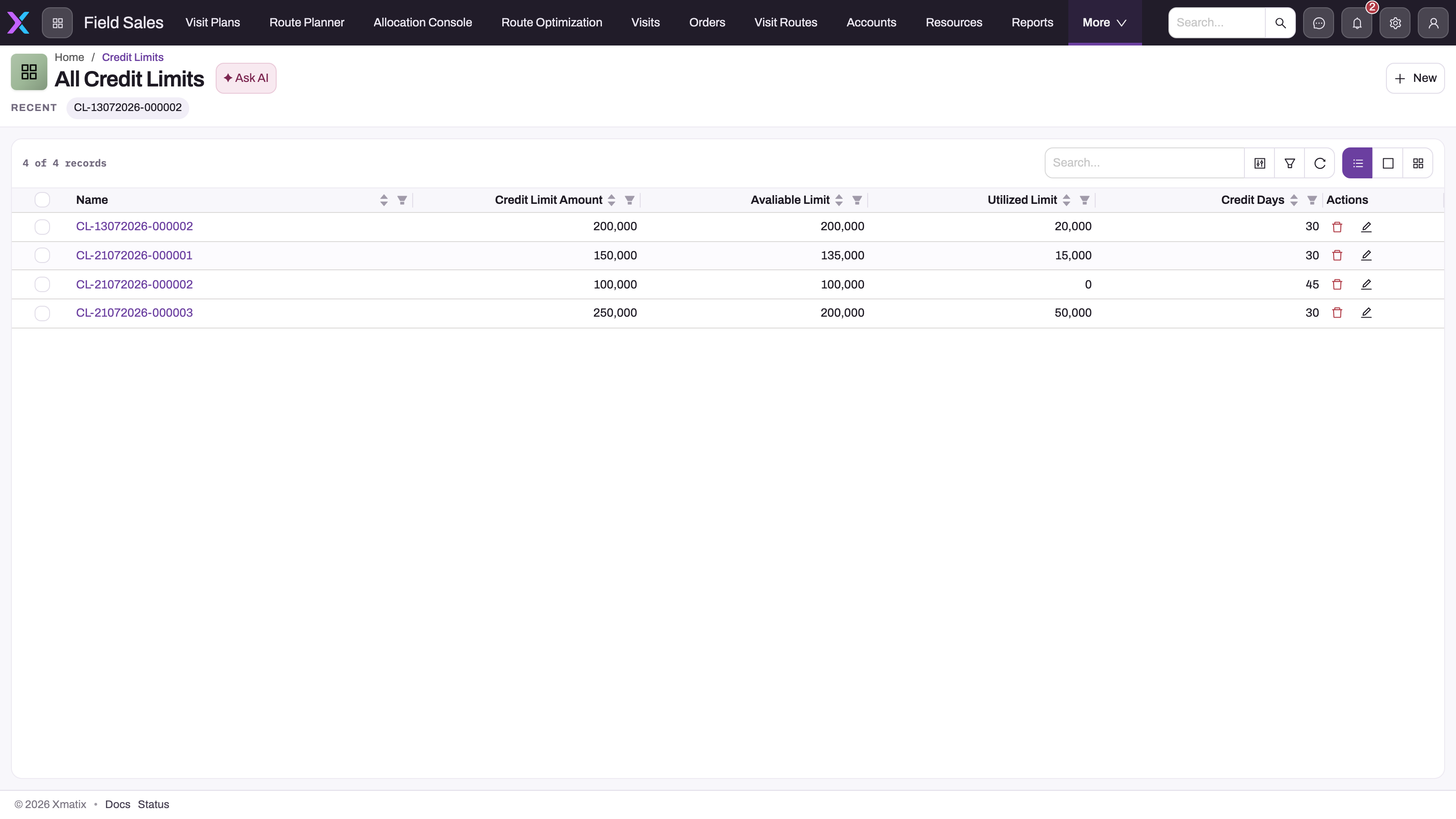
- 1
New opens the create form for a company/customer pair.
- 2
Name is generated on save; open it to see the Partner Account and Account the limit applies to.
- 3
Credit Limit Amount is the only column the enforcement check reads; it must be greater than zero to count as a limit.
- 4
Avaliable Limit (spelled this way in the schema) and Utilized Limit are stored notes, not the live exposure.
- 5
Credit Days is informational; the gate compares amounts and never ages receivables.
- 6
Search, column filters and refresh find the record without changing it.
Two lists are delivered. All Credit Limits shows Credit Limit Name, Credit Limit Amount, Avaliable Limit, Utilized Limit and Credit Days. All Credit Limit shows Name, Account, Avaliable Limit, Credit Limit Amount and Utilized Limit, and is the easier one for finding a customer.
Step 2 — Check whether the pair already has a record
Search for the customer and open each match to see its Partner Account. xMatix does not stop you from saving two records for the same company and customer, and when there are two the check uses whichever it finds first. Keep exactly one record per pair; change it rather than adding another.
Step 3 — Create the limit

- 1
Partner Account is the company extending credit; it must equal the document's partner account or the limit is never found.
- 2
Account is the customer whose trading is capped.
- 3
Avaliable Limit is stored only; real headroom is limit minus live open receivables.
- 4
Credit Limit Amount: the ceiling. Null or zero means no limit, so every document passes.
- 5
Utilized Limit and Credit Days are informational; neither is read by first-party code.
- 6
Save creates the record in Draft; the gate applies it immediately regardless of status.
- Choose New.
- In Partner Account, pick the company that extends the credit (the one on your orders and invoices).
- In Account, pick the customer (or, for a purchase-side limit, the supplier).
- Enter Credit Limit Amount — a positive amount.
- Enter Credit Days if you want the agreed payment terms on record.
- Leave Avaliable Limit and Utilized Limit empty unless you use pay on account or the outlet credit panels (see Step 6).
- Choose Save.
The record is named CL-… and opens on its record page. It takes effect at once: the next order or invoice for that pair is checked against it.
Step 4 — Read the record page
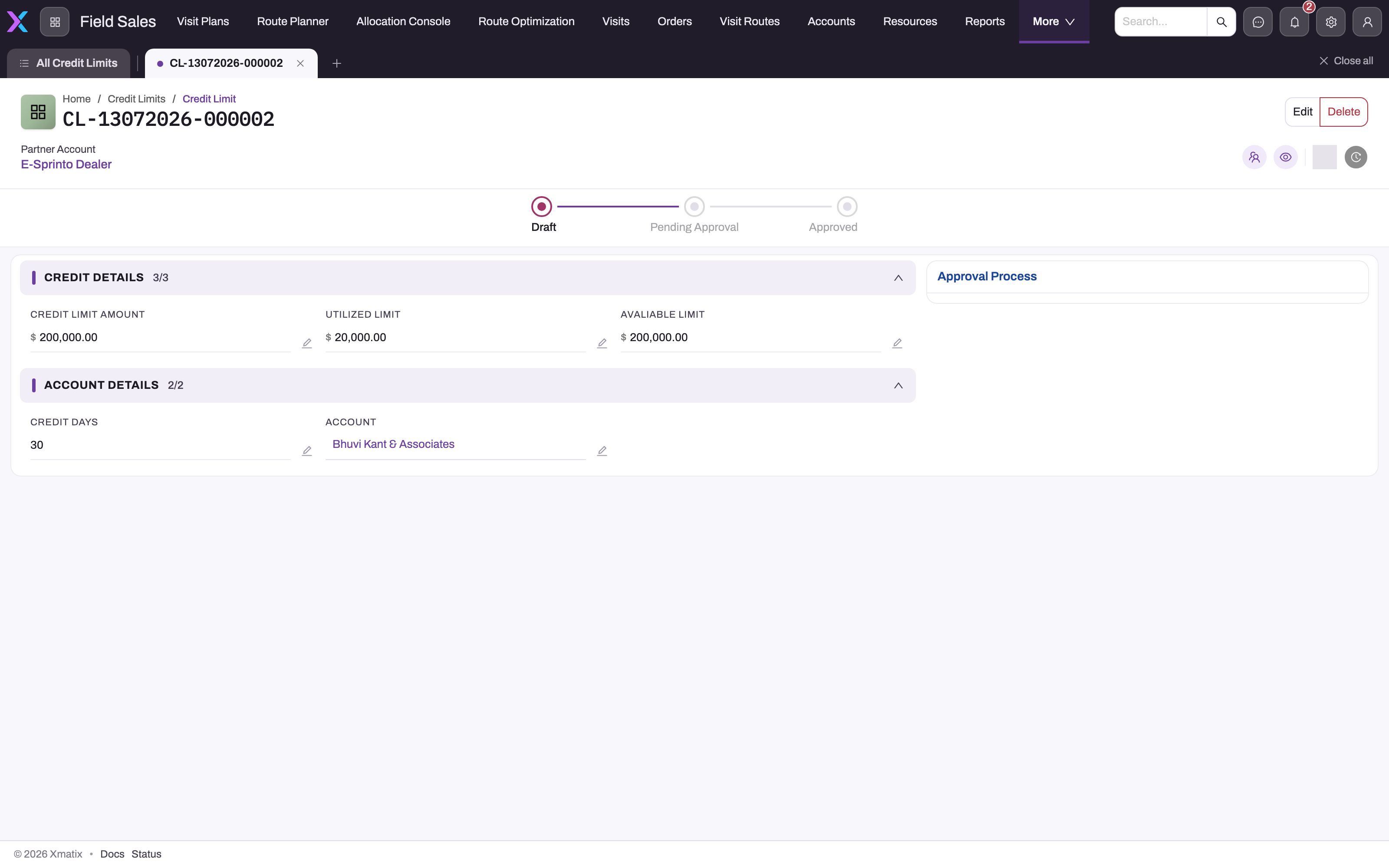
- 1
Partner Account in the header is the company under which this ceiling applies.
- 2
Draft, Pending Approval, Approved: the record's own workflow. A Draft limit already blocks documents.
- 3
Credit Limit Amount is the enforced ceiling.
- 4
Utilized Limit and Avaliable Limit are whatever was last typed; compare with the subledger, not with these.
- 5
Account is the customer half of the lookup key; Credit Days is not used by the amount gate.
- 6
Approval Process shows any tenant approval flow configured for credit-limit records.
The header shows the Partner Account, with Edit and Delete. Under it, the Status timeline shows Draft, Pending Approval and Approved. The page has three sections: Credit Details (Credit Limit Amount, Utilized Limit, Avaliable Limit), Account Details (Credit Days, Account) and System Information (who created and last changed it, and when). An approvals panel sits beside them.
Treat this page as the configuration, not as a live credit position. To see what the customer actually owes, use the party statement or the Receivables Ageing statements under Financials → Statements → Receivables & Payables.
Step 5 — Set or move the status
A record created with New starts with no status, because Status is not on the New form. To set it, click the next step in the timeline on the record page. You can move one step forward at a time (Draft, then Pending Approval, then Approved) or step back. If the change cannot be saved, you see Could not update status and the timeline goes back to where it was.
The status is for your own review process: a record in Draft is enforced exactly like an Approved one.
Step 6 — Keep the displayed figures current
If customers buy on account on a storefront, or field users rely on the outlet Credit card, update Utilized Limit and Avaliable Limit whenever the customer's position changes materially: choose Edit, change the figures, and save. These fields change only when someone edits them or an integration writes them.
Step 7 — Change or remove a limit
- Raise or lower it: choose Edit, change Credit Limit Amount, and save. The next check uses the new figure.
- Stop checking a customer: set Credit Limit Amount to zero, or delete the record (Delete in the header, then confirm). Either way the customer is no longer gated.
Step 8 — Release a blocked customer
When an order or invoice is refused with Credit limit exceeded for …:
- Collect. Record and post the customer's payments, or apply credit notes, against their open invoices. Allocated items reduce exposure immediately.
- Clean up. Settle or reverse open items that no longer reflect what is owed.
- Raise the limit. Once new terms are approved, increase Credit Limit Amount on the record for that company and customer.
Then save the order or invoice again. Changing Utilized Limit or Avaliable Limit does not release the block.
Fields
Fields are listed in the order they appear on the New and Edit form, followed by the fields shown only on the record page.
| Field | What it means | Notes |
|---|---|---|
| Partner Account | Your company that extends the credit. | Must match the Partner Account on the order, invoice or purchase order, or the record is not found and the document goes through unchecked. |
| Account | The customer whose credit is capped, or the supplier for a purchase-side limit. | Any account can be picked. |
| Avaliable Limit | Credit still available, as entered. | Spelled this way on screen. Not used by the order, invoice or purchase order check. Shown as available on the storefront and the outlet Credit card. Never calculated by xMatix. |
| Credit Limit Amount | The ceiling that is enforced. | The only figure the check reads. Blank or zero means no limit. Two decimal places. |
| Utilized Limit | Credit already used, as entered. | Not used by the check. Shown as used on the outlet Credit card, and used for storefront available credit when Avaliable Limit is empty. Never calculated by xMatix. |
| Credit Days | The agreed payment terms, in days. | For information and the ageing statements; due dates and overdue days come from the documents themselves. |
| Name | The record's number, such as CL-28102026-000001. | Set automatically on save. |
| Status | Where the record is in your review: Draft, Pending Approval or Approved. | Not on the New form; set from the timeline on the record page. Does not affect enforcement. |
Business rules
- Lookup. The check finds the record by company and account together. A record for the same customer under a different company does not apply.
- No limit means no gate. A missing record, or a Credit Limit Amount that is blank or zero, lets every document through, whatever the open balance.
- Breach. Open amount plus document amount greater than the limit refuses the save. The message points at the customer Account field (on a purchase order, the Supplier Account field):
- Credit limit exceeded for <customer>: open <amount> + this order <amount> would exceed the limit of <limit>.
- … + this invoice <amount> … on an invoice, … + this purchase order <amount> … on a purchase order.
- Credit limit exceeded for <customer>: open <amount> against a limit of <limit>. when an order is changed through chat ordering; the change is not saved.
- Creation only. Edits to an existing document are not checked again, except for items added to an order through chat ordering.
- Fail open. If the subledger cannot be read, invoices and purchase orders are saved without the check.
- Approval routing. When the Sales setting Route credit limit breaches to an approval process is on, sales orders, invoices and chat-ordering changes are never blocked by the limit. The Procurement setting of the same name does the same for purchase orders.
- Status is not enforced. Draft, Pending Approval and Approved records are checked identically.
- Duplicates. Nothing prevents two records for the same pair. The check, the ageing statements and the storefront each pick one; keep a single record per pair.
Example
Your company sells to Riverside General Store on 30-day terms, up to 2,00,000.
- A finance user opens Field Sales → Settings → Credit Limits, chooses New, picks your company as Partner Account and Riverside General Store as Account, enters 200000 in Credit Limit Amount and 30 in Credit Days, and saves. The record is named
CL-28102026-000001. - Over the month, three invoices totalling 2,15,000 are posted. Riverside's open receivables are now 2,15,000.
- A sales representative creates a new order for Riverside. On save they see Credit limit exceeded for Riverside General Store: open 215000.00 + this order 0.00 would exceed the limit of 200000.00.
- Riverside pays 50,000. The cashier records and posts the payment and allocates it to the oldest invoice. Open receivables drop to 1,65,000.
- The representative saves the order again. It goes through, because 1,65,000 is within the 2,00,000 limit.
Training
Practice exercise
In a sandbox:
- Create a credit limit for a test customer and your company with Credit Limit Amount 1000.
- Create and post an invoice for that customer for 1500.
- Try to create a new sales order for the customer with the same company. Expected: the save is refused with Credit limit exceeded for …, showing open 1500.00 and limit 1000.00.
- Create the same order with a different company as Partner Account. Expected: it saves, because no limit exists for that pair.
- Change Credit Limit Amount to 2000 and retry step 3. Expected: the order saves.
- Set the record's status to Draft from the timeline. Expected: nothing about the check changes.
Quick reference
- One record per company-and-account pair; the company is Partner Account.
- Only Credit Limit Amount is enforced; zero or blank means no limit.
- Exposure is posted, unsettled invoices (or bills), not open orders.
- Orders and purchase orders are checked on first save, before lines exist, so they stop accounts already over the limit.
- Invoices are checked only when they carry a Finance Amount.
- Edits are not re-checked.
- Status is not enforced.
- Utilized Limit and Avaliable Limit are typed in, not calculated; the storefront and outlet credit card show them.
- To release a block: collect, clean up open items, or raise the limit.
Permissions
Access to credit limits is set per security profile, for the Credit Limit entity. The delivered System Admin, Standard User, Sales Manager and Sales Executive profiles have full access — view, create, edit and delete every record, including other users' records. If only finance should set limits, take create, edit and delete away from the sales profiles in Security profiles.
The Field Sales Setup list that holds Credit Limits is granted to the System Admin and Standard User profiles. A user without access to the entity does not see the list and cannot open the records. The block itself does not depend on the user's profile: everyone creating an order, invoice or purchase order is checked the same way.
Configuration
| Setting | Where | What it changes |
|---|---|---|
| Route credit limit breaches to an approval process (Sales) | Setup → Feature Hub → Modules → Sales → Settings, group Credit limit | Off (default): sales orders, invoices and chat-ordering changes that breach the limit are refused. On: they are not blocked; set up an approval process on sales orders to control the override instead. |
| Route credit limit breaches to an approval process (Procurement) | Setup → Feature Hub → Modules → Procurement → Settings, group Credit limit | The same switch for purchase orders. See Purchase orders. |
| Credit Limit Name Setting | Document numbering | The series (CL), date format and counter length used to name records. |
| Status picklist | The Credit Limit entity's Status field in setup | Draft, Pending Approval and Approved are delivered. A value containing "Block" withdraws storefront credit for that customer. |
| Approval process | Approvals | No approval process is delivered for credit limits. Add one if changes to a limit need sign-off; the record page already has an approvals panel. |
| Which app shows the list | App settings | Delivered in Field Sales Setup under Customers & Prospects. Add the entity to a finance app if finance owns the limits. |
Common problems
"Credit limit exceeded" on a tiny order
The order adds nothing, or almost nothing, to exposure; the customer is already over the limit from posted, unpaid invoices. The message shows the open amount. Collect and post payments, clean up stale open items, or raise the limit.
A customer over their limit can still order
Check, in this order: that a record exists for the same company as the order's Partner Account; that its Credit Limit Amount is more than zero; that the over-limit invoices are posted (unposted invoices are not exposure); and that the Sales setting Route credit limit breaches to an approval process is off. Remember that editing an existing order is never checked.
An invoice went through although the customer is over the limit
Invoices are checked only when they carry a positive Finance Amount, and only when first saved. An invoice without a finance amount, or one saved while the subledger could not be read, is not blocked.
I raised the utilised or available figure and nothing changed
Utilized Limit and Avaliable Limit are not part of the check. Change Credit Limit Amount, or reduce the open balance.
The storefront offers no pay on account
The signed-in customer needs a credit limit record with a positive Credit Limit Amount, and positive available credit: Avaliable Limit, or Credit Limit Amount minus Utilized Limit when that is empty. A status containing "Block" also removes the option.
"This order is larger than your available credit"
The storefront cart total is more than the record's available credit. Update Avaliable Limit (or Utilized Limit) if it is out of date, or raise the limit.
The outlet Credit card shows 0 available
The card shows Avaliable Limit exactly as entered. If it was never filled in, it shows zero even when the customer is well inside the limit.
Common questions
Does the status on the credit limit matter?
Only to your own review. The check reads the record by company and customer and ignores Status, so a limit in Draft blocks orders exactly like an Approved one. If you need sign-off before a limit takes effect, do not save a positive amount until it is approved, or add an approval process to the Credit Limit entity and keep the amount at zero while it is pending. The only place a status value matters is the storefront, where a status containing "Block" withdraws credit.
Can one customer have different limits with different companies?
Yes. Limits are kept per customer per company, and each check runs for the company on the document. A customer can be blocked when ordering from one of your companies and clear with another, and each company's ageing statement shows its own limit. Keep one record per company-and-customer pair; with two records for the same pair, which one is used is not defined.
Do unpaid orders count against the limit?
No. Exposure comes from the subledger, so only posted, unsettled invoices and other posted receivable items count. Orders that are not yet invoiced, and invoices that are not yet posted, add nothing. That is why the invoice check exists as a second gate, and why the order check mainly stops customers who are already over their limit.
Does a credit limit work for suppliers?
Yes. Create a record with your company as Partner Account and the supplier as Account. New purchase orders to that supplier are refused while your open payables to them exceed the amount, unless the Procurement setting routes breaches to an approval process. The same record would also gate sales to that account if you sold to it.
Does xMatix use Credit Days to block overdue customers?
No. Credit Days is recorded for reference and shown on the ageing statements. The check compares amounts only; it does not look at how overdue the open items are. Due dates come from the invoices themselves.