
Incentives are tracked in four places: the incentive plan page (targets, definitions and results together), the Compensations list and records (the evaluated results across plans), the Incentives & Targets dashboard, and the seeded Rewards reports. Nothing here needs building — the plan page ships as a designed layout with purpose-built widgets, and the dashboard and reports are seeded. Two facts shape how you read all of them: numbers move only when something runs or is saved (the Perform KPI Calculation action on a source document, or a compensation line), and the platform stores the earned amount but not an achievement percentage — the percentage is computed in memory when a line is evaluated and is not persisted.
The Compensations tracker
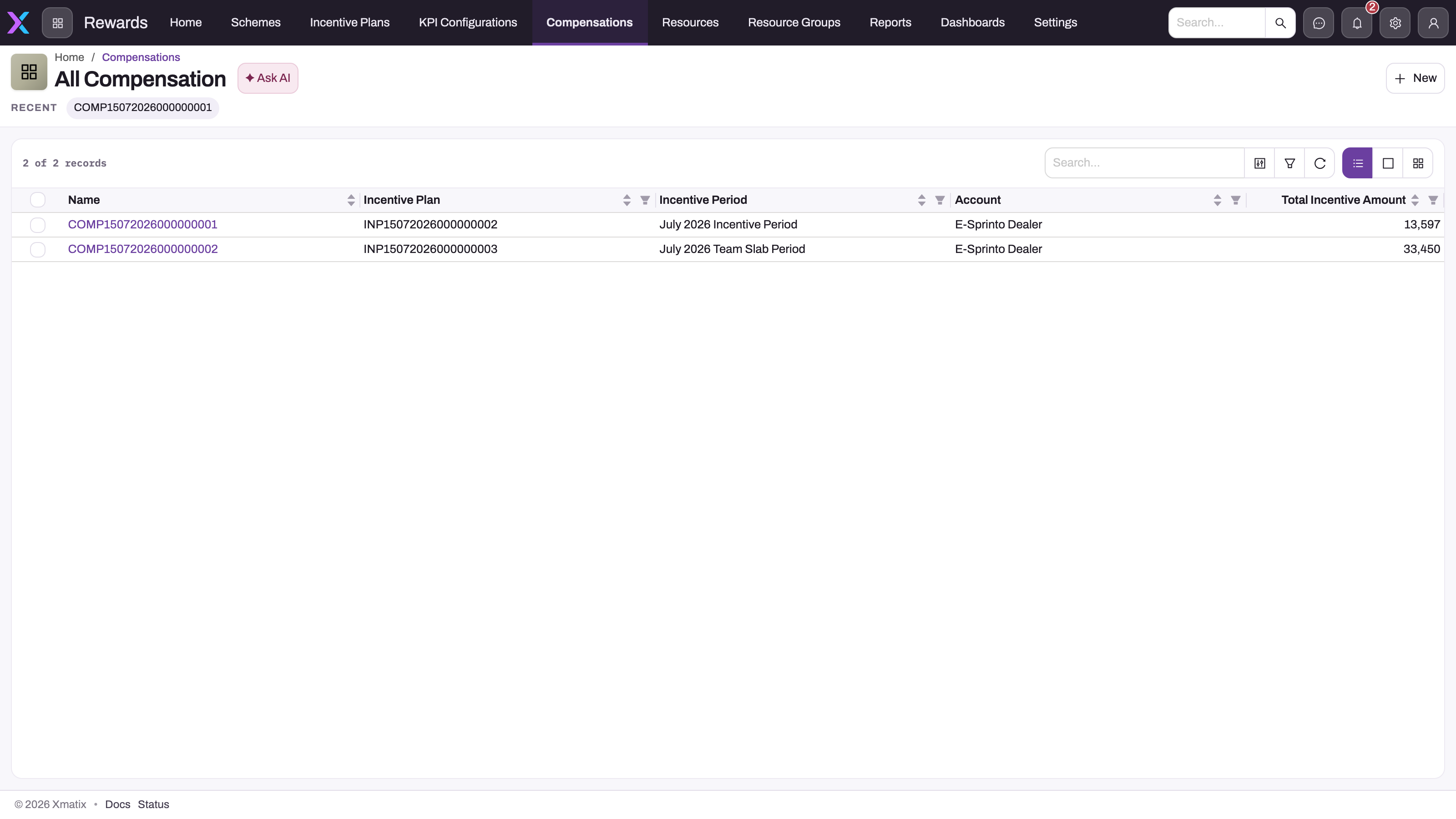
- 1
Compensations on the Rewards app bar; Dashboards further right hosts the Incentives & Targets dashboard.
- 2
The record name opens the compensation header and its Related tab of compensation lines — the row-level evidence behind the total.
- 3
Incentive Plan — the definition whose lines, targets and slabs were evaluated for this record.
- 4
Incentive Period — the window the achievement was measured over; one record per plan and period is the normal grain.
- 5
Account — the commercial participant the record belongs to (the plan's partner account).
- 6
Total Incentive Amount — rolls up the lines' Incentive Amount; a suspicious total is investigated line by line, never edited here.
Open the Rewards app (App Launcher → search Rewards) and choose Compensations. Each record ties a plan, an incentive period and an account to a Total Incentive Amount; open it for the Compensation Lines — one per member — carrying Achieved Value, Value (the target), Incentive Amount, Override Incentive Amount, Gifts and Gift Points, Is Compensation Received, Status and the KPI roll-up columns (sale amount, number of invoices, unique items, billed hours and so on) the engine copied in. Track progress by filtering to one plan and period, reconciling the member count against the plan's members, then comparing the total with its lines. A missing record points upstream — compensation records are created by an operator, not generated — and an unexpected amount is explained line by line against the plan's slabs.
Lines carry a Status of Draft or Rejected only; there is no approved or paid state. Payout is recorded by ticking Is Compensation Received on the line by hand — no service sets it, and nothing flows from here into Payroll or Finance.
The incentive plan page
The plan's detail page is organised into tabs:
- Targets by Resources — the target grid: members as rows, incentive periods as columns, each cell a member's target value for that period, with a dropdown to switch between KPI configurations and a search box over rows. Cells are editable; edits collect as you type and persist together on Save, and Refresh re-reads. Lookup values render as names, and period columns carry their dates.
- Targets by KPI — the same assignments for one member at a time: pick the member in the selector, and the grid shows KPI configurations as rows and periods as columns ("Incentive KPI Target : <member>"). Use it to read one person's measures across the timeline; use Targets by Resources for bulk entry.
- Compensations — the plan's compensation records and lines, where evaluated results land after each incentive cycle.
- Related — the plan's definition widget: add an incentive line (sequence, title, qualification criteria, reward applicability), then per line a condition-and-reward slab builder whose fields adapt to the selected types, and a collapsible list of saved lines with edit and delete.
The Incentives & Targets dashboard
Dashboards in the Rewards app includes the seeded Incentives & Targets dashboard, filterable by incentive period and branch. Its tiles show Target Achievement, Reps vs Target, Incentive Payable (the sum of compensation lines' Incentive Amount), Active Plans, KPI Records and Scheme Budget Utilised; its charts include Attainment by Rep as a percentage of target with a 100% reference line, Target vs Actual by Branch, Targets by Plan and Rep, Attainment Spread by Branch, Incentive Payable by Period, Compensation Lines by Status and KPI Value by Month, plus a Rep × Period actuals table and two embedded reports. Attainment here is computed live from performance KPI rows against target values — it is the one place an achievement percentage is visible.
Rewards reports
Reports in the Rewards app includes a seeded Rewards folder:
| Report | Shows |
|---|---|
| Incentive Plan Report | Plans with their periods and members |
| Incentive Target with Incentive Plan | Targets in plan context, grouped by partner |
| DMS Incentive Target with Account | Targets with their account context |
| New KPIs Report | Performance KPI records by period, grouped by partner |
| New KPIs with Incentive Target Report | KPI records joined to the targets they feed |
| KPIs with Account Report | KPI performance grouped by period, by account |
| KPIs with Incentive Plan Report | KPI performance in plan context |
| Periods wise Incentive | Incentive results period by period |
| Quartely Incentive Report | The quarterly incentive view, grouped by period and partner |
| Resource Compensation Report | Salary-structure assignments — a Payroll record that shares the name, not incentive results |
Reports follow the platform's report tooling — filter, group and export like any other report.
What refreshes the numbers
- Running the Perform KPI Calculation action on an order or invoice writes or updates the performance KPI rows — this is where attainment comes from. Saving the document with its Perform KPI Calculation field ticked does not. See Performance KPI records.
- Saving a Compensation Line runs the engine for that line and rewrites its Incentive Amount and KPI roll-ups. Existing lines do not recompute when later KPIs land; re-save them.
- Dashboards and reports query live, so they reflect the rows above immediately.
- Nothing runs on a schedule, and no notification is sent when a target is reached or a line is evaluated.
On mobile
The mobile app registers the same two purpose-built widgets as the web under the same component names — the target grid (first column frozen, horizontal scroll) and the slab builder — so the Targets by Resources grid and the Related tab's builder behave identically, with matching field names and saved payloads: a target entered on a phone is the record a manager sees in the web grid. The seeded plan layout also references a pivot-grid and a plan-table widget that neither platform registers, so those regions render nothing on either; the Targets by KPI view is the target grid itself, pivoted for one member. Dashboards are read in the mobile Dashboards area. See Using the mobile app.
Common questions
Can targets be edited straight from the grid?
Yes — that is the grid's purpose. Type into the cells; pending edits are highlighted and saved together with Save, so filling a whole period column is one batch, not one save per member. The KPI dropdown scopes which measure's assignments you are editing.
Do mobile users see the same numbers as web users?
Yes. Both platforms render the same layout over the same records with the same widgets, so there is no separate mobile dataset to reconcile.
Where does a member see what they earned?
On the plan page's Compensations tab, on the Compensations list and record, and in the Periods wise Incentive and Quartely Incentive Report reports. Each compensation line shows the achieved figures it was computed from, so "what did I earn and why" is one record — but there is no personal self-service view; members see what their security profile lets them open.