
Read evaluated compensation
Compensation is where incentive evaluation lands. A compensation record is the payout header for one plan, one period and (optionally) one partner account or branch; its compensation lines each hold one participant's evaluated result — what they achieved and what they earned. What they can earn is defined up front on the incentive plan as compensation slabs: bands of achievement, each with a reward.
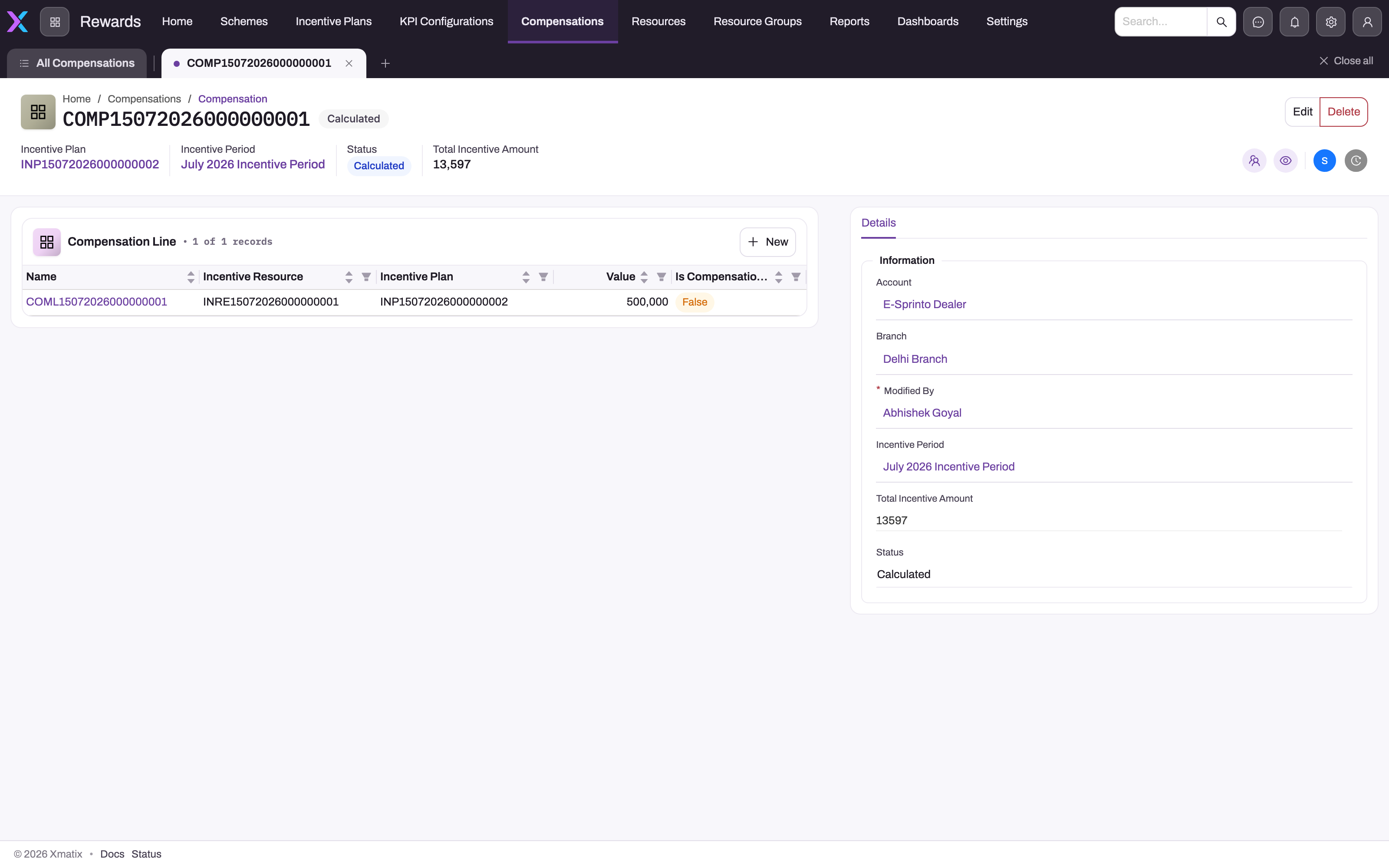
Treat the compensation screens as evidence to review, not a place to type a replacement result: every save of a line re-runs the evaluation and overwrites the computed figures. Start from the register described in Tracking incentives, then open the record whose plan, period, participant and amount you need to explain.
- 1
Incentive Plan and Incentive Period on the header identify which plan definition and performance window this payout run belongs to; the status chip beside the name is the tenant-defined review state.
- 2
One Compensation Line per participant (Incentive Resource). Saving a line re-runs the incentive engine and overwrites its achieved figures and reward; Is Compensation Received is a manual acknowledgement.
- 3
New adds a participant line. The engine evaluates it on save only when the line carries a plan and period and the plan is Approved.
- 4
Account and Branch scope the header to a partner or branch for plans whose member type is Partner or Branch.
- 5
Total Incentive Amount and Status are header fields the engine never writes — reconcile the total against the lines' Incentive Amount during review.
Compensation records
Open the Rewards app and choose Compensations. Each compensation record is the payout header for one incentive period. Process Compensation creates it with Status Draft, numbers it from the COMP series and sets its Total Incentive Amount. Saving a single line by hand does not update that total. The plan and period on the header are for reading only, because the engine scores each line against the plan and period stored on the line. Finding, reviewing, signing off and deleting records are described in Compensation records.
Compensation lines
Each line names the participant (the plan's Incentive Resource), the Incentive Plan and the Incentive Period. Saving a line — creating it or editing any field — triggers the incentive engine for that line. The run:
- Skips silently when the line has no Incentive Plan or no Incentive Period, or when the plan's status is not Approved (the engine only loads lines of approved plans).
- Loads the plan's incentive lines in sequence order, with their targets and slabs, and the period's KPI accruals for the plan.
- For every target, finds the participant's Incentive Resource Target (the quota assigned to this resource for this target). A participant with no quota for a target, or a quota of zero, scores nothing on that target.
- Sums the matching KPI rows — matched to the participant by the plan's member type (Resource, Partner, Branch or Customer) and narrowed by the target's item, account or item-group filter — and stamps the summed achieved figure on the line.
- Computes the achievement percentage, picks the qualifying slab for each target (see How xMatix handles it) and writes the reward.
Achieved figures are stamped per target type so the result is auditable: No of Bookings (for No Of Sale Orders targets), No of Invoices, Sale Order Amount, Sale Amount, Sale Order Quantity, Sale Quantity (for Invoice Quantity), Purchase Order Amount, Purchase Order Quantity, No Of Unique Invoices (distinct accounts), No Of Unique Items (distinct items) and Custom KPI Value.
The reward depends on the qualifying slabs' compensation types: an Incentive Amount, Gifts plus Points, a linked Scheme, or a linked Discount Group.
Beyond the engine-written fields a line carries review fields the engine never touches: Status (tenant-defined picklist), Override Incentive Amount for a manually agreed figure kept separate from the computed one, and Is Compensation Received to record that the payout reached the participant. Use these rather than editing the computed amount, which the next save would overwrite anyway.
Compensation slabs
A compensation slab is one band of achievement on an incentive line and the reward that band pays — for example "80 to 99 % of quota pays a fixed 3,000". You build slabs on the incentive plan, after the line and its targets, and before you approve the plan. When a period is processed, the incentive engine measures each member against each target, finds the slab whose band holds the result, and writes that slab's reward onto the member's compensation line.
When to use it
Add slabs to every incentive line that is meant to pay. A line with targets but no slabs never pays, and neither does a line whose criteria is Always (No Criteria), because rewards only come from slabs that a target qualified. Use several slabs on one line to pay more as achievement rises; use one open-ended slab when any achievement above a threshold pays the same way.
How xMatix handles it
- One slab per target. For each of the line's targets, the engine works out the member's achievement and walks the line's slabs in Sequence Number order. The first slab whose band holds the achievement qualifies for that target, and the search stops there. A target that no band holds does not qualify.
- Percentage bands by default. Achievement is the achieved value divided by the member's quota for that target and period, times 100, rounded down to a whole percent. From Percentage empty counts as 0. To Percentage empty or 0 means there is no upper limit.
- Absolute bands when the line asks for them. If the incentive line has Use Slab Absolute Value ticked, the achieved value itself is compared with the slab's From Value and To Value, and no quota is needed. To Value 0 means no upper limit. A slab with neither value never qualifies.
- KPI configuration filter. A slab with a KPI Configuration only qualifies through a target linked to that same configuration. Leave it empty to let the slab serve every target on the line.
- Each slab pays once per line. If two targets land in the same slab, it is paid once.
- Combining. A line pays only when its targets meet its Definition Filter Criteria. The line's monetary slab rewards are then combined by its Reward Applicability, and the plan's Compensation Eligibility combines the lines. Both are described on Incentive plans.
What each compensation type pays
| Compensation Type | What the slab pays | Value it needs |
|---|---|---|
| Fixed Amount | The fixed amount | Incentive Fixed Amount |
| Amount Per Unit | The per-unit amount × the achieved value of the target that qualified the slab | Incentive Amount Per Unit |
| Amount Per Unit Incremental | The per-unit amount × the part of the achieved value above the quota; never below 0. If the slab names a Reference Incentive Target, that target's achievement and quota are used instead | Incentive Amount Per Unit |
| Percentage On Value | The percentage × the achieved value ÷ 100 | Amount Percentage |
| KPI Reward Value | The reward figure from the member's KPI data for the target's KPI configuration | A target linked to a KPI configuration with a reward field |
| KPI Reward Value Percentage | The percentage × that KPI reward figure ÷ 100 | Amount Percentage, and a KPI-linked target |
| Gifts | No amount. Copies the gift and the reward points onto the compensation line | Gifts, Reward Points |
| Discount Group | No amount. Links the discount group on the compensation line | Discount Group |
| Slab Reward Percentage | A percentage of what an earlier incentive line paid the member. The seeded screens cannot name that earlier line, so out of the box it pays nothing | — |
| Reward Points; | Nothing. The seeded value has no payout | — |
The engine also pays Scheme Rewards (it links the slab's Scheme on the compensation line, with no amount), but that value is not in the seeded picklist. A slab type the engine does not recognise, including a misspelt one, qualifies normally but pays nothing.
Prerequisites
- An incentive plan in Draft, with at least one incentive line and its targets. See Incentive plans, Step 4.
- Access to the Incentive Plan record page and create rights on Compensation Slab (see Permissions).
- For KPI reward types: a KPI configuration with a reward field, and a target on the line linked to it.
Procedure
Step 1 — Open the line in the plan's builder
Open Rewards → Incentive Plans, open the plan and go to the Related tab. The top of the tab is the line builder, with one collapsible panel per incentive line. Expand the line you want to pay. Its targets are listed under the line's conditions; its slabs are listed below them.
Step 2 — Add a slab
- In the line's panel, click Reward (the button with a plus sign). A new slab row opens.
- Choose the Compensation Type. It is required: saving without it marks the label in red.
- Optionally pick a KPI Configuration to limit the slab to targets of that configuration.
- Enter From % and To %. Both accept 0 to 100. Leave To % empty for an open-ended top band.
- Fill the value box that appears for the chosen type: Incentive Fixed Amount, Incentive Amount Per Unit, Incentive Percentage on Value, Discount Group, or Gifts and Reward Points.
- Click the row's save icon. xMatix shows Compensation slab saved, the row becomes read-only and the slab gets a COSL number.
The row's position in the line becomes its Sequence Number, so add the slabs in the order you want them checked. Repeat for each band.
Step 3 — Change or delete a slab
- Change: click the row's edit (pencil) icon, change the values and click save. A box you empty is not cleared on a saved slab — the earlier value stays. To make a band open-ended, enter 0 in To %; to drop a KPI configuration, delete the slab and add it again.
- Delete: click the row's delete icon. The slab is deleted at once, without a confirmation.
Changes take effect the next time the period is processed or a compensation line is saved. Results already written are not recalculated on their own.
Step 4 — Check the result after processing
After Process Compensation runs on the incentive period, open the compensation record. Each member's line shows the achieved figure per target type and the Incentive Amount, or the gift, points, discount group or scheme the slabs wrote. A member with no amount either reached no band or failed the line's criteria — see Common problems.
The plan page in the mobile app offers the same builder with the same boxes for each type.
Fields
The slab builder shows the first five fields on every row and the rest according to the compensation type. The slab's own record page shows more fields, grouped as Information, Slab, Compensations, Rewards and Gifts.
| Field | What it means | Notes |
|---|---|---|
| Compensation Type | What the slab pays | Required in the builder. Values: Amount Per Unit, Amount Per Unit Incremental, Discount Group, Fixed Amount, Gifts, KPI Reward Value, KPI Reward Value Percentage, Percentage On Value, Reward Points;, Slab Reward Percentage. See the table above |
| KPI Configuration | Limits the slab to targets linked to this KPI configuration | Optional. Empty means every target on the line |
| From Percentage (From %) | Lower bound of the achievement band, in percent of quota | Empty counts as 0. Stored to whole percents |
| To Percentage (To %) | Upper bound of the band, inclusive | Empty or 0 means no upper limit. The builder accepts up to 100 |
| Incentive Fixed Amount | Amount paid by a Fixed Amount slab | Shown for Fixed Amount |
| Incentive Amount Per Unit | Amount paid per unit of achieved value | Shown for Amount Per Unit. Amount Per Unit Incremental also reads it, but the builder shows no box for that type |
| Amount Percentage (Incentive Percentage on Value) | Percentage of the achieved value paid | Shown for Percentage On Value. KPI Reward Value Percentage also reads it, but the builder shows no box for that type. Keep it to whole percents: the field stores two decimals of the fraction, so 2.5 % is not kept exactly |
| Gifts | The gift recorded on the compensation line | Free text in the builder; a picklist on the slab form |
| Reward Points | Points recorded on the compensation line with the gift | Shown for Gifts |
| Discount Group | The discount group linked on the compensation line | Shown for Discount Group. Only recorded on the line; it does not change any document's discount |
| Scheme | The trade scheme linked on the compensation line | Used only by Scheme Rewards. Not in the builder |
| Reference Incentive Target | The target whose above-quota result an Amount Per Unit Incremental slab pays on | Optional. On the slab record page only. The target must be on the same incentive line, or the slab pays 0 |
| From Value, To Value | Absolute band bounds, in the target's own units | Read only when the line has Use Slab Absolute Value ticked. Whole numbers. Not in the builder |
| Sequence Number | Order in which the line's slabs are checked | Set by the builder from the row's position |
| Name | Slab number | Generated (COSL series) |
| Incentive Line, Incentive Plan | The line and plan the slab belongs to | Set by the builder |
| Incentive Period, Member Resource Type, Percentage on Profit, Target Percentage, Resource Reward Field Name | Shown on the slab's forms | Not read by the incentive engine. Filling them changes nothing |
Business rules
- Achievement is floored. 80.9 % counts as 80, so it belongs to a band that ends at 80, not one that starts at 81.
- First matching slab wins per target. Overlapping bands pay the slab with the lower sequence number, even if a later one would pay more.
- No quota, no percentage. A member whose quota for the target is missing or 0 never qualifies on a percentage band. Absolute bands do not need a quota.
- Several targets, several slabs. Each target qualifies at most one slab. With two targets landing in different slabs, both slabs pay, combined by the line's Reward Applicability (empty or All Rewards adds them up; Any One With Highest Value or Any One With Lowest Value keeps one). Custom Logic adds them up as well.
- Non-cash rewards are written, not combined. Gifts, points, discount group and scheme are copied onto the compensation line. If two such slabs qualify, the later one wins. They are added to any cash amount, not instead of it.
- Saving one line does not clear old non-cash rewards. A plain save of a compensation line rewrites the Incentive Amount but leaves a gift, discount group or scheme from an earlier run in place. Process Compensation clears them first, so re-run it for a clean result.
- Incremental never goes negative. Amount Per Unit Incremental pays 0 when the achieved value is at or below the quota.
- Approved plans only. Slabs on a plan that is not Approved are never evaluated.
Example
A monthly plan pays sales executives on invoiced revenue. The line Revenue has one target, Sale Amount, and each executive has a quota of 100,000 for May. The administrator adds two slabs:
| Sequence | Compensation Type | From % | To % | Value |
|---|---|---|---|---|
| 1 | Fixed Amount | 80 | 99 | Incentive Fixed Amount 3,000 |
| 2 | Percentage On Value | 100 | (empty) | Incentive Percentage on Value 5 |
At month end, Process Compensation runs on May:
- Executive A invoiced 112,400. Achievement is 112 %, so slab 2 qualifies and the line shows an Incentive Amount of 5,620 (5 % of 112,400).
- Executive B invoiced 86,950. Achievement is 86 %, so slab 1 qualifies and the line shows 3,000.
- Executive C invoiced 79,990. Achievement is 79 %, which no band holds, so the line shows no amount.
Training
Practice exercise
In a sandbox, take a Draft plan with one line and a Sale Amount target, and one member with a quota of 50,000 for an open period. Add three slabs: Fixed Amount 1,000 for 50–79 %, Fixed Amount 2,500 for 80–99 %, and Percentage On Value 4 from 100 % with no upper limit. Approve the plan, make sure the member's performance for the period is about 41,000, then run Process Compensation on the period.
Expected result: achievement is 82 %, the member's compensation line shows an Incentive Amount of 2,500, and the Sale Amount figure on the line is about 41,000.
Quick reference
- Slabs are added with Reward on the line's panel, on the plan's Related tab.
- Compensation Type is required; the value box depends on it.
- Achievement = achieved ÷ quota × 100, rounded down.
- To % empty or 0 = no upper limit.
- The first slab in sequence whose band holds the result wins.
- Make bands meet: 0–79, 80–99, 100 and up.
- Emptying a box on a saved slab does not clear it; enter 0 or delete and re-add the slab.
- Delete in the builder has no confirmation.
- Re-run Process Compensation after changing slabs.
Permissions
- Seeing and building slabs needs access to the Incentive Plan record page and read, create, edit and delete rights on the Compensation Slab entity. The seeded sales and administrator security profiles grant full access to Compensation Slab.
- A user without create or edit rights sees the builder, but saving a slab fails with Save failed and the reason.
- Slabs take effect only after the plan is moved to Approved, and running Process Compensation needs its own server-action permission on Incentive Period — see Incentive periods.
Configuration
- Compensation Type values. The picklist on the Compensation Slab entity is managed under Setup like any other picklist. Add Scheme Rewards if you want slabs that link a trade scheme; deactivate values you do not want offered, such as Reward Points; or Slab Reward Percentage, which pay nothing out of the box.
- Gifts values. The Gifts picklist on Compensation Slab ships with sample values; replace them with your own. In the builder, Gifts is a free-text box, so any text is accepted there.
- Absolute bands. Tick Use Slab Absolute Value when you create the line with New on the plan's Incentive Line list; that form has the box. The add-line panel of the builder does not save it. Then give the slabs From Value and To Value, which the builder does not show.
- Fields the builder does not offer. Scheme, Reference Incentive Target, From Value and To Value, and the Amount Percentage of KPI Reward Value Percentage are set on the slab record, not in the builder. The seeded slab record page has no Edit button; to edit slabs there, add the actions you need to the Compensation Slab View layout, as described in Design a form layout.
- Numbering. Slab names come from the Compensation Slab Document Name Settings (series COSL).
- Create Compensation Slab action. A server action with this label is seeded on Incentive Plan and Compensation Slab, but it does no work. Use the builder.
Common problems
The member's line shows no amount
The achievement fell outside every band, the member has no quota (or a quota of 0) for the target in that period, or the line's criteria was not met. Check the achieved figure on the compensation line, divide it by the quota, round down, and compare with your bands. Close any gap between bands, and leave the top band's To % empty.
An over-achiever is paid less than expected
Bands overlap and an earlier slab caught the result first, or a lower band has no upper limit. Give each band a To % except the last one, and check the sequence order.
An Amount Per Unit Incremental or KPI Reward Value Percentage slab pays nothing
The builder shows no value box for these types, so the per-unit amount or percentage was never saved. Set Incentive Amount Per Unit or Amount Percentage on the slab record (see Configuration), or use Amount Per Unit or Percentage On Value instead.
A KPI Reward Value slab pays nothing
It only pays when it was qualified by a target linked to a KPI configuration, and that configuration has a reward field. A slab qualified by an ordinary target gets no reward figure.
I cleared To % (or KPI Configuration) but the slab still behaves as before
On a saved slab, an emptied box is not sent, so the old value stays. Enter 0 in To %, or delete the slab and add it again.
A gift or discount group is still on a line that no longer qualifies
A plain save of the compensation line does not clear non-cash rewards. Run Process Compensation on the period again; it clears them before rescoring.
A band above 100 % cannot be entered
The builder accepts From % and To % up to 100. Use one open-ended top band starting at or below 100, or use absolute bands on the line.
Common questions
Why did the amount on a line change when I saved it?
Saving a compensation line re-runs the evaluation against the current KPI data, target quotas and plan definition. If performance accrued, a quota changed, or a slab was edited since the last save, the freshly computed achieved figures and reward replace the previous ones. Record a reviewed figure in Override Incentive Amount, which the engine does not write.
A line saved but shows no achieved figures and no amount. Why?
Check, in order: the line has both an Incentive Plan and an Incentive Period; the plan's status is Approved; the participant has an Incentive Resource Target with a non-zero value for each target; KPI rows exist for that plan and period and match the participant according to the plan's member type. Any one of these missing makes the engine skip or score zero without an error. Troubleshooting walks through each check.
Can a slab reward something other than money?
Yes. Gifts writes the gift and reward points to the compensation line, and Discount Group links a discount group. With the Scheme Rewards value added to the picklist, a slab can also link a trade scheme. These are recorded on the line for your payout process; they do not change prices or apply a scheme to any document. They sit in separate fields, so a line can hold a cash amount and a gift at the same time.
What happens between two slabs' bands?
Nothing — an achievement percentage that no band contains qualifies no slab, and that target does not count as met. Because achievement is rounded down to a whole percent, bands such as 80–99 and 100 and up meet without a gap. Leave the top slab's To % empty so over-achievement still pays.
Can one line pay on two targets?
Yes. Each target qualifies its own slab, and the line pays both slabs combined by its Reward Applicability — added together by default. If both targets land in the same slab, it is paid once. Use All Conditions Are Met on the line if the member must meet both targets to be paid at all.
Does the header total update when I add or re-save lines?
Not when you save a line by hand. Total Incentive Amount is recomputed only when Process Compensation runs on the incentive period. It then sums every current member's line, using the Override Incentive Amount where one is set and the Incentive Amount otherwise. Lines that are marked as received are included, and lines of members no longer on the plan are left out. If you work with hand-made lines, sum them yourself (or use a report on Compensation Line grouped by Compensation) and set the header figure through Edit on the record. See Compensation records. To add the Process Compensation button, see Incentive periods.