
xMatix Rewards pays people for performance. An Incentive Plan names who is in it — your own people, partner accounts, dealers, branches or roles — sets each member a target per period, and defines in slabs what each level of achievement earns. The incentive engine evaluates a member's achievement against the performance KPIs the platform has accrued and writes the outcome to Compensation lines, which are then reviewed and paid outside the module.
Rewards is the counterpart to trade schemes, and the distinction matters: a trade scheme rewards the buyer on a document — a discount or free goods applied to an order or invoice at the moment it qualifies. An incentive plan rewards a member of the plan for accumulated performance over a period, measured against a target set for them personally. Schemes discount transactions; incentives compensate people. The two can meet: an incentive slab can hand out a trade scheme or a discount group as its reward.
The Rewards app
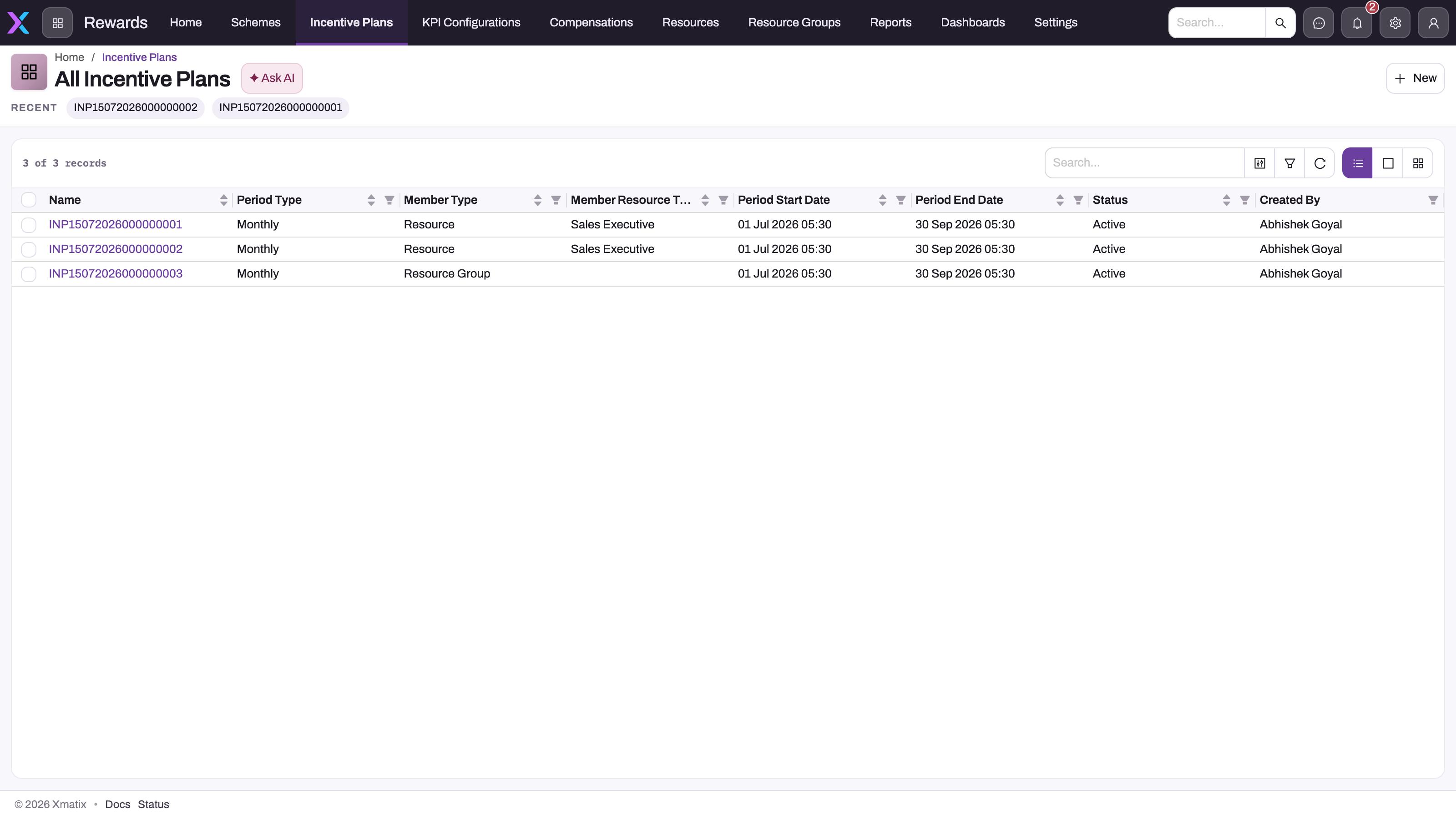
- 1
Incentive Plans — the plan definitions: who is in, which periods, which targets and what each attainment level earns.
- 2
Compensations — the evaluated results; KPI Configurations to its left defines the measures plans can target.
- 3
A plan name opens the designed plan page with its Targets by Resources grid, Targets by KPI pivot, Related definitions and Compensations tab.
- 4
Period Type and Member Type — Monthly plans for Resource members here; Member Type is locked once the plan has members, targets or lines.
- 5
Period Start Date and Period End Date — periods are generated between them once, at plan creation.
- 6
Status is descriptive: nothing in the engine gates on it, so agree its meaning with your team.
Open the App Launcher (the grid icon next to the logo), search for Rewards and select it. The app appears only when your administrator has enabled the Rewards module and granted your security profile access; Claims is a separate module and is not part of Rewards.
| Entry | What it holds |
|---|---|
| Home | Landing page |
| Schemes | Trade schemes, shared with the Sales module — usable as incentive rewards |
| Incentive Plans | Plans, with their periods, members, lines, targets and slabs, on a designed plan page |
| KPI Configurations | Definitions of measures that targets can reference |
| Compensations | Compensation records and their lines — the evaluated results |
| Resources, Resource Groups | The people (and groupings) plans enrol as members |
| Reports, Dashboards | The seeded Rewards reports and the Incentives & Targets dashboard |
| Settings | The module's settings page |
How the pieces connect
- Define the plan. Create an Incentive Plan with its Member Type (Resource, Partner or Branch), Period Type (Weekly, Monthly or Yearly on the form) and Period Start and End dates. Saving generates the plan's Incentive Periods between the dates. This happens once, at creation, so extending the end date later creates no new periods. Member Type, Period Type and the partner scope lock as soon as the plan has members or targets.
- Enrol members and set targets. Saving the plan enrols its members (Incentive Resources) automatically for Resource, Partner and Branch plans. Then add Incentive Lines (a qualification rule plus its reward slabs) and Incentive Targets (what is measured, such as sale amount, number of orders or a KPI configuration). A target whose Target Value Type is Fixed Value, Value Across Periods or Value Across Resources generates each member's quota per period, which you can adjust in the plan page's Targets by Resources grid. Finally, set the plan's Status to Approved.
- Accrue performance. Performance KPI rows are written when the Perform KPI Calculation action runs on an order or invoice (saving the document does not write them, and the action has to be added to the page header by an administrator). Each row is stamped with the plan, period and target it counts toward. Targets linked to a KPI configuration accrue from that configuration instead. Nothing runs on a schedule.
- Evaluate. The incentive engine scores a Compensation Line for each member, period and plan. It measures the member's achievement against their quota, finds the matching slab, and writes the Incentive Amount (or gifts, points, a scheme or discount group) onto the line. Process Compensation on an Incentive Period creates the period's Compensation record and every member's line in one step, scores them and totals the header. It has to be added to the period page by an administrator (see Incentive plans). Without it, create the Compensation and its lines by hand, and saving a line scores it. Lines do not refresh themselves when later KPIs land, so process the period again or re-save the line.
- Review and pay. Compensation totals and lines are reviewed on the record, the dashboard and the reports. There is no approval process and no hand-off to Payroll or Finance: payout is recorded by the line's Is Compensation Received flag, which you set by hand.
Section map
| Page | What it covers |
|---|---|
| Incentive plans | Plans, periods, members, targets and lines — and how the engine evaluates them |
| Plan members | Who takes part in a plan — enrolment, adding and removing members, and how members are matched to performance |
| Incentive lines | A plan's reward rules: adding, changing and removing lines, and how each line's criteria and reward applicability decide what it pays |
| Incentive targets | What a plan measures — target types, item and account filters, generated quotas and how a target is scored |
| Member quotas | Each member's number per target and period — generating, importing and editing quotas, and how they are scored |
| Incentive periods | A plan's time slices — processing each period's compensation, and closing periods |
| KPI configurations | Defining the measures plans can reference, and their limits |
| Performance KPI records | The running totals that Perform KPI Calculation writes from orders and invoices, and that targets without a KPI configuration are scored from |
| Compensation records | The payout header per period — finding, reviewing, overriding, marking paid and signing off |
| Compensation slabs | How lines are scored and what each band of achievement pays |
| Running an incentive cycle | The period cycle: set targets, accrue performance, evaluate, review |
| Tracking incentives | The plan page grids, the Compensations tracker, the dashboard and reports, on web and mobile |
| Configuration reference | Administrator reference: access, picklists, numbering, buttons to add, background jobs, validations, period generation, target types |
| Troubleshooting | Missing lines, unexpected amounts, and what to check |
Common questions
How is an incentive plan different from a trade scheme?
A trade scheme evaluates one document and gives its benefit to the customer on that document. An incentive plan evaluates a member's accumulated KPI performance over a period against a target assigned to that member, and writes what they earned to a compensation line. "5% off orders over 50,000" is a trade scheme; "reps who hit 120% of quarterly quota earn a bonus" is an incentive plan.
Who can an incentive plan reward?
The plan's Member Type decides. Resource covers your own people, optionally narrowed by Member Resource Type or a resource group. Partner covers partner accounts, and Branch covers branches. Customer plans work once an administrator adds Customer to the picklist. Their members are added by hand, and only targets linked to a KPI configuration are scored for them. The picklist values Dealer and Role are not recognised, so such a plan enrols and scores no one. Each member gets their own target values, and achievement is measured against those personal values. A Partner-member plan also derives partner targets for the partner portal automatically.
Does an incentive plan need approval before it runs?
Yes. Only plans whose Status is Approved accrue performance and are scored. A Draft or Pending Approval plan pays nothing, however complete it is. No approval process is seeded, though. You move the plan through Draft, Pending Approval and Approved with the status bar on the plan page, and anyone who can edit the plan can approve it. To restrict that, limit edit access in the security profiles. See Incentive plans.
Where do people see what they've earned?
On the plan page (targets and periods in the grids, results under its Compensations tab), on the Compensations list and records, on the Incentives & Targets dashboard and in the seeded Rewards reports. See Tracking incentives.