
Nudges are administered in two places: Sense AI Settings (Setup → Sense AI Studio → Configuration → Sense AI Settings) holds the module switches that turn the feature on for your organization, and Setup → Sense AI Studio → Configuration → Nudges is the complete inventory of every nudge source — built-in, rule, agent and external — where each one is enabled, tuned or silenced. This page walks through both, and through the tuning model: you store only what you change, so anything left blank keeps following the shipped defaults.
Prerequisites
- The Feature Hub settings capability (
setup.featurehub.settings.manage) for the module switches. - The AI Studio agents capability (
setup.aistudio.agents.manage) for the Nudges inventory page. - Sense AI seats assigned to the users who should see nudges — see Licensing. There is no separate per-user nudge permission: a seat plus the switches below is the whole gate.
Procedure
- 1
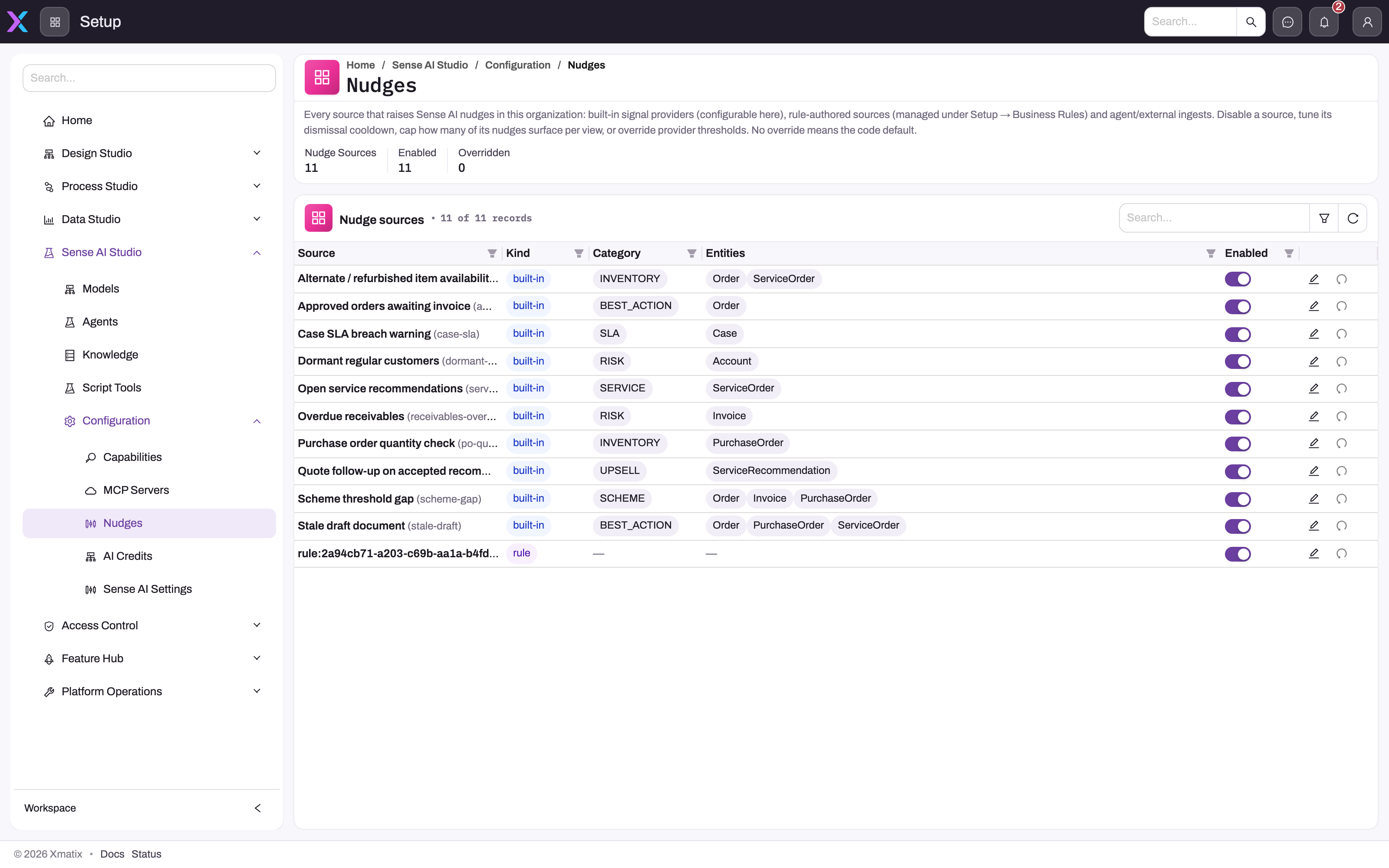
The description states the tuning model: nothing is stored until you override it, and a blank setting follows the code default.
- 2
Nudge Sources, Enabled and Overridden are the control totals to note before and after a change.
- 3
Kind (built-in, rule, agent, external), Category and Entities tell you where a source's logic lives and which records it can annotate.
- 4
Enabled is the per-source gate for future computation; it does not by itself retire nudges already stored.
- 5
Edit opens the cooldown, cap, threshold and entity overrides; the circular arrow is Reset to defaults.
- 6
Search, filter and refresh locate a source and re-read the saved inventory state after a change.
The inventory lists every source with its kind, category, entity scope and Enabled state, with edit and reset actions per row. Note the Nudge Sources, Enabled and Overridden counts before tuning, because Reset to defaults writes default-like values; it is not a historical rollback.
Step 1 — Turn the module switches on
Open Setup → Sense AI Studio → Configuration → Sense AI Settings. There are two switches, and it matters which one you use: the Sense AI master switch controls the whole module — off means both nudges and the chat assistant stop — while Enable Sense AI nudges controls only nudges, so switching it off keeps the assistant running without suggestions. The master switch always wins. Both take effect on the user's next page load, and on the next hourly cycle for background calculation.
Step 2 — Confirm who holds a seat
A user sees nudges only if they hold a Sense AI seat and both switches are on. If a pilot group should see nudges and nobody else, assign seats to the pilot group — the rest of the organization simply has no Sense surfaces.
Step 3 — Review the source inventory
Open Setup → Sense AI Studio → Configuration → Nudges. Each row is one source, tagged by kind:
| Kind | Meaning | Editable here |
|---|---|---|
| built-in | Ships with xMatix — the built-in library | Everything: on/off, cooldown, cap, thresholds, entities |
| rule | A business rule of yours with a Raise Nudge action | On/off, cooldown, cap (the logic lives on the rule itself) |
| agent | Published by an AI agent | On/off, cooldown, cap |
| external | Posted in by an outside system through the API | On/off, cooldown, cap |
The header shows how many sources exist, how many are enabled and how many have an override row. The inventory can stop a source from producing future occurrences, but the effect on already-stored Active nudges depends on how that source next reconciles. Do not promise that toggling a row immediately removes every card already in the store.
Step 4 — Tune a source
Flip Enabled directly in the table, or open Edit for the full set:
- 1
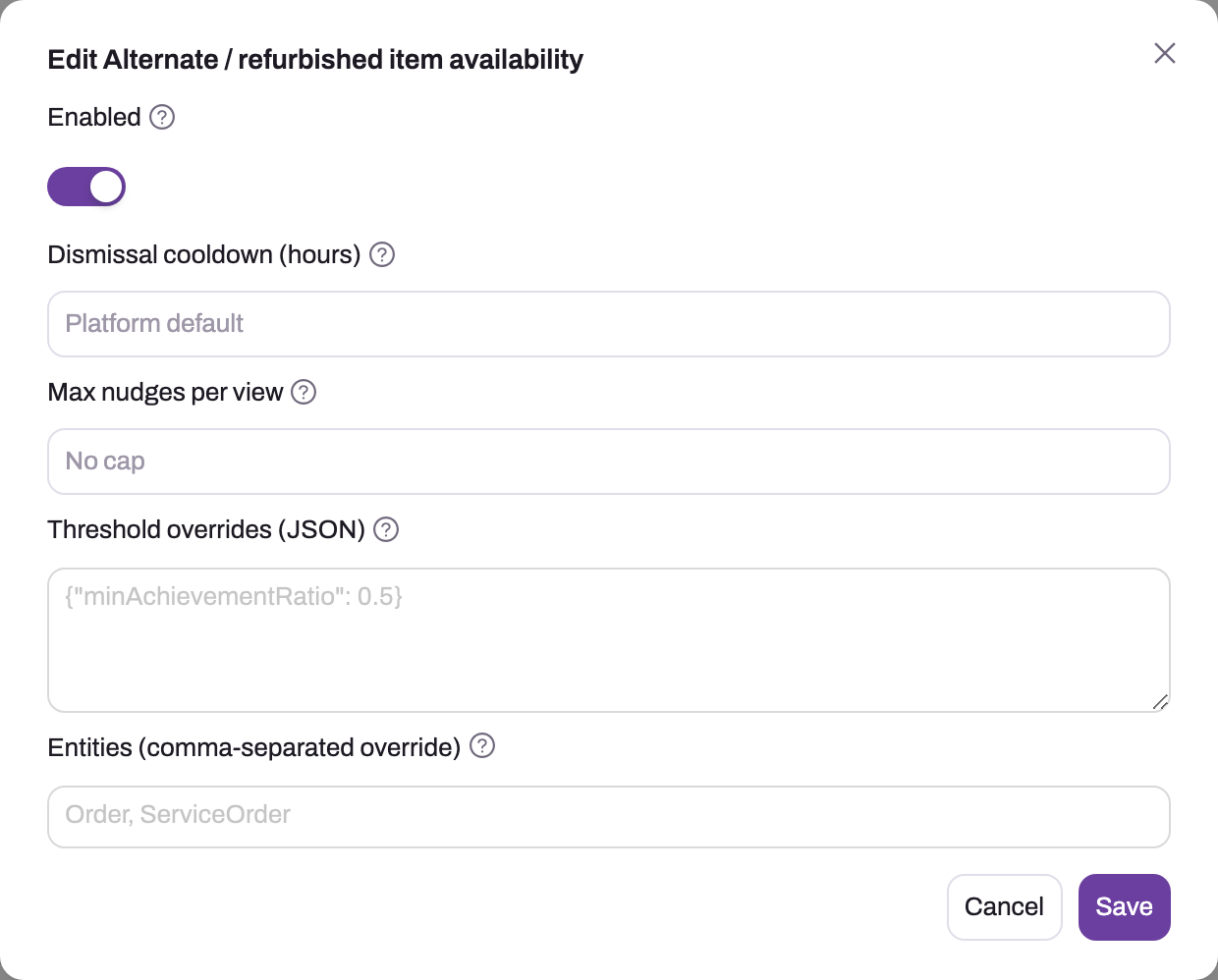
The title names the exact source being tuned; check it against the row before saving.
- 2
Enabled gates future computation for this source; already stored Active nudges are not universally removed by switching it off.
- 3
Dismissal cooldown (1–8760 hours) is how long a dismissed occurrence stays suppressed; blank = the 7-day platform default.
- 4
Max nudges per view (1–50) caps this source on record panels and list strips; it is not applied to the Sense Home feed.
- 5
Threshold overrides must be a JSON object using the source's own key names; unknown keys are ignored silently.
- 6
Entities narrows a built-in source to a comma-separated list of entities; blank keeps its default scope.
- 7
Save writes the override row and invalidates the cache; the change is consulted on the next calculation.
| Setting | Range | What it does |
|---|---|---|
| Enabled | on/off | Off blocks future built-in computation and is consulted by supported rule, agent and external publishers. Existing rows are not universally retired merely by saving this switch |
| Dismissal cooldown (hours) | 1–8760 | How long a dismissed nudge from this source stays suppressed. Blank = 7 days |
| Max nudges per view | 1–50 | Caps this provider on record panels and list/view strips after ranking. It is not applied to the cross-entity Sense Home feed. Blank = no provider cap |
| Threshold overrides (JSON) | built-ins only | Changes the numbers the source decides with |
| Entities | built-ins only | Restricts the source to specific entities. Blank = its defaults |
Blank always means "use the shipped default", so product updates to defaults reach you automatically for anything you haven't overridden. Threshold overrides must be a valid JSON object using the source's exact key names — a worked example, making the scheme nudge speak up only when a customer is genuinely close to the threshold:
{"minAchievementRatio": 0.75}Set that on Scheme threshold gap with Max nudges per view at 2. The threshold changes which future candidates qualify, while the cap shows no more than two rows from that provider on one record or list/view surface. It does not promise a two-item limit in Sense Home. Changes are consulted on the next calculation: scheduled sources on a later sweep and save-triggered sources on a later relevant save.
Step 5 — Reset a source you've over-tuned
Reset to defaults sends enabled=true with blank cooldown, cap, thresholds and entity values. The backend keeps an existing provider-config row and writes those default-like values rather than deleting it, so the source behaves like code defaults even though the inventory can continue to count it as overridden and keep Reset available. Verify the effective columns after resetting; do not use the Overridden counter as proof that custom values remain.
Step 6 — Verify
Save a record that should trigger a save-driven source and expect its nudge within seconds (rapid edits are batched — one calculation per record per minute, not per keystroke). Time-based sources need up to an hour. Then let the feature run and watch the recorded funnel — seen, clicked, applied, dismissed, snoozed, evidence opened — to see which sources earn their place. Sources your users consistently dismiss and never act on are the ones to tune down or switch off.
Expected result
Licensed users see nudges only when the required module switches, seat and applicable source are enabled. A tested source produces within its trigger window and respects its effective entity scope, thresholds and cooldown. Its provider cap can be verified on a record panel or list strip, not in the Sense Home feed. After disabling, verify both future publishing and existing cards for that source; after reset, verify default-like values even if the override counter remains non-zero.
Common problems
No nudges anywhere. Check in order: both Feature Hub switches on; the user holds a seat; the sources you expect are Enabled in the inventory; and for time-based sources, an hour has passed since enabling. The pipeline is deliberately quiet on failure — a misconfigured source produces nothing rather than an error.
One source produces nothing. Check it is Enabled and that its Entities override, if any, still covers the entity you're testing on. Then suspect your threshold overrides — a stricter number than intended is the usual cause, and Reset to defaults rules it out in one click. For a rule source, also confirm the rule itself is active and its condition matches.
Threshold overrides won't save. The field needs a valid JSON object — not an array, not a bare value, double quotes around key names. Unrecognized keys are ignored silently, so a misspelled key looks like a setting that "doesn't work"; check spelling against the source's documented keys.
A dismissed nudge came back. Dismissal lasts the cooldown window, then the source re-evaluates. If that is too chatty, raise the source's dismissal cooldown; if the nudge should never appear, disable the source.
Too many nudges. On record or list surfaces, lower Max nudges per view for the noisiest providers and raise valid provider thresholds. For Sense Home, change the attention-queue widget's overall or per-category caps; provider Max per view is not applied by that cross-entity endpoint.
The Nudges page is missing. It requires the setup.aistudio.agents.manage capability — check your own profile before anything else.
Common questions
Can we create our own nudge?
Yes. Add a Raise Nudge action to a business rule: write the condition, choose a custom template (headline, category, impact value, action buttons) or reuse a built-in source with your own numbers for that rule's specific situation. One rule of thumb matters more than the rest: a nudge about something that becomes true with the passage of time — a draft going stale, a follow-up missed — must use an On Schedule trigger with a candidate filter, because saving a record resets its timestamps and a save-triggered rule can never notice that time has passed. Agents and external systems can also publish nudges; all of it lands in the same inventory.
What exactly happens when I disable a source?
The switch changes the effective provider configuration immediately after cache invalidation. Built-in descriptor selection skips a disabled source, and supported rule, agent or external paths consult the same setting. That alone does not run a universal cleanup of stored rows. Some publishers retract their rows when they next execute; others simply stop producing. Re-enable restores future eligibility and preserves the row's other saved values, then verify the feed rather than assuming old rows were retired.
Do threshold changes affect nudges already showing?
Not retroactively — a threshold change applies from the next calculation. Save-triggered sources re-evaluate the next time each record is saved; hourly sources re-evaluate on the next sweep, at which point nudges that no longer qualify are superseded.