
A call record is the log of one phone call in xMatix. It holds the call's numbers, timings, agent, outcome and notes, and it links to the business record the call was about. The softphone creates and closes these records for you. Each one appears in the Call Register, where you can list it, filter it, report on it and open it like any other record. A call that is linked to a case, order, lead or other record also writes one Call entry onto that record's timeline. That way the conversation shows up where colleagues will look for it.
Overview
The Call Register is organisation-wide. It has one row per call: inbound calls that rang, outbound calls dialled from the softphone, and calls that someone logged by hand. The record's timeline is different: it shows the engagement history of one business record. A call can appear in both places. The register row is the full telephony record, and the timeline entry is a short summary written onto the linked record.
The register is in three apps:
- CRM → Call Register
- Support → Call Register
- the Service Settings App
When to use it
- Agents: to check that a call was logged, to correct its outcome or notes afterwards, and to find calls that rang but were never answered.
- Team leads: to review call volume and talk time over a view, for example one agent's calls this week or every call with the outcome Complaint.
- Anyone without the softphone: to log a phone call by hand with New.
How xMatix handles it
A call is created by the telephony service, not by the agent:
- Inbound calls: the record is created as soon as the call starts ringing, with Status Ringing. A repeat ring signal for the same call adds no second record.
- Outbound calls: the record is created when you dial from the softphone, also as Ringing.
The status moves on as the call progresses:
- When an agent answers (Accept in the softphone), Status becomes InProgress and Answered is stamped. The first agent to accept gets the call, and anyone accepting after that is told "This call was already answered." At this point the call's Agent is set from the routing resource linked to the user who answered.
- When the call ends, either from the agent's hang-up or from the telephony service's end signal, Status becomes Completed and Ended is stamped.
- Wait (s) and Duration (s) are calculated on save: ring start to answer, and answer to end. Each is filled only once and never recalculated after that.
Unanswered calls are also Completed. The Missed, Voicemail, Failed and Declined values are in the Status list, but nothing in the platform writes them. A call that rang and was never answered ends as Completed with an empty Answered and an empty Duration (s). Decline on the ringing card only dismisses the card in your browser and does not change the call. The call ends when the telephony service reports that it ended.
Caller matching is automatic:
- The softphone strips the incoming number (or, for outbound calls, the dialled number) down to its digits and takes the last seven.
- It looks for those seven digits as one unbroken run in a contact's Phone, Mobile Phone, Home Phone or Other Phone.
- If no contact matches, it tries the account's Phone.
- A contact match also fills the call's Account with the contact's account.
Because the match is on an unbroken run of digits, a stored number written with spaces or dashes inside its last seven digits does not match. Assistant Phone is not searched. Numbers with fewer than six digits are never matched. When two contacts share a number, the first one found is used, with no choice offered.
Dispositions are recorded at wrap-up. After you hang up, the softphone shows After-call work with a 45-second countdown.
- Choosing an outcome: six chips are shown: Resolved, Follow-up, Call back, Escalated, Sale and Complaint. More… offers the full list: Resolved, Follow Up Required, Call Back Later, Escalated, No Answer, Voicemail, Wrong Number, Complaint, Sale and Information Provided. If you ran the AI analysis during the call, its suggestion is marked AI and pre-selected when you haven't chosen one.
- Saving: Save disposition saves the chip to the call's Outcome and your Wrap-up notes to Notes. The notes you typed during the call (Agent notes) are the same text. The disposition and notes current at the moment you hang up are also saved when the call is closed.
- Finishing: when the countdown ends, or when you choose Finish & go Available, you go back to Available.
The link to the record you create. During the call, Create from this call lets you pick a record type and opens its New form, pre-filled as follows:
| Field on the new record | Pre-filled with |
|---|---|
| Subject or description | Inbound call · number |
| Contact and account | The caller's matched contact and account |
| Phone number fields | The caller's number |
| Source | Voice |
- Record types offered: Suggested for this call lists Case, Service Order and Task. All records lists Lead, Opportunity, Contact, Account, Activity, Appointment, Quote, Order and Note, and the search box reaches any other record type.
- Linking: when you save the new record, the call is linked to it. Related record then shows the call's subject, and the call remembers which record it belongs to.
The timeline entry is written once. The first time a linked call is saved in a finished status, xMatix adds one Call activity to the linked record's timeline. This entry holds:
| Item | Value |
|---|---|
| Subject | Inbound call · number (or Outbound call · number) |
| Start and end | The call's answer (or ring) time and its end time |
| Duration | In whole minutes |
| Number | The other party's number |
| Outcome | The call's Outcome at that moment |
| Caller | The matched contact and account |
| Visibility | Internal |
Two consequences follow from this:
- Later edits don't reach the timeline. Notes are not copied to the timeline entry. Later changes to the call's Outcome don't update it either.
- Wrap-up dispositions usually miss the timeline. If the call was linked before you hung up, the entry is written at hang-up, before you pick a wrap-up chip, so the disposition stays on the call record only. If the record is created after the call has ended, the entry is written when the link is made and carries whatever Outcome the call has by then.
If a call is linked to a second record, its existing timeline entry moves to the new record.
Recordings and transcripts arrive after the call. Where your organisation records calls:
- Recordings: the telephony service fills Recording URL when the recording file is ready, which is after the call has ended.
- Transcripts: running the AI analysis on a call (see call insights) creates a separate transcript record linked to the call, stores the summary there and sets Transcript status to Ready. Transcript text is never stored on the call itself. See Conversation transcripts.
Prerequisites
- To use the register: access to the Call record type through your security profile.
- To use the softphone: telephony must be set up for your organisation (trunks, numbers and routes), the Telephony (CTI) module must be enabled, and your user must be linked to a routing resource that belongs to an active queue. If any of these is missing, the softphone never appears. The register still works and calls can still be logged by hand.
- Desktop browser: the softphone runs only in the desktop browser.
Procedure
Step 1 — Open the register
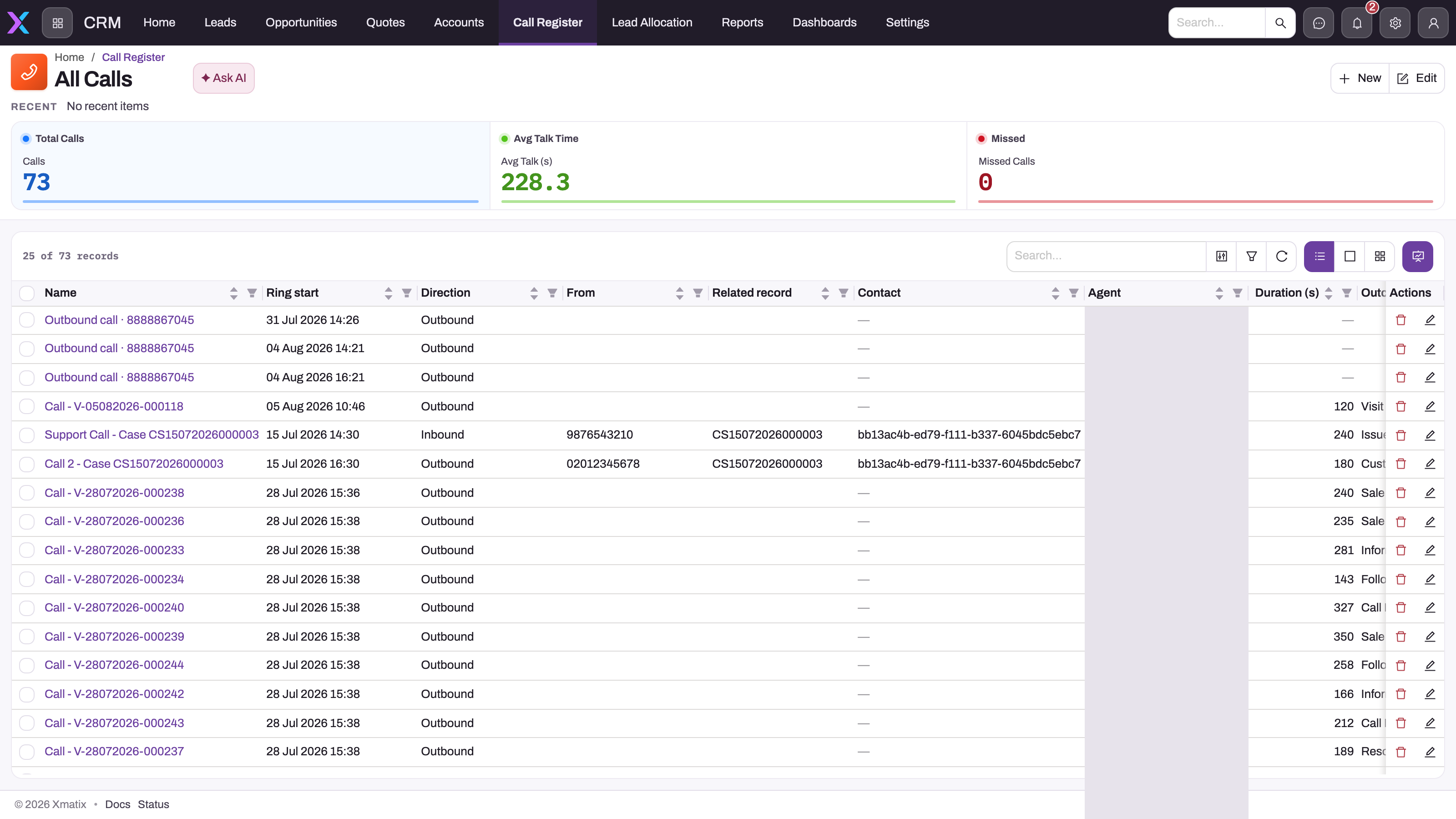
- In the CRM or Support app, choose Call Register. The default view, All Calls, opens.
- Read the cards across the top:
- Total Calls: the number of calls in the view.
- Avg Talk Time: the average Duration (s).
- Missed: calls whose Status is Missed. Because nothing writes that status, this card normally shows 0. To see unanswered calls, see Step 2.
The columns are Call, Ring start, Direction, From, Related record, Contact, Agent, Duration (s), Outcome and Status. A second seeded view, also named All Calls, shows Call Id in place of the name.
From the Calls drawer of the softphone you can also reach the 15 most recent calls you have access to, including colleagues' calls. Select a row to open its call record.
Step 2 — Find a call
Use the toolbar search, the column filters or the filter panel. Useful filters:
- Unanswered calls: Answered is empty (add the column if needed) and Status is Completed.
- One agent's calls: filter Agent.
- Calls about a record: filter Related record, or open the record and read its timeline.
- Calls still open: Status is Ringing or InProgress (see Common problems).
Step 3 — Read a call record
Select the call's name. The header shows Direction, Status, Outcome, From, Duration (s) and Agent. The form has three tabs:
- Details:
- Key Information: Direction, Outcome, Provider, Call Id, Answered and Wait (s).
- Call Details: From, To, Ring start, Ended and Duration (s).
- Notes & Recording: Notes and Transcript status.
- References: Contact, Account, Related entity, Related record and Agent.
Step 4 — Correct the outcome or notes
You can change Outcome and Notes in either of two ways:
- On the call page: edit the field in place. On the call page, Outcome offers only Answered, Missed, Voicemail, Declined, Abandoned and Resolved.
- With Edit: choose Edit to open the full form. Its Outcome list carries every value, including the wrap-up values such as Follow Up Required or Complaint.
Save your change. The call record updates, but a timeline entry already written on the linked record keeps its original outcome.
Step 5 — Log a call by hand
Use this for a call made outside xMatix, for example on a mobile phone.
- In Call Register, choose New.
- Fill Contact and Account.
- On Call Details, set Direction, Outcome, From, To and Notes.
- On Timing & Duration, enter Ring start, Answered and Ended, or type Duration (s) directly.
- Save.
The call is saved as Completed. If you leave Direction empty it is saved as Inbound, and if you leave Ring start empty it is set to now. Its name is built for you, for example Outbound call · 5550142.
A call logged this way has no link to a business record, so it writes no timeline entry. To record the conversation on a case or lead, add a call activity on that record's timeline instead (see Activities).
Step 6 — Close a call that is stuck open
- Open the softphone's Calls drawer.
- On a recent call that still shows Ringing or InProgress, choose End this call (the hang-up icon on the row).
xMatix asks the telephony service to hang up, then marks the call Completed and stamps Ended. The message Call ended. confirms it. If the call is the one you are on, the button goes through the normal hang-up and wrap-up instead.
Step 7 — Export or report
Use the list's export, or build a report on the Call record type. Outcome, Agent, Direction and Duration (s) are the usual groupings.
Fields
| Field | What it means | Notes |
|---|---|---|
| Call | The record's display name | Built as Inbound call · number or Outbound call · number when left empty |
| Direction | Inbound or Outbound | Defaults to Inbound |
| Status | Where the call is in its life | Ringing, InProgress, Completed, Missed, Voicemail, Failed, Declined. Only Ringing, InProgress and Completed are written by the platform; on no seeded form as an input |
| Outcome | The disposition | Answered, Missed, Voicemail, Declined, Abandoned, Resolved, Follow Up Required, Call Back Later, Escalated, No Answer, Wrong Number, Complaint, Sale, Information Provided, Diagnostic Decision, Scheduled Inspection, Case Logged. The call page offers only the first six |
| Provider | The telephony service that handled the call | Filled by the service |
| Call Id | The telephony service's own identifier for the call | Used to match later signals to this record |
| From / To | The calling and called numbers | |
| Ring start | When the call started ringing (or was dialled) | Set to the save time when left empty |
| Answered | When an agent picked up | Empty on unanswered calls |
| Ended | When the call ended | Stamped automatically when a call that was answered is completed without one |
| Wait (s) | Seconds from ring start to answer | Calculated once |
| Duration (s) | Talk time in seconds, answer to end | Calculated once; empty when unanswered |
| Notes | Agent notes and wrap-up notes | Not copied to the timeline entry |
| Transcript status | Whether a transcript exists | None, Pending, Ready, Failed. Set to Ready by the AI analysis |
| Recording URL | Address of the recording file | Filled by the telephony service after the call; not on the seeded forms |
| Contact / Account | The matched caller | Filled by caller matching; editable |
| Related entity / Related record | The record type and title of the record the call is about | Set when you create a record from the call |
| Agent | The routing resource who answered | Set when the call is answered |
| Queue | The queue name | Not filled by the current routing |
Business rules
- Defaults on create: Direction Inbound, Status Completed, Ring start now, and a generated name.
- Agent stamping: when Status becomes InProgress and no agent is set, the agent is the routing resource of the user saving the change. The agent and queue display names are copied onto the call.
- Timings: Wait (s) and Duration (s) are calculated only while empty. Ended is stamped when an answered call is set to Completed without one.
- Timeline entry: written once, the first time a linked call is saved with Status Completed, Missed, Voicemail, Failed or Declined. Its status is always Completed and its visibility Internal.
- Re-linking: linking the call to another record moves the existing timeline entry with it.
- Deleting: deleting a call does not remove its timeline entry, and deleting the timeline entry does not change the call.
- Logging from another dialler: calls handled in a separate dialler can be logged through the platform's telephony call-logging endpoint, called as the signed-in agent. Such calls are saved as Completed, with ring and answer times worked back from the duration you send. The notes sent with them are not stored.
Example
A customer calls the support line from 020 7946 0142. The number is stored on their contact record as Mobile Phone 02079460142, so the softphone shows the contact's name and their account, Harbour Supplies, before anyone answers.
- A support agent accepts. The call is now InProgress, with the agent's resource as Agent.
- The agent types in Agent notes: "Pump at site 3 tripping since Monday."
- The agent chooses Create from this call → Case. The new case opens with the contact, Harbour Supplies, the number and source Voice already filled. The agent saves it, and the call's Related record now shows the case.
- The agent hangs up. The call becomes Completed with a Duration (s) of 312. The case's timeline gains Inbound call · 02079460142 with a duration of 5 minutes.
- In After-call work, the agent picks Escalated and selects Save disposition. The call's Outcome is now Escalated. The case's timeline entry keeps an empty outcome, because it was written at hang-up.
Training
Practice exercise
In a sandbox without a telephony connection:
- Open Call Register and choose New.
- Fill:
- Direction: Outbound
- To: 5550199
- Outcome: Call Back Later
- Notes: "Left message about renewal"
- Answered: today at 10:00
- Ended: today at 10:15 (the time pickers move in 15-minute steps)
- Save.
Expected result:
- The call is named Outbound call · 5550199.
- Status is Completed and Duration (s) is 900.
- The Total Calls card goes up by one.
- On the call page, the Outcome field offers only six values. Edit offers all of them.
Quick reference
- The register is in CRM and Support → Call Register.
- Calls are created by the telephony service. New is for logging a call by hand.
- An unanswered call is Completed with no Answered time, not Missed.
- Decline on the ringing card only hides it on your screen.
- The disposition goes to Outcome, and wrap-up notes go to Notes.
- Create the record during the call with Create from this call, and the call links itself.
- The timeline entry is written once, when a linked call ends. Later edits stay on the call.
- Caller matching uses the last seven digits, stored without separators.
- Use End this call in the Calls drawer for calls stuck in Ringing or InProgress.
Permissions
| To… | You need |
|---|---|
| See, create, edit or delete calls | Access to the Call record type in your security profile. The seeded System Admin, Standard User and Sales Executive profiles have full access |
| Have created records linked to the call | The Link to record server action granted on your profile. The seeded Standard User and System Admin profiles have it; Sales Executive does not |
| Use the softphone | No separate capability. The Telephony (CTI) module must be enabled, and your user must be in an active queue |
| Watch every live call and agent figures | The Supervise telephony (CTI) capability (see the supervisor console) |
| Configure trunks, numbers, queues, agents and routes | The Manage telephony (CTI) capability |
A user whose profile lacks the Link to record grant can still create a record from a call. The record is saved, but the call is not linked to it, no message is shown, and no timeline entry is written. The seeded Sales Executive profile is in this position. Add the grant on the profile's server-action permissions for the Call record type (see security model).
Configuration
- Telephony set-up: Setup → Telephony has five screens: Trunks & Numbers, Queues, Agents, Routing and Settings. Settings holds Enable Telephony (CTI), which is on by default. See telephony configuration and inbound routing.
- Outcome values: Outcome is an ordinary picklist, so you can add organisation-specific values in the field's picklist settings.
- The wrap-up chips and the More… list in the softphone are fixed. New values appear only on the Edit form.
- The call page's Outcome field has its own six values set in the layout. To offer more there, edit the Call view layout in the designer.
- Forms and views: the seeded layouts are the Call view, Call create and Call preview, and the two All Calls views. Change them in the designer like any other record type.
- Status and Recording URL are on no seeded form. Add them to the view layout if your agents need to see them.
- The platform has a Recording Player component that shows an audio player and download link for Recording URL. It is not on the seeded form. Add it to the call layout if your organisation records calls.
- Phone data quality: caller matching depends on contact and account phone numbers. Store them so that the last seven digits are unbroken, for example 02079460142 or +44 20 7946 0142, never 020 794 60 142.
- Header buttons: the seeded call page header also lists Link to record and Create record. Selecting them on the call page completes without linking or creating anything, because these buttons send no target record. Use the softphone's Create from this call. You can remove the two buttons from the view layout's header.
Common problems
The Missed card always shows 0
The card counts calls whose Status is Missed, and nothing writes that status. Unanswered calls end as Completed with no Answered time. To find them, filter the list on an empty Answered.
A caller shows as "Unrecognized number" although they are a contact
The contact's number is either stored with a separator inside its last seven digits, or it is stored only in Assistant Phone. Re-enter it without spaces or dashes in Phone, Mobile Phone, Home Phone or Other Phone. The next call will match.
I created a case from the call but the call isn't linked
Your security profile lacks the Link to record permission on Call. The case was saved, but the link failed silently. Ask an administrator to grant it (see Permissions). For the call you already made, the link can't be added from the seeded forms.
The case timeline shows the call without my disposition
The timeline entry was written when you hung up, before you chose the wrap-up outcome. The outcome is on the call record. Open the call from the case's Related record or from the register to read it.
A call stays in Ringing or InProgress
The telephony service's end signal never arrived. Choose End this call on the call's row in the Calls drawer (Step 6).
Link to record or Create record on the call page does nothing
These header buttons send no target record, so the server skips them. Create records from the softphone during the call instead.
There is no recording player on the call
The seeded call form has no player, and Recording URL is not on it. Ask an administrator to add the field with the Recording Player component (see Configuration). The player shows only when the call has a recording. A call that was never answered, or whose recording file hasn't arrived yet, shows nothing.
Common questions
Are unanswered calls kept?
Yes. Every inbound call is saved from its first ring, whatever happens next. When the call ends without anyone answering, it is marked Completed and keeps its ring time, numbers and caller match. Its Answered and Duration (s) stay empty, which is the way to tell it apart from a conversation. Declining the ringing card does not remove or change it either. Filter the register on an empty Answered to build a call-back list, and sort it by Ring start so the oldest callers come first.
Does changing the Outcome on a call update the record it is linked to?
No. The linked record's timeline entry is a one-time copy made the first time the linked call is saved as finished. It takes the subject, times, duration, number, outcome and caller from that moment. Later edits to the call's Outcome or Notes stay on the call record. If you need the timeline to carry the final disposition, add a note on the linked record, or choose the disposition before the call ends.
Who can see call records and play recordings?
Calls follow your organisation's security model. Your profile's access to the Call record type decides whether you can list, open, change or delete calls. Any recording shown on the call form needs the same access. The supervisor console is separate: it needs the Supervise telephony (CTI) capability and shows every live call on the tenant, whoever is handling it.
Can I use the register without telephony?
Yes. The Call record type works in every organisation. Use New to log calls made on any phone, with direction, numbers, times, outcome and notes. Totals and averages in the list cards include these calls. What you don't get without telephony is automatic creation, caller matching, agent stamping, recordings and the link to a record you create from the softphone. For a quick log on one record, a call activity on its timeline may be enough.
Does the mobile app log calls?
No. The field app has no call register. When you tap a phone number in a list, the Call option opens your phone's own dialler, and that call is not recorded in xMatix. Log it afterwards with New in the register on the web, or add a call activity to the record.