
Start from Access Diagnostics
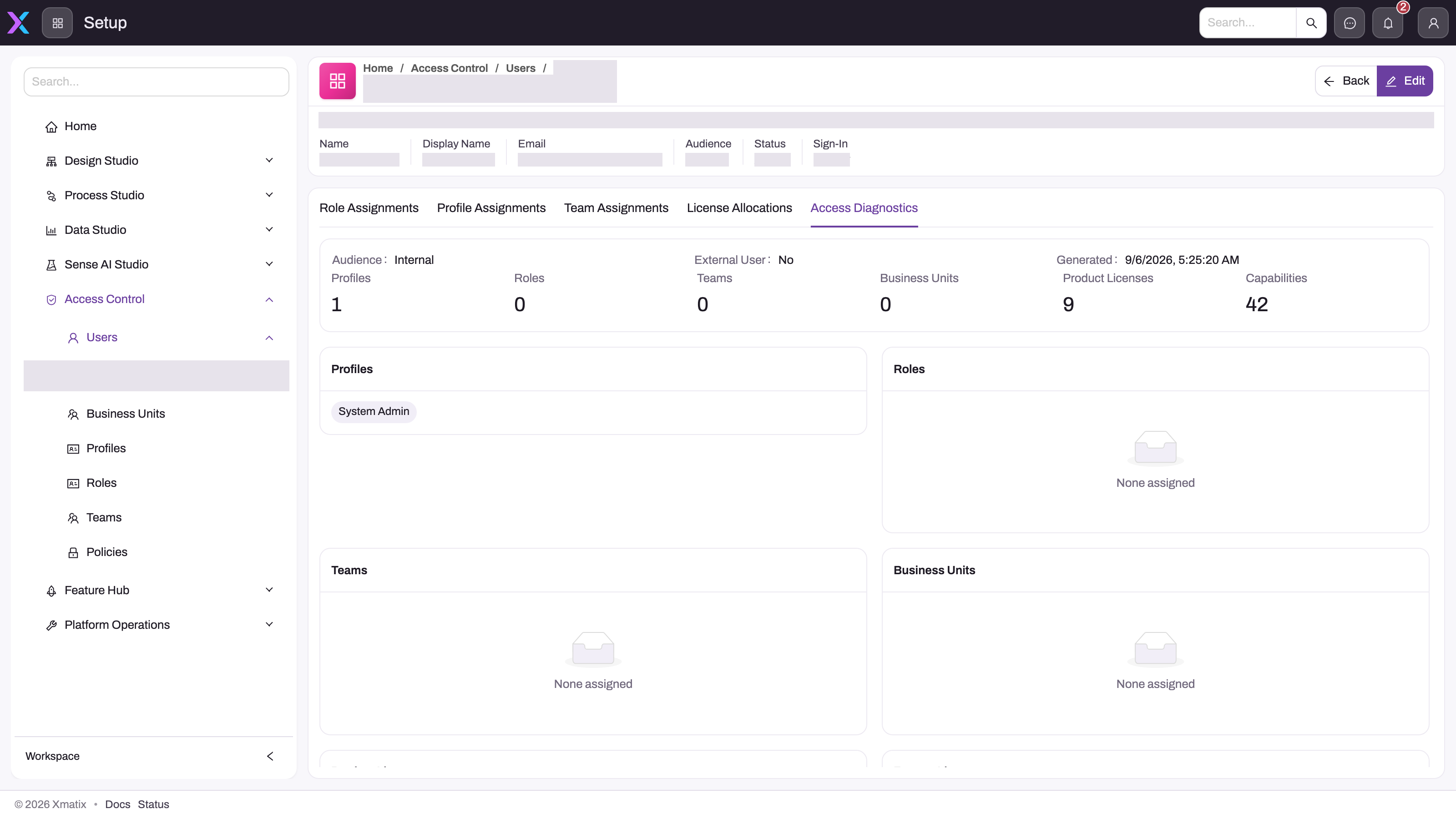
- 1
The header strip shows the account's Audience, Status and Sign-In state — Not provisioned here means identity provisioning never completed and no grant will help until it does.
- 2
Profile, Role and Team Assignments and License Allocations are where fixes are made; Access Diagnostics is read-only.
- 3
Access Diagnostics needs the setup.licensing.admin capability to view for another user; everyone can open their own.
- 4
The counters summarise the effective picture — a zero where you expected an assignment is the finding. Product Licenses and Capabilities count what the profiles carry.
- 5
The Profiles card names the active profiles; a user with none sees no apps and no records at all.
- 6
None assigned on Roles, Teams or Business Units explains missing record visibility that a profile alone cannot supply; the license cards further down show allocated versus required.
Once a user can sign in, the fastest evidence is the user's Access Diagnostics tab (Setup → Access Control → Users → the user). It is computed server-side and lists, in one read-only view, the profiles, roles, teams and business units the account holds, the product and feature licenses allocated to the user beside those its profiles require, and the capabilities the profiles grant. It does not flag the gap for you — compare the allocated lists with the required lists, and read a zero where you expected an assignment as the finding. The adjacent tabs (Profile Assignments, Role Assignments, Team Assignments, License Allocations) are where the fix is made; the account's Sign-in state on the same page tells you whether identity provisioning ever completed. Only the person's name and email are obscured in this capture.
Do not change grants until the problem has been classified. If the person cannot reach any workspace, verify invitation, verification delivery, credentials and provisioning state. If they are signed in but something is absent, confirm license and feature entitlement, then profile, record security, restriction rules and view filters in that order. After a change, have the user refresh their session before concluding the fix failed, because an existing token may still carry the previous access picture.
Sign-in problems and access problems look the same from the user's chair — "I can't get to my work" — but they are fixed in different places. Decide which you have first: if the user cannot reach their workspace at all, it is sign-in; if they are signed in but an app, list, record, field or button is missing, it is access. Everything below assumes that split.
The user can't sign in
The invitation or a one-time code never arrived. First sign-in starts from an invitation email whose set-password link is valid for 72 hours. Check spam and quarantine folders, then have an administrator confirm the account's address and that its Sign-in column shows Ready. Once the account is provisioned the invitation is never re-sent: use Forgot password? on the sign-in page instead. A one-time code is only sent to accounts that have no password, so an invited user (who has one) should use the Password tab. The flow is described in Signing in to xMatix and, from the administrator's side, in Invite a user.
A forgotten password. Use Forgot password? on the sign-in page — a reset link goes to the work mailbox, works once and expires in 1 hour, and opens the page where a new password is chosen. A registered passkey keeps working throughout, so a user with one is never locked out by a forgotten password. If the work mailbox itself is inaccessible, that is an administrator conversation, not something the sign-in page can solve.
The account was never provisioned, or has been removed. The Users register's Sign-in column shows Ready once identity provisioning has completed and Not provisioned until then — a user whose row still says Not provisioned cannot sign in whatever their profiles say; wait for provisioning or re-run the invitation. A cleared Active field, by contrast, does not block an already provisioned identity. If the row is gone altogether, the account was deleted through offboarding; see Offboard or suspend a user.
Sign-in fails on mobile. Try the web with the same credentials first. It is one account everywhere — the same email, password or passkey signs in on web and mobile — so a failure on both is an account question, while a mobile-only failure is an app question. See Using xMatix on mobile and Troubleshooting the mobile app.
Signed in, but something is missing
This is the access side, and it has a canonical ordered walk: Troubleshooting: a user can't see something. Work its checks in order and stop at the first failing layer — fixes elsewhere won't help. In brief:
- Licensing — the tenant license, the module's master switch, and the user's own seat each block independently. See Licensing.
- Profile grants — apps, entities, fields and actions appear only when an active security profile grants them. See Security profiles.
- Record security — the list opens but some records are missing: ownership, role hierarchy, team and business-unit shares, and company scoping decide which rows the user reaches. See Record security.
- Restriction rules — subtractive rules that scope records away even when everything above allows them. See Restriction rules.
- View filters — saved filters, leftover search text and date scopes hide records with no security involved. Compare against an unfiltered view before concluding anything.
The user's Access Diagnostics tab (Setup → Access Control → Users → the user) computes the effective picture server-side — profiles, roles, teams, business units, allocated versus required licenses, capabilities — so start there rather than reading profiles by hand; it shows the lists, and you spot the gap. Viewing another user's diagnostics needs the setup.licensing.admin capability (you can always see your own). For the model behind the layers, read How the xMatix security model works; for worked multi-layer examples, Worked security scenarios.
The fix looks right but "didn't work"
An already-signed-in session can hold its previous access picture until its token refreshes. After changing a grant, seat or rule, have the user refresh their session — or sign out and back in — before concluding the fix failed, then re-check Access Diagnostics. Remember the composition rule as well: a user needs both the entitlement and the security grant, so fixing one layer does nothing while another still blocks.
Other sign-in surfaces
- API and CLI — sign-in and workspace errors in the command-line tools, and 401, 403 and 404 responses from the API, have their own triage in Troubleshooting the developer surface.
- Portal visitors — external users signing up or signing in to a portal are a separate audience with their own failure modes; see Troubleshooting portals.