
Work routing pushes a queued record — most commonly a case, but also an inbound call or any record a business rule asks to route — to one resource without a dispatcher dragging it. The queue names a resource group (the agent pool) and a routing model; the routing service builds the eligible pool from that group, creates a work item (a Resource Work record) for the resource it picks, and leaves the item Pending when nobody qualifies. The dispatch console, by contrast, is a human placing work by hand — see The dispatch console.
Where routing is configured
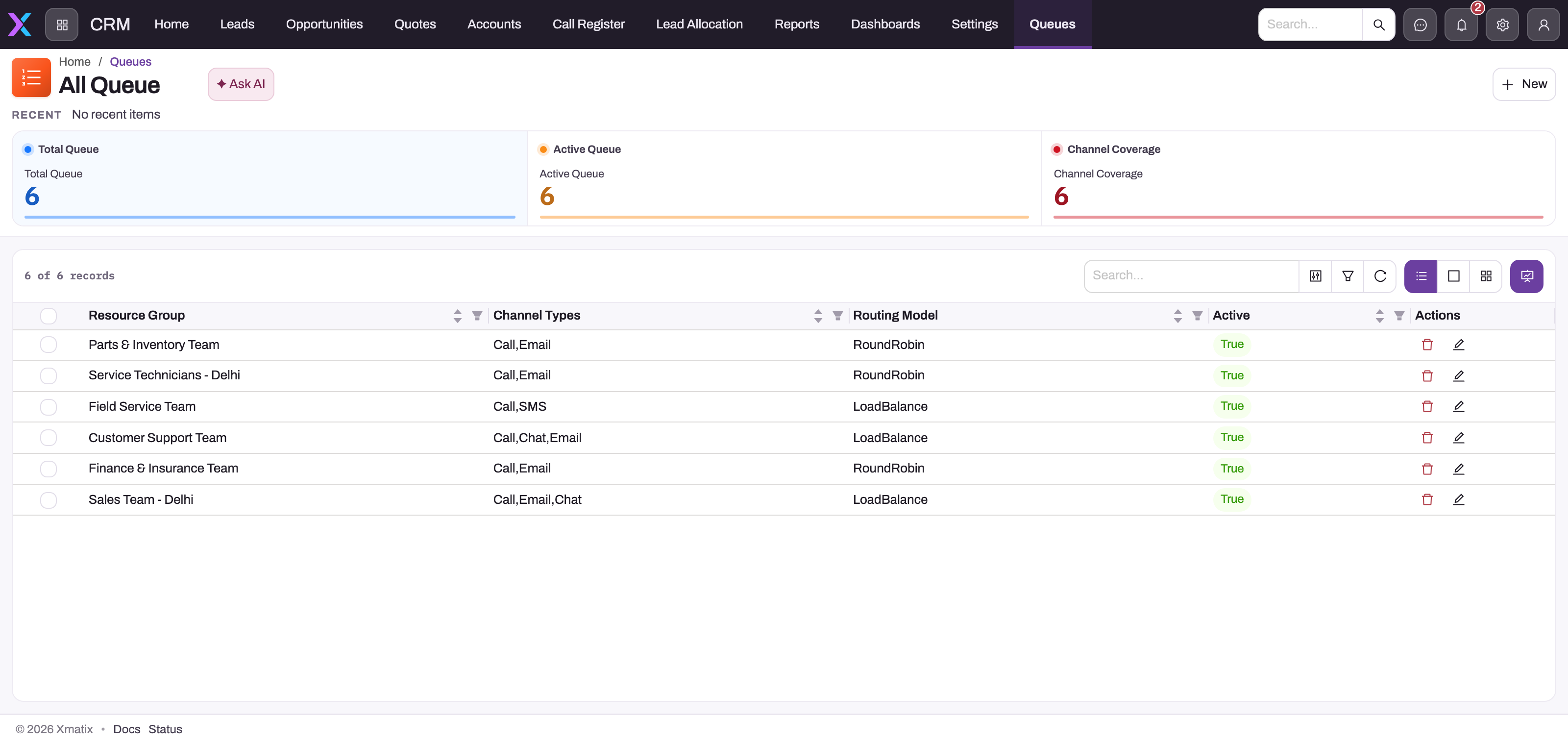
Queues are ordinary records. Operators see them under Support → Settings and CRM → Settings (the Queues card); administrators also maintain them under Setup → Feature Hub → Service → Telephony → Queues, where the New queue dialog asks for a name, description, routing model, the channels the queue serves and its agent pool (a resource group). The Active switch feeds membership checks and the supervisor snapshot, but the route service itself does not refuse a route that names an inactive queue — deactivate a queue and stop pointing rules and telephony routes at it. The case-centric view of the same service is on Queues and omni-channel routing.
- 1
Resource Group — the agent pool. Membership is the first gate of the eligibility ladder; a resource outside the group is never considered.
- 2
Channel Types — the channels this queue serves. Recorded on each work item; the route does not reject a mismatching channel.
- 3
Routing Model — RoundRobin offers to the least-recently-pushed eligible member, LoadBalance to the least-loaded; Skill adds the name/proficiency predicate first; Direct is honoured only when the route names a resource.
- 4
Active — used by membership checks and the supervisor snapshot, but a route that names an inactive queue is not refused.
- 5
New — creates a queue here; administrators can also maintain queues under Setup → Settings → Telephony → Queues.
Three things start a route:
- The Route Case action on a case, which uses the case's own Queue (or a queue passed to the action), the case source as channel, and an optional skill name.
- A business rule that raises the Routing requested event on any entity — the rule supplies the queue, an optional channel, skill and direct resource; a record with no queue and no direct resource is skipped, with a log line, rather than routed nowhere.
- An inbound voice call whose telephony route targets a queue (see Inbound routing).
The eligibility ladder
For every route through a queue, a candidate must pass these checks in order; the first empty result leaves the item Pending:
- Membership — the resource is a member of the queue's resource group.
- Identity — the resource is active and linked to a user account, so accepted work can be owned by that user.
- Presence — the resource's presence is Available and its presence lease is live. Presence is a lease, not a latch: the agent's browser publishes it and renews it every minute; a row not renewed for five minutes reads as Offline even if it still says Available. A presence row with no timestamp (seeded or legacy data) always counts as live.
- Skill — only on a Skill-model queue, and only when the route names a skill. A Resource Skill row must have exactly that
Nameand aProficiencyLevelof at least 1. On Direct, Round robin and Load balance queues the skill argument is ignored. Out of the box a new Resource Skill is named from the RS number series and starts at level 0, so neither condition holds until an administrator changes them — see Skills, resource skills and skill requirements. - Capacity — the resource's current open load plus this item's weight must fit within the Max work items on its presence record (default 5). Load is the sum of the weights of its Assigned and Accepted items; every route today carries a weight of 1, so in practice this is a count of open items.
The skill check is narrower than the Resource Skill record suggests. It reads only Name and ProficiencyLevel; it does not consult SkillId, IsActive, StartDate or EndDate, and it never compares against a work-specific required level. Keep those fields accurate for governance, but test the route with the exact name string the work supplies — a renamed, expired or inactive certification can still match if its stored name and proficiency satisfy the predicate.
When no candidate passes, the item stays Pending for a pull or a supervisor action. That is preferable to silently assigning work to an ineligible user, but it means someone must watch queue backlog and presence.
Routing models
| Model | What the service does |
|---|---|
| Direct | Honoured when the route names a resource: the item is assigned straight to that resource with no eligibility checks. A queue set to Direct whose route names nobody is selected least-loaded, exactly like Load balance. |
| Round robin | Among eligible resources, the one that was pushed work least recently. |
| Load balance | Among eligible resources, the one with the lowest current open load. This is also the fallback when a queue has no model set. |
| Skill | Applies the name/proficiency predicate above, then picks the least-loaded of the remainder. |
Ties are broken by the resource's internal identifier, not by any business priority. Do not read a stable winner between two equal candidates as a configured preference.
Accept, decline, transfer and reassign
- Accept marks the item Accepted and, for a case, stamps the case's assignee and record owner to the accepting resource's user. Routing itself never touches ownership — only acceptance does.
- Decline closes the offer and routes again through the same queue, excluding the decliner — but the repeat route carries no required skill, so on a Skill queue the second offer can go to someone without the skill.
- Transfer to a resource creates an Assigned item for the named resource directly, with no membership, presence, skill or capacity check. Transfer to a queue routes through that queue, again with no required skill.
- Reassign (the supervisor action) re-points the item to the named resource and resets it to Assigned, with no eligibility check at all.
Treat transfer and reassign as deliberate human overrides: check the target's presence, skill evidence and load yourself, because the server does not.
Supervisor checks
The supervisor snapshot lists every active queue with its pending backlog and every resource's effective presence (an expired lease shows Offline), maximum work items and open load. When work is stuck, compare that snapshot with the queue's group membership, each member's user linkage, and — on a Skill queue — the exact skill-name text. For a declined or transferred item, remember the re-route dropped the skill filter.
Common questions
Why did nobody receive the work?
No resource passed the ladder at that moment. Check membership and user linkage first, then whether anyone's presence is Available with a fresh heartbeat, then the exact skill-name match on a Skill queue, then load against Max work items. The item is Pending, not lost.
Does an active, date-valid Resource Skill guarantee routing eligibility?
No. The predicate reads the name and whether proficiency is at least 1; the active flag and validity dates are not consulted. Conversely, an administratively expired row can still satisfy it.
Can a supervisor assign work to someone who is offline or missing the skill?
Yes. Reassign and transfer-to-resource are overrides and do not run the ladder. That flexibility is intentional; the supervisor owns the check.
Can records other than cases be routed?
Yes — any entity a business rule raises the Routing requested event for, and inbound calls. The work item links to the record; only case acceptance carries the extra owner-stamping behaviour.