
The Model Context Protocol (MCP) is the standard for connecting AI assistants and agent frameworks to tools and data, and xMatix speaks it in both directions. Outbound, the platform ships an MCP endpoint: an MCP-capable assistant — Claude, ChatGPT, Claude Code and similar hosts — can discover your organization's entities, query and aggregate records, run reports and dashboards, search knowledge and, when allowed, create and update records, always as a signed-in user and always inside that user's permissions. Inbound, administrators can register external MCP servers in Sense AI Studio so the platform's own Sense agents can call your tools. This page covers both.
xMatix as an MCP server
Enabling it
External assistants are off for every organization until an administrator turns them on under Setup → Sense AI Studio → Configuration → External assistants. The page shows the organization's MCP endpoint URL, statistics for assistants, writes and active connections, and a Settings dialog with three controls: Allow external assistants (the switch — turning it off cuts every existing session immediately), Allow writes (create/update records; setup changes for administrators) (off means every token is capped at read-only, whatever the assistant asked for) and Approved assistants (an optional allow-list of assistant clients). The same page lists every connection — assistant, user, access, connected and last-used times, status — with a per-row Disconnect. Nothing on this page grants anything a user does not already have; it only decides whether assistants may act as your users at all.
How an assistant connects
The endpoint is Streamable HTTP: JSON-RPC 2.0 over POST to the MCP URL, single requests or batches of up to 20, supporting initialize, tools/list, tools/call and prompts/list. An unauthenticated call answers 401 with protected-resource metadata, which is how a standards-compliant assistant discovers the organization's authorization server and registers itself. The user then signs in with the organization's normal sign-in, picks the organization to connect and approves the requested scopes; the assistant receives a short-lived (60-minute) token bound to that one organization, refreshed by rotation. In practice:
- Claude (web or desktop): Customize → Connectors → Add custom connector, paste the MCP URL, sign in when prompted.
- ChatGPT: Settings → Connectors → Create, same URL; the
searchandfetchtools make the connector usable in deep research. - Claude Code:
claude mcp add --transport http xmatix <MCP URL>; the sign-in runs in the browser.
Scopes decide the ceiling: xmatix.read for discovery, query, reports and knowledge; xmatix.write for record creation and updates; xmatix.setup for the administration tools. The write scopes are only granted when the organization has allowed writes, and every tool that changes something is hidden while the organization is in read-only mode. The assistant always reasons with its own model: the endpoint never runs Sense or the Setup Copilot on its behalf, so a connected assistant costs the organization no AI credits.
The tool set
| Tool | What it does |
|---|---|
whoami | Who the token acts as — user, organization, effective scopes |
list_entities, describe_entity | Discover the queryable entities, then load one entity's fields, types, picklists and relations by name or label |
query_data, get_record, query_related | Query records with filters, ordering and paging (25 rows by default, 200 at most), fetch one record by id, or walk a relation from a record |
aggregate_data | Group and aggregate records (counts, sums, averages) without pulling the rows |
list_reports, run_report, list_dashboards, run_dashboard | Enumerate and run the organization's saved reports and dashboards — the same evaluators the product uses |
search_knowledge, read_platform_docs | Search the organization's knowledge collections that ground Sense agents, and read the platform's own documentation |
search, fetch | The generic search-and-retrieve pair some assistants require for deep-research modes |
create_record, update_record | Write tools — need the xmatix.write scope and the organization's write opt-in |
metadata_* (list_collections, describe_entity, list_fields, field_domain, query, get, create, bulk_create, update, delete, composite, clone) | The setup tools for the data model: read and change entities, fields, views, picklists, security profiles and every other metadata collection (xmatix.setup) |
layout_* (list, describe, get, get_reference, upsert, add_field, add_component) | Read and edit form layouts, including adding a field or component to an existing layout |
data_* seeding (query, get, query_view, preview, create, update, delete, composite, bulk_create, run_action), business_rule_preview | Preview-first record seeding and server actions the way the Setup screens do it, plus business-rule evaluation previews |
lifecycle_plan, lifecycle_dry_run | Read an entity's Execution Plan (optionally with an action's phase) and dry-run a save, delete or entity action through the real lifecycle — rolled back, nothing sent — to see every step, what it changed, why each business rule did or did not match, the record after each stage and what would run after commit |
script_*, component_*, workflow_*, integration_* | Automation scripts (draft, test, activate), custom components, Elsa workflows (create, publish, retract, instances) and the whole Integration Hub (apps, connections, bindings, flows, triggers, runs and their errors) |
result_query, jobs_list, audit_query | Mine an oversized setup result with a jq program, list background jobs, query the audit trail |
The setup tools are the Setup Copilot's own tool layer served without its model — the same definitions, the same setup APIs, the same permission checks — offered only to users who hold the xmatix.setup scope in an organization that has allowed writes. Each is annotated read-only or destructive, so a well-behaved assistant runs reads freely and asks you before any change.
The Setup Copilot cookbooks are also exposed as MCP prompts, so an assistant can pull the platform's own step-by-step recipes into its context.
What governs a call
Every tools/call is evaluated as the calling user, in three layers that only ever narrow: the token's scopes, the organization's Sense capability grants (a tool an agent could not be granted is not offered to an assistant either), and the user's own security profiles, record security and restriction rules at execution time. Locked organizations answer 423; read-only organizations hide the write tools. Each call is audited as the calling user; setup calls also appear in the setup audit trail exactly as if the administrator had used the Setup screens. The list/describe/query triple is designed for the way language models work — discover what exists, learn its shape, then query it — so a capable client needs no organization-specific configuration beyond the endpoint URL.
Connecting your MCP servers to xMatix
The reverse direction is a Sense AI Studio concern: register an external MCP server — your pricing service, an internal API, a third-party tool — under Setup → Sense AI Studio → Configuration → MCP servers, and its tools become callable by Sense agents through the MCP tools capability. The list shows Label, Endpoint, Auth, Credential and Status per server, with Set credential, Edit and Delete actions; New MCP server opens the registration dialog.
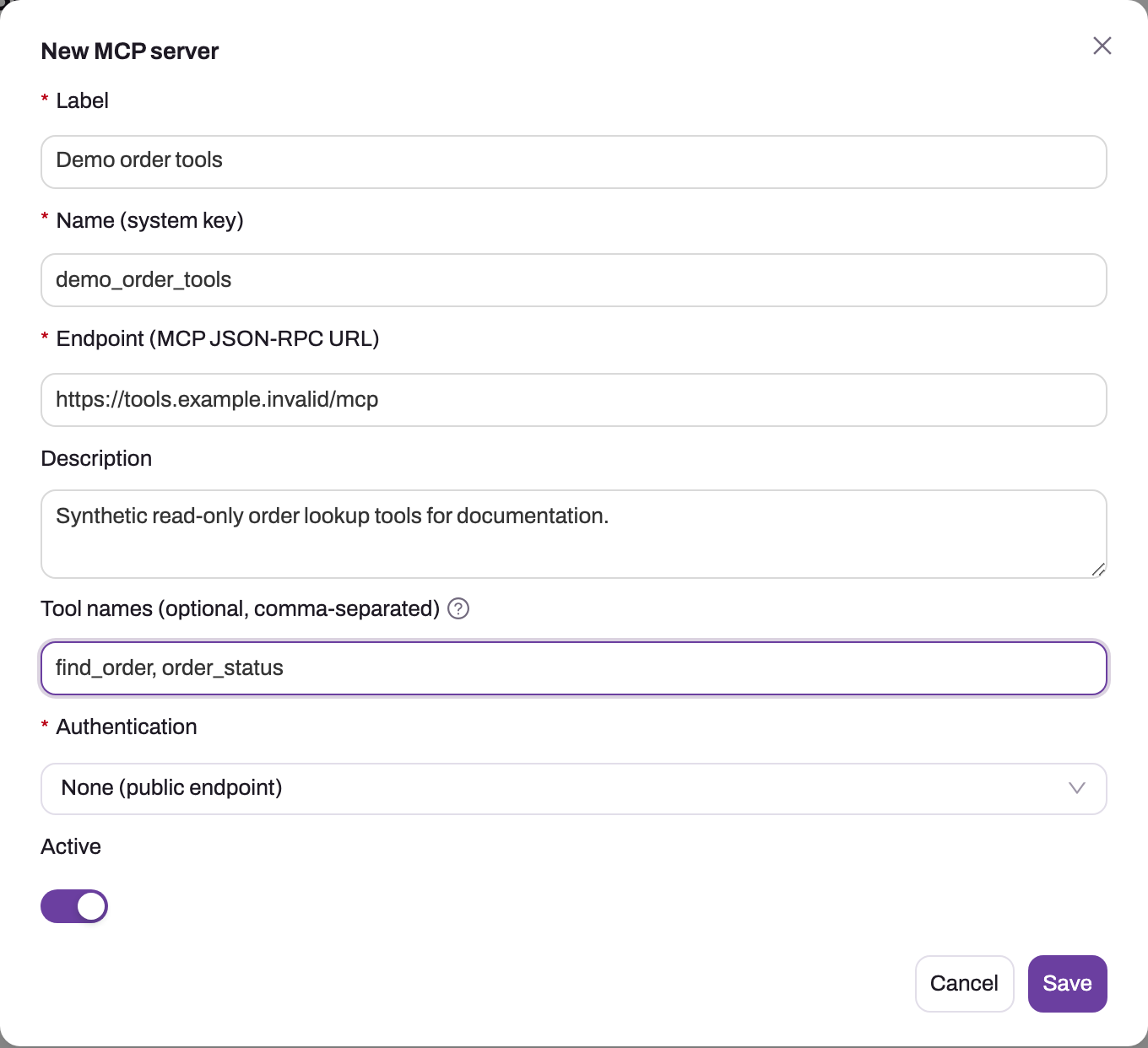
- 1
Label is what administrators see; Name (system key) below is the stable technical identity.
- 2
Endpoint is the server's MCP JSON-RPC URL — HTTPS, and never with a secret in it.
- 3
Description records what the server exposes and who owns it.
- 4
Tool names restrict routing to the listed tools; blank exposes all of the server's tools. This is a routing hint, not authorization.
- 5
Authentication: None, API key (custom header), Bearer token or OAuth 2.0 client credentials — the credential is set separately and stored write-only.
- 6
Active takes the server in or out of rotation for every agent granted the MCP tools.
The dialog asks for a Label and a Name (system key), the Endpoint (MCP JSON-RPC URL), a Description of what the server exposes, optional Tool names (comma-separated — restricts routing to those tools; blank exposes all of the server's tools), the Authentication mode and the Active switch. Authentication is one of None (public endpoint), API key (custom header) (with the API key header name, default Authorization), Bearer token or OAuth 2.0 — client credentials (with the OAuth token endpoint, OAuth client id and optional OAuth scope). The properties that matter to a developer building such a server:
- The secret itself is never part of the registration: enter it afterwards through Set credential. Credentials are stored write-only and encrypted — they are never readable back out of the product, and the list's Credential column only says whether one is set.
- Tools reach an agent only through the granted MCP capability (
list_mcp_tools/call_mcp_tool), so registering a server changes nothing for agents that are not granted it. - MCP tool calls made from chat are approval-gated — the user confirms before the call runs.
- Capability scoping is at the MCP-surface level, not per server: an agent granted the MCP tools can reach every active registered server, so register only servers you would trust together, and use Active to take one out of rotation instantly.
Common questions
How is the MCP endpoint different from the data API?
Same platform services, same permission enforcement, different consumer. The data API is REST for programs you write, authenticated with your own tokens. The MCP endpoint wraps discovery, description, query, reporting, knowledge search and governed writes behind the Model Context Protocol so AI assistants can use them with nothing but a URL and a sign-in. If you are writing an integration, use the data API; if you are pointing an AI assistant or agent framework at the organization, MCP is the shape it expects.
Can an MCP client modify data?
Only when the organization allows it. Writes need three things at once: the administrator has turned on Allow writes under External Assistants, the assistant's token carries the xmatix.write scope, and the user could make the same change in the product. Otherwise create_record and update_record are not even listed. An assistant that must act at scale still belongs on software you control calling the data API, where your code decides what to submit.
Does using MCP expose data beyond the user's permissions?
No. The endpoint requires a real signed-in user, the token is bound to one organization, and every tool call is evaluated against that user's security profiles, record security and restriction rules on the server — the assistant never holds a broader credential. The practical risk to manage is the same as with any AI client: where the client sends what it reads. Govern which assistants your users may connect with the Approved assistants list and the per-connection Disconnect, the same way you govern any tool that handles business data.
Why does the assistant see fewer tools than this page lists?
Tool visibility is the intersection of scopes, capability grants and licensing. A read-only token hides the write tools; an organization that has not licensed or granted a Sense capability (reports, dashboards, knowledge) hides the matching tools; the setup tools appear only for the xmatix.setup scope, which needs the write opt-in, and only where the setup tool service is deployed. whoami reports the effective scopes, which is the first thing to check.