
A storefront takes money through the tenant's own merchant account, never the platform's. Which payment provider a channel uses is configuration — a Payment Gateway Account record plus credentials held as references in your own secret store — so switching providers is a configuration change, not a deployment. Two card-and-UPI providers ship as built-in adapters; further hosted-payment-page providers can be added by the platform operator as descriptors (see Adding a provider). Provider names are never part of the storefront — the shopper sees the provider's own payment sheet or page.
The payment gateway account record
Payment Gateway Accounts live behind the Commerce app's Settings tiles. The record is small on purpose:
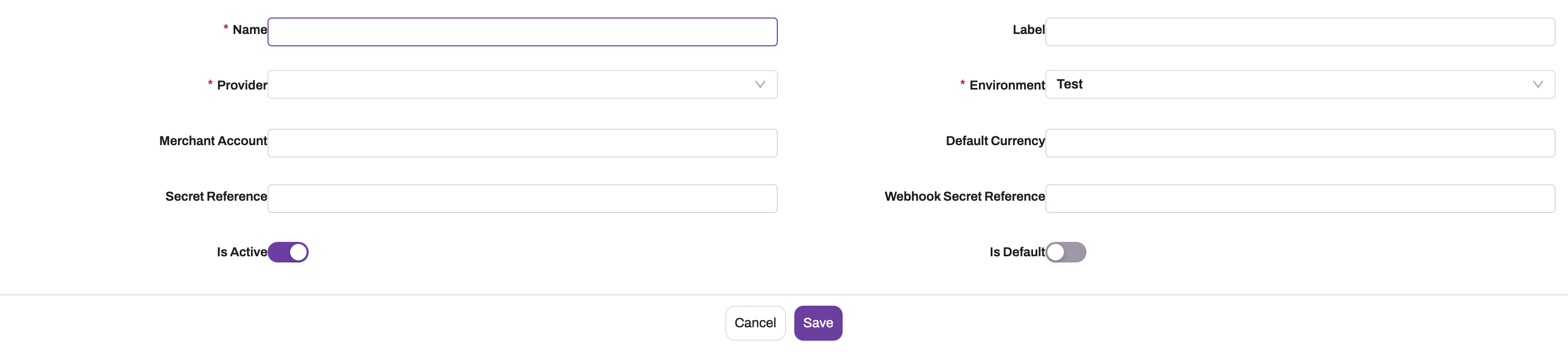
- 1
Provider — the lowercase name of the built-in adapter or operator-deployed descriptor this account charges through.
- 2
Environment — Test or Live. The platform refuses an account whose environment does not match the deployment when it resolves the account or initiates a payment.
- 3
Secret Reference — the secret-store entry holding the key pair as publicKey:secret. Only the public half ever reaches the browser.
- 4
Webhook Secret Reference — the entry holding the signing secret used to verify the provider's callbacks; without it the webhook endpoint refuses deliveries.
- 5
Is Default — the tenant's fallback account when a channel names none; at most one default per provider.
| Field | Meaning |
|---|---|
| Name, Label | Identification — for example "Cards (Live)" |
| Provider | The built-in adapter or descriptor this account uses (a lowercase provider name) |
| Environment | Test or Live — enforced, see below |
| Merchant Account | Your account identifier at the provider, for reference |
| Default Currency | The currency the account settles in |
| Secret Reference | The name of the secret-store entry holding the API key pair |
| Webhook Secret Reference | The name of the secret-store entry holding the webhook signing secret |
| Is Active | Inactive accounts are never selected |
| Is Default | The tenant's fallback account when a channel names none — at most one default per provider |
A commerce channel either points at a gateway account or falls back to the tenant's default account. The Payment Gateway Accounts list shows no New button today; create the record through the Setup Copilot or the Data API, or open the list's create form directly (/PaymentGatewayAccount?create=1) — the record is editable once it exists.
Environments are enforced
The platform knows which environment it is running as, and refuses a gateway account whose Environment does not match when it resolves the account or initiates a payment: a Test account cannot take a payment on a Live deployment and vice versa. The check happens at payment time, not at save time, so exercise a real payment initiation in the target environment before go-live rather than trusting the saved record.
Credentials stay in your secret store
The account holds references, never secrets. Store two entries in the tenant secret store — the same encrypted store integrations use, reached from an integration app's Secrets tab under Setup → Platform → Integrations: the API key pair as one value in the form publicKey:secret, and the webhook signing secret. The account's two reference fields name those entries. Only the public half of the key pair is ever sent to the browser; the secret half creates payment intents, queries payment status and verifies callbacks on the server.
Resolution is tenant-first: the tenant's secret store is read at payment time, and a host-level fallback exists only for the platform's own accounts and tests. If the tenant entry is missing or cannot be read, the payment is refused as "gateway secrets unavailable" rather than falling through to someone else's merchant account. Never paste a live key into a record field: it would land in the tenant database, backups and every export.
Tenders, and why some disappear
The storefront offers tenders — cards, UPI, net banking and wallets through the gateway, pay on account for customers with credit terms, and cash on delivery where the channel enables it. Behind them the platform knows three payment methods: gateway, on account and cash on delivery.
Before checkout, the storefront asks a small public endpoint for the channel's payment configuration: the provider name, the currency, and whether cash on delivery is enabled. No account ids, references or secrets leave the server. If the channel has no usable gateway account, the gateway tenders are simply not offered — a shopper is never shown a payment button whose failure is already known. Pay on account is unaffected; it never needed a gateway.
The freeze, then the money, then the order
Payment follows the freeze-first checkout described in Direct-to-consumer selling. Initiating a gateway payment runs these steps in order and stops at the first failure — every one of them before the shopper is charged:
- The basket is repriced; a change beyond the configured tolerance (default zero) fails with
PRICE_CHANGEDand the shopper re-confirms. - On channels that refuse to oversell, stock is reserved; otherwise
OUT_OF_STOCK. - A coupon is re-evaluated and, for scarce codes, reserved; otherwise
COUPON_EXHAUSTED. - A chosen delivery window is reserved; otherwise
DELIVERY_SLOT_UNAVAILABLE. - The totals are hashed and locked on the checkout session, which moves to Awaiting Payment.
- A payment intent is created with the provider for exactly the frozen amount; a provider error records a failed attempt, releases the holds and returns
PAYMENT_FAILED.
The provider's payment sheet or hosted page then opens in the browser. Its outcome is a claim, not a conclusion. The provider's signed webhook, verified over the exact bytes it sent, is what confirms the payment and places the order; the storefront polls the checkout session until the order exists. A dismissed payment sheet is deliberately not treated as a failure, because a UPI collect request can be approved from the payer's app after the shopper closed the window.
The webhook endpoint accepts no bearer token — the signature is the authentication. A gateway account with no webhook signing secret configured makes the endpoint refuse deliveries outright rather than trust an unsigned claim of payment; an invalid signature is rejected; and a delivery that verified but failed to process is acknowledged and left for the recovery sweep, since asking the provider to retry would not fix our side.
Payment transactions and their event trail
Every payment attempt is a Payment Transaction row — a retry produces a second row with the next attempt number and its own idempotency key. Its Status (Created, Authorized, Captured, Failed, Refunded, Partially Refunded) is a projection of the append-only event trail beneath it: initiated, intent created, redirected to gateway, webhook received, signature verified or rejected, authorized, captured, failed, reconciled, refund requested, refunded. Failure Category buckets a failure into declined, gateway error, timeout, signature invalid, user abandoned or unknown. Events are never edited or deleted. When support is asked what happened to a payment, that trail is the answer.
The recovery sweep
Webhooks get lost; orders must not. Every five minutes the recovery job:
- Places orders for sessions that are Paid but not yet Placed, after a two-minute grace period so it does not race the webhook. After five failed placement attempts it stops retrying and escalates — the money stays captured, is never refunded automatically, and the attempt carries its escalation in its own event trail.
- Reconciles attempts that have been non-terminal for longer than the configured threshold (default 10 minutes) by asking the provider directly. Captured places the order; failed records the failure; anything else appends a "gateway reports…" event so a stuck payment shows its investigation history instead of looking ignored.
The gateway's answer is always the answer of record, whether it arrived by push or by pull.
Refunds
There is no refund button in the product today. A refund is issued in the provider's own dashboard; the provider's signed webhook then moves the payment transaction to Refunded or Partially Refunded and appends the refund events. The platform never refunds money on its own initiative — a captured payment with no order is left for the recovery job and the operator, not reversed.
Adding a provider
Two paths, chosen by what the provider's payment flow needs. In both, provider behaviour is platform-authored — never tenant-supplied code — and tenants select a provider with a gateway account record.
| The provider | Path |
|---|---|
| Hosted payment page; webhooks signed HMAC-SHA256 over the raw body | Descriptor — a host configuration document deployed by the platform operator |
| On-page SDK checkout, or any other signature scheme | Built-in adapter — ships with the platform |
A descriptor is one JSON document per provider in host configuration: the endpoints for creating a payment, querying its status and refunding it, separate Test and Live URLs, how to authenticate, where in the responses to find the intent id and redirect URL, and an explicit map from the provider's event and status names to the platform's own. The engine enforces HTTPS-only absolute URLs; a secret may appear only in the authentication block, never in a URL or body; event and status names must map to declared platform values, and an unmapped event is reported as unknown rather than guessed; Test accounts use the Test URLs; omitting the refund endpoint means refunds are refused for that provider explicitly; and an invalid descriptor is skipped and logged so that one provider reports as unsupported without affecting others. Descriptor providers need no storefront change — the intent carries a redirect URL and the storefront's generic redirect path completes the payment.
The built-in adapters classify provider events by well-known name patterns rather than an explicit map, so subscribe only the payment events the onboarding guide lists for that provider.
Setting up a provider account
- Store the key pair (
publicKey:secret) and the webhook signing secret in the tenant secret store. - Create the Payment Gateway Account naming the provider, the environment, the currency and the two secret references. Mark it default, or point the channel at it.
- In the provider's dashboard, register the platform's webhook URL for that account — it carries the gateway account's id, so each account verifies against its own signing secret — and subscribe the payment captured, failed, authorized and refund-processed events.
- Verify end to end in Test before creating the Live account and repointing channels.
Common questions
Can different storefronts use different providers?
Yes. Each channel points at its own gateway account, so one tenant can run one storefront on one provider and another elsewhere, or move a storefront by repointing the channel. The shopper-facing change is only whose payment sheet or page opens.
Can we use a payment provider that is not built in?
A hosted-page provider with HMAC-SHA256 webhook signing can be onboarded by the platform operator as a descriptor without a code release. Providers needing an on-page SDK or another signature scheme need a built-in adapter. Either way the provider behaviour is platform-authored, and your tenant selects it with a gateway account record.
What happens if a webhook never arrives?
The recovery sweep asks the provider for the attempt's status within minutes and places the order from that answer. The shopper meanwhile sees the checkout still pending rather than a false failure.
Why did the payment succeed but no order appear immediately?
Because the order is placed by the verified webhook, or by the recovery query, not by the browser's success message. The gap is normally seconds; it is the price of never trusting the browser's version of a payment. A session showing Paid but not Placed is that timing window — see Commerce screens and records.